Setup Coveralls for iOS project on CircleCI with Slather #32

Description

Environment
- macOS: 12.0.1
- Xcode: 13.2.1
Enable code coverage for a Xcode project
- Enable
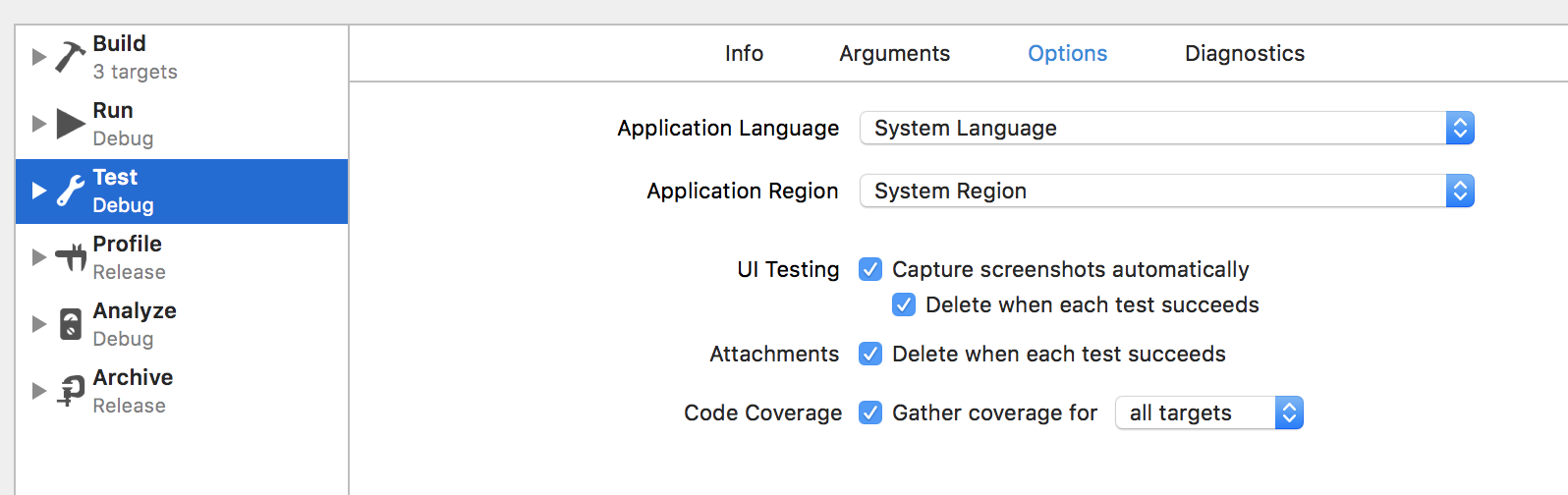
Gather coverage datain Xcode scheme’s Test action: Test >> Options >> Enable Code coverage >> Select all target
Use Slather to hook code coverage into CI
1. Setup Slather
- Create a file named
Gemfilein the root directory with the content
source 'https://rubygems.org'
gem 'coveralls', require: false
gem 'slather', :git => "https://github.com/SlatherOrg/slather.git"
At the time the tip is written, the Github repo is at https://github.com/SlatherOrg/slather, please modify the Gemfile accordingly if the repo name is updated
- Install slather (run
$ gem install bundlerif you don't have bundle in your machine)
$ bundle install
- Generate code coverage
If you use a project in Xcode, RUN:
$ slather coverage -s --scheme YourXcodeSchemeName path/to/project.xcodeproj
OR if you use a workspace in Xcode, RUN:
$ slather coverage -s --scheme YourXcodeSchemeName --workspace path/to/workspace.xcworkspace path/to/project.xcodeproj
2. Configuration for CircleCI
- Create a new
.slather.ymlin the root directory file with content:
ci_service: circleci
coverage_service: coveralls
xcodeproj: YOUR_APP.xcodeproj
workspace: YOUR_APP.xcworkspace
scheme: YOUR_APP
source_directory: ./
output_directory: $CIRCLE_TEST_REPORTS/slather-report
ignore:
  - Pods/*
- Create a new
.coveralls.ymlfile in the root directory with content:
service_name: circleci
- Edit your
circle.ymlfile:
version: 2
jobs:
  build-and-test:
    macos:
      xcode: "13.2.1"
    steps:
      - checkout
      - run: pod install
      - store_artifacts:
          path: output
      - store_test_results:
          path: output/scan
      - run: gem install bundler:1.17.2
      - run: bundle install
      - run: set -o pipefail && xcodebuild CODE_SIGNING_REQUIRED=NO CODE_SIGN_IDENTITY="" PROVISIONING_PROFILE="" -sdk iphonesimulator -destination 'platform=iOS Simulator,OS=15.2,name=iPhone 13 Pro' -workspace MovieApp.xcworkspace -scheme "MovieApp" -enableCodeCoverage YES clean build test
      - run: bundle exec slather
      - run: bundle exec slather coverage --simple-output
workflows:
  version: 2
  build-test-adhoc:
    jobs:
      - build-and-test
NOTES
-
Test each command
runin your machine before pushing code to your Github repo to ensure that there is no syntax error -
MUST HAVE:
run: bundle exec slatheris used to push your code coverage tocoveralls -
Make sure you update
-destination 'platform=iOS Simulator,OS=15.2,name=iPhone 13 Pro'as your desired Simulator -
From CircleCI Project Settings >> Select Environment Variables >> Add new environment variable named
COVERAGE_ACCESS_TOKENwith your coveralls project repository token.

With CircleCI and Coveralls are set, as soon as you push new commits or new pull requests, it will create new CI builds
-
On your CircleCI dashboard, you would be able to see your new build passed or failed

-
On your Coveralls dashboard, you would be able to see the test coverage of your project after each build

That's all for this blog. Happy coding :]