| nav | Example |
|---|---|
| group | SESAME SDK |
| title | Android Version |
| order | 2 |

- Sesame app on
https://play.google.com/store/apps/details?id=co.candyhouse.sesame2
- Sesame app on
https://drive.google.com/file/d/15aRQl6aWBVwJSE4l3ZL-eMisPoe-f2lW/


.
-
-
-




implementation project(':sesame-sdk') <uses-permission android:name="android.permission.BLUETOOTH" />
<uses-permission android:name="android.permission.BLUETOOTH_ADMIN" />
<uses-permission android:name="android.permission.BLUETOOTH_CONNECT" />
<uses-permission android:name="android.permission.INTERNET"/>
<uses-permission android:name="android.permission.ACCESS_NETWORK_STATE"/>
<uses-permission android:name="android.permission.BLUETOOTH_CONNECT " />
<uses-permission android:name="android.permission.ACCESS_FINE_LOCATION" />
<uses-permission android:name="android.permission.BLUETOOTH_SCAN" /> override fun onCreate()
{
super.onCreate()
CHBleManager(this)
}CHBleManager initialization can verify if Bluetooth is running normally on the device, if permissions are obtained from the device, and if Bluetooth has been launched. If everything is fine, the Bluetooth scan will begin. Bluetooth Service Uuid:0000FD81-0000-1000-8000-00805f9b34fb
bluetoothAdapter.bluetoothLeScanner.startScan(
  mutableListOf(
    ScanFilter.Builder()
      .setServiceUuid(
        ParcelUuid(UUID.fromString('0000FD81-0000-1000-8000-00805f9b34fb')),
      )
      .build(),
  ),
  ScanSettings.Builder()
    .setScanMode(ScanSettings.SCAN_MODE_LOW_LATENCY)
    .build(),
  bleScanner,
);
The devices scanned by bleScanner are placed in CHDeviceMap.
4. New devices are added to the ScanNewDeviceFG object, and Adapter is filtered by CHDeviceMap (it.rssi!=nil) to display the list data.
    private var mDeviceList = ArrayList<CHDevices>()
    CHBleManager.delegate = object : CHBleManagerDelegate {
            override fun didDiscoverUnRegisteredCHDevices(devices: List<CHDevices>) {
                mDeviceList.clear()
                mDeviceList.addAll(devices.filter { it.rssi != null }
                    .filter { it.rssi!! > -65 }///The registration list only shows close distances
                )
                mDeviceList.sortBy { it.getDistance() }
                mDeviceList.firstOrNull()?.connect { }
                leaderboard_list.post((leaderboard_list.adapter as GenericAdapter<*>)::notifyDataSetChanged)
            }
        }
    }
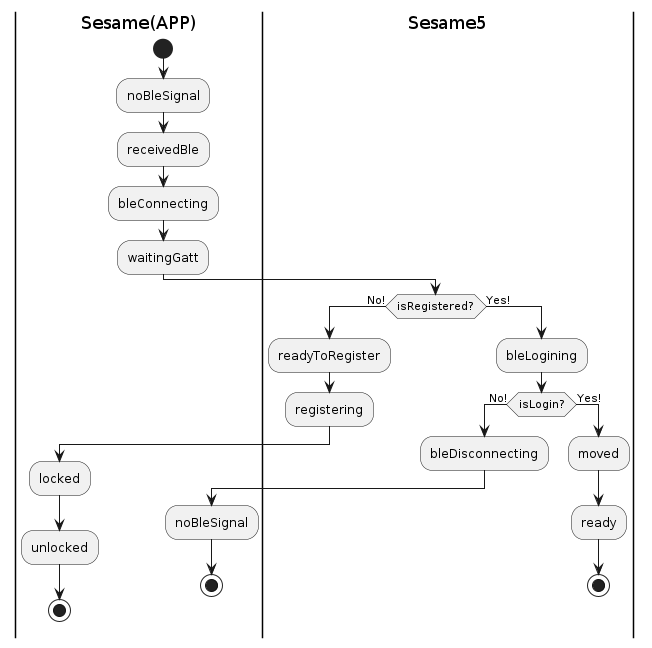
5. The order of connection with the device is to execute connect, and monitor the status of the device with onBleDeviceStatusChanged.
    device.connect { }
    doRegisterDevice(device)
    device.delegate = object : CHDeviceStatusDelegate {
        override fun onBleDeviceStatusChanged(device: CHDevices, status: CHDeviceStatus, shadowStatus: CHDeviceStatus?) {
            if (status == CHDeviceStatus.ReadyToRegister) {
                doRegisterDevice(device)
            }
        }
    }


   fun  doRegisterDevice(device: CHDevices){
       device.register {
        it.onSuccess { // Registration success
        }
        it.onFailure { //  Registration failed
        }
       }
   }
6. Registration success callback, the device model of the membership product can be judged based on the success or failure callback of the device.register registration command.
    (device as? CHWifiModule2)?.let {
        // CHWifiModule2
    }
    (device as? CHSesame2)?.let {
        // CHSesame2
    }
    (device as? CHSesame5)?.let {
        // CHSesame5
    }
    (device as? CHSesameTouchPro)?.let {
        // CHSesameTouchPro
}Once you have paired the device, you can lock and unlock it through the APP
    public func lock(historytag: Data?, result: @escaping (CHResult<CHEmpty>))  {
      if deviceShadowStatus != nil,
         deviceStatus.loginStatus == .unlogined {
          CHIoTManager.shared.sendCommandToWM2(.lock, self) { _ in
              result(.success(CHResultStateNetworks(input: CHEmpty())))
          }
          return
      }
      if (self.checkBle(result)) { return }
      let hisTag = Data.createOS2Histag(historytag ?? self.sesame2KeyData?.historyTag)

      sendCommand(.init(.lock,hisTag)) { responsePayload in
          if responsePayload.cmdResultCode == .success {
              result(.success(CHResultStateBLE(input: CHEmpty())))
          } else {
              result(.failure(self.errorFromResultCode(responsePayload.cmdResultCode)))
          }
      }
} override fun unlock(historytag: ByteArray?, result: CHResult<CHEmpty>) {
if (deviceStatus.value == CHDeviceLoginStatus.UnLogin && isConnectedByWM2) {
CHAccountManager.cmdSesame(SesameItemCode.unlock, this, sesame2KeyData!!.hisTagC(historytag), result)
} else {
if (checkBle(result)) return
// L.d("hcia", "[ss5][unlock] historyTag:" + sesame2KeyData!!.createHistagV2(historyTag).toHexString())
sendCommand(SesameOS3Payload(SesameItemCode.unlock.value, sesame2KeyData!!.createHistagV2(historytag)), DeviceSegmentType.cipher) { res ->
if (res.cmdResultCode == SesameResultCode.success.value) {
result.invoke(Result.success(CHResultState.CHResultStateBLE(CHEmpty())))
} else {
result.invoke(Result.failure(NSError(res.cmdResultCode.toString(), "CBCentralManager", res.cmdResultCode.toInt())))
}
}
}
}For detailed interaction of each instruction, please refer to the description of BlueTooth Protocol.
- Detailed view:BlueTooth Protocol
The following is an example of an Android project structure used to organize the code and resource files.
libs/: This folder is usually used to store the binary files (such as .jar, .aar, etc.) of third-party libraries (libraries).java/: Store Java code. Sub-packages are divided according to functional modules, such asactivities/for storing activity classes,adapters/for storing adapter classes, etc.res/: Store resource files, including layout files, strings, icons, etc. Store in different directories according to the type of resources, for example,layout/stores layout files,drawable/stores image resources,values/stores string and style resources.build.gradle: The application-level Gradle configuration file is used to configure dependencies, plugins, and build settings.proguard-rules.pro: ProGuard configuration file, used for code confusion and optimization. This is optional and is applicable when releasing versions.
- Registration login:Amazon Web Services(Mobile)
- Permission Framework:Easypermissions
- Local Database Persistence:Room
- Cloud Data Hosting:Amazon Web Services (IOT)
- UI Navigation:Navigation
- UI Data Management:ViewModel
- Firmware Update Library:Dfu
- Map Component:Maps for Google
- Local Storage:Preference
- Reactive Framework:Rxjava
- QR Scanning: Depends on libs/qrcodecore-release.aar Zxing
- Message Delivery:Firebase-messaging
- Dropdown Refresh: Swiperefreshlayout
- Recyclerview Header Paste:StickyHeaders
- EditText Adaptation:AutoResizeEditText
- Carousel: LoopView
- Slider Library:Indicatorseekbar
SesameApp: Application process starts
MainActivity: Main application interface
ScanQRcodeFG: QR code scanning
ScanNewDeviceFG: Add new device
WM2SettingFG: WIFI Module settings interface
SSM2SetAngleFG: SS4, SS2 Angle setting interface
SSM5SettingFG: SS5, SS5PRO Settings interface
SSM2SettingFG: SS4, SS2 setting interface
SesameBotSettingFG: SesameBot1 Setting interface
SesameBikeSettingFG: BiKeLock1, BiKeLock2 set interface
SesameKeyboardSettingFG: Sesame5 Setting interface
SesameOpenSensorNoBLESettingFG: SSMOpenSensor Setting interface
SesameTouchProSettingFG: SSMTouchPro, SSMTouch, BLEConnector Setting interface
SesameKeyboardCards: NFC card setting interface
SSMTouchProFingerprint: Fingerprint setup interface
SesameKeyboardPassCode: Digital password setting interface
SSMTouchProSelectLockerListFG: SSMTouchPro device sharing interface
GuestKeyListFG: Guest list interface
SSM2NoHandLockFG: Fully automatic lock screen
MeFG: Homepage -> My interface
MyQrCodeFG: Homepage -> My interface -> My QR code interface
LoginMailFG: Homepage -> My interface -> Registration interface
LoginVerifiCodeFG: Homepage -> My interface -> Registration interface -> QR code verification interface
FriendListFG: Homepage -> Directory interface
FriendDetailFG: Homepage -> Directory interface -> Friend details interface
FriendSelectLockerListFG: Homepage -> Directory interface -> Friend details interface -> Shared device interface
DeviceListFG: Homepage -> Sesame list interface
MainRoomFG: Homepage -> Sesame list interface -> SS4, SS2 device details history record
MainRoomSS5FG: Homepage -> Sesame list interface -> SS5, SS5PRO device details history record
AddMemberFG: Homepage -> Sesame list interface -> Add member interface
KeyQrCodeFG: Homepage -> Sesame list interface -> Share sesame QR code QR interface
WM2ScanSSIDListFG: Homepage -> Sesame list interface -> WIFI details -> WIFI scan list interface
WM2SelectLockerListFG: Homepage -> Sesame list interface -> WIFI details -> Select sesame device interface
- [Android BLE] (https://developer.android.com/guide/topics/connectivity/bluetooth-le?hl=zh-cn)
- [Android NFC] (https://developer.android.com/guide/topics/connectivity/nfc?hl=zh-cn)
- [Android Jetpack] (https://developer.android.com/jetpack?hl=zh-cn)