In Python, A set is a mutable collection of distinct hashable objects, same as the list and tuple. Sets are used to store multiple items in a single variable. Each element in the set must be unique, immutable, and the sets remove the duplicate elements. Sets are mutable which means we can modify it after its creation.
A set is a collection which is both unordered and unindexed.Unlike other collections in Python, there is no index attached to the elements of the set, i.e., we cannot directly access any element of the set by the index.
- We can use set when unique values needed, Since sets cannot have multiple occurrences of the same element.
- It makes sets highly useful to efficiently remove duplicate values from a list or tuple.
- We can use set, when we need to perform common math operations like unions and intersections.
It can be created by built-in function : set ( ) or by curly braces : { }
model_1 = set() # empyty setmodel_2 = {1,2,3,4,5} # set of numbersmodel_3 = {1,'dev',3,4,5} # set of different data typesmodel_4 = {"a","b","c","d","e"} # same as set(["a","b","c","d","e"])myset = {(10,10), 10, 20} # This is also a valid set# Not possible
# since here list is mutable
# this will cause error
my_set = {1, 2, [3, 4]} # Invalid set-declareDays = {"Monday", "Tuesday", "Wednesday", "Thursday", "Friday", "Saturday", "Sunday"}
print(Days) # output will be unordered
print(type(Days)) {'Friday', 'Tuesday', 'Monday', 'Saturday', 'Thursday', 'Sunday', 'Wednesday'}
<class 'set'>
set_a = {1,2,2,3,4,4,4,5,6,7,6,8}
print(set_a) # return with only unique values{1,2,3,4,5,6,7,8}
set1 = set("Devincept") # convert string to set
set2 = set((1,2,3,4,5)) # convert tuple to set
day = {1:'Monday', 2:'Tuesday'}
set3 = set(day) # convert dictionary to setIt is also possible to use the set() constructor to make a set.
set_1 = set(("volvo", "bwm", "tata")) # note the double round-brackets
print(set_1)You cannot simply access the elements by indexing, beacuse it is unordered set.
But you can loop through the set items using a for loop, or ask if a specified value is present in a set, by using the in keyword.
Lets look into above exapmle
set_1 = {"volvo", "bwm", "tata"}
for i in set_1:
    print(i)
To check the elements present in the set
set_1 = {"volvo", "bwm", "tata"}
print("bwm" in set_1) # True
print("Tata" in set_1) # False since python is case-sensitive.Set has some built-in function that can be used. Here we can see each method detailed through example
-
add()
The add() method adds an element to the set. If the element already exists, the add() method does not add the element.
vegetable = {'carrot','onion','beans'}
vegetable.add('potato')
print(vegetable)
-
clear()
The clear() method removes all elements in a set.
vegetable = {'carrot','onion','beans'}
vegetable.clear()
print(vegetable)
-
copy()
The copy() method copies the set.
vegetable = {'carrot','onion','beans'}
veg = vegetable.copy()
print(veg)
-
difference()
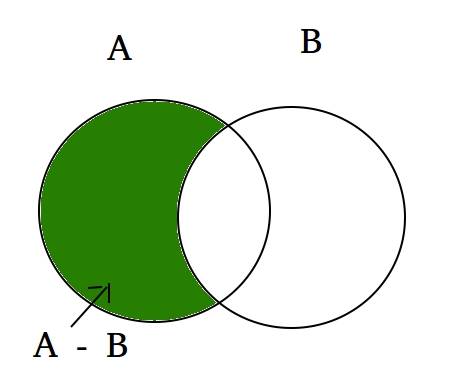
The difference() method returns a set that contains the difference between two sets.The returned set contains items that exist only in the first set, and not in both sets.
vegetable = {'carrot','onion','beans'}
veg = {'potato', 'pears', 'carrot'}

v = vegetable.difference(veg)
print(v)
-
difference_update()
The difference_update() method removes the items that exist in both sets.
The difference_update() method is different from the difference() method, because the difference() method returns a new set, without the unwanted items, and the difference_update() method removes the unwanted items from the original set.
vegetable = {'carrot','onion','beans'}
veg = {'potato', 'pears', 'carrot'}

vegetable.difference_update(veg)
print(vegetable)
-
discard()
The discard() method removes the specified item from the set.
This method is different from the remove() method, because the remove() method will raise an error if the specified item does not exist, and the discard() method will not.
vegetable = {'carrot','onion','beans'}
vegetable.discard('onion')
print(vegetable)
-
intersection()
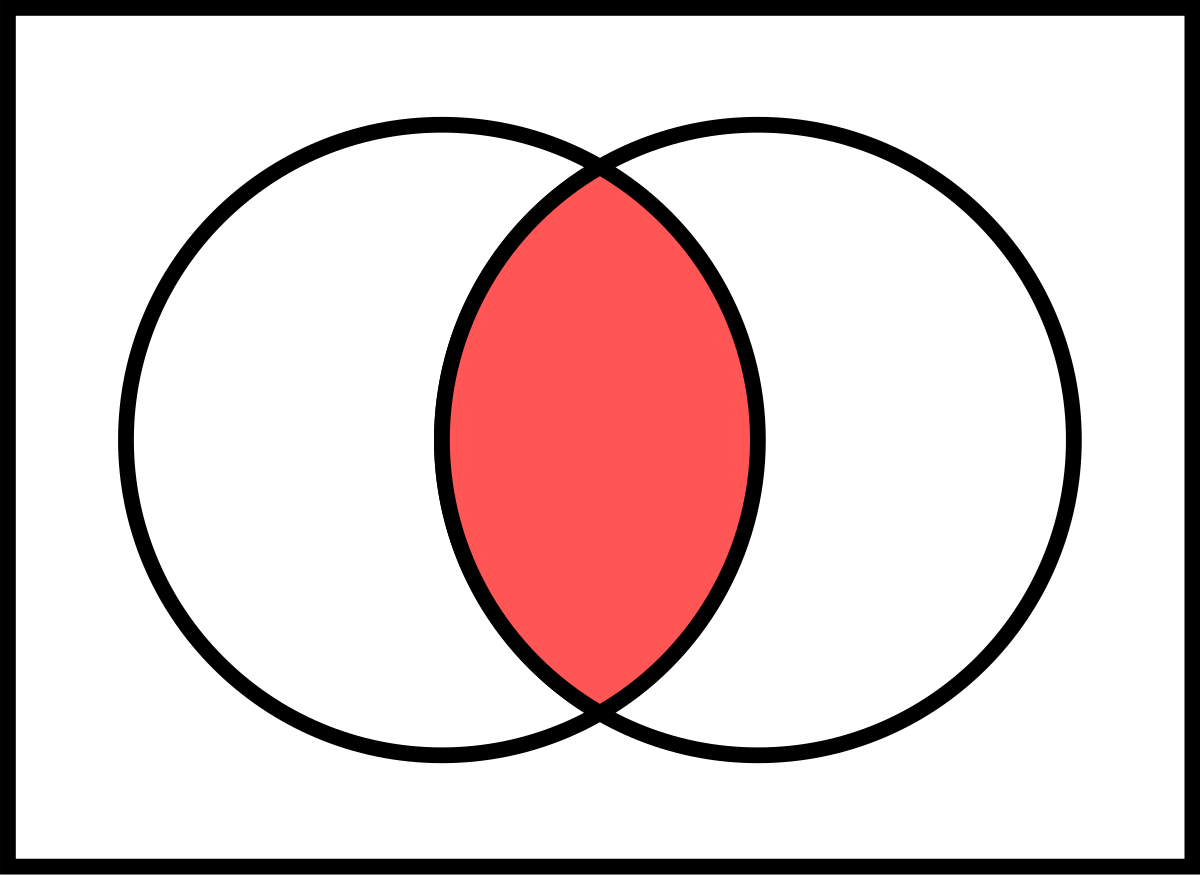
The intersection() method returns a set that contains the similarity between two or more sets.
The returned set contains only items that exist in both sets, or in all sets if the comparison is done with more than two sets.
vegetable = {'carrot','onion','beans'}
veg = {'potato', 'pears', 'carrot'}

v = vegetable.intersection(veg)
print(v)
-
intersection_update()
The intersection_update() method removes the items that is not present in both sets (or in all sets if the comparison is done between more than two sets).
The intersection_update() method is different from the intersection() method, because the intersection() method returns a new set, without the unwanted items, and the intersection_update() method removes the unwanted items from the original set.
vegetable = {'carrot','onion','beans'}
veg = {'potato', 'pears', 'carrot'}

vegetable.intersection_update(veg)
print(vegetable)
-
isdisjoint()
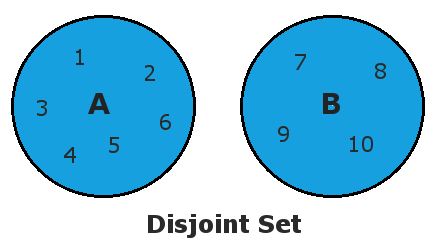
The isdisjoint() method returns True if none of the items are present in both sets, otherwise it returns False.
vegetable = {'carrot','onion','beans'}
veg = {'potato', 'pears', 'carrot'}

v = vegetable.isdisjoint(veg)
print(v)
-
issubset()
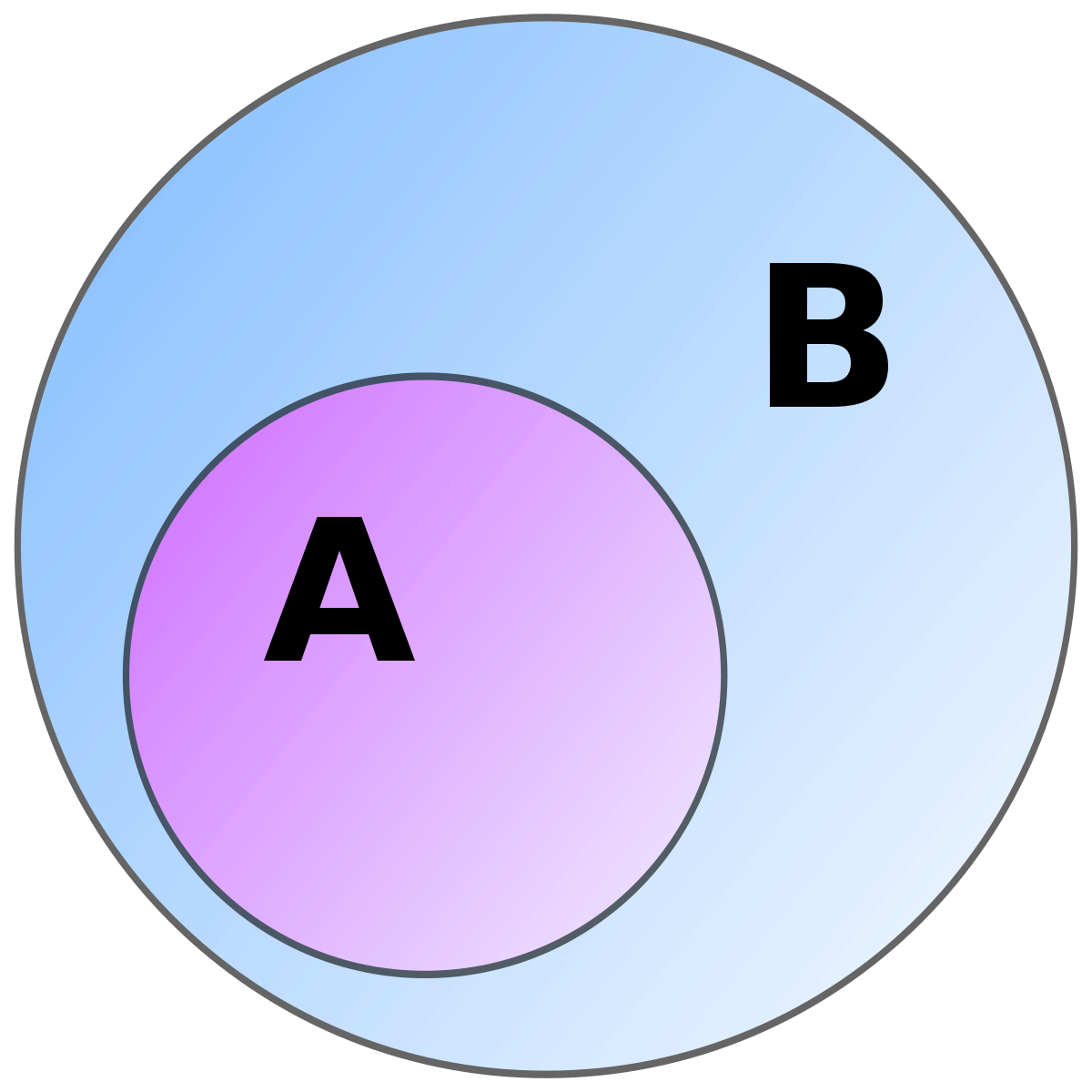
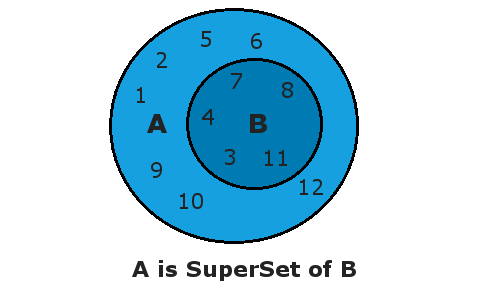
The issubset() method returns True if all items in the set exists in the specified set, otherwise it retuns False.
x = {"a", "b", "c"}
y = {"f", "e", "d", "c", "b", "a"}

z = x.issubset(y)
print(z)
-
issupperset()
The issuperset() method returns True if all items in the specified set exists in the original set, otherwise it retuns False.
x = {"a", "b", "c"}
y = {"f", "e", "d", "c", "b", "a"}

z = x.issuperset(y)
print(z)
-
pop()
The pop() method removes a random item from the set.
This method returns the removed item.
vegetable = {'carrot','onion','beans'}
vegetable.pop('onion')
print(vegetable)
-
remove()
The remove() method removes the specified element from the set.
This method is different from the discard() method, because the remove() method will raise an error if the specified item does not exist, and the discard() method will not.
vegetable = {'carrot','onion','beans'}
vegetable.remove('onion')
print(vegetable)
-
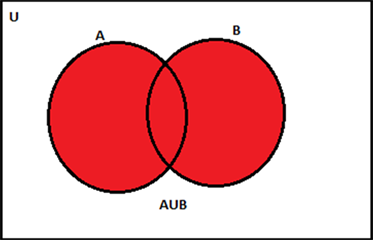
union()
The union() method returns a set that contains all items from the original set, and all items from the specified set(s).
You can specify as many sets you want, separated by commas.
vegetable = {'carrot','onion','beans'}
veg = {'potato', 'pears', 'carrot'}

v = vegetable.union(veg)
print(v)
-
update()
The update() method updates the current set, by adding items from another set (or any other iterable).
vegetable = {'carrot','onion','beans'}
veg = {'potato', 'pears', 'carrot'}

vegetable.update(veg)
print(vegetable)
-
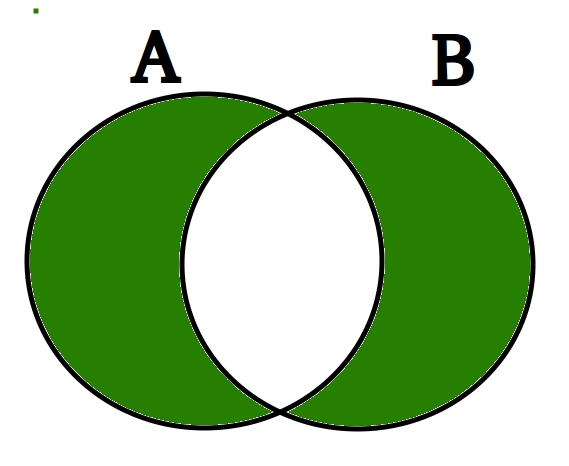
symmetric_difference()
The symmetric_difference() method returns a set that contains all items from both set, but not the items that are present in both sets.
vegetable = {'carrot','onion','beans'}
veg = {'potato', 'pears', 'carrot'}

v = vegetable.symmetric_difference(veg)
print(v)
-
symmetric_difference_update()
The symmetric_difference_update() method updates the original set by removing items that are present in both sets, and inserting the other items.
vegetable = {'carrot','onion','beans'}
veg = {'potato', 'pears', 'carrot'}

vegetable.symmetric_difference(veg)
print(vegetalbe)
The set not only work with built-in commands but also it works with operators.
-
in
To check elements present in the set
set1 = {1,2,3,4,5}
print(2 in set1)
-
not in
To check elements not present in the set
set1 = {1,2,3,4,5}
print(2 not in set1)
-
==
To check elements present in both the sets are equal
set1 = {1,2,3,4,5}
set2 = {1,2,4,5,6}
print(set1 == set2)
-
!=
To check elements present in both the sets are not equal
set1 = {1,2,3,4,5}
set2 = {1,2,4,5,6}
print(set1 != set2)
-
<=
To check elements of the sets1 are less than or equal to set 2.
set1 = {1,2,3,4,5}
set2 = {1,2,4,5,6}
print(set1 <= set2)
-
>
To check elements of the sets1 are greater than set 2.
set1 = {1,2,3,4,5}
set2 = {1,2,4,5,6}
print(set1 > set2)
-
|
To get union from two sets.
set1 = {1,2,3,4,5}
set2 = {1,2,4,5,6}
set3 = set1 | set2
print(set3)
-
&
To get intersection from two sets
set1 = {1,2,3,4,5}
set2 = {1,2,4,5,6}
set3 = set1 & set2
print(set3)
-
^
The set of elements in precisely one of s1 or s2
set1 = {1,2,3,4,5}
set2 = {1,2,4,5,6}
set3 = set1 ^ set2
print(set3)
-
-
Difference between set1 and set2
set1 = {1,2,3,4,5}
set2 = {1,2,4,5,6}
set3 = set1 - set2
print(set3)

| Set | List | Tuple | Dictionary |
|---|---|---|---|
| Set is represented by { } | List is represented by [ ] | Tuple is represented by( ) | Dictionary is represented by { } |
| Set will not allow duplicate elements | List allows duplicate elements | Tuple allows duplicate elements | Dictionary- Set will not allow duplicate elements but keys are not duplicated |
| Set can use nested among all | List can use nested among all | Tuple can use nested among all | Dictonary can use nested among all |
| {1, 2, 3, 4, 5} | [1, 2, 3, 4, 5] | (1, 2, 3, 4, 5) | {1:'one', 2:'two', 3:'three', 4:'four', 5:'five'} |
| Can be created using set() function | Can be created using list() function | Can be created using tuple() function. | Can be created using dict() function. |
| Empty set a=set() | Empty list l=[] | Empty Tuple t=() | empty dictionary d={} |
| Set is unordered | List is ordered | Tuple is ordered | Dictionary is ordered |
| Set is mutable But elements are not duplicated. | List is mutable. | Tuple is immutabl e. | Dictionary is mutable. But Keys are not duplicated. |
Let's Look into something interesting and it is part of set. Let's talk about Frozen set.
Frozen sets in Python are immutable objects that only support methods and operators that produce a result without affecting the frozen set or sets to which they are applied. While elements of a set can be modified at any time, elements of the frozen set remain the same after creation.
If no parameters are passed, it returns an empty frozenset.
normal_set = set(["a", "b","c"])
print(normal_set)

frozen_set = frozenset(["e", "f", "g"])
print(frozen_set)Hurray! You have learnt about Set in python. Let's get into a small test to check your understanding about sets.
Why still waiting click the link and enjoy your test.
-
Python – Find missing and additional values in two lists.
-
Python program to count number of vowels using sets in given string.
-
Python – Check if a given string is binary string or not.
-
Python Set – Pairs of complete strings in two sets.
-
Python set to check if string is panagram.
-
Python program to check whether a given string is Heterogram or not
-
Python program to get all subsets of given size of a set.
-
Python – Minimum number of subsets with distinct elements using Counter.
-
Python – Convert a set into dictionary.
-
Concatenated string with uncommon characters in Python
Set is Mutable. Each elements in a set is Unordered, Immutable, Unindexed, Unique.
Declaring sets using either set() - built in function
or
Using curly braces set1 = {1,2,3,4,5}
| Method | Function |
|---|---|
| add() | Adds an element to the set |
| clear() | Removes all the elements from the set |
| copy() | Returns a copy of the set |
| difference() | Returns a set containing the difference between two or more sets |
| difference_update() | Removes the items in this set that are also included in another, specified set |
| discard() | Remove the specified item |
| intersection() | Returns a set, that is the intersection of two other sets |
| intersection_update() | Removes the items in this set that are not present in other, specified set(s) |
| isdisjoint() | Returns whether two sets have a intersection or not |
| issubset() | Returns whether another set contains this set or not |
| issuperset() | Returns whether this set contains another set or not |
| pop() | Removes an element from the set |
| remove() | Removes the specified element |
| union() | Return a set containing the union of sets |
| update() | Update the set with the union of this set and others |
| symmetric_difference() | Returns a set with the symmetric differences of two sets |
| symmetric_difference_update() | inserts the symmetric differences from this set and another |
| Operator | Function |
|---|---|
| in | To check elements of the sets1 is present in set 2. |
| not in | To check elements of the sets1 is not present in set 2. |
| == | To check elements of the sets1 is equal set 2 |
| != | To check elements of the sets1 is not equal set 2 |
| <= | To check elements of the sets1 are less than or equal to set 2 |
| > | To check elements of the sets1 are greater than set 2 |
| | | To get union from two sets |
| & | To get intersection from two sets |
| ^ | The set of elements in precisely one of s1 or s2 |
| - | Difference between set1 and set2 |