Español 🇪🇸 | English 🇬🇧🇺🇸




-purple.svg)

Warning
Project Status: refugiOS is currently in its first Beta version. It is an actively developing project and there is still a long way to go: internationalization of the documentation, bug fixing, and the implementation of the features detailed in the roadmap.
Important
🚀 Quick Installation Guides:
🌐 ¿Buscas la versión en español? Lee el Manual en Español aquí / Looking for the Spanish version? Read the Spanish Guide here.
refugiOS is a portable operating system designed for emergency situations, lack of Internet connectivity, or extreme privacy needs.
Unlike other complex solutions, refugiOS turns any ordinary computer (even an old one) into a complete information station that boots directly from a USB drive.
It also works on Raspberry Pi, turning it into a compact, silent, and low-power information station.
It is a tool designed to have all vital knowledge, maps, and documents at hand in a safe, private, and fully functional way without depending on the cloud.
- ⚡ Boots on any PC (Plug-and-play): You don't need to install anything on the computer you find. You connect the USB, turn on the machine, and your digital refuge is already running at full capacity.
- 🍓 Native Raspberry Pi Support: Certified installation on Raspberry Pi 3B+. The installer automatically detects the ARM architecture and adapts all decisions (APT packages, graphics rendering, etc.).
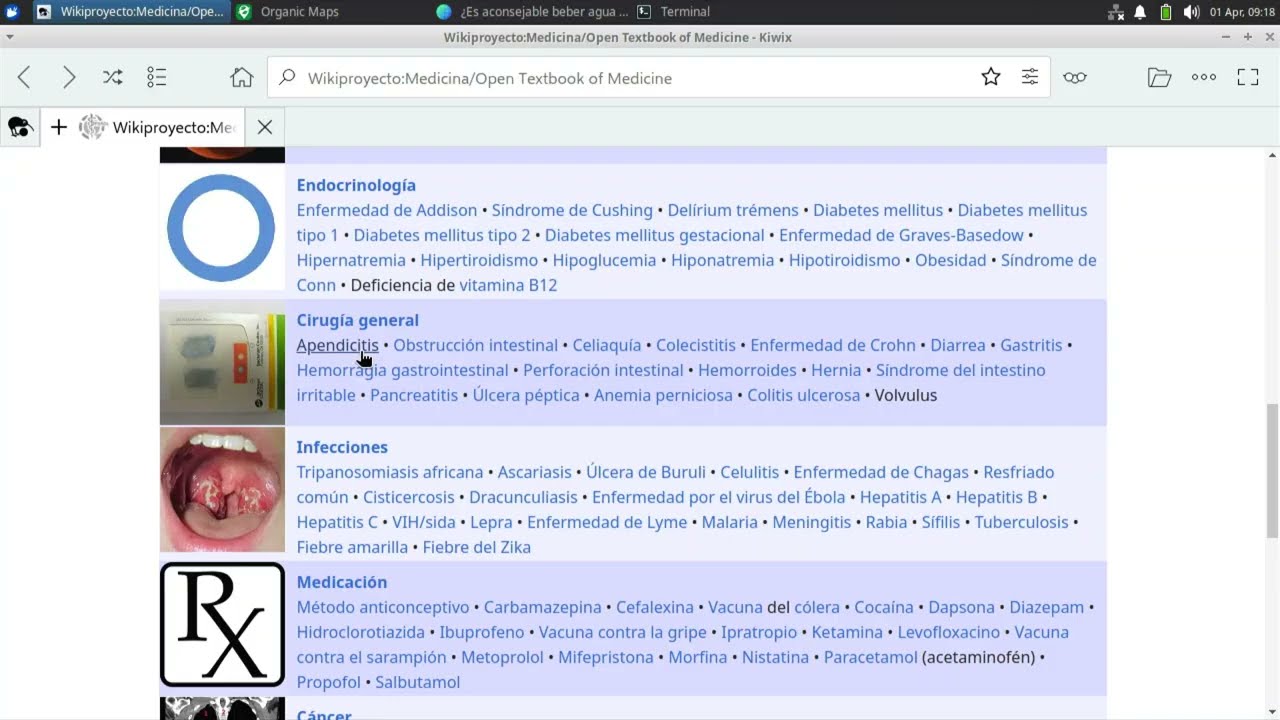
- 📚 Universal Offline Knowledge: Includes complete copies of Wikipedia, WikiMed (medicine), survival encyclopedias, and trade guides thanks to Kiwix technology.
- 🤖 Private Artificial Intelligence: Incorporate an assistant that works 100% locally, without Internet. It can help you solve technical, medical, or translation problems using only the power of your computer.
- 🗺️ Maps and GPS Navigation: Detailed maps of the entire world via Organic Maps. You can search for routes and points of interest (fountains, hospitals, shelters) without emitting any network signal.
- 🔒 Secure File Vault: Professional encryption system to store your most important documents (passports, titles, photos) protected by a master password.
- 🌐 Adapted to Your Language: The system automatically configures in your language (Spanish or English), downloading only the dictionaries and help files you need.
- You can see in the Applications and Roadmap section the current status of the project, with the modules that are already implemented and those that will be added in the future.
| Element | Screenshot |
|---|---|
| Main Interface |  Main menu with an open vault |
| Knowledge |  Medical encyclopedia (WikiMed) |
| Navigation |  Cartography and offline navigation |
| Assistant |  Local Artificial Intelligence |
refugiOS running on a 2018 Microsoft Surface, booted from a 16GB USB drive and completely offline
If you already have a USB with XUbuntu freshly installed, you just need to connect the team to the Internet once and run this command in the terminal:
sudo apt install curl -y
curl -fsSL https://raw.githubusercontent.com/Ganso/refugiOS/main/install.sh | bash
Important
Don't have the XUbuntu USB ready yet? If you're starting from scratch, first follow our XUbuntu Installation Guide to prepare your pendrive from Windows or Linux.
First install Raspberry Pi OS with the official tool Raspberry Pi Imager and then run the same installer:
sudo apt install curl -y
curl -fsSL https://raw.githubusercontent.com/Ganso/refugiOS/main/install.sh | bash
The installer will automatically detect that you are on a Raspberry Pi and adapt everything. See the Raspberry Pi Installation Guide for details and hardware recommendations.
Note
The installer will guide you step by step and ask you what content you want to include based on your storage size.
Tip
Already have your first USB drive ready? Once you've tried it and configured it to your liking, we recommend cloning it to another unit to have a backup or to give copies to your loved ones.
Note
Want to try it quickly without touching a USB drive? If you have experience with virtual machines, you can mount refugiOS on a virtual disk image and boot it with QEMU or VirtualBox. See our Virtualization Guide for detailed steps.
| Platform | Status | Notes |
|---|---|---|
| XUbuntu 24.04 LTS | ✅ Certified | Reference platform |
| Xubuntu 25.10 | ✅ Certified | Needs retesting every new release |
| Raspberry Pi 3B+ | ✅ Certified | Raspberry Pi OS 64-bit, Wayland |
| Raspberry Pi 4 / 5 | 🧪 Untested (theoretically functional) | Testers wanted |
| Raspberry Pi Zero 2W | 🧪 Untested | Testers wanted |
| Other Debian-based distros | 🧪 Untested | Testers wanted |
To learn more about how refugiOS works and how to get the most out of it, consult the guides in the /doc/ directory:
- XUbuntu Installation: How to prepare your XUbuntu USB from Windows or Linux.
- Raspberry Pi Installation: Specific guide for Raspberry Pi with Raspberry Pi OS.
- Vision and User Experience: The purpose of the project and what to expect when using it.
- Comparison of Solutions: Why refugiOS is different from other alternatives.
- Applications and Roadmap: Information about Kiwix, Maps, and Artificial Intelligence.
- System Architecture: Technical details about the Linux base and its performance.
- Security Vaults: How the encryption of your personal files works.
- Unit Cloning: How to make exact copies of your USB on Windows or Linux.
Special thanks to Felipe Monge "PlayOnRetro" for the logo design.
refugiOS is possible thanks to the incredible work of open source projects like:
- Xubuntu and the Ubuntu community for the operating system base.
- Raspberry Pi Foundation for the hardware and ARM software ecosystem.
- Kiwix and the Wikimedia Foundation for offline access to universal knowledge.
- Mozilla Ocho for the Llamafile inference engine.
- HuggingFace and bartowski for the excellent AI model quantizations.
- Phi-4-mini (Microsoft) and Qwen3 (Alibaba-Qwen) language models.
- Organic Maps and OpenStreetMap contributors for offline mapping.
- Aria2 for high-efficiency downloads.
- Flatpak and Flathub for modern application distribution.
- Cryptsetup / LUKS for personal data security and encryption.
(refugiOS is an open source initiative for digital resilience. Currently in Beta phase, we are looking for collaborators to internationalize the documentation, migrate it to wiki format, and polish the user experience according to our Roadmap).