Feature request: "Simple" integration with GLPI Planning and Projects #46

Description

- Version of the plugin : 1.6.2
- Version of your GLPI : 9.5.4
This is a great plugin, however, I have seen a number of requests to integrate with other areas of GLPI that use tasks. We use GTD methodology and moving tasks to the right status, context and place is key to that process. Tasklist provides a lot of the functionality required for GTD, but not the required capabilities for scheduling or moving a task to a Project. Planning or scheduling a task is important, as it moving to a Project, so here are my proposals.
- Look and Feel
Make the look and feel of the tasklist - task editing window same as that of ticket task (familar). Only need to add fields for Priority, Other Client, Requester, Percent done, Description, Visibility and Archived to the form.
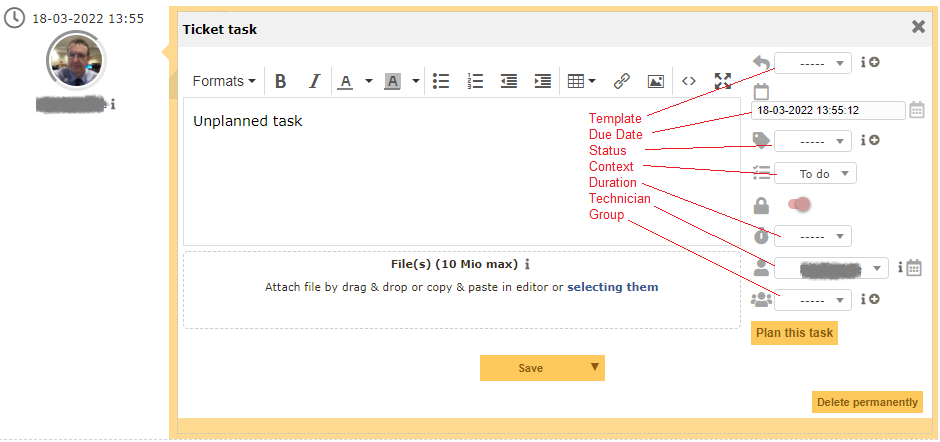
- Integrate with Planning
Add a "Plan this task" button as per above image, which would allow definition of a Start date, Planning duration or end date and Reminder for the task (see below). This button would effectively create a duplicate task in Planning (maybe an external task for now) and link to it from the tasklist task (similar to the ticket linking already provided).
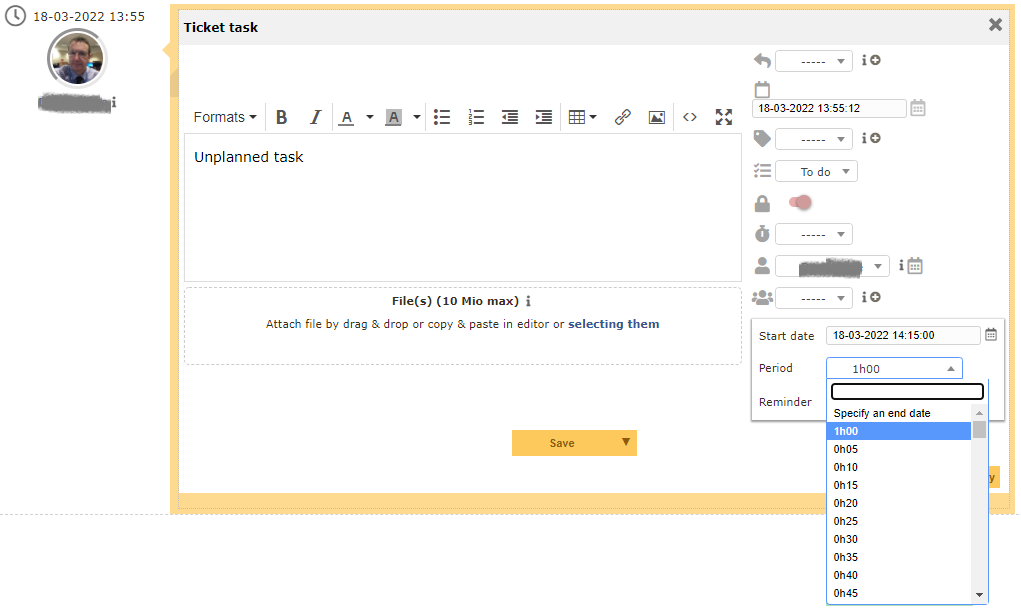
No need to store the Start date, Planning duration or end date and Reminder information with the tasklist task as this is held with the linked Planning task.
In the same way as a Status can be defined as a Finished state, we could also define a Status as a Planned state and move the tasklist task to this Status automatically when it is planned.
- Integrate with Projects
Ad an "Add this task to Project" button, similar to the "Plan this task" button. This button would also allow definition of a Start date, Planning duration or end date for the task, but it would also allow the selection of a GLPI Project under which a duplicate task would be created and linked back to the tasklist task (again similar to the Ticket linking).
Alternatively proposals 2 and 3 could be combined and the target for the created task could be chosen, either Project or Planning in the same dialog.