- HTML: Content
- CSS: Style
<HTML><Head><Title><body><footer>
<H1> etc<a href=""><img a href=""><p>
All tags can also have an Attribute followed by a Value
<p lang="eng-us">
|:---|:---:| | '
- ' | creates and unordered list, displays your list items in whatever order they are entered
|'
- you can define the width and heigth
- you can limit the width and heigth
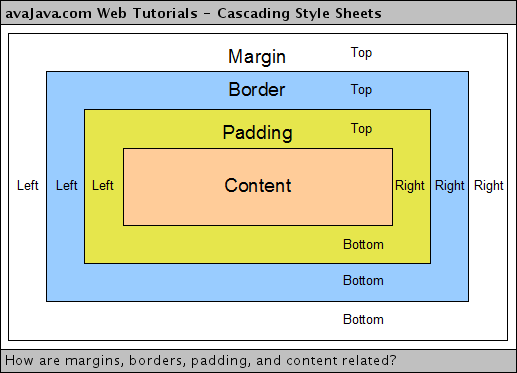
- You can also allow it to overflow using it's own scroll bar independent of the rest of the page Border, margins, padding
- Change how an element displays using a display property
- Hide borders
- make a border-image
- add a box-shadow
- round corners using Border-radius
- Make a circle by showing a block with a border, then adjust the corner radius until it becomes a circle
- you can provide : to adjust an action element of an HTML tag ie. a:hover will change how all
<header>= top<nav>= under header<article>= Replicable content piece<aside>= Relevant content to the main content<section>= A group of content<hgroup>= A group of header tags<figure <figcaption>= Content referenced in an article (images, videos, graphs, etc)-
<footer>= Bottom of Page- Content Creation
- Visual Hierarchy
- Size
- Color
- Style
- Images
- Content Organizing: Consistency and Headings
- Proximity
- Closure
- Continuance
- White Space
- Color
- Borders
- Concise
- Clear
- Selective
- Context
- Interactive
- Consistent
- Normal Flow
- Relative positioning
- Absolute Positioning
- Fixed positioning
- Floating Elements
- the z-index controls the layer order
- Adding text
- Making Choices
- Submitting Forms
- A user fills in a form then presses a button to submit information to a server
- The name of each form control is sent to the server with the value the user entered
- The server processes the information using a programming language like:
- PHP
- C#
- VB.net
- Java
- The server creates a new page to send back to the browser
- best for short forms and retrieving data from a server post = sent in HTML headers to the specified URL
- best for uploading a file, long files, sensitive data, adds or deletes info from a database Forms can had id attributes!
- Text
- Inputs text
- Password
- Blocked out string
<Text Area>- For multi line input
cols="width"USE CSSrows="height"USE CSS
- Radio
- Allows for a checked box
- Create multiple inputs with multple values
- the checked attribute allows you to pre-select an option
- Checkbox
- Allows for multiple check box inputs
- Select
- Allows for a drop down list with multiple options
<Select name="value"><option value="ipod">iPod</option>- with the multiple attribute, you can allow for multiple inputs from the list
- file
- Allows for file input box
- submit
- sends a form to the server
- image
- image allows you to add a src to put an image as the submit button
- button
- allows you to create a button element
- allows for multiple things to be held inside of a button
- hidden
- allows for a form to be submitted without user knowledge/automatically
- date
- Allows the user to input a date
- Allows the user to email address
- url
- Allows a user to enter a URL
- search
- allows a suer to seach a page
- use the placeholder attribute for "placeholder" text
- give the input an id and add a for attribute to the label html
- use
<legen>directly after to put a text element onto the form Use the required attribute to force a form element to be submitted - list-style-type:
- none
- disc
- square
- circle
- list-style-image: allows you to use an image as a bullet point
- list-style-position:
- outside = outside the block of text
- inside = inside the block of text
- list-style
- short hand for all of the above
- width
- padding
- text-transform (to uppercase)
- border-top/bottom
- text-align
- background-color (alternating table rows)
- :hover (highlight a table row when hovering over it)
- empty-cells
- show - shows borders of empty cells
- hide - hides borders of empty cells
- inherit - inherit rules of the table element
- border-spacing
- border-collapse
- font-size
- color
- background-color
- border
- border-radius
- :focus
- :hover
- background-image
- Page Titles
- URL
- Headings
- Text
- Link Text
- Image Alt Text
- Page Descriptions
- put the tracking code from Google into the head tag
- Visits
- Unique Visits
- Page Views
- Page per Visit
- Average time on Site
- Date Selector
- Export
- Pages
- Landing Pages
- Top Exit Pages
- Refferers
- Search Terms
- ' | creates a numbered list based on the list items
| '
- ' | creates a list that is defined with indentation
| '
- ' | Nested lists are unordered lists that are lined up in nested style
HTML5 is the current version of HTML to use
You must specify the DOCTYPE at the beginning of the file to define the language used
<!-- --!>= Non-Diplayed comment on the code
Class Attributes: Any element on a webpage can be given a defined class but those classes will all follow the same CSS defined attributes. You can also give multiple classes to the same item
<div>= Create a group in a block element
<span>= Create a group inline
<iFrame>= A window that allows another website to be displayed and interacted with on your page
<Meta>= Lives in the tag. Provides descriptions, keywords, robots, authors, pragma and cache expiration timing
They will need a special display code if used
Previously you had to ID your
sections to make them seperated. HTML5 has specific tags so you do not need to ID all of them.
Who is visiting the site? What information do they want? What information do you want to present?
Individuals vs Companies:
| Individuals | Companies |
|---|---|
| Age range? | Size of the company? |
| Women or Men? | Position of visitors? |
| What country? | For themselves or other things? |
| Urban or Rural? | Budget? |
| Income? | - |
| Level of Education? | - |
| Marital status? | - |
| Occupation? | - |
| Hours per week worked? | - |
| What kind of device? | - |
> Are they familiar with your brand or products?
> Are they familiar with your presence?
> Does it need to be updated?
Card Sorting: Pertinent visitor information on each card then organized into a site map
Navigation:
| Tag | Function | Description |
|---|---|---|
<table> |
Table intializer | Defines the following elements as being in a table |
<tr> |
Table row | starts a new row of data cells |
<td> |
Table data | the cell in a row |
<th> |
Table heading | boldens the data in each cell |
use the attribute colspan="#ofcolumnstospan" to span a cell across multiple columns use the attribute rowspan="#ofcolumnstospan" to span a cell across multiple rows
you can make long tables by using <thead> for header cells, <tbody> for body cells, and <tfoot> for footer cells
CSS styles can be applied to table elements
Block level elements alwaysw start on a new line Inline elements flow between surrounding text
If there is an element inside of another element, that element is the Parent and is Containing the child element
You can control elements with:
You can 'clear' a float to say that no element should touch another elemnts within the same containing element
Utilize floated Columns to create layouts for webisites
You can import multiple style sheets to the same html
3 types of form controles:
Steps of a Form:
FORMS BY DEFAULT REFRESH THE BROWSER PAGE ON SUBMISSION! .preventDefault(); keeps the page from reloading
<form action="link" method="get or post">
get = adding the values of the form to the end of the URL specified in the form
<input type="text" name="username" size="15" maxlength="30" />
input - the type of input - the return variable - do not use size, USE CSS - limits number of characters
In CSS there are many ways to style lists forms and tables
Cursor: Allows you to change the hovered cursor over the element
You can control the height and width individually or in ratio
Use float to align images
be default, images are inline display, change them to a block for more control
A background image is the image that is behind the content of a webpage
You can create a gradient using the background-image attritbute
Optimize SEO with on-page and off-page elements
Google analytics tracking!
Track: