-
Notifications
You must be signed in to change notification settings - Fork 0
Expand file tree
/
Copy pathpresentation.qmd
More file actions
775 lines (558 loc) · 15 KB
/
Copy pathpresentation.qmd
File metadata and controls
775 lines (558 loc) · 15 KB
1
2
3
4
5
6
7
8
9
10
11
12
13
14
15
16
17
18
19
20
21
22
23
24
25
26
27
28
29
30
31
32
33
34
35
36
37
38
39
40
41
42
43
44
45
46
47
48
49
50
51
52
53
54
55
56
57
58
59
60
61
62
63
64
65
66
67
68
69
70
71
72
73
74
75
76
77
78
79
80
81
82
83
84
85
86
87
88
89
90
91
92
93
94
95
96
97
98
99
100
101
102
103
104
105
106
107
108
109
110
111
112
113
114
115
116
117
118
119
120
121
122
123
124
125
126
127
128
129
130
131
132
133
134
135
136
137
138
139
140
141
142
143
144
145
146
147
148
149
150
151
152
153
154
155
156
157
158
159
160
161
162
163
164
165
166
167
168
169
170
171
172
173
174
175
176
177
178
179
180
181
182
183
184
185
186
187
188
189
190
191
192
193
194
195
196
197
198
199
200
201
202
203
204
205
206
207
208
209
210
211
212
213
214
215
216
217
218
219
220
221
222
223
224
225
226
227
228
229
230
231
232
233
234
235
236
237
238
239
240
241
242
243
244
245
246
247
248
249
250
251
252
253
254
255
256
257
258
259
260
261
262
263
264
265
266
267
268
269
270
271
272
273
274
275
276
277
278
279
280
281
282
283
284
285
286
287
288
289
290
291
292
293
294
295
296
297
298
299
300
301
302
303
304
305
306
307
308
309
310
311
312
313
314
315
316
317
318
319
320
321
322
323
324
325
326
327
328
329
330
331
332
333
334
335
336
337
338
339
340
341
342
343
344
345
346
347
348
349
350
351
352
353
354
355
356
357
358
359
360
361
362
363
364
365
366
367
368
369
370
371
372
373
374
375
376
377
378
379
380
381
382
383
384
385
386
387
388
389
390
391
392
393
394
395
396
397
398
399
400
401
402
403
404
405
406
407
408
409
410
411
412
413
414
415
416
417
418
419
420
421
422
423
424
425
426
427
428
429
430
431
432
433
434
435
436
437
438
439
440
441
442
443
444
445
446
447
448
449
450
451
452
453
454
455
456
457
458
459
460
461
462
463
464
465
466
467
468
469
470
471
472
473
474
475
476
477
478
479
480
481
482
483
484
485
486
487
488
489
490
491
492
493
494
495
496
497
498
499
500
501
502
503
504
505
506
507
508
509
510
511
512
513
514
515
516
517
518
519
520
521
522
523
524
525
526
527
528
529
530
531
532
533
534
535
536
537
538
539
540
541
542
543
544
545
546
547
548
549
550
551
552
553
554
555
556
557
558
559
560
561
562
563
564
565
566
567
568
569
570
571
572
573
574
575
576
577
578
579
580
581
582
583
584
585
586
587
588
589
590
591
592
593
594
595
596
597
598
599
600
601
602
603
604
605
606
607
608
609
610
611
612
613
614
615
616
617
618
619
620
621
622
623
624
625
626
627
628
629
630
631
632
633
634
635
636
637
638
639
640
641
642
643
644
645
646
647
648
649
650
651
652
653
654
655
656
657
658
659
660
661
662
663
664
665
666
667
668
669
670
671
672
673
674
675
676
677
678
679
680
681
682
683
684
685
686
687
688
689
690
691
692
693
694
695
696
697
698
699
700
701
702
703
704
705
706
707
708
709
710
711
712
713
714
715
716
717
718
719
720
721
722
723
724
725
726
727
728
729
730
731
732
733
734
735
736
737
738
739
740
741
742
743
744
745
746
747
748
749
750
751
752
753
754
755
756
757
758
759
760
761
762
763
764
765
766
767
768
769
770
771
772
773
774
775
---
format:
presentation-beamer: default
presentation-revealjs: default
---
# MANIT Quarto Presentations
## Hello, There
This template demonstrates what you can do with Quarto and Reveal.js, including:
- Presenting code with syntax highlighting and animations
- Including LaTeX equations and computations
- Image, video, and iframe backgrounds
- Fancy transitions and animations
- Fragments and incremental reveals
- Column layouts and absolute positioning
- Tabsets and interactive content
...and much more
::: footer
MANIT - Maulana Azad National Institute of Technology, Bhopal
:::
# Pretty Code
## Syntax Highlighting {auto-animate="true"}
- Over 20 syntax highlighting themes available
- Default theme optimized for accessibility
- Modern AI techniques leverage NLP for text analysis [@nag2021ContextualBIDirectionalAttention]
``` r
# Define a server for the Shiny app
function(input, output) {
# Fill in the spot we created for a plot
output$phonePlot <- renderPlot({
# Render a barplot
})
}
```
::: footer
Learn more: [Syntax Highlighting](https://quarto.org/docs/output-formats/html-code.html#highlighting)
:::
## Code Animations {auto-animate="true"}
- Auto-animate transitions between code states
- Watch code evolve smoothly on the slide
``` r
# Define a server for the Shiny app
function(input, output) {
# Fill in the spot we created for a plot
output$phonePlot <- renderPlot({
# Render a barplot
barplot(WorldPhones[,input$region]*1000,
main=input$region,
ylab="Number of Telephones",
xlab="Year")
})
}
```
::: footer
Learn more: [Code Animations](https://quarto.org/docs/presentations/revealjs/advanced.html#code-animations)
:::
## Line Highlighting
- Highlight specific lines for emphasis
- Step through code line-by-line
- Can highlight multiple line ranges
``` {.python code-line-numbers="4-5|7|10"}
import numpy as np
import matplotlib.pyplot as plt
x = np.linspace(0, 2*np.pi, 100)
y = np.sin(x)
plt.plot(x, y)
plt.xlabel('x')
plt.ylabel('sin(x)')
plt.show()
```
::: footer
Learn more: [Line Highlighting](https://quarto.org/docs/presentations/revealjs/#line-highlighting)
:::
## Executable Code - Python
```{.python}
import numpy as np
import matplotlib.pyplot as plt
x = np.linspace(0, 2*np.pi, 100)
y = np.sin(x)
fig, ax = plt.subplots()
ax.plot(x, y)
ax.set_xlabel('x')
ax.set_ylabel('sin(x)')
ax.set_title('Sine Wave')
plt.show()
```
*Note: Code shown for demonstration. For executable code, configure Python with reticulate.*
AI and deep learning approaches enable advanced healthcare analytics [@nag2023EmotionalIntelligenceArtificial].
::: footer
Learn more: [Executable Code](https://quarto.org/docs/presentations/revealjs/#executable-code)
:::
# Mathematics
## LaTeX Equations
[MathJax](https://www.mathjax.org/) rendering of equations to HTML
::: columns
::: {.column width="40%"}
``` tex
\begin{gather*}
a_1=b_1+c_1\\
a_2=b_2+c_2-d_2+e_2
\end{gather*}
\begin{align}
a_{11}& =b_{11}&
a_{12}& =b_{12}\\
a_{21}& =b_{21}&
a_{22}& =b_{22}+c_{22}
\end{align}
```
:::
::: {.column width="60%"}
```{=tex}
\begin{gather*}
a_1=b_1+c_1\\
a_2=b_2+c_2-d_2+e_2
\end{gather*}
```
```{=tex}
\begin{align}
a_{11}& =b_{11}&
a_{12}& =b_{12}\\
a_{21}& =b_{21}&
a_{22}& =b_{22}+c_{22}
\end{align}
```
:::
:::
::: footer
Learn more: [LaTeX Equations](https://quarto.org/docs/authoring/markdown-basics.html#equations)
:::
## Maxwell's Equations
In differential form:
$$
\begin{aligned}
\nabla \cdot \mathbf{E} &= \frac{\rho}{\epsilon_0} \\
\nabla \cdot \mathbf{B} &= 0 \\
\nabla \times \mathbf{E} &= -\frac{\partial \mathbf{B}}{\partial t} \\
\nabla \times \mathbf{B} &= \mu_0 \mathbf{J} + \mu_0\epsilon_0 \frac{\partial \mathbf{E}}{\partial t}
\end{aligned}
$$
These four equations describe how electric and magnetic fields are generated by charges, currents, and changes in the fields.
# Layout & Design
## Column Layout {.smaller}
Arrange content in columns
::: columns
::: {.column width="35%"}
**Contents**
- Theory
- Methodology
- Results
- Discussion
:::
::: {.column width="3%"}
:::
::: {.column width="62%"}
**Diagrams**
```{mermaid}
%%| fig-width: 3
flowchart LR
A[Input] --> B[Process]
B --> C[Output]
C --> D{Valid?}
D -->|No| B
D -->|Yes| E[Deploy]
```
:::
:::
::: footer
Learn more: [Multiple Columns](https://quarto.org/docs/presentations/revealjs/#multiple-columns)
:::
## Incremental Lists
Lists can optionally be displayed incrementally:
::: incremental
- First item
- Second item
- Third item
:::
. . .
<br/> Insert pauses to make other types of content display incrementally.
::: footer
Learn more: [Incremental Lists](https://quarto.org/docs/presentations/revealjs/#incremental-lists)
:::
## Fragments
Incremental text display and animation with fragments:
<br/>
::: {.fragment .fade-in}
Fade in
:::
::: {.fragment .fade-up}
Slide up while fading in
:::
::: {.fragment .fade-left}
Slide left while fading in
:::
::: {.fragment .fade-in-then-semi-out}
Fade in then semi out
:::
. . .
::: {.fragment .strike}
Strike
:::
::: {.fragment .highlight-red}
Highlight red
:::
::: footer
Learn more: [Fragments](https://quarto.org/docs/presentations/revealjs/advanced.html#fragments)
:::
# Tabsets & Panels
## Tabsets
Multi-language support essential for text-based emotion recognition [@r.2023TextbasedEmotionRecognition].
::: panel-tabset
### Python
```{.python}
import matplotlib.pyplot as plt
import numpy as np
x = np.linspace(0, 10, 100)
y = np.sin(x)
plt.plot(x, y)
plt.show()
```
### R
```{.r}
library(ggplot2)
x <- seq(0, 10, length.out = 100)
y <- sin(x)
df <- data.frame(x = x, y = y)
ggplot(df, aes(x, y)) +
geom_line()
```
### Julia
```{.julia}
using Plots
x = range(0, 10, length=100)
y = sin.(x)
plot(x, y)
```
:::
::: footer
Learn more: [Tabsets](https://quarto.org/docs/presentations/revealjs/#tabsets)
:::
## Code in Tabs
Use tabsets to show code in multiple languages:
::: panel-tabset
### Method
```python
def factorial(n):
if n <= 1:
return 1
return n * factorial(n-1)
```
### Test
```python
assert factorial(5) == 120
assert factorial(0) == 1
assert factorial(1) == 1
```
### Complexity
- **Time:** O(n)
- **Space:** O(n) (call stack)
- **Recursive approach**
:::
# Backgrounds
## Slide Backgrounds {background-color="#43464B"}
Set the `background` attribute on a slide to change the background color (all CSS color formats are supported).
Different background transitions are available via the `background-transition` option.
::: footer
Learn more: [Slide Backgrounds](https://quarto.org/docs/presentations/revealjs/#color-backgrounds)
:::
## Media Backgrounds {background-color="#43464B"}
You can also use the following as a slide background:
- An image: `background-image`
- A video: `background-video`
- An iframe: `background-iframe`
::: footer
Learn more: [Media Backgrounds](https://quarto.org/docs/presentations/revealjs/#image-backgrounds)
:::
## Gradient Backgrounds {background-gradient="linear-gradient(to bottom, #006DAE, #17b2c3)"}
Beautiful gradients using MANIT colors
```markdown
## My Slide {
background-gradient="linear-gradient(to bottom, #006DAE, #17b2c3)"
}
```
## MANIT Blue Background {background-color="#006DAE"}
Use MANIT's official blue color for important slides
```markdown
## My Slide {background-color="#006DAE"}
```
# Advanced Features
## Absolute Position
Position images or other elements at precise locations
*Note: This feature is specific to RevealJS HTML format and demonstrates absolute positioning of elements on slides.*
**Syntax Example:**
```markdown
{.absolute top="170" left="30" width="200"}
```
::: footer
Learn more: [Absolute Position](https://quarto.org/docs/presentations/revealjs/advanced.html#absolute-position)
:::
## Auto-Animate {auto-animate="true"}
Automatically animate matching elements across slides with Auto-Animate.
::: {style="margin-top: 100px;"}
Animation
:::
::: footer
Learn more: [Auto-Animate](https://quarto.org/docs/presentations/revealjs/advanced.html#auto-animate)
:::
## Auto-Animate {auto-animate="true"}
Automatically animate matching elements across slides with Auto-Animate.
::: {style="margin-top: 200px; font-size: 3em; color: #006DAE;"}
Animation
:::
::: footer
Learn more: [Auto-Animate](https://quarto.org/docs/presentations/revealjs/advanced.html#auto-animate)
:::
# Visualizations
## Flowcharts with Mermaid
```{mermaid}
%%| fig-width: 5
%%| fig-height: 3.5
flowchart LR
A[Start] --> B{Review}
B -->|Gap| C[Hypothesis]
B -->|No Gap| D[Refine]
D --> B
C --> E[Method]
E --> F[Data]
F --> G[Analyze]
G --> H[Paper]
H --> I[End]
```
::: footer
Learn more: [Diagrams](https://quarto.org/docs/authoring/diagrams.html)
:::
## Sequence Diagrams
```{mermaid}
%%| fig-height: 3
sequenceDiagram
participant Student
participant Supervisor
participant Committee
Student->>Supervisor: Submit Draft
Supervisor->>Student: Provide Feedback
Student->>Supervisor: Submit Revision
Supervisor->>Committee: Recommend Defense
Committee->>Student: Schedule Defense
Student->>Committee: Present Research
Committee->>Student: Award Degree
```
## Process Flow
```{mermaid}
%%| fig-width: 5
graph LR
A[Input] --> B[Process]
B --> C[Model]
C --> D[Validate]
D --> E{Good?}
E -->|No| C
E -->|Yes| F[Deploy]
```
# Tables & Data
## Comparison Tables
Performance metrics for various AI and deep learning approaches [@nag2025ExpandingAIsRole]:
| Method | Accuracy | Precision | Recall | F1-Score |
|--------|----------|-----------|--------|----------|
| SVM | 0.85 | 0.83 | 0.84 | 0.835 |
| RF | 0.88 | 0.87 | 0.86 | 0.865 |
| NN | 0.91 | 0.90 | 0.89 | 0.895 |
| LSTM | 0.93 | 0.92 | 0.91 | 0.915 |
: Comparison of Machine Learning Methods {#tbl-comparison}
## Research Results Example
**Experiment:** Algorithm Performance Comparison
AI-driven analysis reveals patterns in healthcare data [@nag2024LeveragingTextData].
:::: columns
::: {.column width="50%"}
| Algorithm | Time (s) |
|-----------|----------|
| Bubble | 45.2 |
| Quick | 2.1 |
| Merge | 2.8 |
| Heap | 3.2 |
:::
::: {.column width="50%"}
**Key Findings:**
- Quick sort is fastest
- Bubble sort is slowest
- All O(n log n) algorithms perform similarly
:::
::::
# Presentation Features
## Speaker View
Press `S` to open speaker view
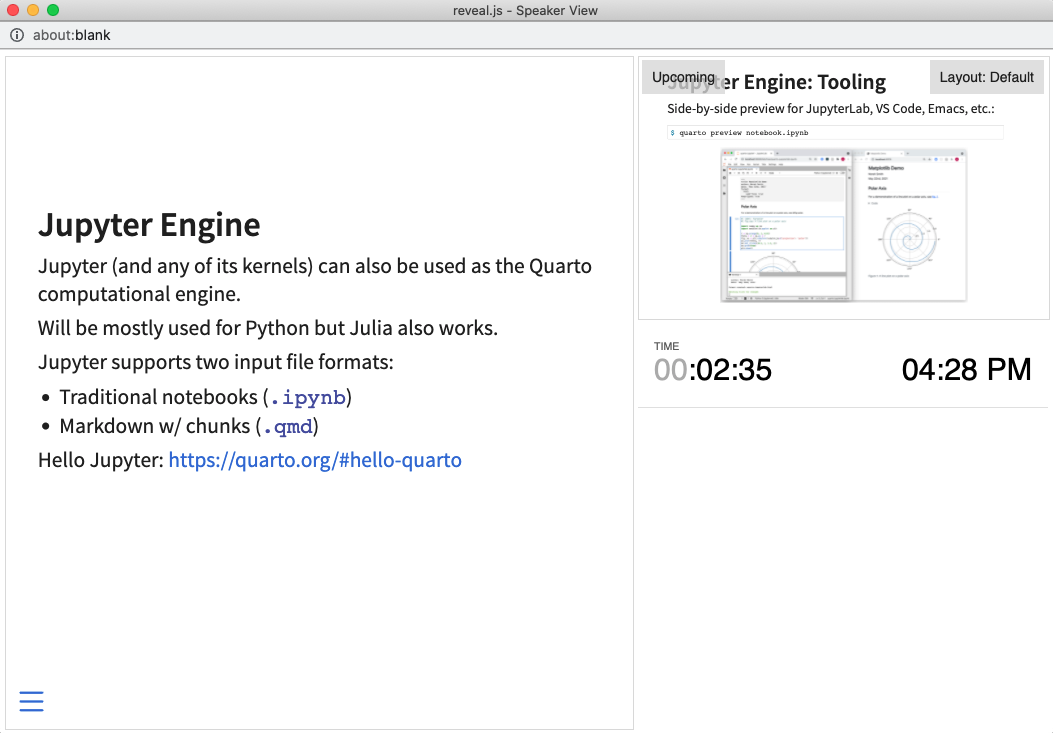{fig-align="center" style="border: 3px solid #dee2e6;" width="600"}
::: footer
Learn more: [Speaker View](https://quarto.org/docs/presentations/revealjs/presenting.html#speaker-view)
:::
## Navigation
Press `O` to toggle overview mode
Press `?` to see keyboard shortcuts
Hold `Alt` and click on any element to zoom
::: footer
Learn more: [Navigation](https://quarto.org/docs/presentations/revealjs/presenting.html)
:::
## Slide Transitions
Different transition styles available:
- `none` (default)
- `fade`
- `slide`
- `convex`
- `concave`
- `zoom`
```markdown
## My Slide {transition="zoom"}
```
# MANIT Templates
## Two Output Formats
This template generates two presentation types:
1. **Beamer (PDF)** - For printing and formal submissions
2. **RevealJS (HTML)** - For interactive web presentations
All from the **same source file**!
::: footer
One Source, Multiple Outputs
:::
## Building Your Presentation
**In VS Code:**
1. Open `presentation.qmd`
2. Press `Ctrl+Shift+B`
3. Select your desired format:
- Build All Formats
- Build Beamer PDF
- Build RevealJS HTML
**Or use terminal:**
```bash
quarto render presentation.qmd
```
## MANIT Branding
**Template Features:**
- MANIT logo (top-right corner)
- Official MANIT colors
- Metropolis-inspired theme
- Professional styling
- Consistent across formats
**Who should use:**
- Students (BTech, MTech, PhD)
- Faculty members
- Research scholars
# Best Practices
## Content Guidelines
**Do:**
- Start with clear objectives
- Use MANIT branding consistently
- Keep slides focused (one idea per slide)
- Use visuals to support text
- Include references
- Test presentation beforehand
**Don't:**
- Overcrowd slides with text
- Use excessive animations
- Forget to acknowledge guides
- Copy without attribution
- Use low-quality images
## Research Presentation Structure
Typical structure for thesis/seminar [@nag2024SystematicReviewAI]:
::: incremental
1. **Title Slide** - Name, guide, date
2. **Introduction** - Background and motivation
3. **Literature Review** - Previous work [@nag2024AdvancingPatientCarea]
4. **Research Gap** - What's missing
5. **Objectives** - Your contribution
6. **Methodology** - How you did it
7. **Results** - What you found
8. **Discussion** - What it means
9. **Conclusions** - Summary and future work
10. **References** - Bibliography
:::
## Tips for Effective Delivery
:::: columns
::: {.column width="50%"}
**Preparation:**
- Rehearse multiple times
- Time your presentation
- Prepare for questions
- Have backup slides
:::
::: {.column width="50%"}
**During:**
- Make eye contact
- Speak clearly
- Use speaker notes (press `S`)
- Engage audience
- Handle questions well
:::
::::
# Resources
## Learning Resources
**Official Documentation:**
- [Quarto Presentations](https://quarto.org/docs/presentations/)
- [RevealJS Guide](https://quarto.org/docs/presentations/revealjs/)
- [Beamer Guide](https://quarto.org/docs/presentations/beamer.html)
**MANIT Resources:**
- Template repository
- Sample presentations
- Department guides
::: footer
Continuous Learning
:::
## Keyboard Shortcuts
| Key | Action |
|-----|--------|
| `→` / `Space` | Next slide |
| `←` | Previous slide |
| `F` | Fullscreen |
| `S` | Speaker view |
| `O` | Overview |
| `M` | Menu |
| `?` | Help |
## Speaker Notes Example
This is what the audience sees on the slide
::: {.notes}
**Remember to:**
- Explain this concept slowly
- Ask if there are questions
- Show the demo if time permits
- Thank the audience
:::
**Press `S` to see speaker notes during presentation**
# Conclusion
## Summary
You've seen:
- Code presentation (highlighting, animations, executable)
- Mathematics with LaTeX
- Layout features (columns, fragments, tabsets)
- Visualizations (Mermaid diagrams)
- Backgrounds and transitions
- Navigation and speaker features
- MANIT-specific customization
These tools enable modern healthcare communication and AI research [@nag2024EmotionalIntelligenceArtificial; @nag2025ExpandingAIsRole].
**Start creating your own presentations!**
## Your First Presentation
::: incremental
1. Copy this template
2. Add your content
3. Customize with MANIT details
4. Build and preview
5. Iterate and improve
6. Present with confidence!
:::
## MANIT Pride! {.unnumbered .unlisted}
**Department of Mathematics, Bioinformatics and Computer Applications**
**Maulana Azad National Institute of Technology, Bhopal**
---
### Thank you!
### Questions?
::: {.notes}
Thank the audience and invite questions. Be prepared to demonstrate features if asked.
:::
# References
## References {.unnumbered .unlisted .allowframebreaks .smaller}
::: {#refs}
:::