I love this collection of tutorials!
There are a few things that you can do to make them a little easier to explore in RStudio. The IDE provides a Tutorial tab to explore tutorials in installed packages. Currently DOSStoolkit tutorials appear like this in that pane:
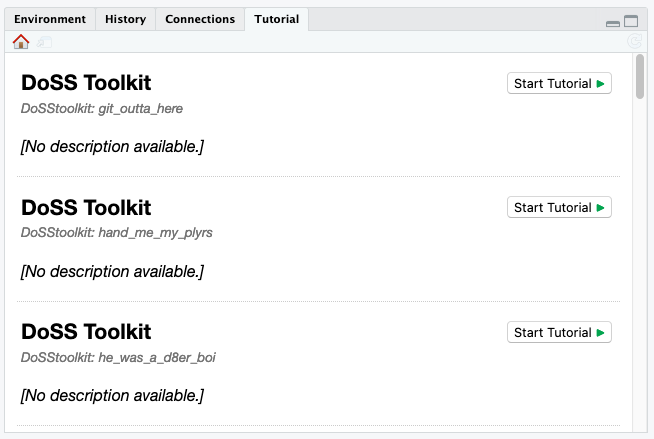
You can improve their appearance by:
-
Sorting the tutorials by prepending an index at the front of the directory name, e.g. 00-hello_world, 01-operating_in_an_error_prone_world, etc.
Unfortunately, this does change the command to run the tutorial — learnr::run_tutorial("00-hello_world", package = "DoSStoolkit") — but you could also provide a wrapper function in this package to find and add the correct prefix and to call learnr::run_tutorial() behind-the-scenes.
-
Swapping the title and subtitle field so that the title of the tutorial appears in bold in the tutorial list.
-
Copying the list of module content into the description field.
This can be markdown formatted, so you can just copy the list straight from the README:
title: "Hello World!"
subtitle: "DoSS Toolkit"
date: "25 May 2021"
output:
  learnr::tutorial:
    allow_skip: true
runtime: shiny_prerendered
description: |
  -   Why I love R, by Liza Bolton.
  -   Setting up RStudio, by Annie Collins.
  -   Getting to know what is what - console, terminal, etc, by Annie
      Collins.
  -   A fun hello world exercise, by Annie Collins.
  -   Another fun hello world exercise, by Shirley Deng.
  -   R Weekly newsletter, R Ladies, R meetups, by Annie Collins.
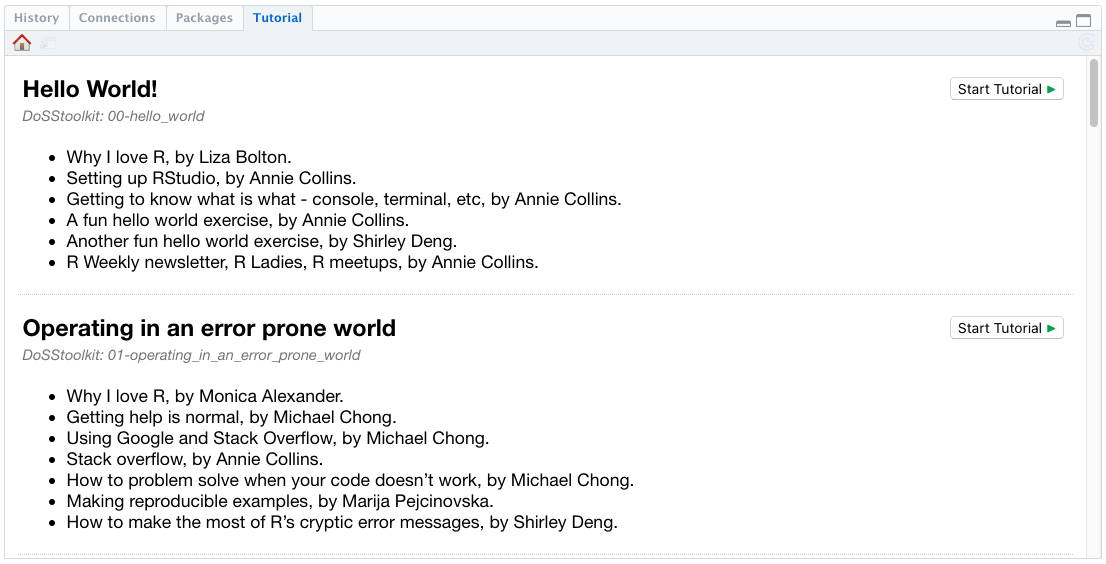
After making the above changes, the tutorials will appear in the Tutorial tab like this:


I love this collection of tutorials!
There are a few things that you can do to make them a little easier to explore in RStudio. The IDE provides a Tutorial tab to explore tutorials in installed packages. Currently DOSStoolkit tutorials appear like this in that pane:
You can improve their appearance by:
Sorting the tutorials by prepending an index at the front of the directory name, e.g.
00-hello_world,01-operating_in_an_error_prone_world, etc.Unfortunately, this does change the command to run the tutorial —
learnr::run_tutorial("00-hello_world", package = "DoSStoolkit")— but you could also provide a wrapper function in this package to find and add the correct prefix and to calllearnr::run_tutorial()behind-the-scenes.Swapping the
titleandsubtitlefield so that the title of the tutorial appears in bold in the tutorial list.Copying the list of module content into the description field.
This can be markdown formatted, so you can just copy the list straight from the README:
After making the above changes, the tutorials will appear in the Tutorial tab like this: