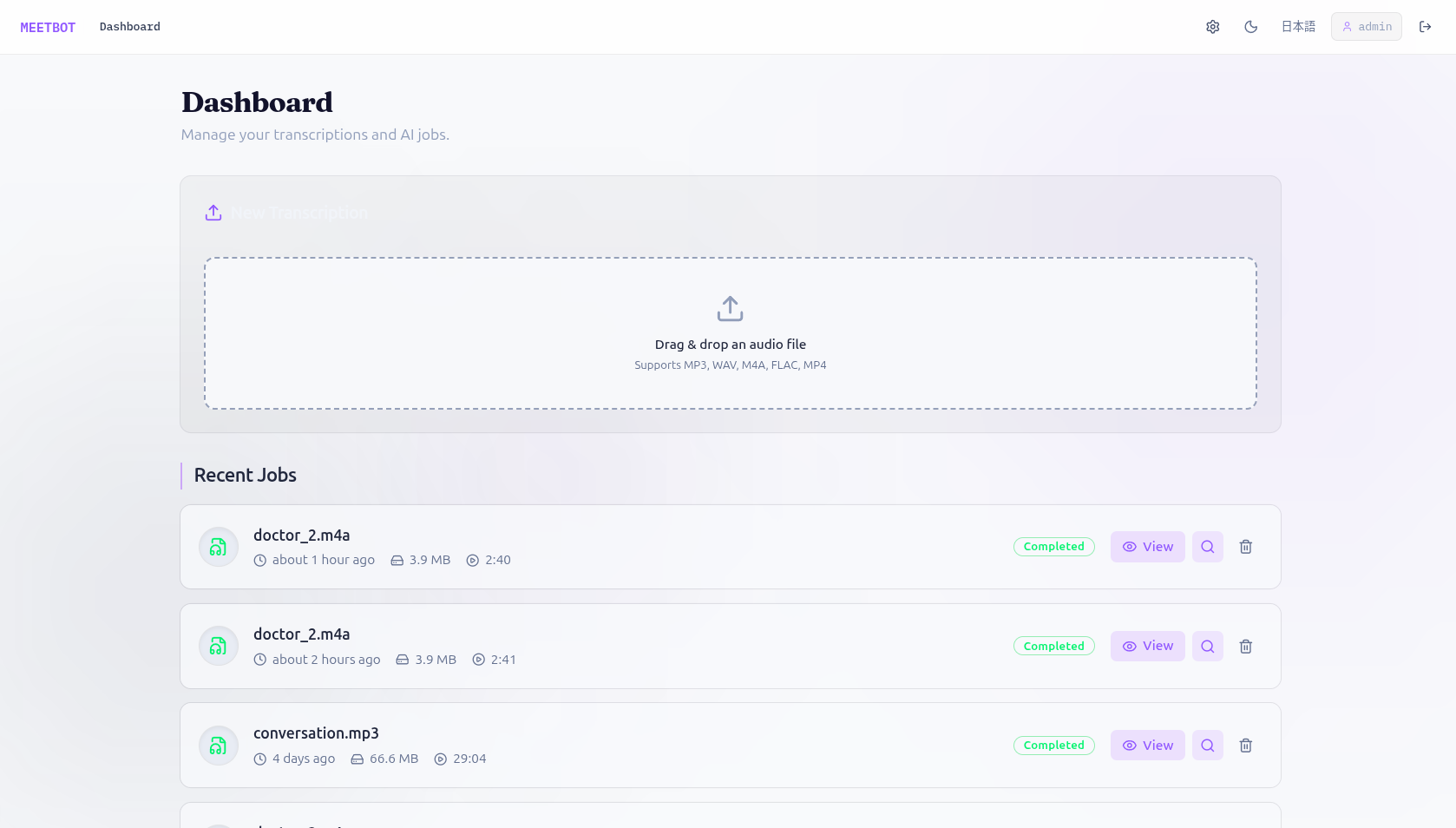
MeetBot turns audio recordings into searchable, queryable transcripts. Upload a meeting, interview, or podcast — MeetBot transcribes it, identifies who spoke when, aligns the two outputs, stores the result in a multi-level ChromaDB vector index, and lets you ask natural language questions with streaming token-by-token answers.
Runs fully offline on CPU. GPU and cloud APIs are also supported.
- Transcription — Local GPU (faster-whisper / Whisper large-v3) or HuggingFace Inference API
- Speaker diarization — Pyannote Audio 3.1 labels every speaker turn with timestamps
- Alignment — Merges Whisper segments and Pyannote intervals into speaker-labelled turns
- Multi-level RAG indexing — ChromaDB index at document, segment, and chunk granularity; memory-safe streaming pipeline with atomic index swap
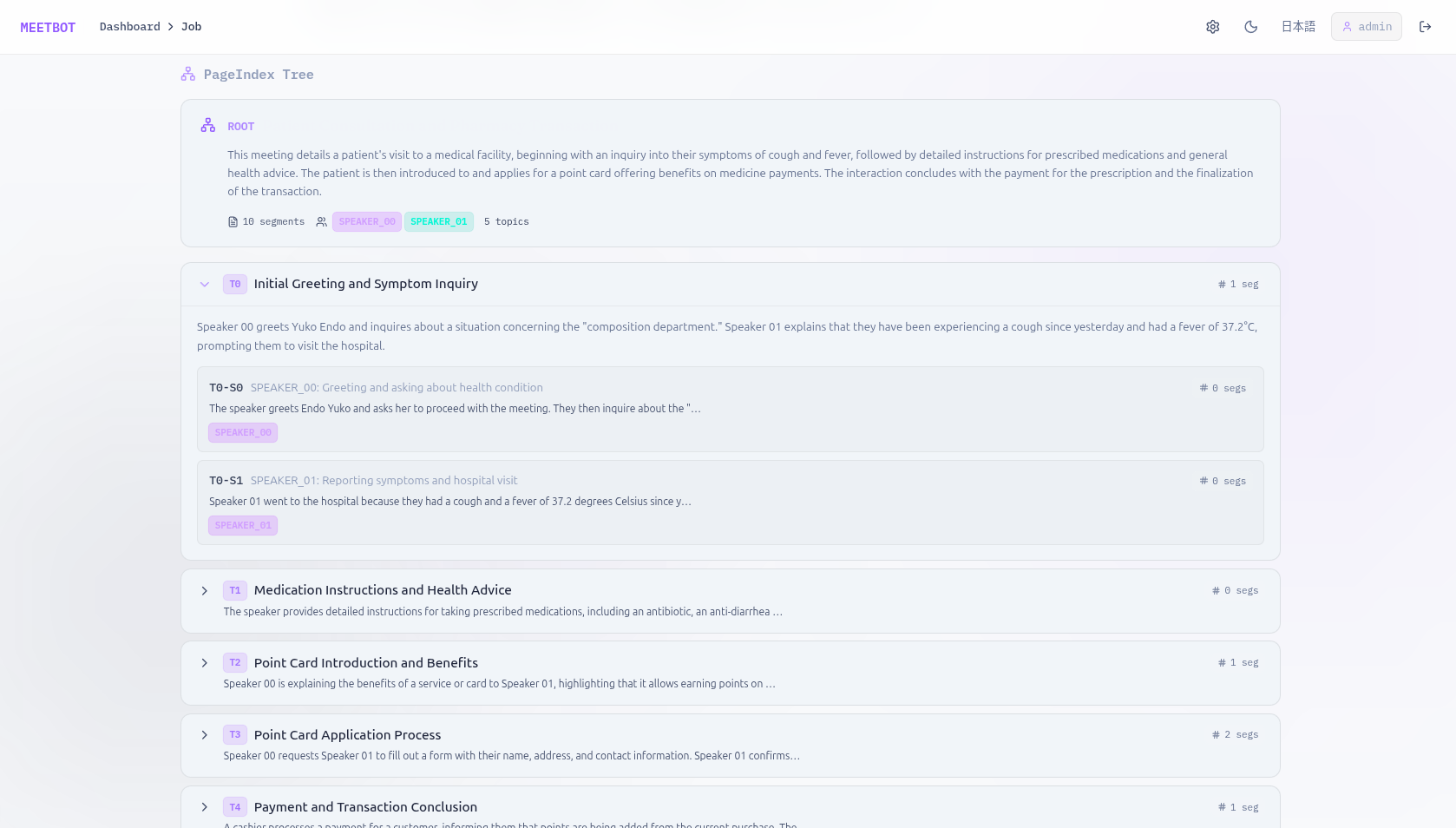
- PageIndex — Lightweight positional index for page-aware retrieval alongside the vector index
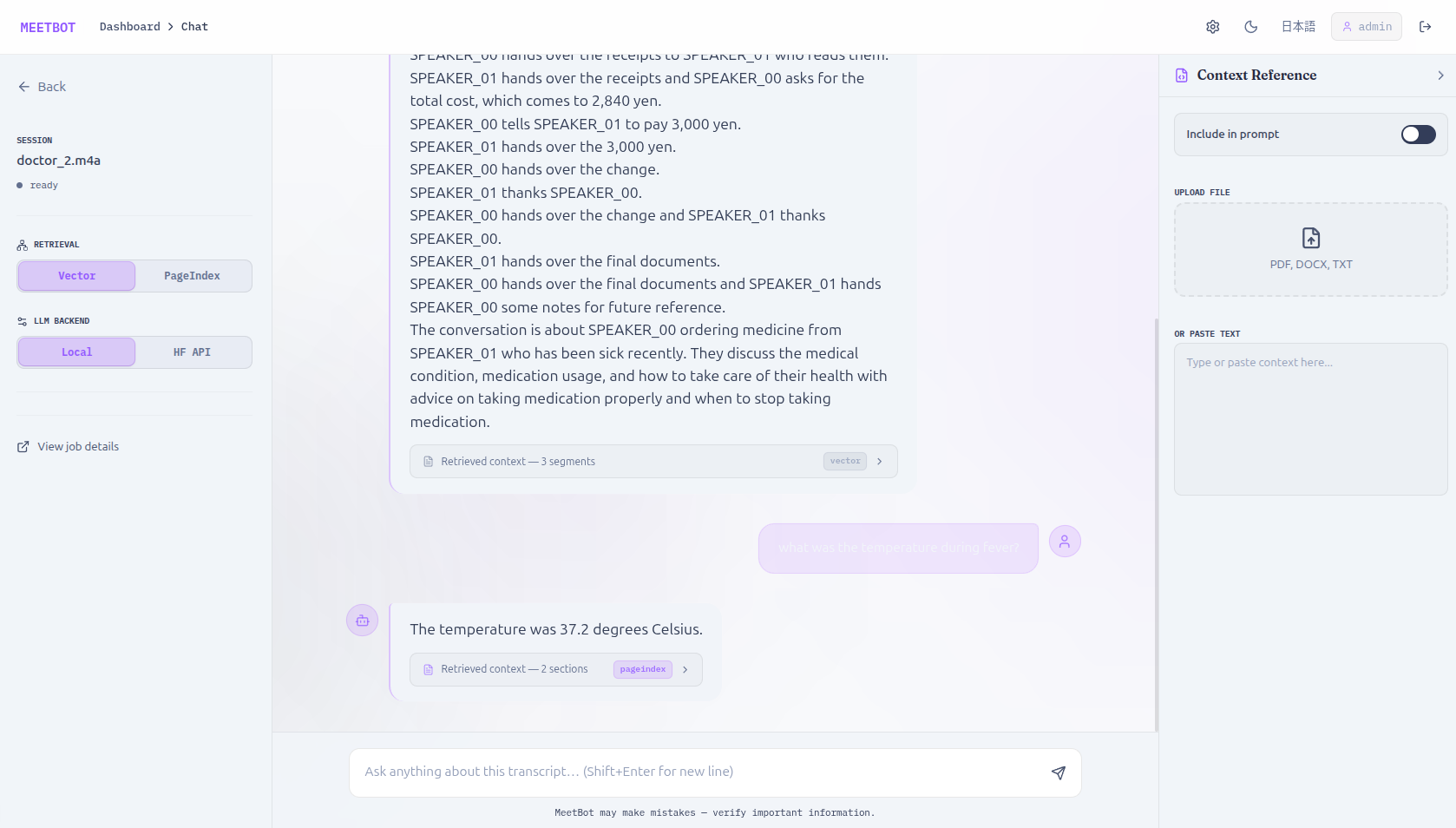
- Streaming Q&A chat — Token-by-token answers via local GGUF (llama.cpp) or HuggingFace Inference API; context references passed from the UI into each prompt
- Persistent chat history — Per-job conversation sessions stored in SQLite; individual messages can be deleted
- Transcript editing + incremental reindex — Edit speaker names or text in the UI; rebuild only changed segments
- Speaker rename — Rename a speaker label across all segments in one operation
- Download outputs — Aligned JSON, raw Whisper transcription, and Pyannote diarization JSON
- Authentication — JWT Bearer tokens for REST endpoints; NiceGUI session for legacy pages
- Web UI — Next.js 16 / React 19 / Tailwind SPA (port 3000)
- REST + WebSocket API — FastAPI backend (port 8080); all core operations are machine-readable
- CLI — Batch transcribe, index, and query from the command line
- Project Overview
- System Architecture
- Repository Structure
- Installation
- Environment Variables
- Running the Application
- Indexing and Processing Pipeline
- Query System
- REST and WebSocket API
- Docker
- Troubleshooting
- Development Notes
- Running Tests
MeetBot is a self-hosted meeting-intelligence assistant with the following capabilities:
- Transcription — OpenAI Whisper (local GPU) or HuggingFace Inference API
- Speaker diarization — Pyannote Audio 3.1 identifies and labels each speaker
- Alignment — Merges Whisper segments and Pyannote intervals into speaker-labelled turns
- Multi-level RAG indexing — ChromaDB index with document, segment, and chunk levels
- Streaming Q&A — Token-by-token answers via local GGUF model or HuggingFace API
- Persistent chat history — Per-job conversation history in SQLite
- Transcript editing and reindexing — Edit speakers/text in the UI; rebuild the index instantly
- Download outputs — Aligned JSON, raw Whisper output, diarization JSON
- Web UI — Modern, responsive Next.js SPA frontend architecture with Tailwind CSS
- REST + WebSocket API — All core operations exposed as machine-readable endpoints from a Python FastAPI backend
- CLI — Batch-processing command-line interface
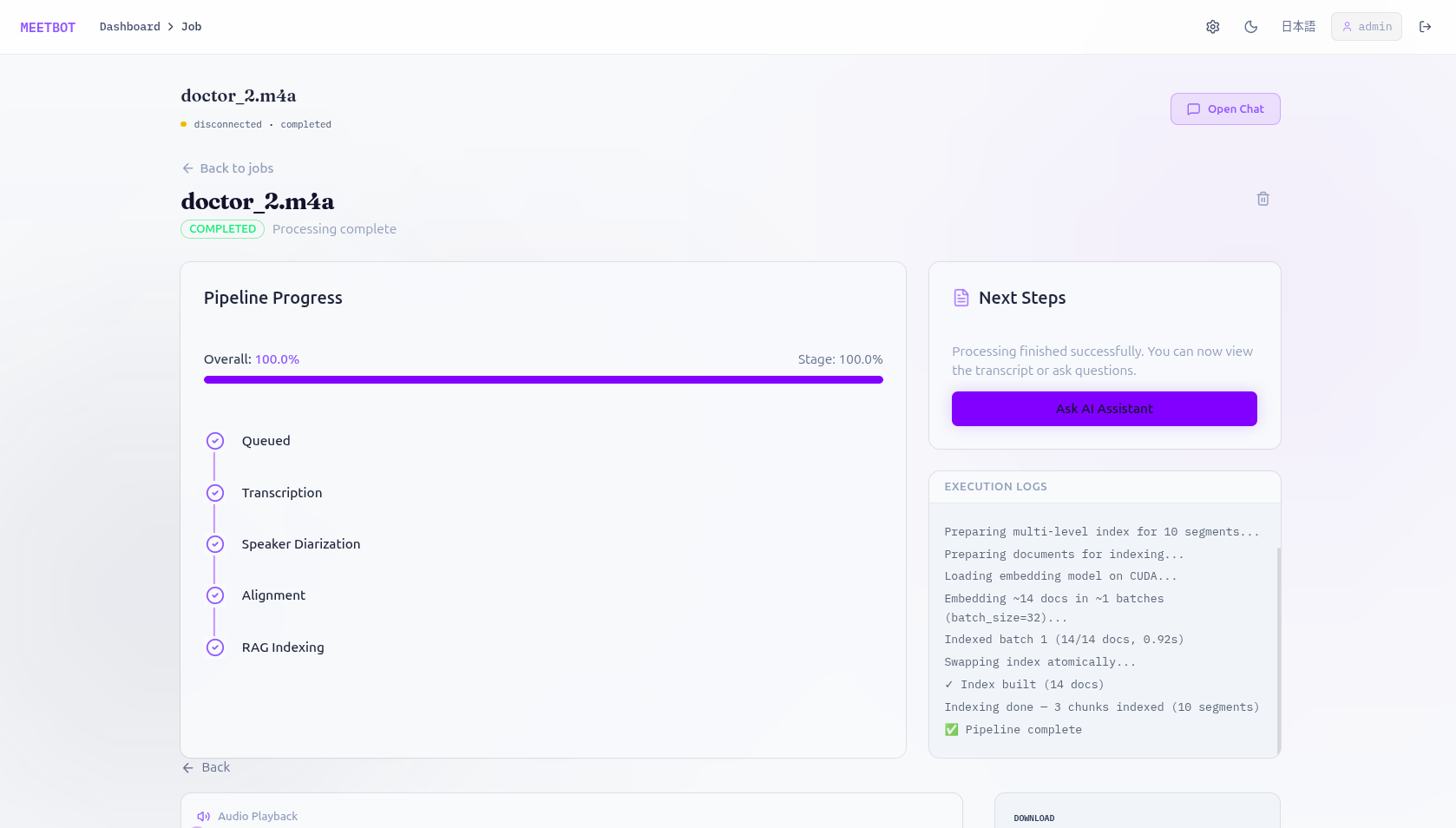
Audio upload
  └─► Stage 1: Transcription  (Whisper)              0 – 40 %
        └─► Stage 2: Diarization  (Pyannote)         40 – 65 %
              └─► Stage 3: Alignment                 65 – 75 %
                    │  ► Insert / replace segments in SQLite
                    └─► Stage 4: RAG Indexing         75 – 95 %
                          │  ► Write JSONL (doc + segment + chunk docs)
                          │  ► Batch-embed with sentence-transformers
                          └─► Chroma atomic swap to live collection
User edits text / speaker labels in the UI
  └─► Bump transcript version in DB
        └─► Flush DB segments → result JSON
              └─► Re-embed and rebuild Chroma index (atomic swap)
User question
  └─► Stage 1: ANN recall  (RAG_RECALL_N candidates from Chroma)
        └─► Stage 2: MMR reranking  (picks RAG_MAX_CONTEXT_CHUNKS)
              └─► Stage 3: LLM generation  (local llama.cpp or HF API)
                    └─► Token stream → WebSocket → browser
All pipeline work runs in a single dedicated OS thread (meetbot-pipeline-worker).
Only one job runs at a time — this avoids VRAM contention between Whisper, Pyannote,
and the embedding model. Jobs from the web UI are enqueued through JobQueue (a
threading.Queue) and dispatched by pipeline_worker.py or reindex_worker.py.
MeetBot/
├── meetbot/
│   ├── adapters/              Backend adapters (pluggable)
│   │   ├── llm/               llama.cpp (local) and HuggingFace LLM clients
│   │   └── transcribers/      Local Whisper and HF Inference API transcribers
│   ├── services/              Core business logic
│   │   ├── transcriber.py     Audio → Whisper segments (with chunk-based large-file support)
│   │   ├── diarizer.py        Audio → Pyannote speaker intervals (with caching)
│   │   ├── aligner.py         Merge transcript + diarization → speaker-labelled turns
│   │   ├── formatters.py      Produce the aligned result JSON written to disk
│   │   ├── query_service.py   RAG recall → MMR rerank → LLM streaming generation
│   │   └── rag/               RAG v2 pipeline modules
│   │       ├── indexer.py     Multi-level Chroma indexer (atomic swap, memory-safe)
│   │       ├── chunker.py     Speaker-aware overlapping chunker (streaming)
│   │       ├── retriever.py   ChromaDB ANN retrieval with level filtering
│   │       ├── reranker.py    MMR cosine reranker
│   │       ├── selector.py    Context window selection after reranking
│   │       ├── summarizer.py  Answer-embedding source filtering
│   ├── workers/               Background job processing
│   ├── web/                   Legacy NiceGUI app & New FastAPI Backend
│   │   ├── main.py            App initialisation, CORS config, and route registration
│   │   ├── api.py             FastAPI REST endpoints for the Next.js frontend
│   │   ├── ws.py              Job-progress WebSocket (/ws/jobs/{id})
│   │   └── ws_chat.py         Streaming RAG chat WebSocket (/ws/chat/{id})
│   ├── db/                    Data layer
│   ├── utils/                 Utilities
│   ├── cli.py                 Command-line entry point
│   └── config.py              Pydantic Settings (all configuration lives here)
├── frontend/                  New Next.js Web App
│   ├── src/app/               App Router pages (Dashboard, Job Details, Chat)
│   ├── src/components/        React Server/Client components (shadcn/ui, Tailwind)
│   ├── src/lib/               API wrappers and WebSocket hooks
│   ├── tests/                 Playwright E2E and Jest Unit tests
│   ├── next.config.ts         Standalone Next.js configuration
│   └── Dockerfile             Multi-stage frontend Dockerfile
├── tests/                     Pytest test suite for Python Backend
├── Dockerfile                 Backend Python engine Dockerfile
├── docker-compose.yml         Run both Backend and Frontend easily
| Requirement | Notes |
|---|---|
| Python 3.12 | Tested version |
ffmpeg |
Required for audio conversion and silence detection |
| CUDA 11.8 or 12.1 | Optional; strongly recommended for transcription/diarization |
| CMake + compiler | Only if installing llama-cpp-python from source |
Install ffmpeg:
# Ubuntu / Debian
sudo apt install ffmpeg

# macOS
brew install ffmpeg# 1. Clone and enter project directory
git clone https://github.com/your-org/meetbot.git
cd meetbot/MeetBot
# 2. Create and activate virtual environment
python -m venv ../venv
source ../venv/bin/activate # Windows: ..\venv\Scripts\activate
# 3. Install PyTorch — choose the correct variant for your hardware
# CPU only:
pip install torch torchvision torchaudio --index-url https://download.pytorch.org/whl/cpu
# CUDA 11.8:
pip install torch torchvision torchaudio --index-url https://download.pytorch.org/whl/cu118
# CUDA 12.1:
pip install torch torchvision torchaudio --index-url https://download.pytorch.org/whl/cu121
# 4. Install all Python dependencies
pip install -r requirements.txt
# 5. Install MeetBot in editable mode
pip install -e .
# 6. (Optional) Build llama-cpp-python with CUDA support for the local LLM
# CUDA 11.8:
CMAKE_ARGS="-DLLAMA_CUDA=on" pip install llama-cpp-python
# CUDA 12.1:
CMAKE_ARGS="-DLLAMA_CUDA=on -DCMAKE_CUDA_ARCHITECTURES=native" pip install llama-cpp-python
# 7. Configure environment variables
cp .env.example .env # or create .env from scratch — see Section 5| Model | Size | Auto-downloaded? | Location |
|---|---|---|---|
| Whisper large-v3 | ~3 GB | Yes (first use) | ~/.cache/huggingface |
| Pyannote 3.1 | ~500 MB | Yes (requires free HF token + accept conditions) | ~/.cache/huggingface |
| Sarashina embedding (1B) | ~2 GB | No — download manually | ./models/sarashina-embedding-v1-1b/ |
| RakutenAI-7B-instruct GGUF | ~5 GB | No — download manually | ./models/rakutenai-7b-instruct-gguf/ |
For the embedding model and local LLM, place the files under ./models/ and
set EMBEDDING_MODEL / LOCAL_LLM_MODEL_PATH in .env.
See Section 10.
All variables are optional unless marked required. They can be set in .env or
passed directly as environment variables.
| Variable | Default | Description |
|---|---|---|
HF_API_TOKEN |
— | Required for Pyannote and gated HF models |
HF_HUB_TOKEN |
— | Alias for HF_API_TOKEN (deprecated) |
| Variable | Default | Description |
|---|---|---|
WHISPER_MODEL |
openai/whisper-large-v3 |
Whisper model name (HF model ID) |
DIARIZATION_MODEL |
pyannote/speaker-diarization-3.1 |
Pyannote model ID |
EMBEDDING_MODEL |
./models/sarashina-embedding-v1-1b |
Local path or HF model ID for sentence embeddings |
HF_MODEL |
deepseek-ai/DeepSeek-V3-0324 |
HuggingFace model for cloud Q&A |
HF_PROVIDER |
auto |
HF inference provider (auto, sambanova, novita, cerebras, …) |
LOCAL_LLM_MODEL_PATH |
./models/rakutenai-7b-instruct-gguf |
Path to GGUF model directory |
LOCAL_LLM_GPU_LAYERS |
15 |
Transformer layers offloaded to GPU (0 = CPU only) |
LOCAL_LLM_CONTEXT_SIZE |
2048 |
Context window in tokens |
LOCAL_LLM_MAX_TOKENS |
128 |
Max output tokens per Q&A response |
LOCAL_LLM_TEMPERATURE |
0.7 |
Sampling temperature |
| Variable | Default | Description |
|---|---|---|
TRANSCRIPTION_BACKEND |
huggingface |
local (GPU Whisper process) or huggingface (API) |
USE_LOCAL_LLM |
false |
true to use local GGUF model; false to use HF Inference API |
DEVICE |
auto | Global compute device: cuda, cpu, or unset (auto-detect) |
EMBEDDING_DEVICE |
cuda |
Device for embedding model: cuda or cpu |
DEFAULT_LANGUAGE |
— | Language hint for Whisper (e.g. en, ja) |
| Variable | Default | Description |
|---|---|---|
VECTOR_DB_PATH |
./db/sample |
Root directory for Chroma persist directories |
RAG_TOP_K |
4 |
Chunks returned by the REST query endpoint |
RAG_RECALL_N |
50 |
ANN recall pool size (stage-1 candidates before reranking) |
RAG_MAX_CONTEXT_CHUNKS |
6 |
Chunks passed to LLM after MMR reranking |
CHUNK_TOKENS |
300 |
Target chunk size in tokens for transcript chunking |
CHUNK_OVERLAP |
50 |
Overlap tokens between consecutive chunks |
SOURCE_SIM_THRESHOLD |
0.30 |
Minimum cosine similarity for a chunk to appear in sources |
SOURCE_MAX_RETURN |
5 |
Maximum sources shown after answer-embedding filtering |
| Variable | Default | Description |
|---|---|---|
EMBED_BATCH_SIZE |
16 |
Documents per embedding batch |
INDEX_BATCH_PERSIST_CHECKPOINT |
100 |
Log a checkpoint every N batches |
MEMORY_WATCH_ENABLED |
true |
Enable psutil memory monitoring during indexing |
MEMORY_WATCH_THRESHOLD_PCT |
0.85 |
RAM fraction that triggers batch-size halving |
RAG_MEMORY_SAFE_MODE |
true |
Streaming JSONL + batched inserts (set false only for debugging) |
| Variable | Default | Description |
|---|---|---|
OUTPUT_DIR |
./results |
Directory for pipeline JSON outputs |
TEMP_DIR |
./temp |
Temporary per-job JSONL during indexing (auto-cleaned on restart) |
CACHE_DIR |
./.cache_hf |
HuggingFace model cache |
PREPARED_DOCS_DIR |
./prepared |
Legacy staging directory (not used by the current pipeline) |
| Variable | Default | Description |
|---|---|---|
AUDIO_CHUNK_ENABLE |
true |
Split audio files larger than the size threshold |
AUDIO_CHUNK_SIZE_BYTES |
104857600 |
Trigger threshold (100 MB default) |
AUDIO_CHUNK_OVERLAP_SECONDS |
1.0 |
Overlap between consecutive audio chunks |
AUDIO_CHUNK_NOMINAL_DURATION |
120.0 |
Target chunk duration in seconds |
AUDIO_CHUNK_USE_SILENCE_DETECTION |
true |
Snap chunk boundaries to silence for cleaner cuts |
| Variable | Default | Description |
|---|---|---|
WEB_HOST |
0.0.0.0 |
Bind address |
WEB_PORT |
8080 |
Listening port |
WEB_SECRET_KEY |
(insecure default) | Change in production — signs sessions |
WEB_STORAGE_SECRET |
(insecure default) | Change in production — encrypts NiceGUI user storage |
MAX_UPLOAD_SIZE_MB |
500 |
Maximum audio file upload size |
ALLOWED_AUDIO_EXTENSIONS |
.wav,.mp3,.m4a,.flac,.aac,.ogg,.wma,.opus |
Accepted MIME types |
source ../venv/bin/activate
python -m meetbot.cli serve
The API and WebSockets will be available at http://localhost:8080.
cd frontend
npm install
npm run dev
Open http://localhost:3000 to view the new React-based web interface.
Open http://localhost:8080. Create an account on first run.
# Transcribe + diarize + index using HF backend
python -m meetbot.cli run path/to/meeting.mp3

# Use local Whisper GPU + local GGUF model
python -m meetbot.cli run path/to/meeting.mp3 \
    --transcription-backend local \
    --use-local-llm

# Force overwrite of an existing index
python -m meetbot.cli run path/to/meeting.mp3 --overwrite-indexpython -m meetbot.cli query db/abcd1234 "What were the main action items?"- Open the job detail page for any completed job.
- Edit speaker names or transcript text inline.
- Click Reindex (orange button in the header).
- A progress bar tracks the rebuild; existing queries continue against the old index until the swap completes.
TranscriberService supports two backends selected by TRANSCRIPTION_BACKEND:
local— Runs Whisper directly in-process on GPU/CPU. Output is cached underCACHE_DIRso restarts skip the expensive step.huggingface— Calls the HuggingFace Inference API. Cheaper to run on a CPU-only host; requiresHF_API_TOKEN.
Large audio files (WAV > AUDIO_CHUNK_SIZE_BYTES) are automatically split into
~2-minute chunks with silence-detection boundary snapping, processed in sequence,
and merged back before alignment.
DiarizationService uses pyannote/speaker-diarization-3.1 to produce a timeline
of (speaker, start, end) intervals. The model is downloaded from HuggingFace on
first use and cached locally. A valid HF_API_TOKEN that has accepted the Pyannote
model conditions is required.
AlignerService.build_speaker_transcript() overlaps Whisper word-level segments
with Pyannote intervals to produce the final list of speaker-labelled turns, each
with { start, end, speaker, text }.
Idempotency: create_segments_from_aligned() deletes any existing segments for
the job before inserting new ones. A cancelled-and-restarted pipeline always produces
exactly the correct segment count — never duplicates.
RAGIndexer.build_multilevel_index_atomic() writes three categories of document
into a single Chroma collection (distinguished by level metadata):
| Level | Count | Best for |
|---|---|---|
document |
1 (full concatenated transcript) | Broad summarisation queries |
segment |
N (one per speaker turn) | Speaker-specific or timestamped queries |
chunk |
M (overlapping ~300-token chunks) | Localised factual retrieval |
The user selects the retrieval level from the UI (Chunk / Segment / Document radio buttons); the backend uses the chosen level directly without automatic intent classification.
Memory-safe streaming design:
All documents are written to a temporary JSONL file first, then streamed through
the embedder in batches of EMBED_BATCH_SIZE. No full document list is ever held
in memory. After embedding, the index is built in a .tmp directory and atomically
renamed to the live path — queries remain consistent throughout.
Atomic swap:
{job_id[:8]}/ → {job_id[:8]}.old/ → (temp becomes live) → old deleted.
If the swap fails mid-way, the old live index is automatically restored.
question
  │
  ├─ ANN recall: Chroma WHERE level = {chosen level}, limit = RAG_RECALL_N
  │
  ├─ MMR reranking: Reranker.mmr_select() picks RAG_MAX_CONTEXT_CHUNKS
  │    (balances relevance to query with diversity among selected candidates)
  │
  ├─ Context assembly: Selector formats chunks with speaker + timestamp headers
  │
  └─ LLM generation: streaming token-by-token via llama.cpp or HF Inference API
       └─ Source filtering: answer embedding cosine-compared with chunk embeddings;
            chunks above SOURCE_SIM_THRESHOLD (max SOURCE_MAX_RETURN) are shown
The query page shows a Retrieval panel with three options:
- Chunk (default) — overlapping ~300-token windows; best for factual questions
- Segment — speaker turns; best for "what did Speaker X say about Y"
- Document — the whole transcript as one vector; best for high-level summaries
Segment mode additionally exposes a Segment count input that controls how many speaker turns are retrieved.
| Mode | Setting | Description |
|---|---|---|
| Local | USE_LOCAL_LLM=true |
llama.cpp with a GGUF model (e.g. RakutenAI-7B) |
| HuggingFace | USE_LOCAL_LLM=false |
HF Inference API via HF_MODEL + HF_PROVIDER |
Both modes stream tokens to the WebSocket as {"type":"token","text":"..."} events.
A {"type":"done","retrieval_level":"..."} event is sent when generation completes.
| Method | Path | Description |
|---|---|---|
GET |
/api/jobs/{id}/status |
Job status, progress percentage, paths |
POST |
/api/jobs/{id}/query |
RAG query; body {"q":"...","llm_mode":"local|hf"} |
GET |
/api/jobs/{id}/download?type=aligned|transcription|diarization |
Download output JSON |
POST |
/api/jobs/{id}/reindex |
Trigger index rebuild from current DB transcript |
POST |
/api/jobs/{id}/cancel |
Cancel an in-progress job |
POST |
/api/jobs/{id}/restart |
Restart a cancelled or failed job (clears stale segments + temp files) |
| Path | Protocol | Description |
|---|---|---|
/ws/jobs/{id} |
JSON events | Real-time pipeline progress (stage, progress, message) |
/ws/chat/{id} |
JSON events | Streaming RAG chat; send {"question":"...","llm_mode":"local|hf","retrieval_level":"chunk|segment|document","segment_count":5} |
The application supports Docker deployment for both the backend (CPU/GPU) and the new Next.js frontend.
# CPU-only (default)
docker build -t meetbot-backend .cd frontend
docker build -t meetbot-frontend .A docker-compose.yml can be set up to run the local SQLite database/backend on port 8080 alongside the standalone Next.js image on port 3000 mapping internally to the backend.
# Start all services
docker compose up -d

# Tail logs
docker compose logs -f

# Stop
docker compose down| Container path | Contents |
|---|---|
/app/data |
Uploaded audio files |
/app/models |
Embedding model + GGUF weights (read-only in compose) |
/app/db |
Chroma vector stores + SQLite database |
/app/results |
Pipeline output JSONs |
/app/.cache_hf |
HuggingFace model download cache |
/app/temp |
Per-job JSONL intermediates (ephemeral; auto-cleaned) |
ffmpeg: command not found
Install it: sudo apt install ffmpeg (Ubuntu) or brew install ffmpeg (macOS).
In Docker, ffmpeg is installed by the Dockerfile; no action needed.
Pyannote download fails / 401 Unauthorized
Set HF_API_TOKEN to a token that has explicitly accepted the Pyannote licence at
https://huggingface.co/pyannote/speaker-diarization-3.1.
HF Inference: "Model is not supported by provider"
Leave HF_PROVIDER=auto — MeetBot looks up the correct provider automatically.
Pin it manually (e.g. HF_PROVIDER=sambanova) only if you have a specific reason to.
GPU out-of-memory during indexing MeetBot automatically falls back to CPU for embedding if a GPU OOM is detected and logs a warning. To avoid OOM proactively:
- Lower
EMBED_BATCH_SIZE(e.g.8) - Set
EMBEDDING_DEVICE=cputo keep embedding off the GPU entirely - Reduce
LOCAL_LLM_GPU_LAYERSif the GGUF model is also on GPU
Job stuck at 18 segments after restart
This was a known duplication bug (fixed). create_segments_from_aligned() now
deletes all existing segments before inserting, and api_job_restart clears the
segment table and temp JSONL on every restart. Segment counts are always stable.
Pipeline cancelled mid-indexing — restart produces wrong index Restart via the UI Restart button (not by re-uploading). The restart handler clears:
- Stale DB segment rows
- Temporary JSONL files under
TEMP_DIR/<job_id>/The pipeline then re-runs from the beginning, loading transcription and diarization from cache (near-instant). The new index will be correct.
Local LLM generates garbage or empty output
- Verify the GGUF file exists at
LOCAL_LLM_MODEL_PATH - Only GGUF-quantised models are supported (not GPTQ or AWQ)
- Try reducing
LOCAL_LLM_MAX_TOKENSif the model cuts off prematurely - Increase
LOCAL_LLM_CONTEXT_SIZEif the prompt exceeds the window
Database schema errors on upgrade
MeetBot runs lightweight column-add migrations on startup. If a schema error occurs,
back up and delete meetbot.db, then restart — job history is lost but all other
configuration is preserved.
EMBED_BATCH_SIZE / memory pressure
MEMORY_WATCH_ENABLED=true halves the batch size automatically when RAM usage
exceeds MEMORY_WATCH_THRESHOLD_PCT. If you see repeated warnings, lower
EMBED_BATCH_SIZE permanently in .env.
The job queue runs exactly one job at a time in a dedicated thread. This is intentional — GPU models (Whisper, Pyannote, embeddings) cannot share VRAM safely. Do not parallelise the worker without adding per-model locks.
All three retrieval levels (document / segment / chunk) share a single Chroma
collection, distinguished by a level metadata field. Advantages over separate
collections: one atomic swap covers all levels; a single model-load batch embeds
everything. The Retriever uses WHERE level = {level} to filter at query time.
create_segments_from_aligned() always deletes existing segments before inserting
new ones. This means restarting a cancelled job never doubles the segment count.
The deletion is also triggered from api_job_restart() before re-queuing.
Indexing writes to {collection}.tmp/, renames live → .old/, renames .tmp/ →
live, then deletes .old/. Queries run against the live path throughout. If the
swap fails, .old/ is restored automatically.
The full indexer pipeline is streaming end-to-end: chunk_segments_iter() yields
documents lazily, they are written to a JSONL file, then _stream_jsonl() feeds
them one at a time into the batched embedder. No large in-memory list is materialised.
Workers check cancel_registry.check_and_raise(job_id) at every inter-stage
boundary. If a cancel is requested while a stage is running, it will complete that
stage before stopping. GPU memory is freed in the finally block regardless of
outcome.
The UI sends retrieval_level and (for segment mode) segment_count over the
WebSocket. The backend uses these values directly — there is no automatic intent
classifier. The default is "chunk" when the parameter is omitted.
source ../venv/bin/activate
python -m pytest tests/ --ignore=tests/test_characterization.py -v
test_characterization.py requires real model weights and a valid HF_API_TOKEN.
Skip it in CI with the --ignore flag above.
Navigate to the frontend directory:
cd frontend

# Run Unit Tests (Jest)
npm run test

# Run End-to-End Tests (Playwright)
npm run test:e2eMIT