Account Dropdown: Switch Interface #1661

Description

This task defines the ability for logged in users to switch between interface views on any page of the Mathshare site, via the header's user dropdown.
Desktop View
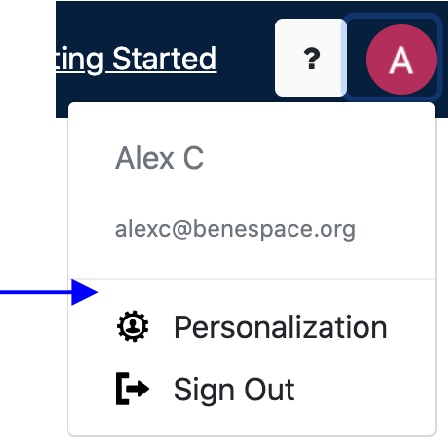
On the desktop view (e.g. msVersion=1), there should be a menu button option in the profile dropdown to "Switch to Mobile View". This should be the first clickable option, located directly above the personalization option.
Alt Text: "Switch to Mobile View"
Mobile View
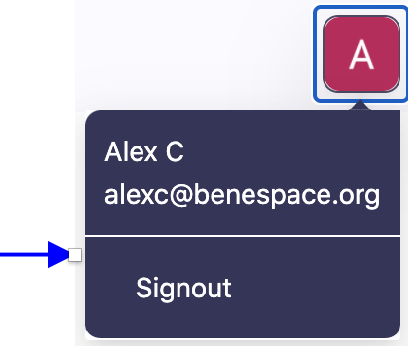
On the mobile view (e.g. msVersion=2), there should be a menu button option in the profile dropdown to "Switch to Desktop View". This should be the first clickable option, located directly above the option to sign out.
Alt Text: "Switch to Mobile View"
Reference
Style Guides: https://invis.io/CQYLLW8J49U
Mobile Mockups: https://invis.io/5HYLLW1G4BD
Fonts: https://www.dropbox.com/sh/c12m6ufweyds20d/AAAdXNPOt8e52DkSAr9pd-a-a/Fonts?dl=0
Acceptance criteria:
Given that I'm a logged-in user who has chosen to view the Mathshare site on desktop, when I access my user profile dropdown from anywhere on the site, I should encounter an option to Switch to Mobile View. When I click the mobile view button, I am brought to the new Mathshare version, and this choice is remembered the next time I access Mathshare on mobile.
Similarly, given that I'm a logged-in user who has chosen to view the Mathshare site on mobile, when I access my user profile dropdown from anywhere on the site, I should encounter an option to Switch to Desktop View. When I click the desktop view button, I am brought to the original Mathshare interface, and this choice is remembered the next time I access Mathshare on mobile.