Describe the bug
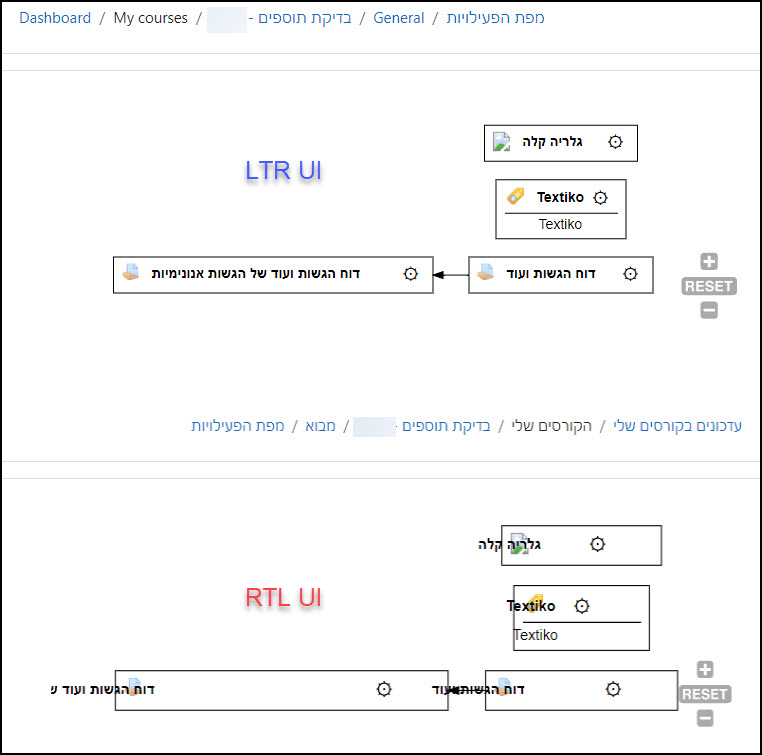
The "Activity Map" looks incorrect when viewing it in an RTL (Right-to-left) user interface.
To Reproduce
Steps to reproduce the behavior:
- In your Moodle environment, install an Arabic or Hebrew language pack.
- Create some activities and set activity completion restrictions for them.
- Add an "Activity Map".
- Enter the "Activity Map" and see how the graph looks.
- In Moodle, switch to an Arabic of Hebrew user interface.
- See how the "Activity Map" graph looks in an RTL UI.
Expected behavior
The graph should be readable also in an RTL user interface.
Screenshots
Please see attached a relevant screenshot.
Desktop (please complete the following information):
- OS: Windows
- Browser: Chrome
- Version: 99
Moodle (please complete the following information):

Describe the bug
The "Activity Map" looks incorrect when viewing it in an RTL (Right-to-left) user interface.
To Reproduce
Steps to reproduce the behavior:
Expected behavior
The graph should be readable also in an RTL user interface.
Screenshots
Please see attached a relevant screenshot.
Desktop (please complete the following information):
Moodle (please complete the following information):