DO280 "Red Hat OpenShift Administration II: Operating a Production Kubernetes Cluster" notes in the margin
You will find here notes and links to official docs with additional information on products and technologies that described on RedHat training. THIS DOCUMENT DOES NOT REPRINT ANY COPYRIGHTED CONTENT FROM REDHAT TRAINING. You will find here only public accessible outline.
[ToC]
Red Hat Docs: OpenShift Container Platform 4.5 Documentation Product Documentation for OpenShift Container Platform 4.5 Red Hat KB: Red Hat OpenShift Container Platform Life Cycle Policy Red Hat Developer: Getting Started with Red Hat OpenShift

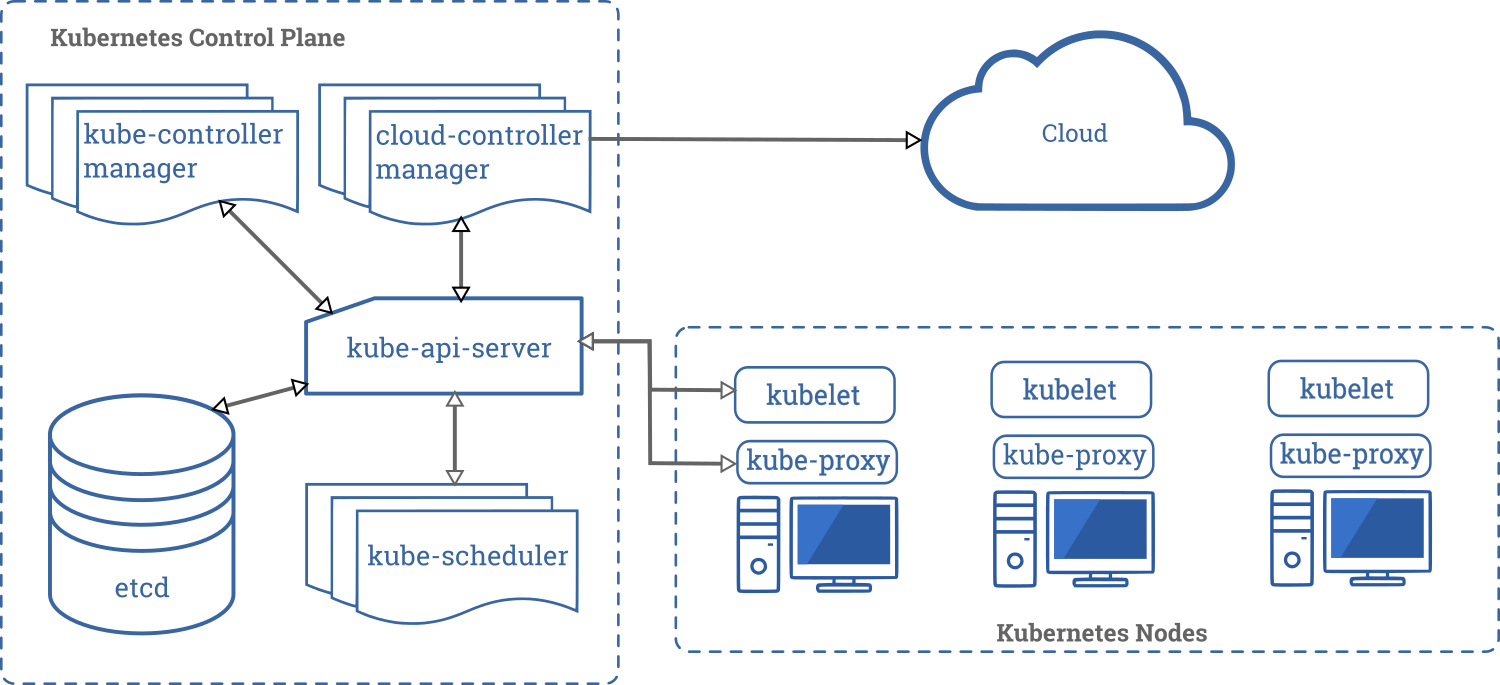
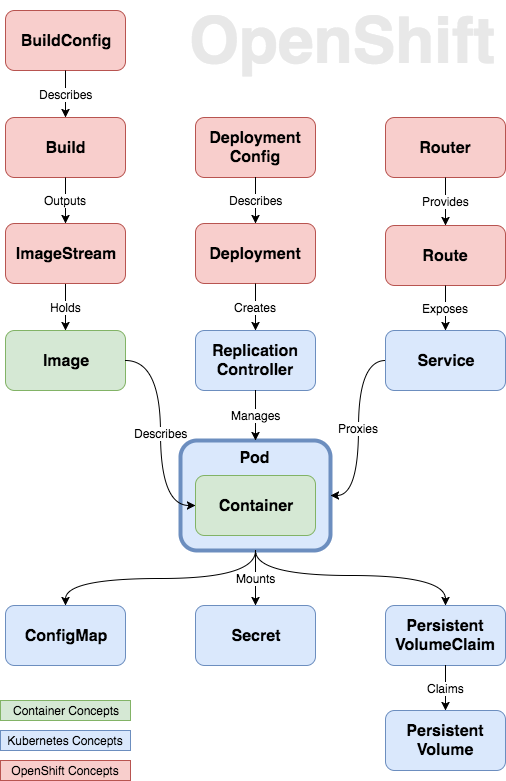
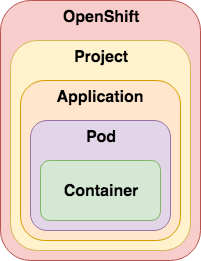
Kubernetes Architecture Deep-dive Walkthrough
RedHat Blogs: Kubernetes Deep Dive: API Server - part 1 RedHat Blogs: Kubernetes Deep Dive: API Server - part 2 RedHat Blogs: Kubernetes Deep Dive: API Server – part 3a
Learn Kubernetes - from the beginning, Part I, Basics, Deployment and Minikube Learn Kubernetes - from the beginning, part II, Pods, Nodes and Services
What is an Operator? An Operator is a method of packaging, deploying and managing a Kubernetes-native application. A Kubernetes-native application is an application that is both deployed on Kubernetes and managed using the Kubernetes APIs and kubectl tooling.
An Operator is essentially a custom controller. A controller is a core concept in Kubernetes and is implemented as a software loop that runs continuously on the Kubernetes master nodes comparing, and if necessary, reconciling the expressed desired state and the current state of an object. Objects are well known resources like Pods, Services, ConfigMaps, or PersistentVolumes. Operators apply this model at the level of entire applications and are, in effect, application-specific controllers.
The Operator is a piece of software running in a Pod on the cluster, interacting with the Kubernetes API server. It introduces new object types through Custom Resource Definitions, an extension mechanism in Kubernetes. These custom objects are the primary interface for a user; consistent with the resource-based interaction model on the Kubernetes cluster.
An Operator watches for these custom resource types and is notified about their presence or modification. When the Operator receives this notification it will start running a loop to ensure that all the required connections for the application service represented by these objects are actually available and configured in the way the user expressed in the object’s specification.
WHAT IS AN OPERATOR AFTER ALL?
An Operator represents human operational knowledge in software, to reliably manage an application. They are methods of packaging, deploying, and managing a Kubernetes application.
The goal of an Operator is to put operational knowledge into software. Previously this knowledge only resided in the minds of administrators, various combinations of shell scripts or automation software like Ansible. It was outside of your Kubernetes cluster and hard to integrate. With Operators, CoreOS changed that.
Operators implement and automate common Day-1 (installation, configuration, etc) and Day-2 (re-configuration, update, backup, failover, restore, etc.) activities in a piece of software running inside your Kubernetes cluster, by integrating natively with Kubernetes concepts and APIs. We call this a Kubernetes-native application. With Operators you can stop treating an application as a collection of primitives like Pods, Deployments, Services or ConfigMaps, but instead as a single object that only exposes the knobs that make sense for the application.
OperatorHub.io is a new home for the Kubernetes community to share Operators
Youtube: Kubernetes Operator simply explained in 10 mins Youtube: Custom Operators for OpenShift Administrators
Openshift Cluster Operators provides
- Oauth Server and RBAC. Support for Identity providers
- Internal CoreDNS
- Web Console
- Internal Image Registry
- Monitoring and Logging stack
Medium post: What is the Cluster Etcd Operator ?
Client tools and images for latest OpenShift release
Ways to learn Openshift without need to install it. https://learn.openshift.com/ https://learn.openshift.com/playgrounds https://developers.redhat.com/developer-sandbox
Try your own Red Hat OpenShift 4 cluster
| On your computer | In your datacenter | Self-managed | Managed service |
|---|---|---|---|
| * Your laptop or desktop; | * Your IT environment (VMware or bare metal) | * Your account with a supported provider** | * Installed and maintained for you |
| * Minimal, pre-configured | * Self-managed | * Self-managed on Red Hat OpenShift Container Platform | * Red Hat-managed |
| * Ideal for development and testing | |||
| * Developer-focused resources | |||
| * Self-managed | |||
| Try it Locally | Try it in your IT environment | Try it in your cloud | Try Openshifdt Dedicated Try OpenShift on IBM Cloud |
Red Hat CodeReady Containers is a way to install OpenShift on your laptop in a VM
Red Hat Discussion: Pull Secrets and Customer Account User Red Hat OpenShift Cluster Manager site
OpenShift Container Platform installation overview
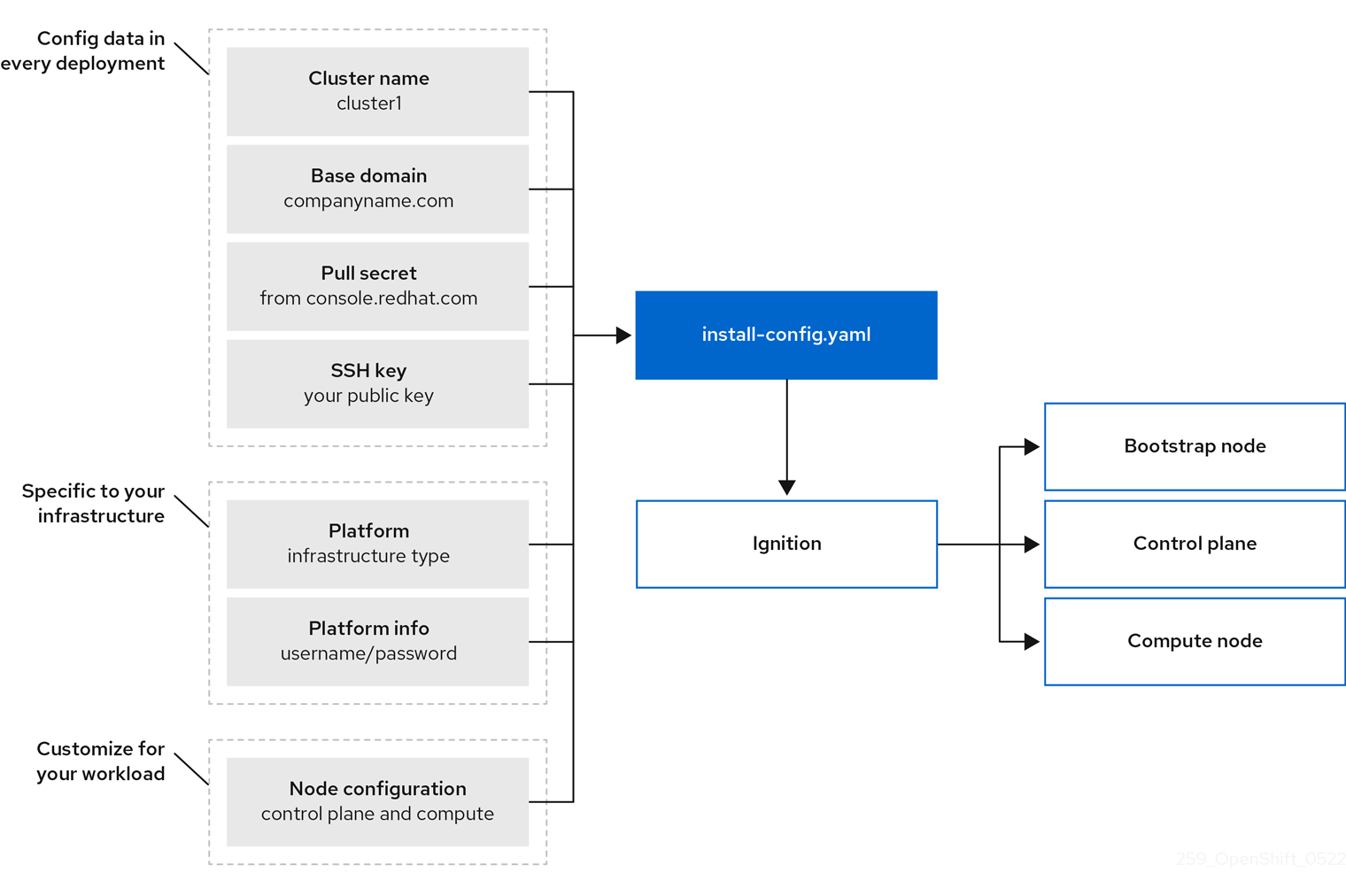
OpenShift Container Platform installation overview
Bootstrapping a cluster involves the following steps:
- The bootstrap machine boots and starts hosting the remote resources required for the master machines to boot. (Requires manual intervention if you provision the infrastructure)
- The master machines fetch the remote resources from the bootstrap machine and finish booting. (Requires manual intervention if you provision the infrastructure)
- The master machines use the bootstrap machine to form an etcd cluster.
- The bootstrap machine starts a temporary Kubernetes control plane using the new etcd cluster.
- The temporary control plane schedules the production control plane to the master machines.
- The temporary control plane shuts down and passes control to the production control plane.
- The bootstrap machine injects OpenShift Container Platform components into the production control plane.
- The installation program shuts down the bootstrap machine. (Requires manual intervention if you provision the infrastructure)
- The control plane sets up the worker nodes.
- The control plane installs additional services in the form of a set of Operators.


Using Fio to Tell Whether Your Storage is Fast Enough for Etcd
How OCP distribution looks like?
The Community Distribution of Kubernetes that powers Red Hat OpenShift
How to easily install OCP in my lab? In a VM or Bare-metal? In a cloud or on-premise? ITNext Blogs: Craig Robinson Guide: Installing an OKD 4.5 Cluster UPI
Medium: OpenShift 4 in an Air Gap (disconnected) environment: Part 1 — prerequisites Medium: OpenShift 4 in an Air Gap (disconnected) environment: Part 2 — installation Medium: OpenShift 4 in an Air Gap (disconnected) environment: Part 3 — customization OpenShift Cluster Managed Bare Metal Documentation
ITNext Blogs: Craig Robinson Guide: OKD 4.5 Single Node Cluster on Windows 10 using Hyper-V The Easiest And Fastest Way To Deploy An OKD 4.5 Cluster In A Libvirt/KVM Host
Medium: Openshift Single Node for Distributed Clouds Github RedHatOfficial: OCP4 Helper Node Github Kubernetes SIG: Kubernetes NFS Subdir External Provisioner
Ansible Agnostic Deployer Installing OKD4.X with User Provisioned Infrastructure. Libvirt, iPXE, and FCOS Building an OKD4 single node cluster with minimal resources
RedHat Blogs: OpenShift 4 Partner Reference Architectures
OCP on VMware validated design
VMware Validated Design 6.x: Architecture and Design for a Red Hat OpenShift Workload Domain
VMware Validated Design 6.x: Deployment of a Red hat OpenShift Workload Domain
OpenShift sizing and subscription guide for enterprise Kubernetes
RedHat KB: How to isolate infrastructure workload from other workload and pay less for RedHat subscription? RedHat Blogs: OpenShift tip: Resolve a terminating state issue
RedHat Blog: Deploying OpenShift Applications to Multiple Datacenters RedHat Blog: Global Load Balancer for OpenShift clusters: an Operator-Based Approach
RedHat KB: Red Hat OpenShift Container Platform High Availability, and Recommended Practices

https://blog.freshtracks.io/a-deep-dive-into-kubernetes-metrics-part-5-etcd-metrics-6502693fa58 https://itnext.io/etcd-performance-consideration-43d98a1525a3 https://access.redhat.com/solutions/5060021
RedHat KB: Red Hat OpenShift Container Platform High Availability, and Recommended Practices
How-to fully replace failed master server. Openshift docs: Replacing an unhealthy etcd member
RedHat KB: Clusteroperator is degraded with NodeInstallerDegraded in status (Redeploy static pods)
OpenShift tip: Resolve a Project terminating state issue RedHat KB: Unable to Delete a Project or Namespace in OCP
Howto regenerate system:admin kubeconfig file
Pods use ephemeral local storage for scratch space, caching, and logs. Issues related to the lack of local storage accounting and isolation include the following:
- Pods do not know how much local storage is available to them.
- Pods cannot request guaranteed local storage.
- Local storage is a best effort resource.
- Pods can be evicted due to other pods filling the local storage, after which new pods are not admitted until sufficient storage has been reclaimed.
Kubernetes Docs / Concepts / Storage / Persistent Volumes
A PersistentVolume (PV) is a piece of storage in the cluster that has been provisioned by an administrator or dynamically provisioned using Storage Classes. It is a resource in the cluster just like a node is a cluster resource. PVs are volume plugins like Volumes, but have a lifecycle independent of any individual Pod that uses the PV. This API object captures the details of the implementation of the storage, be that NFS, iSCSI, or a cloud-provider-specific storage system.
A PersistentVolumeClaim (PVC) is a request for storage by a user. It is similar to a Pod. Pods consume node resources and PVCs consume PV resources. Pods can request specific levels of resources (CPU and Memory). Claims can request specific size and access modes (e.g., they can be mounted ReadWriteOnce, ReadOnlyMany or ReadWriteMany, see AccessModes).
Kubernetes Docs / Concepts / Storage / Storage Classes
While PersistentVolumeClaims allow a user to consume abstract storage resources, it is common that users need PersistentVolumes with varying properties, such as performance, for different problems. Cluster administrators need to be able to offer a variety of PersistentVolumes that differ in more ways than just size and access modes, without exposing users to the details of how those volumes are implemented. For these needs, there is the StorageClass resource.
RedHat Blogs: Deploying OpenShift Container Storage using Local Devices
A Guide to Customizing Red Hat Enterprise Linux CoreOS
OCP 4.5 Docs / Authentication and authorization / Understanding authentication OCP 4.5 Docs / Authentication and authorization / Understanding authentication / Understanding identity provider configuration
Keycloak (as an Identity Provider) to secure Openshift

Adding Azure AD as trusted OAuth Identity Provider Blog post: OpenShift 4 Authentication via Azure AD
Rotating the OpenShift kubeadmin Password
Authorization is managed using:
| Authorization object | Description |
|---|---|
| Rules | Sets of permitted verbs on a set of objects. For example, whether a user or service account can create pods. |
| Roles | Collections of rules. You can associate, or bind, users and groups to multiple roles. |
| Bindings | Associations between users and/or groups with a role. |
| Default cluster role | Description |
|---|---|
admin |
A project manager. If used in a local binding, an admin has rights to view any resource in the project and modify any resource in the project except for quota. |
basic-user |
A user that can get basic information about projects and users. |
cluster-admin |
A super-user that can perform any action in any project. When bound to a user with a local binding, they have full control over quota and every action on every resource in the project. |
cluster-status |
A user that can get basic cluster status information. |
edit |
A user that can modify most objects in a project but does not have the power to view or modify roles or bindings. |
self-provisioner |
A user that can create their own projects. |
view |
A user who cannot make any modifications, but can see most objects in aproject. They cannot view or modify roles or bindings. |
| Default ClusterRole | Default ClusterRoleBinding | Description |
|---|---|---|
| cluster-admin | system:masters group | Allows super-user access to perform any action on any resource. When used in a ClusterRoleBinding, it gives full control over every resource in the cluster and in all namespaces. When used in a RoleBinding, it gives full control over every resource in the role binding's namespace, including the namespace itself. |
| admin | None | Allows admin access, intended to be granted within a namespace using a RoleBinding. If used in a RoleBinding, allows read/write access to most resources in a namespace, including the ability to create roles and role bindings within the namespace. This role does not allow write access to resource quota or to the namespace itself. |
| edit | None | Allows read/write access to most objects in a namespace.
This role does not allow viewing or modifying roles or role bindings. However, this role allows accessing Secrets and running Pods as any ServiceAccount in the namespace, so it can be used to gain the API access levels of any ServiceAccount in the namespace. |
| view | None | Allows read-only access to see most objects in a namespace.
It does not allow viewing roles or role bindings.
This role does not allow viewing Secrets, since reading the contents of Secrets enables access to ServiceAccount credentials in the namespace, which would allow API access as any ServiceAccount in the namespace (a form of privilege escalation). |
Applications
- [Projects]
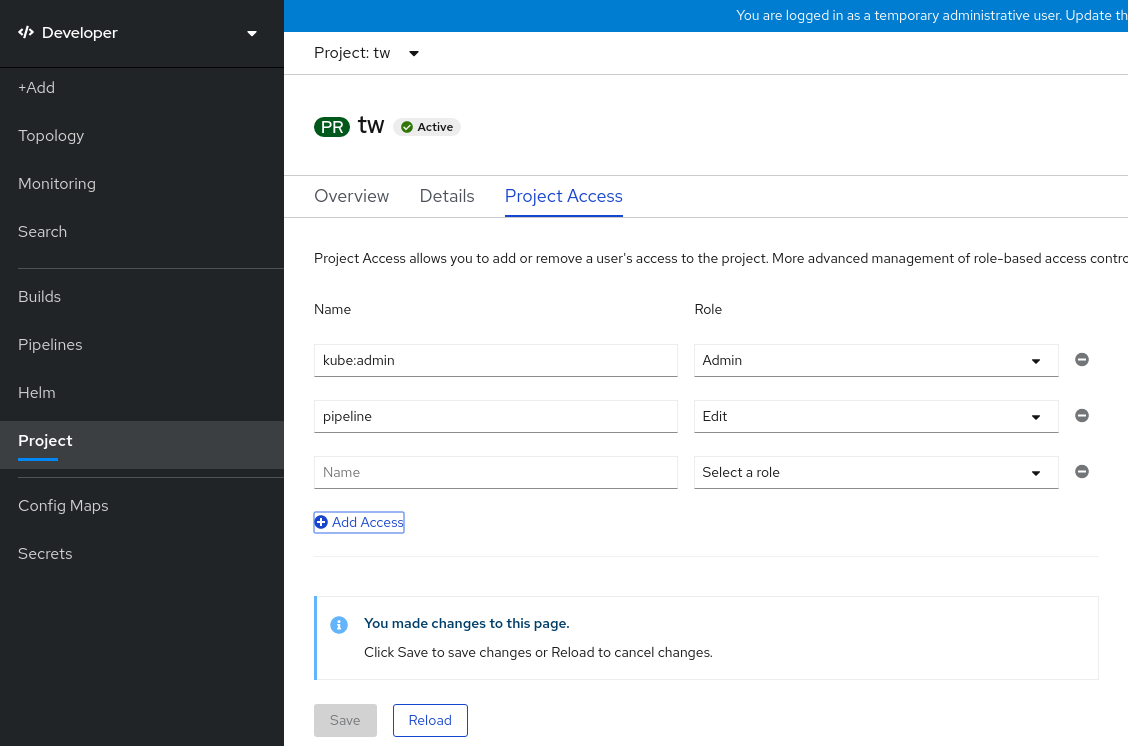
Disabling project self-provisioning Bug 1629524 - Should remove warning message for remove-cluster-role-from-user compared with add-cluster-role-to-user
[student@workstation ~]$ oc adm policy remove-cluster-role-from-group self-provisioner system:authenticated:oauth
Warning: Your changes may get lost whenever a master is restarted, unless you prevent reconciliation of this rolebinding using the following command: oc annotate clusterrolebinding.rbac self-provisioners 'rbac.authorization.kubernetes.io/autoupdate=false' --overwrite
clusterrole.rbac.authorization.k8s.io/self-provisioner removed: "system:authenticated:oauth"
Red Hat E-book: Red Hat OpenShift security guide
rakkess (Review Access) - kubectl plugin to show an access matrix for server resources

RedHat KB: "oc logout is not working when logged in with system:admin"
Resolution
system:admin is created automatically when the infrastructure is defined, mainly for the purpose of enabling the infrastructure to interact with the API securely.
By default system:admin uses certificate not the token to login to the cluster. Which mean system:admin doesn't have a password or token like other normal users have. When you try to logout from system:admin it will not get logged out.
Root Cause
system:admin credentials live in a client certificate data that can be seen in ~/.kube/config. If you get prompted for a password, that means your $KUBECONFIG file does not contain those credentials.
To know more about configuring authentication please refer document
OCP 4.5 Docs / 4.5 / Nodes / Working with pods / Providing sensitive data to Pods OCP 4.5 Docs / 4.5 / Images / Managing images / Using image pull secrets You use this pull secret to authenticate with the services that are provided by the included authorities, including Quay.io and registry.redhat.io, which serve the container images for OpenShift Container Platform components.
$ oc create secret generic <pull_secret_name> \
    --from-file=.dockerconfigjson=<path/to/.docker/config.json> \
    --type=kubernetes.io/dockerconfigjson
$ oc secrets link default <pull_secret_name> --for=pull
RedHat Blogs: Understanding Service Accounts and SCCs
RedHat Blogs: Managing SCCs in OpenShift
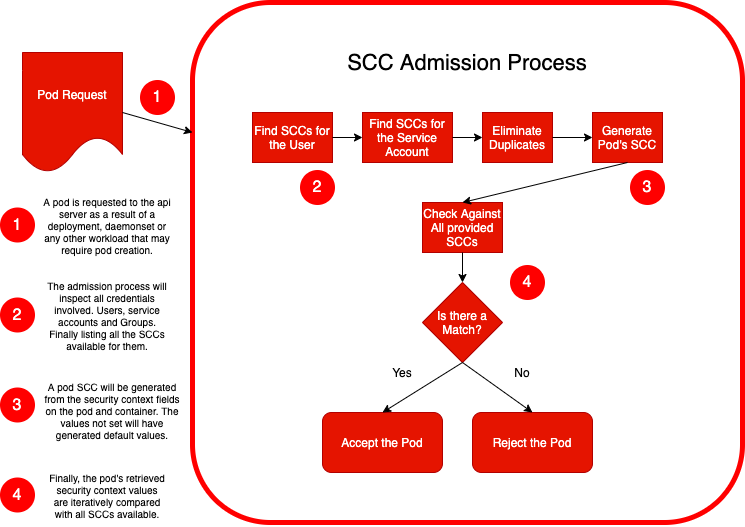
opensource.com blog post (Daniel J Walsh (RedHat)) Just say no to root (in containers) Medium.com blog post: Processes In Containers Should Not Run As Root How SCC can enforce rules to your application user id and group id RedHat Blogs: A Guide to OpenShift and UIDs
Security Zones in OpenShift worker nodes
Support node-level user namespace remapping
Improving Kubernetes and container security with user namespaces YouTube OpenShift: [What's New] OpenShift 4.9 [Oct-2021]
Best practices for building images that pass Red Hat Container Certification
Red Hat Blog: Enhancing your Builds on OpenShift: Chaining Builds
OCP 4.5 Docs / OpenShift Container Platform / 4.5 / Networking / Understanding the DNS Operator
RedHat Blogs: Demystifying Multus


Roberto Carratalá blog post: DNS Deep Dive in Openshift 4
Anatomy of a Linux DNS Lookup – Part I
[student@workstation ~]$ oc get clusternetwork
NAME      CLUSTER NETWORK   SERVICE NETWORK   PLUGIN NAME
default   10.8.0.0/14       172.30.0.0/16     redhat/openshift-ovs-networkpolicy
[student@workstation ~]$ oc describe clusternetwork
Name:                   default
Created:                6 months ago
Labels:                 <none>
Annotations:            <none>
Service Network:        172.30.0.0/16
Plugin Name:            redhat/openshift-ovs-networkpolicy
ClusterNetworks:
CIDR            Host Subnet Length
----            ------------------
10.8.0.0/14     9
[student@workstation ~]$ oc get hostsubnet
NAME       HOST       HOST IP         SUBNET         EGRESS CIDRS   EGRESS IPS
master01   master01   192.168.50.10   10.10.0.0/23
master02   master02   192.168.50.11   10.8.0.0/23
master03   master03   192.168.50.12   10.9.0.0/23

# Lets Calculate this subnet networks
# http://jodies.de/ipcalc?host=10.8.0.0&mask1=14&mask2=23


Address (Host or Network) Netmask Netmask for sub/supernet (optional)
10.8.0.0                  14      move to:  23

Address:   10.8.0.0              00001010.000010 00.00000000.00000000
Netmask:   255.252.0.0 = 14      11111111.111111 00.00000000.00000000
Wildcard:  0.3.255.255           00000000.000000 11.11111111.11111111
=>
Network:   10.8.0.0/14           00001010.000010 00.00000000.00000000 (Class A)
Broadcast: 10.11.255.255         00001010.000010 11.11111111.11111111
HostMin:   10.8.0.1              00001010.000010 00.00000000.00000001
HostMax:   10.11.255.254         00001010.000010 11.11111111.11111110
Hosts/Net: 262142                (Private Internet)

Subnets:
Netmask:   255.255.254.0 = 23    11111111.111111 11.1111111 0.00000000
Wildcard:  0.0.1.255             00000000.000000 00.0000000 1.11111111

master01:
Network:   10.10.0.0/23          00001010.000010 10.0000000 0.00000000 (Class A)
Broadcast: 10.10.1.255           00001010.000010 10.0000000 1.11111111
HostMin:   10.10.0.1             00001010.000010 10.0000000 0.00000001
HostMax:   10.10.1.254           00001010.000010 10.0000000 1.11111110
Hosts/Net: 510                   (Private Internet)

master02:
Network:   10.8.0.0/23           00001010.000010 00.0000000 0.00000000 (Class A)
Broadcast: 10.8.1.255            00001010.000010 00.0000000 1.11111111
HostMin:   10.8.0.1              00001010.000010 00.0000000 0.00000001
HostMax:   10.8.1.254            00001010.000010 00.0000000 1.11111110
Hosts/Net: 510                   (Private Internet)

master03:
Network:   10.9.0.0/23           00001010.000010 01.0000000 0.00000000 (Class A)
Broadcast: 10.9.1.255            00001010.000010 01.0000000 1.11111111
HostMin:   10.9.0.1              00001010.000010 01.0000000 0.00000001
HostMax:   10.9.1.254            00001010.000010 01.0000000 1.11111110
Hosts/Net: 510                   (Private Internet)
OCP 4.5 Docs: Troubleshooting OpenShift SDN
The Interfaces on a Node These are the interfaces that the OpenShift SDN creates:
br0: The OVS bridge device that containers will be attached to. OpenShift SDN also configures a set of non-subnet-specific flow rules on this bridge.tun0: An OVS internal port (port 2 onbr0). This gets assigned the cluster subnet gateway address, and is used for external network access. OpenShift SDN configuresnetfilterand routing rules to enable access from the cluster subnet to the external network via NAT.vxlan_sys_4789: The OVS VXLAN device (port 1 onbr0), which provides access to containers on remote nodes. Referred to asvxlan0in the OVS rules.vethX(in the main netns): A Linux virtual ethernet peer ofeth0in the Docker netns. It will be attached to the OVS bridge on one of the other ports.
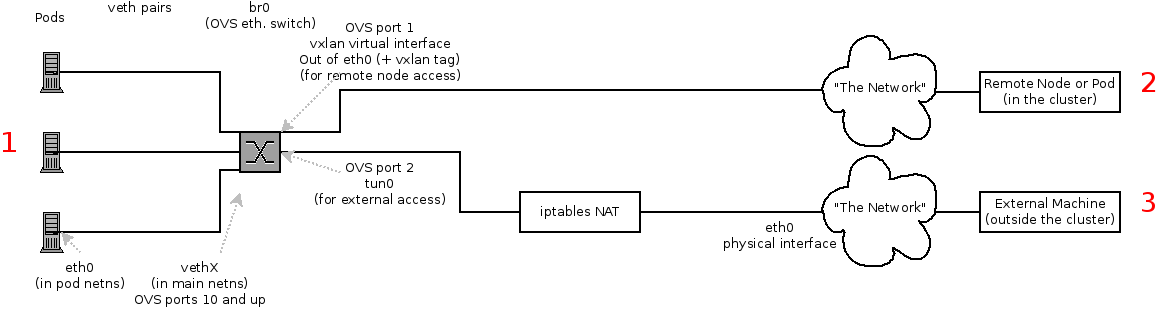
Depending on what you are trying to access (or be accessed from) the path will vary. There are four different places the SDN connects (inside a node). They are labeled in red on the diagram above.
- Pod: Traffic is going from one pod to another on the same machine (1 to a different 1)
- Remote Node (or Pod): Traffic is going from a local pod to a remote node or pod in the same cluster (1 to 2)
- External Machine: Traffic is going from a local pod outside the cluster (1 to 3)
Of course the opposite traffic flows are also possible.
How about using LetsEncrypt Certificates in Openshift?
openshift-acme is ACME Controller for OpenShift and Kubernetes clusters Medium Blog: OpenShift 4.4 Ingress across multiple projects
OpenShift ACME Controller Ansible Role
Self-Serviced End-to-end Encryption Approaches for Applications Deployed in OpenShift

In the diagram we can see:
- Clear text: the connection is always unencrypted.
- Edge: the connection is encrypted from the client to the reverse proxy, but unencrypted from the reverse proxy to the pod.
- Re-encrypt: the encrypted connection is terminated at the reverse proxy, but then re-encrypted.
- Passthrough: the connection is not encrypted by the reverse proxy. The reverse proxy uses the Server Name Indication (SNI) field to determine to which backend to forward the connection, but in every other respects it acts as a Layer 4 load balancer. Openshift github Issue: Move TLS-related secrets out of Route object into a Secret
Self-Serviced, End-to-End Encryption for Kubernetes Applications, Part 2: a Practical Example
For automating the certificate provisioning process, we are going to use three operators:
- Cert-manager: this operator is responsible for provisioning certificates. It interfaces with the various CAs and brokers certificate provisioning or renewal requests. Provisioned certificates are placed into Kubernetes secrets.
- Cert-util-operator: this operator provides utility functions around certificates. In particular, it will be used to inject certificates into OpenShift routes and turn PEM-formatted certificates into java-readable keystores.
- Reloader: this operator is used to trigger a deployment when a configmap or secret changes. We are going to use it to restart our applications when certificates get renewed.
ConsoleLabs Blog:OpenShift and Let's Encrypt
Habrahabr: SSL-сертификаты от Let's Encrypt с cert-manager в Kubernetes
Adding security layers to your App on OpenShift
- Part 1: Deployment and TLS Ingress
- Part 2: Authentication and Authorization with Keycloak
- Part 3: Secret Management with Vault
- Part 4: Dynamic secrets with Vault
- Part 5: Mutual TLS with Istio
- Part 6: PKI as a Service with Vault and Cert Manager
https://docs.openshift.com/container-platform/4.7/networking/openshift_sdn/assigning-egress-ips.html
https://habr.com/ru/company/jetinfosystems/blog/527482/
Theory: RedHat Blogs: What's New in OpenShift 3.5: Network Policy (Tech Preview)
Practice:
RedHat Blogs: Network Policy Objects in Action

Cilium: Network Policy Editor for Kubernetes
Container Networking Is Simple!
OCP 4.5 Docs / 4.5 / Nodes / Controlling pod placement onto nodes (scheduling) / About pod placement using the scheduler
Amazon Web Services Regions and Availability Zones
Azure geographies
Microsoft Azure Regions Interactive Map of Azure regions (unofficial map)
Azure Availability zones
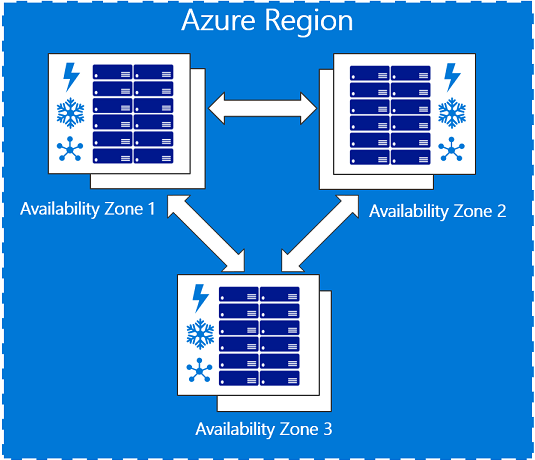
OCP 4.5 Docs: Node Placement and Scheduling Explained
Github Project: Cluster Autoscaler FAQ
Openshift Blogs: Descheduler GA in OpenShift 4.7
RedHat Blogs: How Full is My Cluster? Capacity Management and Monitoring on OpenShift

https://docs.openshift.com/container-platform/3.11/admin_guide/out_of_resource_handling.html
https://docs.openshift.com/container-platform/3.11/admin_guide/overcommit.html
https://developers.redhat.com/blog/2020/11/10/you-probably-need-liveness-and-readiness-probes/ https://blog.phusion.nl/2015/01/20/docker-and-the-pid-1-zombie-reaping-problem/
https://www.openshift.com/blog/liveness-and-readiness-probes
https://daein.medium.com/startup-liveness-and-readiness-probes-on-openshift-fdcb04f36b53
Cgroups
- RedHat Blogs: Mark Richters World domination with Cgroups - Part 1 - Cgroup basics
- Habr: redhatrussia: Борьба за ресурсы, часть 1: Основы Cgroups
- Habr: redhatrussia: Борьба за ресурсы, часть 2: – Играемся с настройками Cgroups
- Habr: redhatrussia: Борьба за ресурсы, часть 3: Памяти мало не бывает
- Habr: redhatrussia: Борьба за ресурсы, часть 4: Замечательно выходит
- Habr: redhatrussia: Борьба за ресурсы, часть 5: Начиная с нуля
- Habr: redhatrussia: Борьба за ресурсы, часть 6: cpuset или Делиться не всегда правильно
https://www.openshift.com/blog/node-placement-scheduling-explained
Как избежать простоя в работе Kubernetes-кластера при помощи PodDisruptionBudgets
Kubernetes Docs: Specifying a PodDisruptionBudget
https://softchris.github.io/pages/kubernetes-two.html https://softchris.github.io/pages/kubernetes-three.html
How to delete pods hanging in Terminating state https://access.redhat.com/solutions/2317401
habr Flant article: ертикальное автомасштабирование pod'ов в Kubernetes: полное руководство
probes
https://dev.to/pavanbelagatti/configure-kubernetes-readiness-and-liveness-probes-tutorial-478p
Youtube Video: Openshift TV: OpenShift Updates and Release Process w/ Rob Szumski and Scott Dodson
Red Hat Blog: Time Is On Your Side: A Change to the OpenShift 4 Lifecycle
Red Hat KB: Red Hat OpenShift Container Platform Life Cycle Policy
RHLC: Demo video Upgrading OpenShift
Red Hat User Experience Design (UXD)
- This repository includes designs, conventions, and research related to the OpenShift Container Platform ecosystem.
https://access.redhat.com/labs/ocpupgradegraph
Q: What is the Developer Sandbox for Red Hat OpenShift? A: The sandbox provides you with a private OpenShift environment in a shared, multi-tenant OpenShift cluster that is pre-configured with a set of developer tools.
Developer Sandbox for Red Hat OpenShift Q: What is the Developer Sandbox for Red Hat OpenShift? A: The sandbox provides you with a private OpenShift environment in a shared, multi-tenant OpenShift cluster that is pre-configured with a set of developer tools.
Youtube Stream: Learning CodeReady Workspaces from Red Hat on OpenShift Command-line cluster management with Red Hat OpenShift’s new web terminal (tech preview)
Red Hat Blog: A Deeper Look at the Web Terminal Operator
RedHat Developers Blog: Understanding Red Hat OpenShift’s Application Monitoring Operator
Kubernetes monitoring with Prometheus, the ultimate guide
Red Hat Blog: Monitoring your own workloads in the Developer Console in OpenShift Container Platform 4.6 Red Hat Developer Blog: More for developers in the new Red Hat OpenShift 4.6 web console
Red Hat Blog: How Full is My Cluster? Capacity Management and Monitoring on OpenShift Red Hat Blog: Configure OpenShift Metrics with Prometheus backed by OpenShift Container Storage
Red Hat Communities of Practice https://github.com/redhat-cop/containers-quickstarts Openshift Evangelists https://github.com/openshift-evangelists/wordpress-quickstart https://github.com/openshift-evangelists/phpbb-quickstart https://github.com/RedHatWorkshops https://github.com/openshift-labs/lab-learning-portal https://www.openshift.com/blog/openshift-4.6-blog-quick-starts