The purpose of this readme is to outline the data model that the map uses to track organization/community map markers.
A map marker represents an organization or community effort to orchestrate aid. It consists of several components as well as a latitude, longitude, and area of influence (a radius measured in meters).
/**
 * Contact details capture various methods to contact an organization.
 */
export interface ContactDetails {
  facebookGroup?: string;
  web?: { [id: string]: string }; // List of URLs
  phone?: string[];
  email?: string[];
}

/**
 * Locations can be saved so they can be re-used for other markers.
 *
 * See the LOCATIONS array.
 */
export interface Location {
  description: string; // human readable name of the location
  lat: number;
  lng: number;
  serviceRadius: number; // distance in meters
}

/**
 * A marker that will be rendered on the map. A short title and description is also visible to users.
 *
 * It contains an array of services
 */
export interface MarkerInfo {
  // name of the organization or community effort
  contentTitle: string;

  // description of the organization or community effort
  contentBody?: string;

  // a list of services provided -- at least one is required from the list below
  services: [
    'food',
    'supplies',
    'aid',
    'mobility',
    'medicine',
    'manufacturing',
    'financial',
    'information',
  ];

  // Three contact detail objects cover various opportunities available at each organization
  contact: {
    general?: ContactDetails; // For general info
    getHelp?: ContactDetails; // For showcasing how those who need help can interact with the organization
    volunteers?: ContactDetails; // For showcasing how those who want to help can interact with the organization
  };

  loc: Location; // The location data for this organization
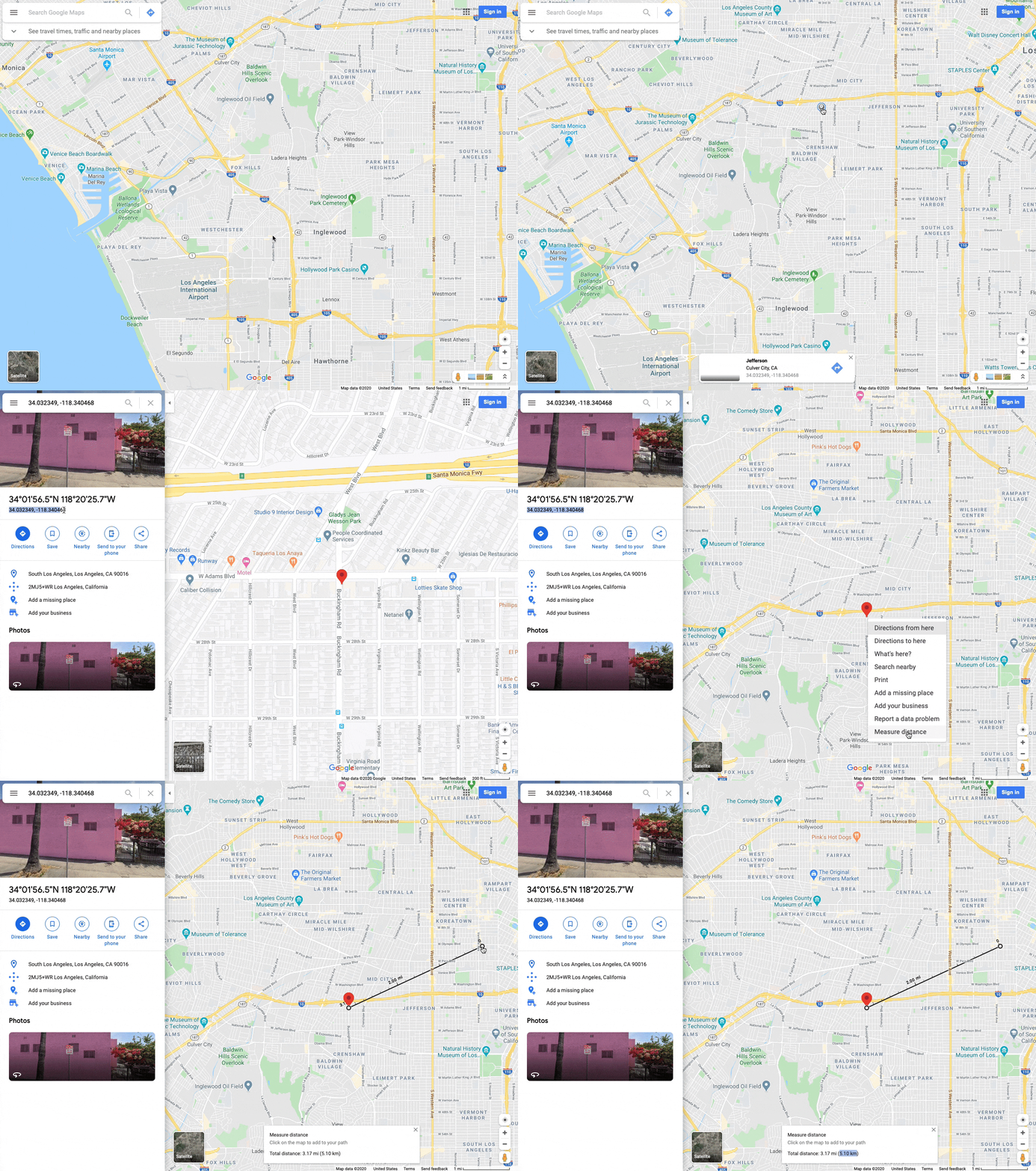
}- Open Google Maps
- Click and hold (~1 sec.) until a marker appears.
- Click the "Lat., Long" on the marker to open it.
- Now you can copy the numbers with ease.
- Right-click on the map to open the option menu.
- Select the "Measure Distance" (or clear it if it's already on).
- Click on the map to make a start point, and again to make an end point.
- You can drag the measure around to identify the correct radius.
- Remember to convert the radius from KM to Meters
See the video below if you have any questions.
{
  "contentTitle": "Community Organization for Aid - SF Bay Area",
  "contentBody": "We are a collective of parents, industry leaders, and volunteers providing aid to anyone who needs it.",
  "services": [
    "food",
    "supplies",
    "aid",
    "mobility",
    "medicine",
    "manufacturing",
    "financial",
    "information"
  ],
  "contact": {
    "general": {
      "facebookGroup": "https://facebook.com/groups/findhelp",
      "web": {
        "Homepage": "https://www.findhelp.org",
        "Our Team": "https://www.findhelp.org/team",
        "Our Mission": "https://www.findhelp.org/misson"
      },
      "phone": ["+1 800 555 1234", "+1 800 555 5678"],
      "email": ["info@findhelp.org", "another-email@findhelp.org"]
    },
    "getHelp": {
      "web": {
        "Request Help Form": "https://google.com/forms/get-help.html"
      },
      "email": ["helpme@findhelp.org"]
    },
    "volunteers": {
      "web": {
        "Offer Help Form": "https://google.com/forms/get-help.html",
        "Donate Funds": "https://gofundme.com/findhelp",
        "Donate Items": "https://google.com/forms/donate-items.html"
      },
      "email": ["offerhelp@findhelp.org"]
    }
  },
  "loc": {
    "description": "Bay Area, California",
    "lat": 37.8272,
    "lng": -122.2913,
    "serviceRadius": 85000
  }
}You may submit PRs to this repository to add markers to the map. Submit your changes to the marker source file.
You may test your changes locally by following the steps outlined in the map README.