中文 English
You are the persons(times) to visit the stop-debugger.
Most of the content on this page is translated through
Google Translate

A Chrome Extension and system proxy for disable the debugger function in Chrome DevTools。
一个禁止Chrome DevTools中执行debugger的拓展和系统代理。
- TurnOff
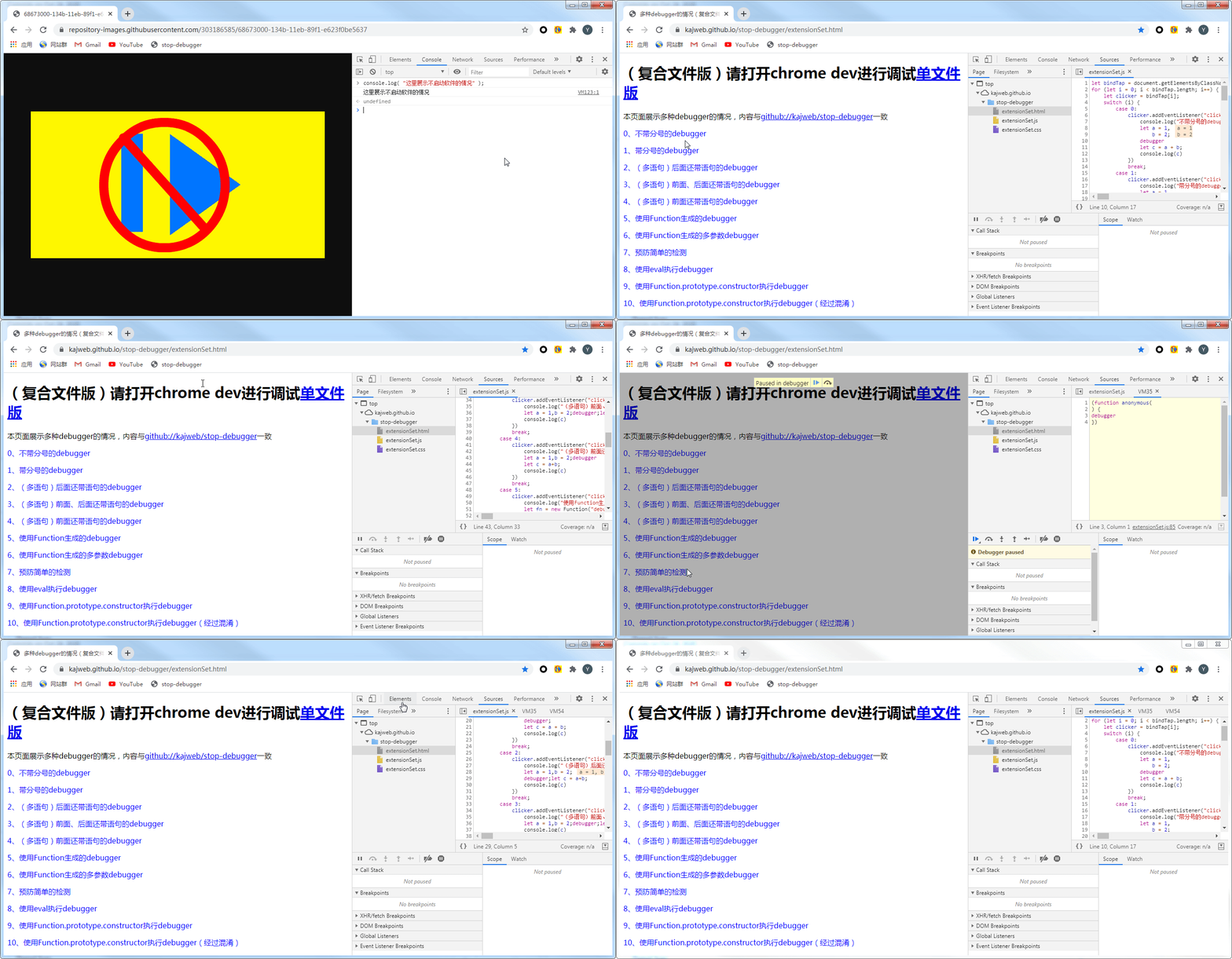
- TurnOn
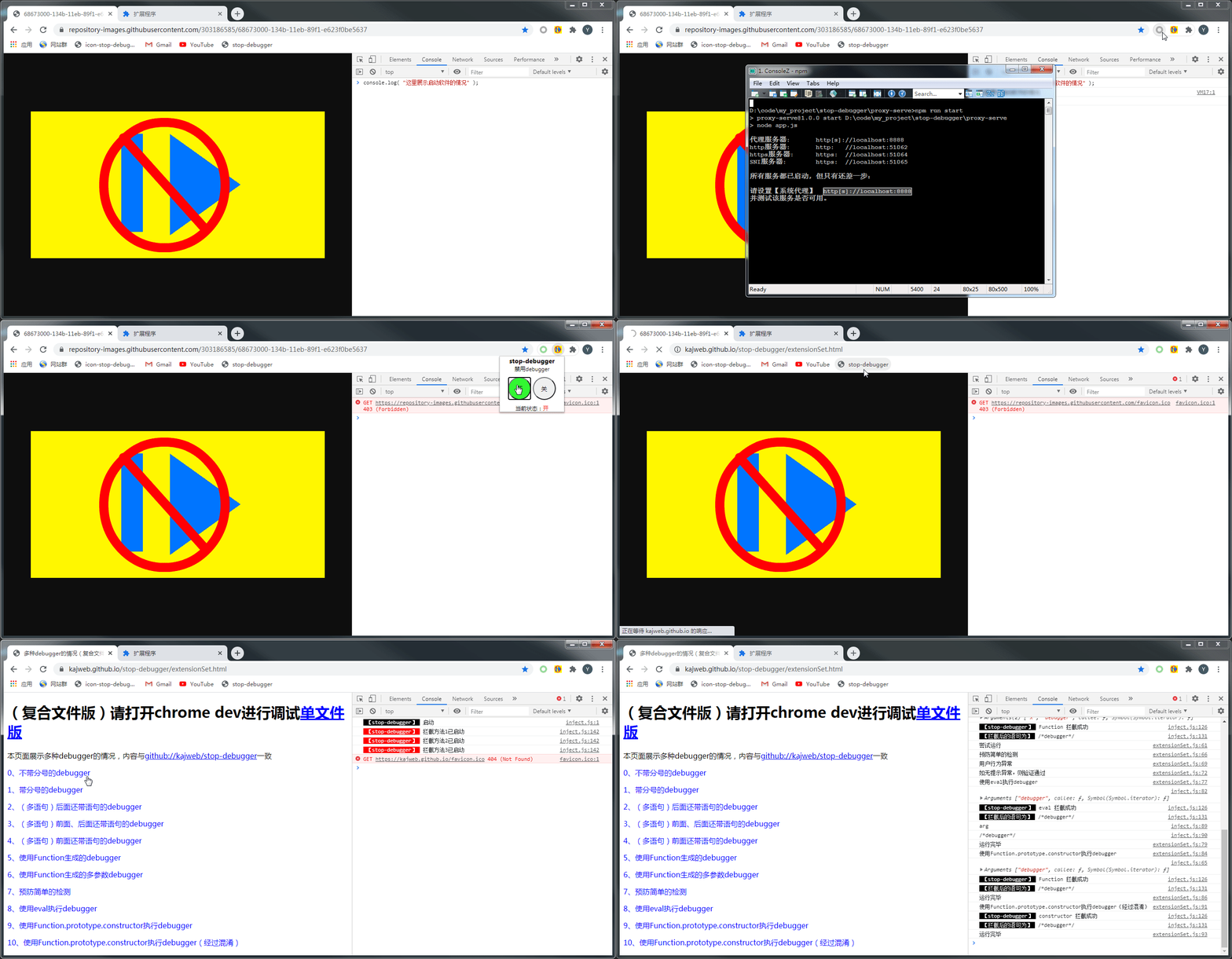
- Proxy
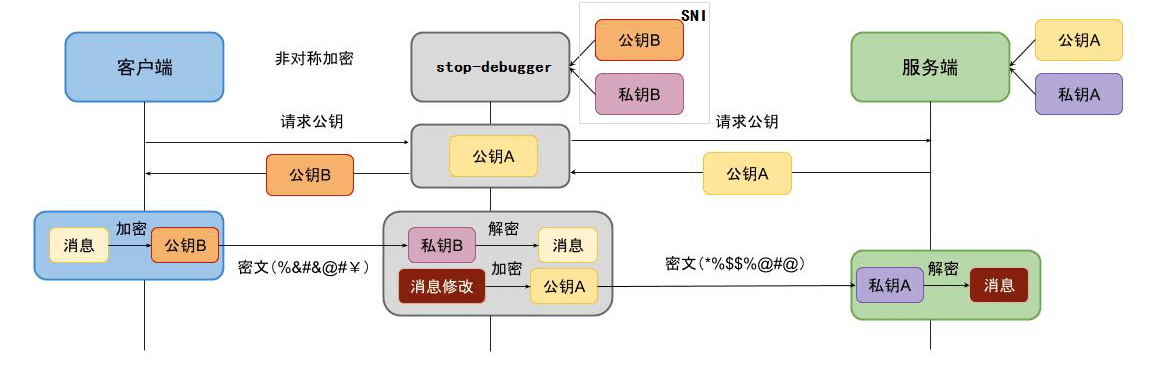
This program is divided into two parts: chrome browser extension and Node system agent.
-
Chrome browser extension
The
chrome browser extensionis used to cover the feature functions of the browser. The source code of the browser extension is in the directory ofchrome-extension. The extension needs to be installed in the browser before use. After the extension is installed, the extension needs to be turned on to take effect.Detailed description of the offline installation method of Chrome plug-in
-
Node system agent
The
Node system agentis used to process thedebuggerappearing in files such as javascript,html, andjson, use specific regular expressions to match thedebugger`, and annotate the corresponding code.
git clone https://github.com/kajweb/stop-debugger.git
cd stop-debugger/proxy-serve
cd proxy-serve
npm i
npm run en
The https link needs to install the certificate to the
Trusted Root Certification Authority, otherwise it may not be able to process HTTPS requests.For
win7andwin10systems, the system program will be called to import the certificate into the system when the Node client is running.Other systems currently do not support automatic certificate import.
We provide a relatively rich test page to test the debugger. You can open the Chrome DevTools and click the corresponding item to view the running result.
Debugger Usability Test Address
| Directory name | Function |
|---|---|
| depoly | github page deployment page, used to provide developers to test the debugger operation |
| proxy-serve | Node proxy server code. Debugger for blocking plaintext |
| chrome-extension | Source code of chrome extension. Used to shield specific functions that can execute the debugger method, |
Such as Function(), ʻeval(), Function.prototype.constructor` and other methods |
|
| cert | Certificate directory. The code used to generate the CA certificate and sign the client certificate. |
In fact, the generated CA certificate has been copied from /cert/ca to /proxy-serve/src/cert. |
|
Subsequent client issuing certificates are taken over by /proxy-serve/src/cert/index.js, developers do not need to pay much attention to this directory. |
|
| dev | Program test development directory, most of which are meaningless codes. |
| It is only used for various experimental tests during the development process, and developers do not need to pay too much attention to this directory. | |
| docs | System documentation directory, covering documents in various languages, |
Can be in deploy, or open online test page
-
- debugger without semicolon
This type of code is processed by
proxy-serve
let a = 1, b = 2;
debugger
let c = a+b;-
- debugger with semicolon
This type of code uses
proxy-servefor processing
let a = 1, b = 2;
debugger;
let c = a+b;-
- (multi-statement) debugger with statement after it
This type of code uses
proxy-servefor processing
let a = 1, b = 2;
debugger;let c = a+b;-
- (multiple statements) debugger with statements before and after
This type of code uses
proxy-servefor processing
let a = 1,b = 2;debugger;let c = a+b;-
- (multi-statement) debugger with statement in front
This type of code uses
proxy-servefor processing
let a = 1, b = 2; debugger
let c = a+b;-
- Debugger generated by Function
This type of code is processed using
chrome-extension
let fn = new Function("debu"+"gger");
fn()-
- Multi-parameter debugger generated by Function
This type of code is processed using
chrome-extension
let fn = new Function("x","debugger");
fn()-
- Prevent simple detection
This type of code is processed using
chrome-extension
let a = ";debugger;"
if( a!==";debug" + "ger;" ){
console.log("User Behavior Abnormal")
}
debugger-
- Use eval to execute debugger
This type of code is processed using
chrome-extension
eval("debugger");-
- Use Function to execute debugger
This type of code is processed using
chrome-extension
// https://blog.csdn.net/zhsworld/article/details/104660742
Function.prototype.constructor("debugger")()-
- Use Function to execute debugger (obfuscated)
This type of code will be processed with
chrome-extension
// http://www.sc.10086.cn/service/login.html

let _0x2764ed = {
	wcluU: "debu",
	tvBGO: "gger",
	tOyvN: "action",
	vyxZy(a,b){return a+b}
}

function xhs__0x4f79(e){
	switch(e){
		case '0x1e3':
			return "constructor";
			break;
		case '0x5c6':
			return "vyxZy";
			break;
		case '0x5ca':
			return "wcluU";
			break;
		case '0x5d0':
			return "tOyvN";
			break;
		default:
			throw new RangeError( e );
			break;
	}
}

(function() {}[xhs__0x4f79('0x1e3')](_0x2764ed[xhs__0x4f79('0x5c6')](_0x2764ed[xhs__0x4f79('0x5ca')], _0x2764ed['\x74\x76\x42\x47\x4f']))['\x63\x61\x6c\x6c'](_0x2764ed[xhs__0x4f79('0x5d0')]));

(function() {}["constructor"]("debugger")["call"]("action"));RSS source: If you are interested in the implementation principle of this program, please follow kajweb's Blog - iwwee. I will update the thought, development process and thought principle of this program from time to time.
List of blog posts:
- [Stop-debugger] debugger introduction
- [Stop-debugger] Installation and development of browser extension
- [Stop-debugger] HTTP proxy principle and implementation method
- [Stop-debugger] Man-in-the-middle attack
- [Stop-debugger] Differences and details between HTTP and HTTPS proxy
- [Stop-debugger] Implement a simplest HTTP proxy
- [Stop-debugger] Implement a simplest HTTPS proxy
- [Stop-debugger] Normal proxy and tunnel proxy
- [Stop-debugger] The principle and implementation of HTTP and HTTPS sharing a port
- [Stop-debugger]……