This repo contains a simple application called helloworld. All it does is respond to an http request with "hello world!", the application is written using fastAPI to be able to integrate swagger and schema definitions.
-
First implement the Infrastructure as code
- we will need a cluster and for high availablity I chose different zones with different regions with auto scaling setup for the nodepools
- we reserve a static IP for each cluster (planning to use it with CDN to maximize performance and latency)
- in an ideal scenario I would also add redis instances and maintain them in their own nodepool [to be discussed in next steps] but in my scenario it was fairly simple
-
Setup our code CI/CD
- use helm to configure our deployment
- configure HPA [ was planning to use it with prometheus ]
- configure kubernetes service to forward traffic to our deployment
- configure our ingress and pass our reserved static ip address
-
Create a github action pipeline to tie all components together
- special ServiceAccounts with limited access were created for the pipeline and all secrets stored in github action (this wouldn't be my first choice i would have opted for vault but for the sake of time I chose github action secrets)
- Terragrunt: used to configure Terraform modules and store backend
- Helm Used deploy the application
- GitHub Actions: used to execute the following tasks:
- Unit test
- Build and publish Docker image
- Deploy infrastructure changes
- Deploy the application using Helm
Notes: I have a lot to discuss on how I could have improved on this especially with my pipeline for example using vault to push and fetch secrets instead or using multi workflow setup whereby each workflow is a different file.
- Pre-requisites
- ensure you have latest version of terraform
- ensure you have latest version of terragrunt
- navigate to the /deploy/terragrunt
- run
terragrunt plan-all - you should see the plan of what will execute
- run
terragrunt run-all applyto apply the changes - Note: by default the input will come default.tf vars if you dont specify the region TF_VAR_region for example if you want to execute the command agains the us-central1 region your terragrunt command should be
TF_VAR_region="us-central1" terragrunt run-all apply --terragrunt-non-interactivethis will pick up any variables defined in us-centea1l.tfvars under terragrunt/gke/
- you may use the pipeline to execute the infra setup and app deployment
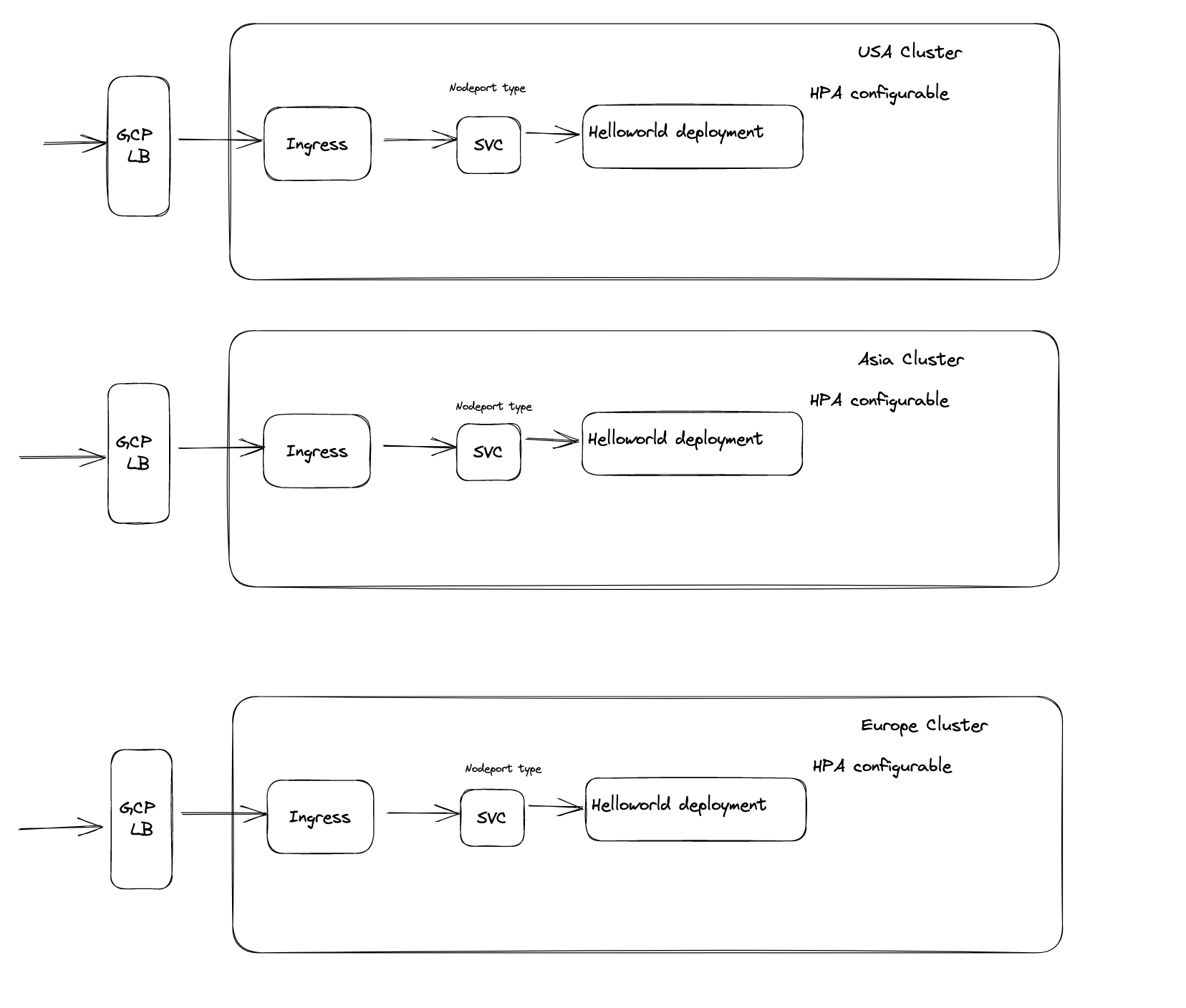
There are 3 main cluster located in USA, Asia and Europe. The helm chart is configured to support HPA incase of highload. I could have added redis and prometheus but I couldn't get a response in time so I just proceeded forward with my current design.
1- A client sends a request to access a particular application or service hosted on the GCP cluster.
2- The request first reaches the load balancer that is set up with an ingress class of gce.
3- The load balancer checks its configuration to determine which backend service should handle the request. In this case, the backend service is configured as nodetype port, which means that the traffic will be forwarded to a Kubernetes Service with a type of NodePort.
4- The load balancer then forwards the request to the Kubernetes Service, which acts as a virtual IP for the pods running the application.
5- The Kubernetes Service checks its configuration to determine which backend pod should handle the request.
6- The service forwards the request to the pod that is currently serving the application.
7- when the Kubernetes Service receives the request from the load balancer, kube-proxy running on the node where the pod is running intercepts the request. Kube-proxy then routes the request to the appropriate pod based on the pod's IP address and the service's port number.
8- The pod processes the request and sends a response back to the Kubernetes Service.
9- The Kubernetes Service sends the response back to the load balancer.
10- The load balancer forwards the response back to the client that initiated the request.