Product shelf
✨ Branch: shelf
Introduction
The next block that we'll use is the Shelf, on which we display a product collection. This session will show you how to render and configure this shelf on your store's homepage.
Shelf
After a closer look at the Shelf documentation, we see that it's possible to configure which product collection we want to have displayed using either category, specificationFilters or collection props, according to the products added in the catalog.
Other props help to configure how the items are displayed. It's important to remember that the shelf component always requests that product-summary type blocks be part of its composition. Check out the product-summary block's documentation for more info on how it functions.
Below, we have a Shelf implementation example:
{
  "store.home": {
    "blocks": [
      ...
      "shelf"
    ]
  },
  ...
  "shelf": {
    "blocks": ["product-summary.shelf"],
    "props": {
      "category": 1,
      "orderBy": "OrderByTopSaleDESC",
      "paginationDotsVisibility": "desktopOnly",
      "productList": {
        "maxItems": 10,
        "itemsPerPage": 5,
        "minItemsPerPage": 1,
        "scroll": "BY_PAGE",
        "arrows": true,
        "titleText": "Top sellers"
      }
    }
  },
  "product-summary.shelf": {
    "children": [
      "product-summary-image",
      "product-summary-add-to-list-button",
      "product-summary-name",
      "product-rating-inline",
      "product-summary-space",
      "product-summary-price",
      "product-identifier.summary",
      "product-summary-buy-button"
    ]
  }
}
Activity
- In
home.jsonc, declare a shelf component is the store.home template;
- Inside the blocks folder, create a
shelf.jsonc file;
- In
shelf.jsonc, define the shelf block with all the props given in the example above;
- Change the maximum number of displayed items to
8
- Change the number of items per page to
4
Note: It's important to remember that the product-summary.shelf block is already declared in default.jsonc. Therefore, it wasn't necessary to declare it during this activity.
ℹ️ Remember to access the Shelf's documentation if you have any questions during this activity.
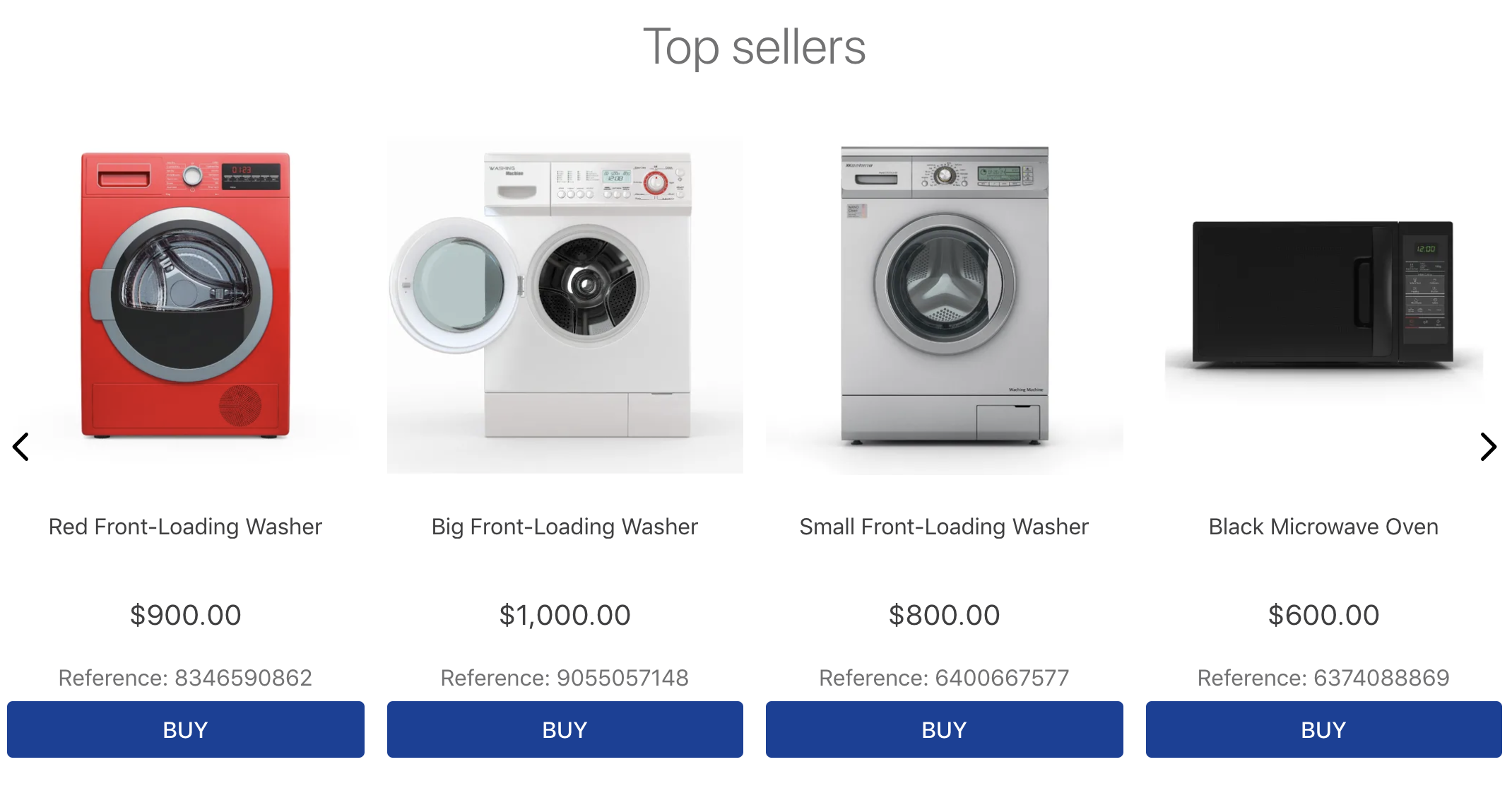
The end result should be similar to the one below:
Troubleshoot
In case you're using your own VTEX account, make sure that the category 1 is functional and active in your environment.
🚫 Are you lost?
Is there any problem with this step? What about sending us a feedback? 🙏
Submit feedback
If you're still unsure as to how to send your answers, click here.

Product shelf
✨ Branch: shelf
Introduction
The next block that we'll use is the Shelf, on which we display a product collection. This session will show you how to render and configure this shelf on your store's homepage.
Shelf
After a closer look at the Shelf documentation, we see that it's possible to configure which product collection we want to have displayed using either
category,specificationFiltersorcollectionprops, according to the products added in the catalog.Other props help to configure how the items are displayed. It's important to remember that the
shelfcomponent always requests thatproduct-summarytype blocks be part of its composition. Check out the product-summary block's documentation for more info on how it functions.Below, we have a Shelf implementation example:
{ "store.home": { "blocks": [ ... "shelf" ] }, ... "shelf": { "blocks": ["product-summary.shelf"], "props": { "category": 1, "orderBy": "OrderByTopSaleDESC", "paginationDotsVisibility": "desktopOnly", "productList": { "maxItems": 10, "itemsPerPage": 5, "minItemsPerPage": 1, "scroll": "BY_PAGE", "arrows": true, "titleText": "Top sellers" } } }, "product-summary.shelf": { "children": [ "product-summary-image", "product-summary-add-to-list-button", "product-summary-name", "product-rating-inline", "product-summary-space", "product-summary-price", "product-identifier.summary", "product-summary-buy-button" ] } }Activity
home.jsonc, declare ashelfcomponent is thestore.hometemplate;shelf.jsoncfile;shelf.jsonc, define theshelfblock with all the props given in the example above;84Note: It's important to remember that the
product-summary.shelfblock is already declared indefault.jsonc. Therefore, it wasn't necessary to declare it during this activity.ℹ️ Remember to access the Shelf's documentation if you have any questions during this activity.
The end result should be similar to the one below:

Troubleshoot
In case you're using your own VTEX account, make sure that the category
1is functional and active in your environment.🚫 Are you lost?
Is there any problem with this step? What about sending us a feedback? 🙏
Submit feedback
If you're still unsure as to how to send your answers, click here.