

-
|
Hello, Regards |
Beta Was this translation helpful? Give feedback.
Replies: 12 comments

-
|
Hi, The JS7 Agent requires Java 1.8, 11 or 17. Chances do not look good for this prerequisite:
Maybe a possible alternative is to run an SSH Server on Windows 2003 and to use JS7 Agentless Scheduling |
Beta Was this translation helpful? Give feedback.
-
|
Hi, You're right. But my company still use Windows Server 2003 because of our old business management software, We have already tried js7 SSH Jobs using Cygwin and we got stuck on this error : This error seems to have already been reported here : https://kb.sos-berlin.com/display/PKB/Limitations+when+using+SSH+jobs+for+Windows Regards, |
Beta Was this translation helpful? Give feedback.
-
|
Hi, am I right to assume that you are the poster of How to install jobscheduler js7 agent on Windows server 2003 SP1 ? Then first of all, congrats! You obviously did make it to have a matching JVM up and running on Windows 2003. As indicated by my response the warning from the installer can be ignored: it's about a symlink that is created for convenience only. The remaining question about coupling the Agent from a Controller will be resolved when we have knowledge of the errors that you find in the Controller's and Agent's logs as indicated. |
Beta Was this translation helpful? Give feedback.
-
|
Yes this is me, I've installed java 8_u0 (exactly 8.0.0.132). js7_agent_4445 service is running but the agent is not launched correctly, |
Beta Was this translation helpful? Give feedback.
-
|
The controller.log states
The message is clear: The Agent cannot be reached by its host:port. Possible reasons include that
|
Beta Was this translation helpful? Give feedback.
-
|
Thanks for your answer I've already opened all the ports in my firewall between the controller and this machine. And I can reach it.
The agent.log file remain empty that why I didn't send it. Regards, |
Beta Was this translation helpful? Give feedback.
-
|
It's good to know that no agent.log file has been created. Let me suggest that you stop the Agent's Windows Service (otherwise check that you kill the Agent's Java process from the Task Manager). Then open a command shell and navigate to the Agents ./bin directory where you should find the Agent's Instance Start Script that you can execute like this
(running the command without argument gives you the usage clause) This should create output to the console window, and/or to ./var_4445/logs/agent.log and/or to the watchdog.log file in the same directory. |
Beta Was this translation helpful? Give feedback.
-
|
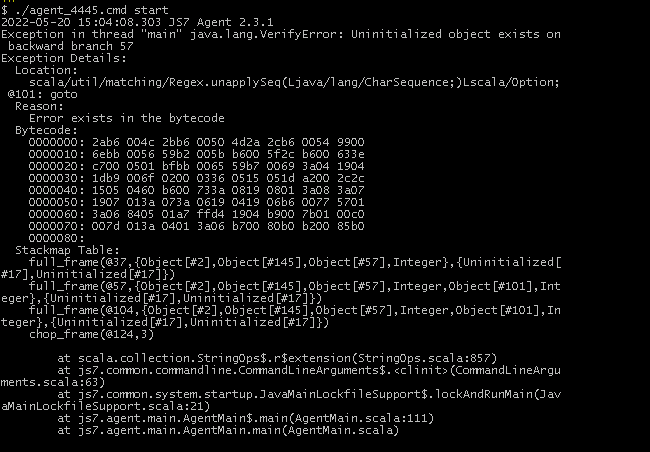
I got this :
Nothing in the file agent.log and no watchdog.log file |
Beta Was this translation helpful? Give feedback.
-
|
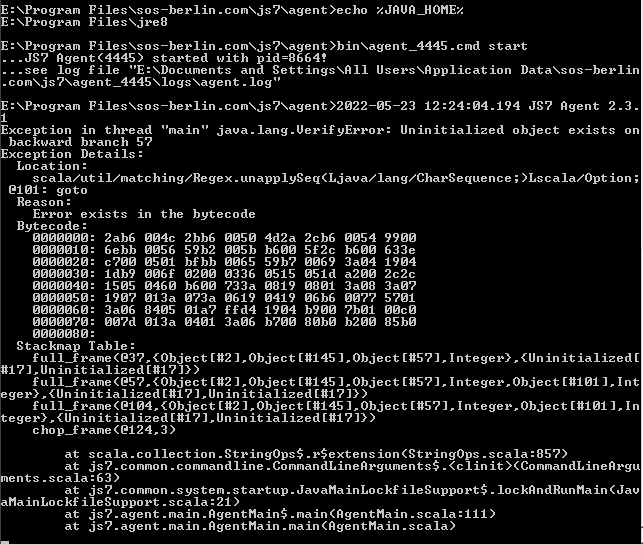
Please set your JAVA_HOME environment variable to your JRE, not JDK. For example
|
Beta Was this translation helpful? Give feedback.
-
|
Hello @sosap,
|
Beta Was this translation helpful? Give feedback.
-
|
The agent.log file cannot be created as Java crashes and logging is performed with Log4j. This is why you see output in stdout. The issue most probably is due to an old Java version. Oracle reports that JDK bug 8046233 should be resolved, some users report that JRE 1.8.0.144 resolves the problem. I cannot verify this information. Best would be if you can check to use the latest Java JRE available for Windows 2003. |
Beta Was this translation helpful? Give feedback.
-
|
I'll see what I can do Thanks |
Beta Was this translation helpful? Give feedback.


Hi,
The JS7 Agent requires Java 1.8, 11 or 17. Chances do not look good for this prerequisite:
Maybe a possible alternative is to run an SSH Server on Windows 2003 and to use JS7 Agentless Scheduling