API
##Contents
##Basic properties
Basic API is available through the test object
###Methods:
-
.done()- outputs therootinto the console. The usual way - to call this method after all tests and groups. example:var a = 1; var b = 2; test.it(a+b === 3); test.done(); // outputs the result
But it can be called as group/test chain-closer. In this case, it will output group/test in which chain it was called.
If it called in some group scope, that group will be outputted.
example:
test.group('first group',function(){
    // ... here goes the tests

    test.done(); // outputs the first group
});
test.group('first group').done(); // outputs the first group
test.it(someThing).done(); // outputs the test

####tests Tests are a basic functional of the test.it framework.
They all:
- check some received value or values;
- can receive the exact number of arguments (return an error instead of the value if not);
- can be
passed,failedand ended witherror - add their results to the current level stack.
The output of each test looks like:

Each passed test is collapsed by default. In a screenshot it's showed as uncollapsed to look more representative
The first line consists of
-
status- displays the result of a test (passed,failedorerror); -
comment- a user-defined text
The second line may consist of:
-
description- a text which describes the test type and the result -
error- some type of error signifying that arguments in a test are incorrectError displays:
-
type- the type of error:-
RangeError- there are more or fewer arguments than expected -
TypeError- the type of one or more arguments is incorrect
-
-
message- describes an error -
trace- the result oftest.trace() -
error object- a real error if you need more details
-
The last line consists of:
-
arguments- the array of the received arguments.
#####There is a list of all available tests (v.1.0.0):
-
test.it( value )- checksvaluefor non-false value.Simplified, it looks like:
javascript if ( value ) {return 'pass'} else {return 'fail'}So eachvaluewhich will passesiftest will passtest.it( value ). ```javascript // The next tests will pass test.it( 1 ); test.it( 'text' ); test.it( true ); test.it( window ); test.it( alert ); test.it( 2+2 === 4 ); var a = 10; test.it( a > 5 );
// The next tests will fail test.it( 0 ); test.it( '' ); test.it( false ); test.it( 2+2 === 5 ); var a = 3; test.it( a > 5 ); test.it( null ); test.it( NaN );
// The next lines will return an error test.it( ); test.it( 1, 2, 3 );
// The next line will throw the ReferenceError and will not be executed test.it( myNotDefinedVariable ); test.it( myNotDefinedFunction() ); ```
-
test.it( value1, value2 )- checks the equality betweenvalue1&value2.This is not just
value1 == value2. ThedeepCompare()function is used here which is taken from here. It can compare any types of values, but obviously they must be of the same type.
// The next tests will pass test.it( 5, 5 ) test.it( 'text', 'text' ) test.it( [1,2,3], [1,2,3] ) test.it( {a:1,b:2}, {a:1,b:2} )
// The next tests will fail test.it( 5, 1 ) test.it( 'text', 'line' ) test.it( '10', 10 ) test.it( [1,2,3], [3,2,1] ) test.it( {a:1,b:2}, {a:1,b:2,c:3} ) ```
-
test.them( values )- checks for non-false value all elements in thevaluesarray.It is similar to
test.it( value )but checks for non-false more than 1 value, which must be contained in thevaluesarray.
// The next tests will pass test.them( [1,'text',true,window,alert] )
// The next tests will fail test.them( [1,'text',true,window,alert,false] )
// The next lines will return an error test.them( ) test.them( 1 ) test.them( 1, 2 ) test.them( [1,2], 2 ) ```
-
test.type( value, type )- checks the type (function,object, ...) of thevalue.It uses
test.typeof()function which is more powerful than commontypeof(). It recognizesArray,Boolean,Date,Error(EvalError,RangeError,ReferenceError,SyntaxError,TypeError,UriError),Function,NaN&Number,Object,RegExp,String,Window,HTML,NodeList.There is no matter how the name is written. You can type 'String', or 'string', or 'StRiNg' etc.
// The next tests will pass test.type( 1, 'number' ) test.type( 'text', 'String' ) test.type( alert, 'function' )
// The next tests will pass test.type( 'text', 'number' ) test.type( alert, 'String' ) test.type( 1, 'function' )
// The next lines will return an error test.type( ) test.type( 1 ) test.type( 1, 2 ) test.type( 1, 'myType' ) test.type( 1, 'number', 3 ) ```
-
test.types( values [, type] )- checks the equality between the types of all elements in thevaluesarray. If thetypeis defined - the types of elements will be compared with it.It is similar to
test.type( value, type )but checks the types of more than 1 value, which must be contained in thevaluesarray.
// The next tests will pass test.types( [1,2,3,new Number()] ) test.types( [1,2], 'number' ) test.types( ['asd','dsa'], 'string' )
// The next tests will fail test.types( [1,2,'text'] ) test.types( ['asd','dsa'], 'number' )
// The next lines will return an error test.types( ) test.types( 1 ) test.types( 1, 2 ) test.types( 1, 'number' ) test.types( [1,2], 'myType' ) test.types( [1,2], 'number', 3 ) ```
###groups Groups are an extremely useful tool, which allows multi-level combining of tests.
Like tests, they:
- can be
passed,failedand ended witherror- it depends on the worst result in their stack - add their result to the current level stack.
The output of groups looks like:

Each passed group is collapsed by default. In the screenshot they are shown as uncollapsed to look more representative
The first line:
-
name- a user-defined name of the group. -
status- can bepassed,failedorerror. -
counters- numbers separated by/signify the number of passed, failed and error tests/groups. -
time- time in milliseconds spent on executing code in this group. -
comment- a user-defined text.
The second and following lines represent the stack of this group, it may consist of another groups and tests.
####There are two ways to use test.group
-
test.group( name, function(){ ... } )- makes a new group.If the group already exists, it extends it.
// will make the group 'first group' test.group('first group',function(){ // ... here go the first tests });
// adds tests to the group 'first group'
test.group('first group',function(){
// ... here go the second tests
});
The code above is similar to:javascript
// will make the group 'first group'
test.group('first group',function(){
// ... here go the first tests
// ... here go the second tests
});
```
-
test.group( name )- returns thetestobject to provide nesting and chainingProvides a transit to the next-level group
// will make the group test.group('first group',function(){ // ... here go the first tests });
// returns the link to the group 'group in first group'
test.group('first group')
####Nesting `test.group` provides multi-level nesting. `test.group( name, function(){ ... } )` can be nested in another `test.group( name, function(){ ... } )` like this:javascript
// will make the group with a group in it
test.group('first group',function(){
// ... here go the first tests
test.group('group in first group',function(){
// ... here go the second tests
});
// ... here go the third tests
});
With `test.group( name )` you can use nesting in this wayjavascript
// will make the group with a group in it
test.group('first group',function(){
// ... here go the first tests
test.group('group in first group',function(){
// ... here go the second tests
});
// ... here go the third tests
});
// adds tests to the group 'group in first group'
test.group('first group').group('group in first group',function(){
// ... here go the fourth tests
});
The code above is similar to: javascript
// will make the group with a group in it
test.group('first group',function(){
// ... here go the first tests
test.group('group in first group',function(){
// ... here go the second tests
// ... here go the fourth tests
});
// ... here go the third tests
});
```
A group throws an error if it receives 0 or more than 2 arguments, or if there is only 1 argument with a non-existing name:
```javascript
test.group( );
test.group('wrong group',function(){
    test.it(true);
},3);
test.group('non existing group')
```
###Attributes:
-
test.root- returns a zero-level group.All results will get in it. Any type of output is based on it.
An empty root has the structure:
{
type: "group",
name: "root",
status: undefined,
time: 0,
result: {
pass: 0,
fail: 0,
error: 0,
total: 0
},
stack: []
}
```
Every test located outside the groups and the first-level groups will get into root.stack.
When any test/group gets into any stack, the `result` counters and the `status` of the current and all previous levels (till `root`) are updated. But the counters of the `result` mean the number of test/groups in the current level only.
##Chaining Chain - is a set of functions, which starts from a Chain-opener (with Chain-preporatory), is followed by Chain-links (there is no limit on the number) and ends with a Chain-closer.
chainPreporatory.chainOpener().chainLink().chainLink().chainCloser();
// or
chainPreporatory.chainOpener()
  .chainLink()
  .chainLink()
  .chainCloser();
###Chain-preparatory
They add something to a test/group. Added staff can be used inside of test/group by core of testit framework. They must be called between test and chainOpener
test.time.it(someThing());
```

-
.exclude- makes test/group unpushable into current level group stackIs reasonable to use it with
.done()(async tests eg), or.callback()etc.example
alert(test.exclude.it(someThing).result()); // will alert true/false test.exclude.group('some group',function(){ ... }).done(); // will output group into console ```
###Chain-openers
###Chain-links
-
.comment( text )- adds a comment to a test/groupIf there are more than one
.comment( text )in a chain - only the last will be used.
test.group('first group',function(){ test.it(true).comment('test with true argument'); }).comment('group with only one test'); ```
-
.callback( function(){ /* funcIfpass */}[, function(){ /* funcIffail */}[, function(){ /* funcIferror */}]])- will executefuncIfpassif a test/group passes,funcIffailif it fails,funcIferrorif it causes an error.funcIffailandfuncIferrorare not required.
// will cause two alerts: 'test pass' - the first one, and 'group pass' - the following one test.group('first group',function(){ test.it(true).callback(function(){alert('test pass')} ,function(){alert('test fail')} ,function(){alert('test error')}); }).callback(function(){alert('group pass')} ,function(){alert('group fail')} ,function(){alert('group error')}); ```
-
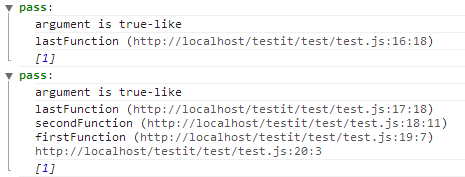
.addTrace( level )- adds trace to a test/group.level- Number of trace lines which will be addedif
levelundefined - all trace will be added.example:
(function firstFunction() {
(function secondFunction() {
(function lastFunction() {
test.it(1).addTrace(0); // adds only curent line
test.it(1).addTrace(); // adds every lines of trace
})();
})();
})();
```
###Chain-closers They all return something. So it makes sense to assign chain to some variable, or to use it like an argument in some function.
-
.result()- returns the result of a test/groupThe returned value has
booleantype.-
true- if test is passed -
false- otherwise
-
// will cause two alerts: 'test true' - the first one, and 'group true' - the following one alert('group '+test.group('first group',function(){ alert('test '+test.it(true).result()); }).result()); ```
-
.arguments()- returns a single argument or an array of arguments from the test (not from a group!)This is the only Chain-closer that can't be used in chains that start with
test.group, because groups don't save their arguments in an arguments array.
// will cause the alert: 'test true' alert('test '+test.it(true).arguments());
// even if a test causes an error, there will be an alert: 'test 1,2,3' alert('test '+test.it(1,2,3).arguments()); ```
So you can use chains like this:
test.group('first group',function(){test.it('single')})
    .comment('group with simple test')
    .callback(function(){alert('test has been passed')})
    .result() // -> true
test.group('second group',function(){test.it('first','second')})
    .comment('group with test equalence')
    .result() // -> false

test.it('single')
    .comment('test a simple string')
    .arguments() // -> 'single'
test.it('first','second')
    .comment('test two string')
    .callback(null, function(){alert('test has been failed')})
    .arguments() // -> ['first','second']
##features
They do not produce any tests or tests manipulations. There are some useful functions, which are used in the core of test.it framework.
-
test.typeof( value )- determines and returns the type ofvalue.It recognizes
Array,Boolean,Date,Error(EvalError,RangeError,ReferenceError,SyntaxError,TypeError,UriError),Function,NaN&Number,Object,RegExp,String,Window,HTML,NodeList.
test.typeof(1); // -> Number test.typeof(NaN); // -> NaN test.typeof(Infinity); // -> Number test.typeof('text'); // -> String test.typeof(window); // -> Window test.typeof(null); // -> null test.typeof(document); // -> HTML ```
-
test.trace()- returns the list (joined by "\n") of lines in your code that were performed to call the current line.It is not a true
trace()because any links to the code lines of thetest.itframework were removed from the results
(function firstFunction(){
(function secondFunction(){
console.log(test.trace());
})()
})()
The code above will put into *Chrome* console the next lines:
secondFunction (http://path/to/script.js:3:26)
firstFunction (http://path/to/script.js:4:7)
http://path/to/script.js:5:3
```