AndJaco 是用于Android App的增量代码测试覆盖率工具,基于jacoco源码修改而来。相比于原版jacoco全量测试,AndJaco可以支持增量代码的覆盖测试和全量代码的覆盖。 git地址:https://github.com/41809310102/AndJaco 因为在运行时会把ec数据文件上传到服务器,编译时会去下载,得到ec,所以要先配置服务器。
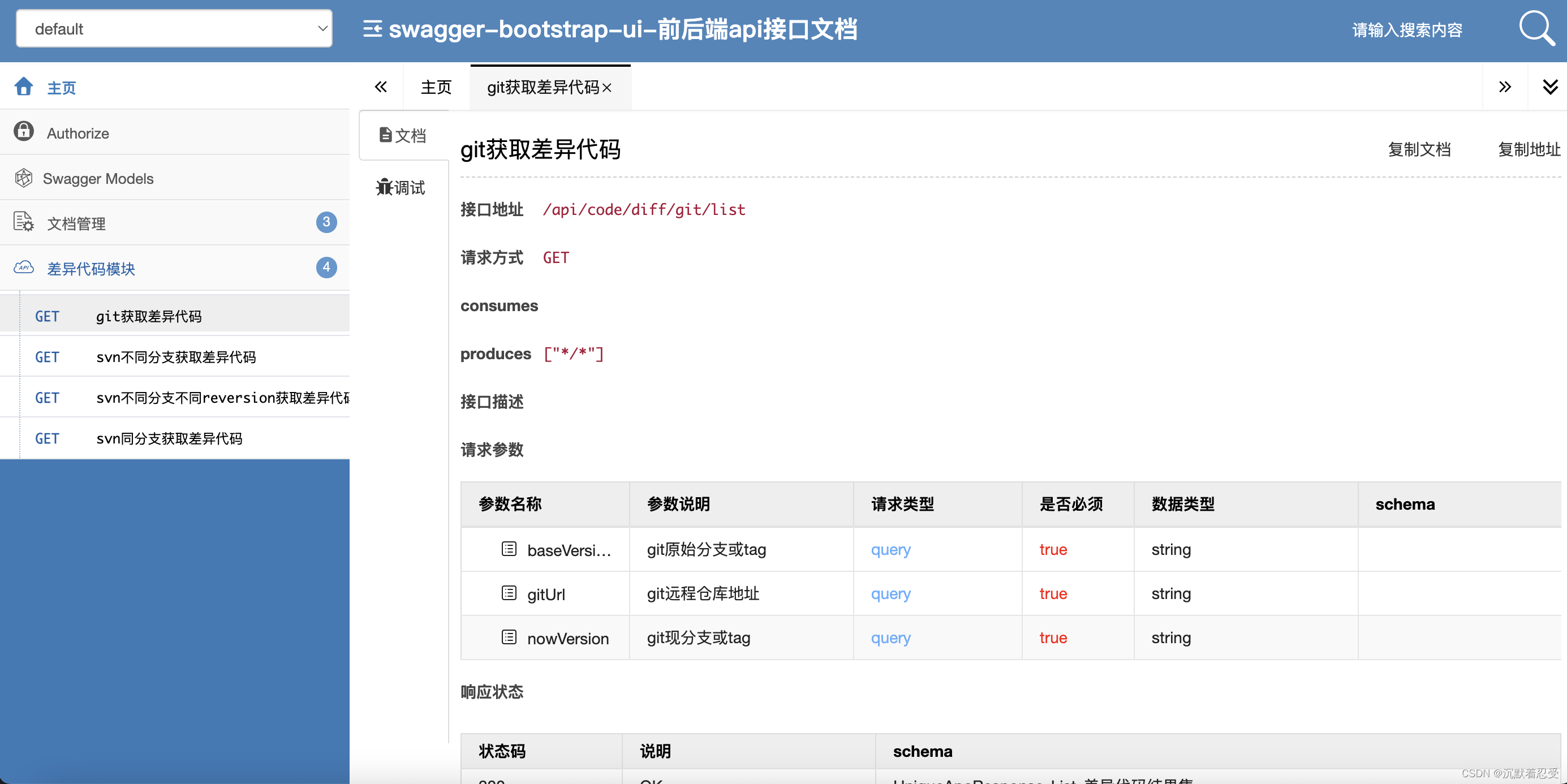
1、 diff服务器布在局域网即可,diff平台是集成分析java文件和kotlin文件的解析服务器。可以通过对比分支代码,获取代码不同点。该项目不开源,请谅解!
buildscript {
    repositories {
        maven { url 'https://jitpack.io' }
    }
    dependencies {
        //见 github最新版
        classpath 'com.github.41809310102.AndJaco:AJdebug:0.1.8'
    }
}

allprojects {
    repositories {
        maven { url 'https://jitpack.io' }
    }
}apply plugin: 'com.ttp.and_jacoco'
//代码覆盖配置
jacocoCoverageConfig {
jacocoEnable true //开关
branchName 'main'//主分支
nowVersion 'debug'//开发分支
downEchost ''
giturl "" //项目git地址
gitdiffurl ""//diff平台地址
host=""//下载服务host
isLocal false //flase代表从ec文件服务器下载,true是本地导入
execDir "${project.buildDir.absolutePath}/outputs/coverage"//ec 下载存放路径
sourceDirectories = getAllJavaDir() //源码路径
classDirectories = ["${rootProject.projectDir.absolutePath}/app/build/intermediates/javac/debug/classes"
,"${rootProject.projectDir.absolutePath}/app/build/tmp/kotlin-classes/debug"] //classes 路径
includes = ['com.example.test2'] //要包含的class 包名,数组
excludeClass = { // return true 表示要排除的class
println("exclude it=${it}")
return false
}
excludeMethod = {//return true 表示要排除此方法
println("excludeMethod it=${it}")
return false
}
}
def ArrayList<String> getAllJavaDir() {
//获取所有module 的源码路径
Set<Project> projects = project.rootProject.subprojects
List<String> javaDir = new ArrayList<>(projects.size())
projects.forEach {
javaDir.add("$it.projectDir/src/main/java")
javaDir.add("$it.projectDir/src/main/kotlin")
}
return javaDir
}
jacocoCoverageConfig 是代码覆盖的配置。 jacocoEnable: 是总开关,开启会copy class,执行 git命令等,插入代码。线上包建议关闭。 branchName: 要对比的分支名,一般为线上稳定分支,如master, giturl: 项目git地址 nowVersion: 要检测的开发分支名 host: 运行时ec 数据文件的上传与下载服务器,应确保是同一个 execDir:生成报告时,从服务器下载的ec 文件存放目录 gitdiffurl:diff平台接口 isLocal: 是否本地导入ec文件。true为本地导入,false为从Ec文件服务器下载Ec文件。 classDirectories:class 存放路径,enable开启时会copy class 到该目录 includes:要保存的class 包名,建议只保存自己包名的class。当这些class 有差异时才会插入代码。 excludeClass:就算是你项目的包名,可能还要过滤某些自动生成的class,例如 DataBinding....。return true表示过滤 excludeMethod:过滤某些方法,因为在编译时,会自动生成某些方法。如带 $ 的虚方法。 reportDirectory:报告输出目录,默认为 "${project.buildDir.getAbsolutePath()}/outputs/report"
plugins {
    id 'com.android.application'
}
apply plugin: 'kotlin-android'
apply from: 'Andjacoco.gradle' //引入自定义配置

android {
    .....
    buildTypes {
        release {
            buildConfigField "String", "host", "\"${jacocoCoverageConfig.host}\""
            minifyEnabled false
            proguardFiles getDefaultProguardFile('proguard-android-optimize.txt'), 'proguard-rules.pro'
        }
        debug {
            buildConfigField "String", "host", "\"${jacocoCoverageConfig.host}\""
            minifyEnabled false //获取代码覆盖率需要设为false
            proguardFiles getDefaultProguardFile('proguard-android.txt'), 'proguard-rules.pro'
        }
    }
    compileOptions {
        sourceCompatibility JavaVersion.VERSION_1_8
        targetCompatibility JavaVersion.VERSION_1_8
    }
}


dependencies {

    implementation 'androidx.appcompat:appcompat:1.2.0'
    implementation 'com.google.android.material:material:1.3.0'
    implementation 'androidx.constraintlayout:constraintlayout:2.0.4'
    testImplementation 'junit:junit:4.+'
//    testImplementation 'org.junit.jupiter:junit-jupiter'
    androidTestImplementation 'androidx.test.ext:junit:1.1.2'
    androidTestImplementation 'androidx.test.espresso:espresso-core:3.3.0'
    testImplementation 'org.robolectric:robolectric:3.0'
    implementation 'com.squareup.okhttp3:okhttp:3.14.9'
    implementation('org.jacoco:org.jacoco.report:0.8.5') {
        exclude group: 'org.jacoco', module: 'org.jacoco.core'
    }
    implementation 'com.github.41809310102.AndJaco:rt:AJdebug0.1.8'

}

repositories {
    mavenCentral()
}//通过反射遍历项目所有类信息,并且生成ec文件,上传ec文件存储器
public void generateCoverageFile() {
try {
Object agent = Class.forName("org.jacoco.agent.rt.RT").getMethod("getAgent").invoke(null);
// 这里之下就统计不到了
byte[] outs = (byte[]) agent.getClass().getMethod("getExecutionData", boolean.class).invoke(agent, false);
new Thread(new Runnable() {
@Override
public void run() {
httpFilePost(outs, "test", "http://10.23.180.41:8001/perf_data_manage/perfdog/report_test", outs.length);
}
}).start();
Log.i("whh", "GenerateCoverageFile success");
} catch (Exception e) {
Log.i("whh", "GenerateCoverageFile Exception:" + e.toString());
}
}
定义http方法:
public void httpFilePost(byte[] bytes, String fileName, String url, long size) {
DataOutputStream out = null;
BufferedReader in = null;
StringBuilder result = new StringBuilder();
try {
URL console = new URL(url);
HttpURLConnection conn = (HttpURLConnection) console.openConnection();
conn.setConnectTimeout(30000);
conn.setReadTimeout(30000);
conn.setUseCaches(false);
conn.setRequestProperty("Content-Type", "application/text");
conn.setDoOutput(true);
conn.setDoInput(true);
conn.setRequestMethod("POST");
conn.connect();
out = new DataOutputStream(conn.getOutputStream());
out.write(bytes);
out.flush();
out.close();
in = new BufferedReader(new InputStreamReader(conn.getInputStream(), "utf-8"));
String line;
while ((line = in.readLine()) != null)
{
result.append(line);
}
conn.disconnect();
} catch (Exception e) {
Log.i("whh", "Upload failed: " + e.toString());
e.printStackTrace();
} finally {
try {
if (out != null) {
out.close();
}
if (in != null) {
in.close();
}
} catch (IOException ex) {
Log.i("whh", "调用in.close Exception, url=" + url + ",param=" + fileName, ex);
}
}
}在activity.onCreate中测试调用增量方法:
     @Override
    protected void onCreate(Bundle savedInstanceState) {
        super.onCreate(savedInstanceState);
        setContentView(R.layout.activity_main);
        EditText Uname = findViewById(R.id.editTextTextPersonName2);
        EditText Upword = findViewById(R.id.editTextTextPassword2);
        Button Blogin = findViewById(R.id.button3);
        ktfiles ktfile = new ktfiles();
        ktfile.toString();
        ktfile k = new ktfile();
        k.hashCode();
    }
在activity.onStop中调用generateCoverageFile()方法:
   @Override
    protected void onStop() {
        generateCoverageFile();
        super.onStop();
    }
详细见demo源码。 运行一会,然后退出app到后台,这时app 会把上次的 ec 文件上传到服务器。
执行 ./gradlew generateReport 任务生成报告,报告生成目录 app/builds/outputs/report,打开index.html,就可以看见本次的覆盖率报告了。