Beacon
English | 中文
Beacon is a floating panel that lives above your macOS menu bar, inspired by the iPhone Dynamic Island. It provides real-time project context and AI-powered authorization for your coding tools.
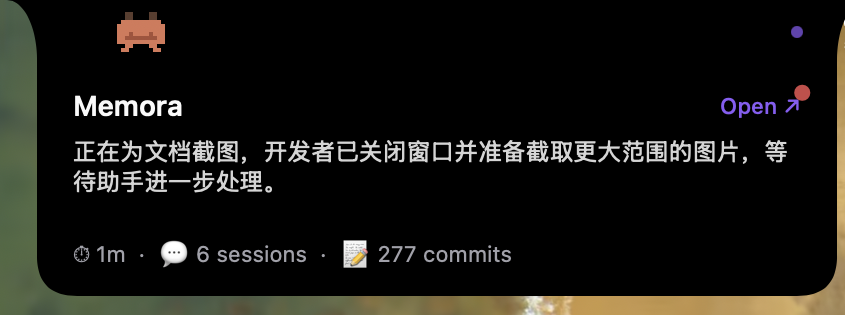
A pixel crab mascot sits in the notch area with a pulse indicator. Visible at all times when a coding app is in the foreground.

Shows the current project name, AI-generated summary, and a link to open the project in Memora. The crab walks from its collapsed position to the left edge with a leg animation. Since v0.4.1, clicking an empty area collapses the panel so you can see what's behind it; it re-expands automatically on the next window-title change.
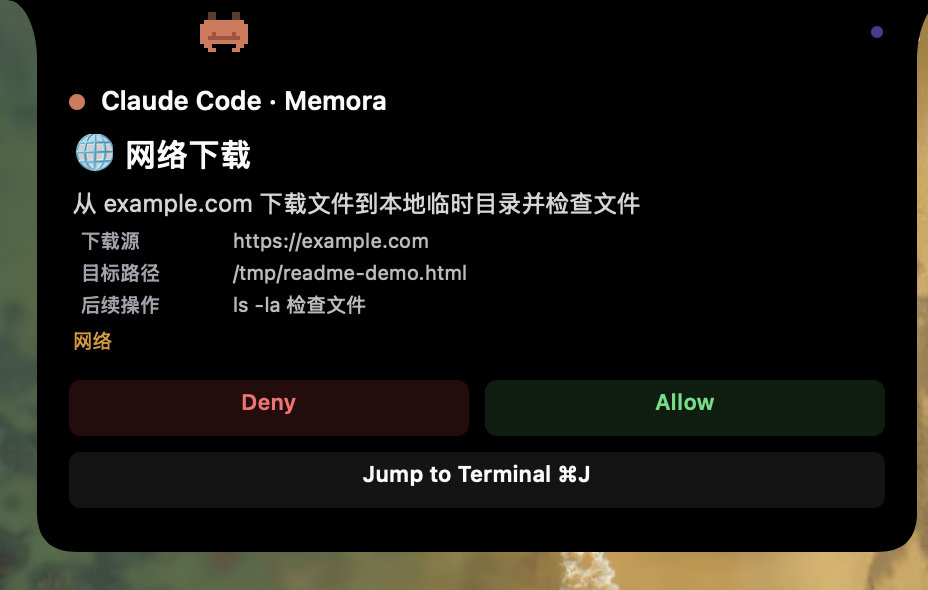
When your AI tool needs permission to run a command or edit a file, Beacon shows a semantic action verb (e.g. "🔍 Search files", "💾 Git commit"), key parameters, and — once the Risk Engine finishes — an AI-generated risk level (low/medium/high) and recommendation (allow/ask/deny). While analysis is running, a spinner is shown; if the LLM times out or is unavailable, Beacon falls back to static rules or raw command display so you never see a blank panel.
Beacon is a Channel — one of several notification surfaces Memora can dispatch approval requests to. See Settings for enabling Lark (remote) channel alongside Beacon.
-
Hook integration —
memora-hook's PreToolUse handler writes a JSON request file to~/.memora/beacon-requests/<toolUseId>.jsonand blocks. -
Three-layer decision (see Changelog v0.4.0):
-
Hard Deny (regex + context) — obvious dangers (
rm -rf /,git push --force, credential paths) → alwaysask. -
Hard Allow — project-local
Edit/Writeand read-only/build/git-day-to-day Bash → response written immediately, no notification. -
Gray area — dispatched to all enabled channels; the Risk Engine (LLM advisor: DeepSeek / Claude / OpenAI) runs in parallel and pushes its verdict to the panel via
beacon:updateNotification.
-
Hard Deny (regex + context) — obvious dangers (
-
File-based IPC — when you click Allow/Deny (or Lark responds first, or Unattended Mode auto-allows), Memora writes
~/.memora/beacon-responses/<toolUseId>.json. The hook is watching that directory and exits with the decision. No keystroke injection, no focus stealing. -
Auto-dismiss —
PostToolUsehook writes~/.memora/beacon-resolved/latest; any stale panel whose request file has been consumed is cleaned up on the next scan cycle.
| Mode | Behavior |
|---|---|
| Normal (default) | Everything outside deny-list / hard-allow prompts. LLM verdict shown as advice. |
| Unattended (opt-in) | LLM judges level != high && rec != deny → auto-approved without asking. Toggle in Settings → Risk Engine. |
Unattended Mode requires an LLM provider configured; if the provider is offline, Memora falls back to Normal Mode (prompts you) as a safety net.
| Source | Tool | Buttons |
|---|---|---|
| Claude Code | Edit, Write | 3 (Allow / Allow All / Deny) |
| Claude Code | Bash | 2 (Allow / Deny) |
| Other sources | Any | 2 (Allow / Deny) |
- Shape: Concave bezier arcs (15px × 30px) create a "growing from the screen edge" effect.
-
Level:
NSPanelatstatusBar + 1— always above the menu bar. -
Background: Pure black
NSView(NSVisualEffectViewcannot achieve true black). -
Coordinate system: Paths drawn in visual coordinates (y=0 at top), flipped to CG coordinates via
CGAffineTransform.