


Not another FAQ block. 4WP FAQ wraps the core Accordion you already use, adds FAQPage JSON-LD, and turns every question on your site into one registry you can reuse, update everywhere, and show as a searchable hub. Your design stays the same. Free, no Pro tier.
Live demo & docs · Live hub: 296 questions · WordPress.org · 60-second video
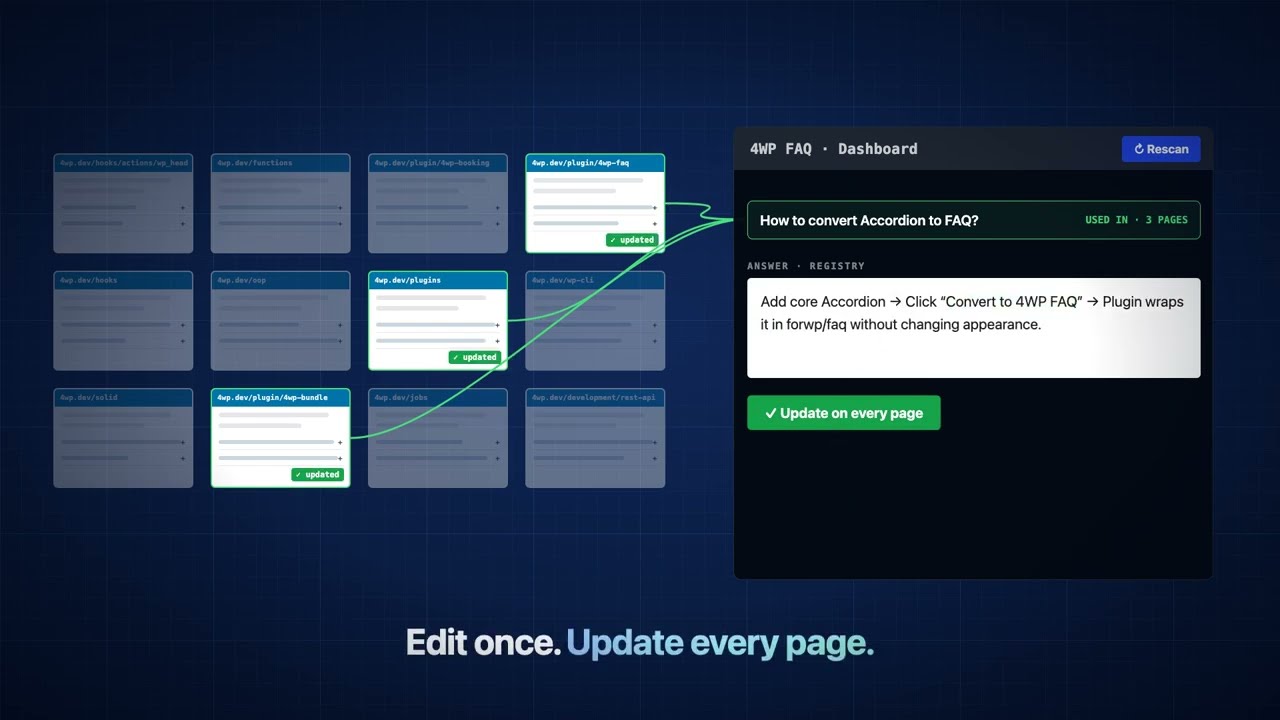

- Built on core. A thin wrapper over the core Accordion. No new design, no lock-in: unwrap any time and the Accordion stays.
- The only FAQ plugin that scans. Questions live on your pages. A scan collects them into one registry. You never type a question twice.
- Edit once, update everywhere. Change a question in the registry and 4WP FAQ writes it onto every page listed in Used in.
- SEO hub for free. List, Categories, Search and Count blocks, pretty category URLs, category SEO titles, canonical and Open Graph.
- AI without a vendor. Category copy through the standard WordPress AI Client (Connectors). No custom SDK, no API keys in the plugin.
flowchart LR
    subgraph IN["Your content"]
        A["core Accordion / Details /<br/>heading + paragraph"]
        D["4WP Drive<br/>Google Doc: H2 + H3"]
    end
    A -- "Convert to FAQ" --> W["forwp/faq<br/>wrapper"]
    D -- "import mapping" --> W
    W --> P["Your page<br/>(source of truth)"]
    P -- "JSON-LD on" --> S["FAQPage schema"]
    P -- "Rescan" --> R[("Registry<br/>questions + categories")]
    R -- "Update / Add FAQ" --> P
    R --> H["Hub: Categories + List<br/>+ Search + Count"]
    H --> U["/faq/term-slug/<br/>SEO title, canonical, OG"]
    AI["WordPress AI Client"] -- "category copy" --> R
Your pages stay the source of truth. The registry only collects, reuses and displays.
| 4WP FAQ | Easy Accordion | Ultimate FAQ Accordion | Helpie FAQ | Yoast SEO FAQ block | |
|---|---|---|---|---|---|
| Approach | Wraps core Accordion | Own accordion | Own post type | Own post type | Own block |
| Scan into a registry | ✅ | ❌ | ❌ | ❌ | ❌ |
| Edit once, update every page | ✅ | ❌ | ❌ | ❌ | ❌ |
| Hub with categories + SEO URLs | ✅ | Pro | Partial | Partial | ❌ |
| FAQPage schema | ✅ | ✅ | ✅ | ✅ | ✅ |
| Paid tier | None | Pro | Pro | Pro | Premium |
Full comparison and sources: 4wp.dev/plugin/4wp-faq.
- Insert or select a core Accordion, then click Convert to FAQ in the toolbar (or insert 4WP FAQ). Select existing Details, Accordion items, or heading + paragraph blocks and use Transform to → 4WP FAQ.
- Write one question per Accordion Item (heading = question, panel = answer).
- Open FAQ → Settings and turn on FAQPage JSON-LD when you want structured data.
- Optional: finish the registry setup wizard, run Rescan, then build a hub with 4WP FAQ List + 4WP FAQ Categories.
- Optional: configure Settings → Connectors, enable FAQ → Settings → AI, then Generate with AI on a category.
JSON-LD works without the registry. The registry is a helper: scan unique questions, edit one record to push Q/A onto every Used In page, or Add FAQ onto category pages / one page. Accordion items on the site stay the source of truth.
- Directory assets: animated WordPress.org banner/icon GIFs and nine screenshots.
- Docs: README and directory copy refreshed (demo, comparison, video).
Earlier 2.6.4: hub List no longer vanishes when the page slug matches a FAQ category; Convert keeps Accordion items; Unwrap restores them; Include/Exclude no longer freezes the editor.
Release history: 4wp.dev/plugin/4wp-faq · readme.txt changelog · GitHub Releases
Generation uses the WordPress AI Client. Configure a text-generation connector under Settings → Connectors. Until a connector is available, the Settings AI card and the Generate panel stay off.
- Finish registry setup so FAQ categories exist.
- Open Settings → Connectors and complete the connector for text generation.
- Under FAQ → Settings → AI, turn on Allow predefined field markup.
- Edit a term on FAQ → Categories and Generate with AI. The prompt uses the category name and questions in that term (registry titles).
- Review the four fields, Apply, then Update. Nothing is saved until you update the term.
The plugin does not ship API keys or talk to a model until the site administrator has configured a connector.
forwp/faqwrapper — keeps Accordion layout and theme styles- FAQPage JSON-LD — site-wide toggle in Settings; per-block override; output in
<head> - Convert to FAQ — toolbar on Accordion / Accordion Item / Details / List; Transform to → 4WP FAQ for one or many selected items
- Optional registry — CPT + taxonomy, scan, Used In, edit-to-push, Add FAQ onto category pages or one page
- Admin Dashboard — classic wp-admin widgets: status, categories (tree), reused, uncategorized; Rescan from Status
- Drag-and-drop category order — on FAQ → FAQ Categories; same order in admin lists, Dashboard, and front-end List / Categories
- FSE hub blocks — List, Categories, Count, Card
- Collapsible category nav — parents start closed; visitors expand them and the browser remembers
- Pretty category URLs —
/current-page/term-slug/when Settings + Categories block allow it - Category SEO — display title, SEO title (as-is when filled), SEO description
- Polylang — categories follow the language of the page that owns the FAQ block
- AI Assistant — WordPress AI Client connectors; generate category description and SEO fields (opt-in)
Legacy core/details inside the wrapper is still supported for schema and scan.
| Screen | Who | Purpose |
|---|---|---|
| Dashboard | Editors+ | Status metrics, Rescan, category tree, reused / uncategorized |
| Add FAQ | Editors+ | New question + answer; place via FAQ categories and/or one page |
| All FAQs | Editors+ | Registry list table |
| Categories | Editors+ | Hierarchy + drag-and-drop order (saved to term_order; used admin + front) |
| Settings | Admins | Overview stats, Rescan, JSON-LD, pretty URLs, optional AI (Connectors), title rules, Documentation |
In-place FAQ (schema + scan):
forwp/faq                    ← 4WP FAQ wrapper
└── core/accordion
    └── core/accordion-item  ← one Q&A (JSON-LD + registry)
        ├── heading
        └── panel content
Registry hub (after setup + rescan):
forwp/faq-categories         ← nav; filters the list (Interactivity API)
forwp/faq-list               ← grouped or flat registry list
└── forwp/faq-card           ← inner template
core/search                  ← optional; inspector “Filter 4WP FAQ List”
Details: docs/BLOCKS.md.
Typical layout: Categories in a sidebar, List in the main column.
| Block | Name | Role |
|---|---|---|
| 4WP FAQ List | forwp/faq-list |
Registry questions, grouped or flat; include/exclude terms. All view shows N per group + “View all”. |
| 4WP FAQ Card | forwp/faq-card |
Inner template (inserter: false). Accordion or heading + body; optional “Used in”. |
| 4WP FAQ Categories | forwp/faq-categories |
Parent → child nav (subcategories collapsed by default). Pretty /page/term-slug/ or in-place filter. |
| 4WP FAQ Count | forwp/faq-count |
Live count for All / category / search ([forwp_faq_count]). |
- FAQ → Settings → enable Pretty category URLs.
- On the hub page, open 4WP FAQ Categories → enable SEO-friendly category URLs there too.
- Result:
/your-hub-page/term-slug/. On-page title comes from the category Display title (empty: category name) in these core blocks: Title (core/post-title), Query Title / Archive title (core/query-title), Term Name (core/term-name). Heading level is the template’s choice; Heading blocks are not swapped. On-page description comes from the category Description in Excerpt (core/post-excerpt) or Term Description (core/term-description). Document title / meta still use SEO title / SEO description. Canonical andog:urlare the category URL. SEO image on the term is used for Open Graph (empty: hub page image). The List omits the group H2 when that title is already in the page heading. JSON-LD is limited to that category. - Off: clicks filter the list in place; the page URL stays unchanged.
Filled category SEO title is used as the document title as-is (no “ – site name” suffix). Empty SEO title → display title + site name.
Core Search on the same page as the List → sidebar 4WP FAQ → Filter 4WP FAQ List. Filters cards in place (not a site search).
| Source | Notes |
|---|---|
| WordPress.org | Install from Plugins → Add New, or see readme.txt. |
| GitHub | Clone, build, activate (below). |
git clone https://github.com/4wpdev/4wp-faq.git
cd 4wp-faq
npm install && npm run build
# Copy or symlink into wp-content/plugins/4wp-faq and activate.- WordPress 6.6+ (Accordion blocks; tested up to 7.1)
- PHP 7.4+
- Optional: WordPress AI Client + a text-generation connector under Settings → Connectors
| Plugin page, demo & docs | 4wp.dev/plugin/4wp-faq |
| Live FAQ hub | 4wp.dev/faqs |
| Video | YouTube — 60 seconds |
| WordPress.org | wordpress.org/plugins/4wp-faq |
| More 4WP plugins | 4wp.dev/plugins |
| Repository | github.com/4wpdev/4wp-faq |
| Releases | GitHub Releases |
| Block reference | docs/BLOCKS.md |
| Roadmap | docs/ROADMAP.md |
| WordPress.org readme | readme.txt |
- Namespace:
ForWP\FAQ - Blocks:
forwp/faq,forwp/faq-list,forwp/faq-card,forwp/faq-categories,forwp/faq-count· Text domain:4wp-faq - REST:
forwp-faq/v1(settings, registry scan, setup, category AI prompt/generate) - Build:
npm run build→build/
npm install
npm run build   # production
npm run start   # watch
Release ZIPs should include build/ and PHP only—see .distignore.
A family of modular WordPress plugins: each works on its own or together through the 4WP Bundle. All plugins, demos and docs: 4wp.dev/plugins
| Plugin | What it does | Version | Directory |
|---|---|---|---|
| 4WP Account | Membership user account hub — registration, user profile cabinet, email/password and social login, Gutenberg blocks. |  |
WordPress.org |
| 4WP Advanced Code | Syntax highlighting, copy/share, and SoftwareSourceCode JSON-LD for core/code and Advanced Code blocks. |  |
WordPress.org |
| 4WP Drive | Import Google Docs and Markdown from Google Drive or GitHub into WordPress drafts, or update existing posts from Incoming. |  |
WordPress.org |
| 4WP Notifications | In-app notification inbox: header bell, list page, WooCommerce alerts, and developer hooks/REST. |  |
WordPress.org |
| 4WP SEO Helper | Site-wide SEO inventory with P1–P3 priority lanes and optional Google Search Console workspace. |  |
WordPress.org |
| 4WP Smart Link | Make Cover, Group, and Column blocks fully clickable — Query Loop post cards without nested-link hacks. |  |
WordPress.org |
| 4WP Style Switcher | Visitor and per-page style variations for block themes, Light/Dark navigation toggle, optional A/B split. |  |
WordPress.org |
| 4WP TODO | Team action items as Gutenberg notes — frontend overlay, admin kanban, taxonomies, REST/Integration API. |  |
WordPress.org |
| 4WP Weather | Live weather Gutenberg block via OpenWeatherMap — server-side API key, templates, optional JSON-LD. |  |
WordPress.org |
| 4WP Booking | Appointment booking with pluggable providers (ClinicCards live), Gutenberg block, shortcode, email/Telegram notifications. |  |
WordPress.org |
| 4WP QL Blocks | Query Loop integration with Search and Taxonomy filters for WordPress |  |
— |
| 4WP Icons | Custom SVG icon system for Gutenberg blocks |  |
— |
| 4WP Mega Menu | Advanced Gutenberg-based mega menu block |  |
— |
| 4WP Responsive | Responsive utilities and layout helpers |  |
— |
| 4WP MCP Abilities | MCP abilities for admin content operations. |  |
— |
| LMS4WP | LMS platform for learning your favorite programming language. |  |
— |
Versions are live from the WordPress.org Stable tag or the latest GitHub tag. The list syncs daily from 4wpdev/plugins.json.
GPL v2 or later. See readme.txt and 4wp-faq.php.