
Apply smarter, not harder — track it all in Google Sheets


JobDocket is an intelligent Chrome extension that helps you track your job applications effortlessly. It automatically logs your job applications directly to your personal Google Sheets, so you never lose track of where you've applied, what positions you're interested in, or when you submitted applications.
Job hunting can be overwhelming—keeping track of every application, following up on opportunities, and staying organized is challenging. JobDocket simplifies this process by providing a seamless way to save and organize all your job applications in one place that you own and control.
Job searching is stressful enough without the added burden of manually tracking dozens of applications across multiple platforms. We created JobDocket to solve these common problems:
- Lost Applications: Ever forget where you applied or what jobs you were interested in? JobDocket keeps everything organized.
- Manual Tracking: Manually copying job details into spreadsheets is time-consuming and error-prone. JobDocket automates this process.
- Data Ownership: Your job search data is personal and important. With JobDocket, all your data stays in your own Google Sheets—you own it, you control it.
- Efficiency: Save time with smart auto-fill that extracts job information from popular job boards like LinkedIn, Indeed, and Glassdoor.
JobDocket empowers job seekers to stay organized, save time, and focus on what matters most—landing their dream job.
Sign in with your Google account using industry-standard OAuth 2.0. Your credentials are never stored, ensuring maximum security.
Creates a beautifully organized Google Sheet in your Drive automatically. No manual setup required—just click and go.
Extracts job information from LinkedIn, Indeed, Glassdoor, and more. Save time with one-click filling of company names, job titles, and links.
Save job applications instantly. Mark as 'Saved' for later review or 'Applied' if you've already submitted your application.
Your sheet is saved and reused across sessions. Never lose your application history—everything is automatically synced to your Google Drive.
Easily track which jobs you've saved vs. applied. Filter and organize in Google Sheets to see your application status at a glance.
Clean, intuitive interface with real-time notifications. Beautiful design that's easy to use and makes job tracking enjoyable.
Works seamlessly in Chrome popup window. Optimized for quick access and efficiency, so you can save jobs without interrupting your workflow.
Getting started with JobDocket is quick and easy. Follow these 4 simple steps:
Add JobDocket to Chrome from the Chrome Web Store. It's free and takes just a few seconds.
Click the extension icon and sign in with your Google account. We use secure OAuth authentication—your credentials are never stored.
Click 'Create My Google Sheet' to set up your tracking spreadsheet. It's automatically saved to your Drive and ready to use.
Visit any job posting on LinkedIn, Indeed, Glassdoor, or other job boards. Click the extension icon, and JobDocket will auto-fill the job details. Click 'Save' or 'Applied' to track it in your sheet!
See JobDocket in action! Watch our demo video to see how easy it is to track your job applications:
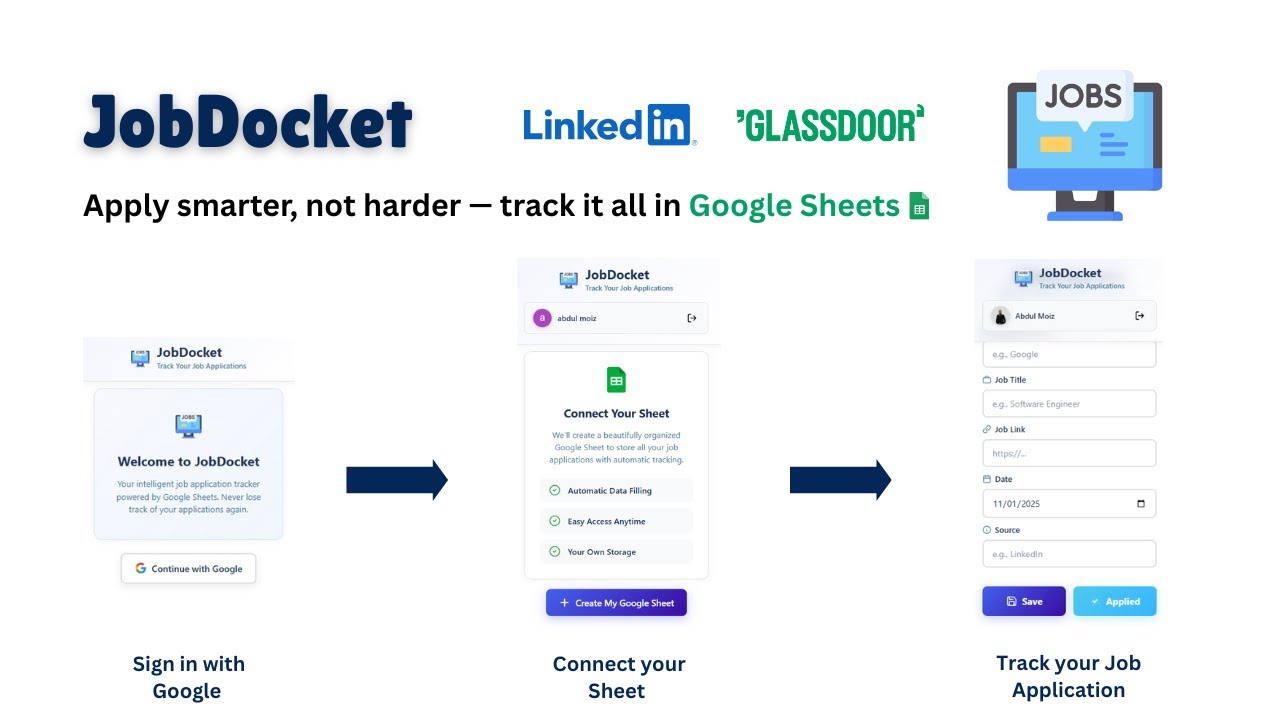
Click the image above to watch the full demo on YouTube
Or watch directly: https://youtu.be/24yK8EXoibs
- 100% Free - No hidden costs, no premium tiers. JobDocket is completely free to use.
- Your Data, Your Control - All your job applications are stored in your own Google Sheets. You own the data, you control access, and you can export it anytime.
- Lightning Fast - Save job applications with a single click. Auto-fill from popular job boards means less typing and more applying.
- Secure & Private - We use industry-standard OAuth 2.0 authentication. No passwords stored, no data shared with third parties. Your privacy is our priority.
- Chrome Web Store: Install JobDocket
- Demo Video: Watch on YouTube
- GitHub: View Source Code
- Support: Contact Us
- Feedback: Share Your Thoughts
Made with ❤️ for job seekers everywhere
Ready to streamline your job search? Install JobDocket now!