Decentralised Repositories via a python REPL CI/CD called RADKit using rotating APIs
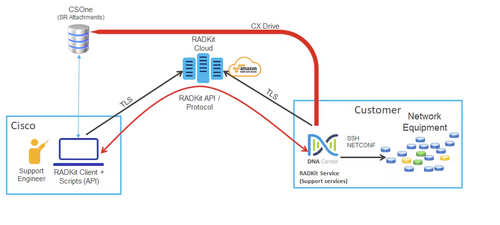
Install RADKit from https://radkit.cisco.com/downloads/release/
Once devices added and verified with service.inventory
which genie
which python
python3 -m venv .venv
source /home/#/.local/radkit/versions/1.#/venv/bin/activate
radkit-service run (this will show real-time status)
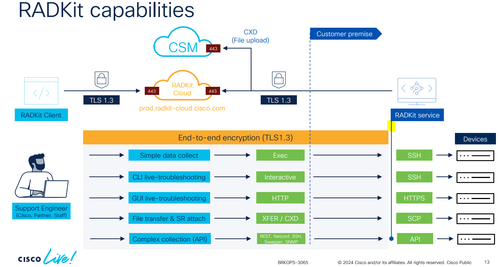
cd ~/.local/radkit/versions/1.#/venv/bin
$ radkit-client script rk-update-https.py
$ radkit-client script rk-update-sshciphers.py
deactivate
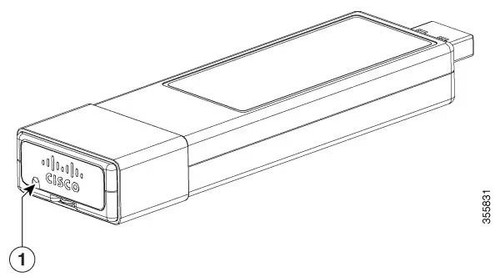
$ conf t

vlan 10

interface Vlan10
 ip address 10.10.10.10 255.255.255.0
 ip nat outside
 no shut
exit

ip route 0.0.0.0 0.0.0.0 10.10.10.1

vlan 4094

interface vlan4094
ip address 192.168.35.1 255.255.255.0
ip nat inside
no shut
exit

interface AppGigabitEthernet2/0/1
switchport mode trunk
no shut

vlan
iox
app-hosting appid guestshell
 app-vnic AppGigabitEthernet trunk
  vlan 4094 guest-interface 0
   guest-ipaddress 192.168.35.2 netmask 255.255.255.0
 app-default-gateway 192.168.35.1 guest-interface 0
 app-resource profile custom
  cpu 1000
  memory 384
  persist-disk 3
 name-server0 10.10.10.5

exit

ip nat inside source static tcp 192.168.35.2 8082 10.10.10.10 8082 no-payload extendable stateless
ip nat inside source list GS_NAT interface Vlan10 overload
ip access-list standard GS_NAT
10 permit 192.168.35.0 0.0.0.255

guestshell enable
guestshell run bash

ls -ltr
chmod +x cisco_radkit_1.8.5_linux_x86_64.sh

./cisco_radkit_1.8.5_linux_x86_64.sh -keep

Verify RADKit & BOOTSTRAP to create a superadmin pw and initiate RK DB

radkit-service --version
/home/guestshell/.local/bin/radkit-service bootstrap

systemctl enable radkit

show iox-service
systemctl start radkit