Contains the GUI.py file that is designed to automate monitor information gathering.
- Run the
reuse_monitor_specscript. Note: This is the same asmonitor_specs/GUI.py. - Use the Refresh button to update the current monitor information.
- Update any incorrect or missing information, then click Add to add the monitor to the internal queue.
- Repeat steps 2 and 3 until all monitors have been added. Note: The current list of monitors can be viewed from the terminal.
- Click the Print button to print the list of monitors to the printer. This will empty the list of monitors.
The (Remove) button can be used to remove a monitor from the list. This is useful if a monitor is added by mistake. The (Reprint) button can be used to reprint the list of monitors. This is useful if the printer jams or the printout is lost.
To setup the program, run the /monitor_specs/init.sh script. This will install the required packages and initialize the configuration files.
There are two configurtion files:
- Monitor Allowlist - This file contains a list of any monitors that should not be detected by the program. This is useful for preventing the program from detecting the computers's own monitors.
- Printer Name - This file contains the name of the printer that the program should print to.
To ignore all presently connected monitors, do not leave the Monitor Allowlist prompt empty when running the /monitor_specs/init.sh script.
To add a printer, run the /monitor_specs/init.sh script and enter the name of the printer when prompted. The script should automatically list all printers connected to the computer. If the printer is not listed, make sure that the printer is connected and turned on.
Contains the os_clone BASH script used for writing OSs to hard drives. ISO files can be found here.
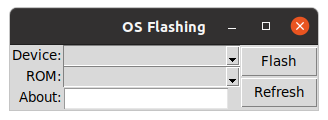
This program will check for images in the os_install/iso/ directory. Each image is composed of a base folder that needs to have a executable of the same name and optionally a conf file also with the folder's name to give a description. Folder /foo/ will have the executable /foo/foo, but many images will often have /foo/foo.conf and sometimes a /foo/bar.iso if desired.
The job of the executable is to completely handle the disk operations, being passed two parameters, The first parameter is the name of the device in /dev/ and the second is the path to /foo/foo.iso. (Note: this argument can be ignored).
The .conf file should contain one line of text. That line will be displayed in the GUI.
This script may provide diffrent values in the text boxes for dropdowns, but the actual values being submitted are correct.
- Install the GreaseMonkey addon for Firefox.
- Click the GreaseMonkey icon in the top right of the browser and select *Import a Backup.
- Select the
/TDX/Greasemonkey/main.zipfile.
The script should now be installed and ready to use.
Note: THIS SCRIPT IS NOT GUARANTEED TO WORK ON ANY BROWSER OTHER THAN FIREFOX.
For details on how to modify the script, refer to this page.
Refer to the GreaseMonkey Documentation for more information on how to modify the script.
gpl-3.0