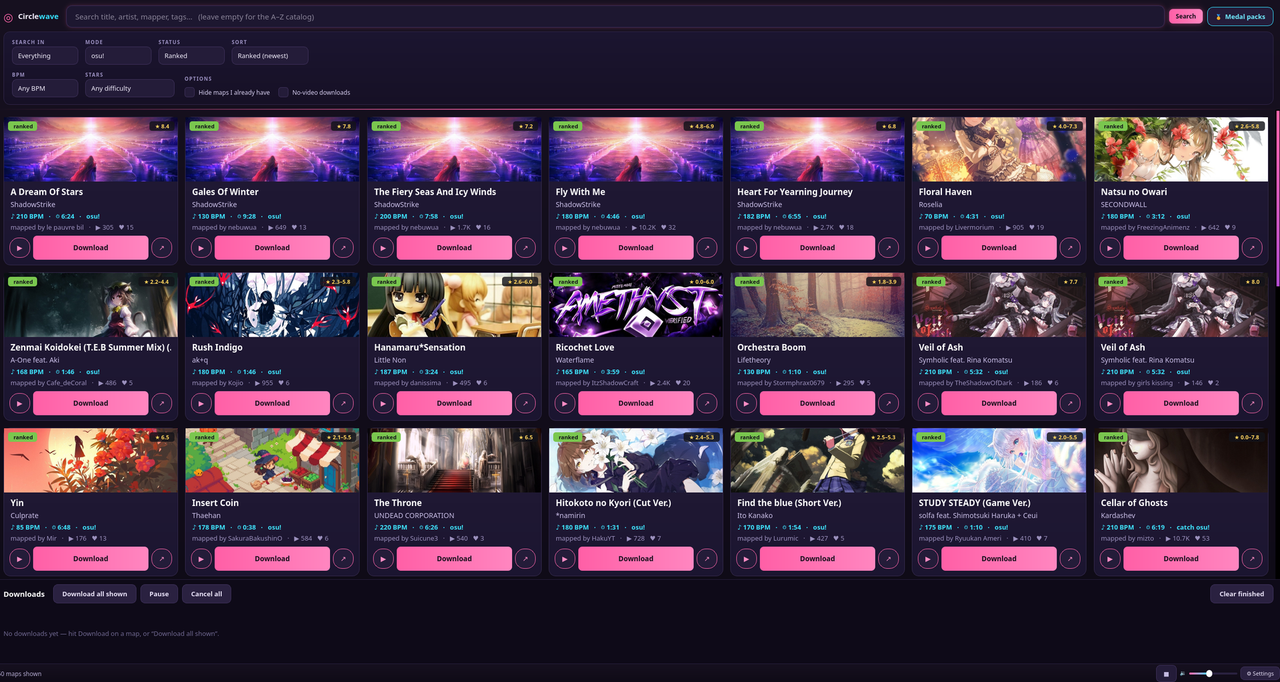
A synthwave-themed desktop browser & batch downloader for osu! beatmaps.
Search the catalogue, preview audio, queue downloads with mirror fallback, and auto-build osu!stable collections straight from Beatmap Pack medals — all from a single-file PySide6 app with a neon pink-and-cyan UI.


Windows: grab the latest CircleWave.exe from the
Releases page — no Python, no
install, just download and run.
It's an unsigned app, so Windows SmartScreen may warn "Windows protected your PC" on first launch → click More info → Run anyway. The first start is a little slow while the bundle unpacks.
Linux / macOS: run from source — see below. It's a single Python file with two dependencies, so it's a couple of commands on any distro.
- Synthwave / osu! UI — neon pink-and-cyan theme on deep indigo, glowing search, hitcircle-style controls, cover art with status + star badges.
- A–Z catalogue — empty search box + sort Title (A–Z); infinite scroll loads more.
- Search — title / artist / mapper / tags, with a Search in selector. To pull up a specific mapper's maps, set Search in → Mapper (a plain text search otherwise mixes in maps merely tagged with that name).
- Filters — mode, status, BPM range, length range, star range (incl. 7★/8★/9★/10★-and-up bands), plus genre and language. Field-scoped (Artist/Title/Mapper) and genre/language searches run against a complete mirror index for accurate, full results.
- Audio preview — ▶ on any card streams the ~10s clip; volume slider + stop button in the status bar.
- Medal packs (osu!stable) — the 🏅 Medal packs button lists every Beatmap Pack medal
(pulled live from the osu! wiki). Pick one and it loads the pack's maps (with real artist / title /
mapper / stars), downloads them all through the queue, hashes the
.osufiles, and writes a collection named after the medal into acollection.dbyou choose. The path is set in Settings (Browse / Auto-detect) or picked once and remembered; a.bakbackup is written and existing collections are merged, not overwritten. Close osu! before it finishes, then reopen. Stable only — lazer keeps collections in a Realm DB that can't be safely written from outside. - Beatmap packs — the 📦 Beatmap packs button browses all ~3,750 official osu! packs across the seven categories (Standard, Featured Artist, Tournament, Project Loved, Spotlights, Theme, Artist/Album), with a game-mode filter and name search. Pick a pack and it loads exactly like a medal pack: download every map and build a collection named after the pack.
- Most played — the 🔥 Most played button loads any player's most-played beatmaps by username (no login or API key needed — it reads the public profile), ordered by play count. Mass-download them and build a collection named after the player, exactly like a pack.
- One folder — a single location does double duty: maps download into it and it's scanned to mark what you already have (auto-detects osu-wine / lazer / Windows / macOS). Combined with a local history file, "✓ In library" / hide-owned works for lazer too and across machines.
- Batch downloads — queue manager with adjustable concurrency, per-item progress, mirror fallback, optional no-video, optional auto-open to import.
- Bulk + queue control — "Download all shown" queues the visible results; Pause/Resume the queue, Cancel all, or cancel an individual item (✕).
CircleWave is one file (circlewave.py) and needs just PySide6 and requests on
Python 3.10+. Pick the route for your system.
The system Python is externally managed (PEP 668), so install from the repos:
sudo pacman -S pyside6 python-requests
python circlewave.py
If audio preview is silent, add the GStreamer codecs PySide6 uses on Linux:
sudo pacman -S gst-plugins-good gst-plugins-bad gst-libavsudo dnf install python3-pyside6 python3-requests
python circlewave.py
# audio codecs (if preview is silent), from RPM Fusion:
sudo dnf install gstreamer1-plugins-good gstreamer1-plugins-bad-free gstreamer1-libavThe packaged PySide6 is often older than upstream, so a virtualenv with pip is the reliable path:
sudo apt install python3-venv gstreamer1.0-plugins-good gstreamer1.0-plugins-bad gstreamer1.0-libav
python3 -m venv ~/.venvs/circlewave
~/.venvs/circlewave/bin/pip install -r requirements.txt
~/.venvs/circlewave/bin/python circlewave.pysudo zypper install python3-PySide6 python3-requests \
gstreamer-plugins-good gstreamer-plugins-bad gstreamer-plugins-libav
python3 circlewave.pyWorks anywhere with Python 3.10+; pip ships a self-contained Qt, so the only extra you may need is the system GStreamer plugins (above) for audio preview:
python3 -m venv ~/.venvs/circlewave
~/.venvs/circlewave/bin/pip install -r requirements.txt
~/.venvs/circlewave/bin/python circlewave.pybrew install python # if you don't already have Python 3.10+
python3 -m venv ~/.venvs/circlewave
~/.venvs/circlewave/bin/pip install -r requirements.txt
~/.venvs/circlewave/bin/python circlewave.pyAudio preview uses macOS's native media backend, so no extra codecs are needed. On Apple Silicon the pip PySide6 wheels are arm64-native.
Note on audio preview: on Linux, PySide6 plays through GStreamer, so the relevant plugin packages must be present (they usually are on a desktop install). Windows and macOS use their native backends and need nothing extra.
- Search uses the Hinamizawa mirror (
mirror.hinamizawa.ai) — a complete, no-auth index with clean relevance ranking, sort, pagination, and genre/language filters. It returns accurate, full results (e.g. an artist's whole catalogue), unlike thinner mirrors that miss maps or can't filter by artist. Nerinyan (api.nerinyan.moe) is the automatic fallback if it's unreachable. - BPM and play/favourite counts aren't in the mirror's search response, so visible cards enrich those on demand from osu.direct. No account or API key needed for any of this.
- Most played reads the public osu! profile (the same JSON the website uses) — no login or key.
- Downloads cascade across several mirrors (Nerinyan, Sayobot, catboy.best, Beatconnect) so a map that's slow or missing on one is fetched from another.
- The folder scan reads osu!(stable)-style entries (
<setid> Artist - Title); the local history file covers everything downloaded through the app, including lazer imports. - Sort options are the ones the mirror supports (ranked date, title, artist, plays, favourites, updated).
CircleWave is released under the GNU General Public License v3.0 — see LICENSE. It bundles PySide6 (LGPL/Qt) and requests (Apache-2.0), both compatible with the GPL.
Not affiliated with or endorsed by ppy Pty Ltd. "osu!" is a trademark of its respective owner. Beatmaps are downloaded from third-party mirrors; please support mappers and the official game.