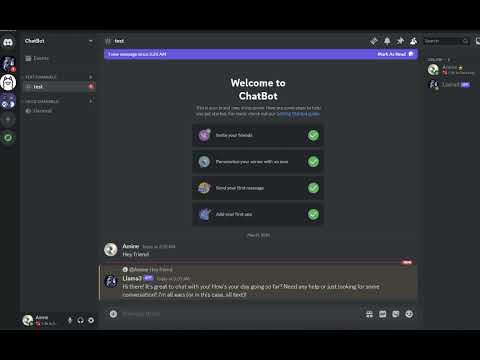
This is a Discord chatbot that uses Ollama to generate responses. It can handle messages, process text attachments, and reset the conversation log using the command '!reset'.
- A Discord account and a bot token
- Ollama installed locally from the official website
First, clone the repository to your local machine and navigate to the project directory.
git clone https://github.com/Amine-LG/Discord-Ollama-ChatBot.gitcd Discord-Ollama-ChatBotCreate a virtual environment to manage dependencies.
python -m venv bot-envActivate the virtual environment.
- On Windows:
bot-env\Scripts\activate
- On macOS/Linux:
source bot-env/bin/activate
Install the required packages using requirements.txt.
pip install -r requirements.txtCreate a .env file in the root directory and add your Discord bot token.
DISCORD_TOKEN=your_discord_bot_token
Make sure Ollama is installed and running on your local machine.
To download and install the Llama3 model, run the following command in your terminal:
ollama run llama3For more models, visit the Ollama Model Library.
Run the bot using the following command.
python main.pyThis is the main script that runs the bot. It includes the following functionalities:
- Loading environment variables
- Initializing logging
- Defining the bot's behavior
- Handling messages and attachments
- Interacting with the Ollama running locally
- Changing the bot's nickname (optional)
This file lists all the necessary packages and their versions.
python-dotenv==1.0.1
discord.py==2.3.2
ollama==0.2.0
You can reset the conversation log by using the !reset command in Discord.