Exam Notifier provides users with notifications that a card will appear after an upcoming exam date. This feature allows the user to determine how to answer the card (i.e. Again, Hard, Good, Easy) or determine if rescheduling the card is deemed necessary. For example, a user may struggle with a particular subject and despite their ability to answer the card correctly, that they would like to revist these cards on the days leading up to their exam.
Many of us use Anki to prepare for exams. Some of us use Anki to learn a language in preparation for a trip to another country. Exam Notifier will tell you which cards are set to reappear after your test date. For example, if my big exam is coming up in 27 days and the current card is set to reappear in 28 days, this addon will notify you of this fact and give you the option to reschedule that card to reappear sooner for further review(s).
The easiest way to install Exam Notifier is through AnkiWeb.
Please click on the entry corresponding to your Anki version:
Anki 2.1
- Make sure you have the latest version of Anki 2.1 installed. Earlier releases (e.g. found in various Linux distros) do not support
.ankiaddonpackages. - Download the latest
.ankiaddonpackage from the releases tab (you might need to click on Assets below the description to reveal the download links) - From Anki's main window, head to Tools → Add-ons
- Drag-and-drop the
.ankiaddonpackage onto the add-ons list - Restart Anki
Video summary:
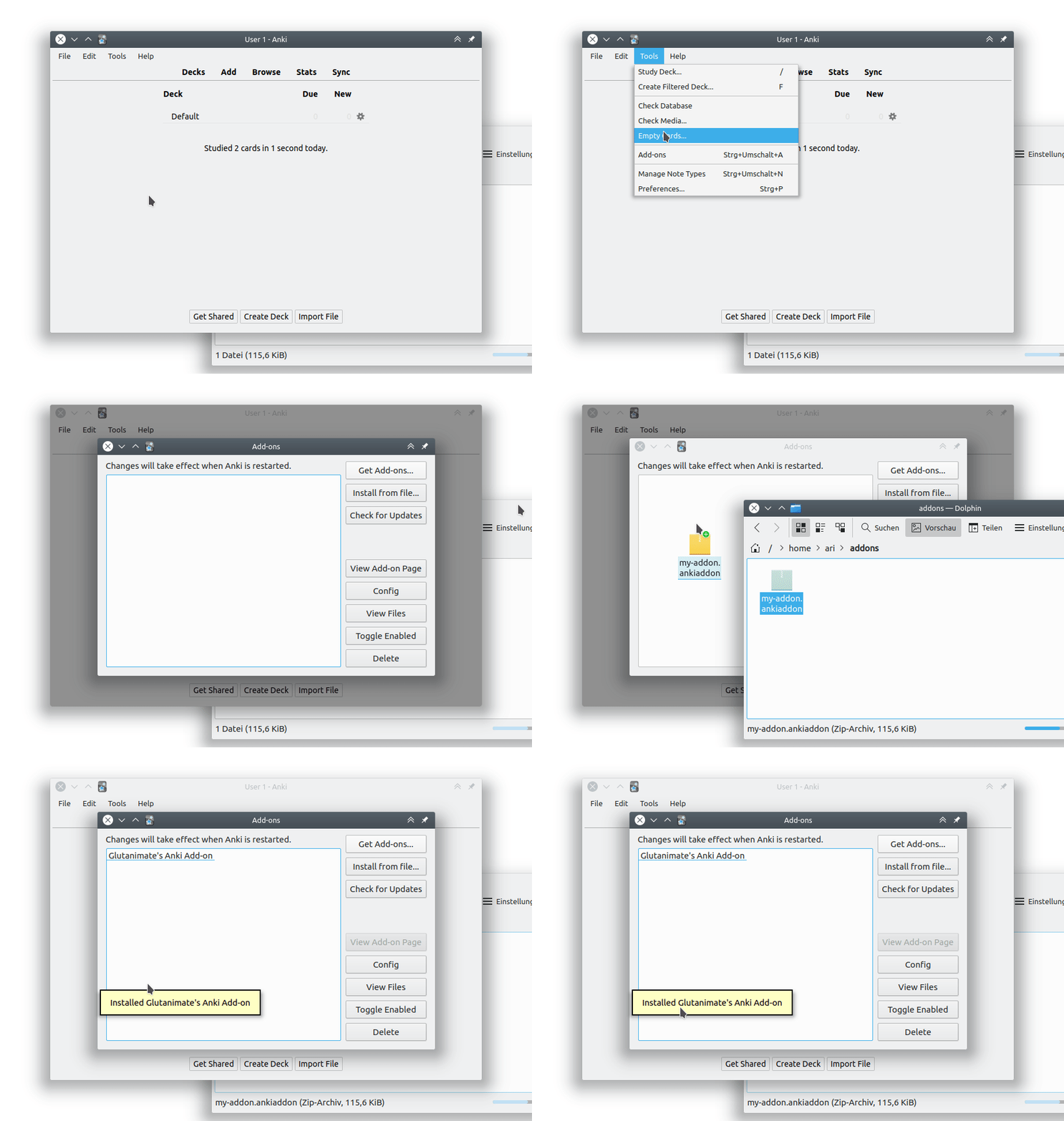
For further information on the use of this add-on please check out the description text for AnkiWeb.
To build Exam Notifier, you will need to have the latest development build of Anki add-on builder installed, alongside Qt5 and Qt6 dependencies:
pip install --upgrade git+https://github.com/glutanimate/anki-addon-builder.git@v1.0.0-dev.1#egg=aab[qt5,qt6]You also need have Node and yarn installed.
You can then proceed to build the add-on via:
git clone https://github.com/ankingmed/exam-notifier.git
cd exam-notifier
make build
For more information on the build process please refer to aab's documentation.
You can run make develop to build into /src/exam_notifier, which you can then soft link from addons21 directory.
Run yarn dev, and when you edit an existing ts/svelte file, the files are re-built automatically. (You may still need to restart Anki for the changes to take effect)
Contributions are welcome! Please review the contribution guidelines on how to:
- Report issues
- File pull requests
- Support the project as a non-developer
Exam Notifier is Copyright © 2019-2022 Aristotelis P. (Glutanimate)
All credits for the original idea for this add-on go to to The AnKing.
Exam Notifier is free and open-source software. The add-on code that runs within Anki is released under the GNU AGPLv3 license, extended by a number of additional terms. For more information please see the LICENSE file that accompanied this program.
Please note that this program uses the Libaddon library which comes with its own additional terms extending the GNU AGPLv3 license. You may only copy, distribute, or modify the present compilation of this program with Libaddon under the combined licensing terms specified by both licenses.
This program is distributed in the hope that it will be useful, but WITHOUT ANY WARRANTY.
If you enjoy Exam Notifier, please consider supporting our work through one of the means below:
Please consider checking out our:





Make sure to check out my socials for the latest add-on updates and news:


Lots of exclusive add-ons and other goodies also await on my Patreon page. Make sure to take a look!: