Home
Welcome to the MiniDexed wiki!
Select a page from the right-hand side of this page.
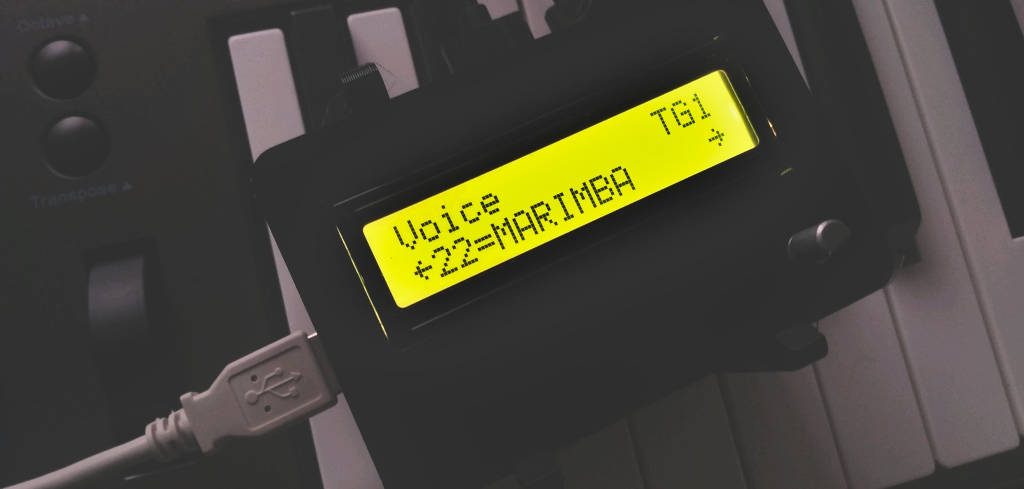
A brief introduction to using the miniDexed
NOTE: This Quick Start Guide assumes a Raspberry Pi 2, Zero 2 or later, with Rotary Encoder and Display. Other hardware configurations are possible.
The miniDexed is a DIY synthesizer that emulates eight DX7s, an 8-channel mixer, reverb, and a compressor as acting a limiter — all running on a Raspberry Pi (version 2 or higher).
The DX7 simulation is based on the excellent open-source software Dexed.
In miniDexed, each Dexed instance is referred to as a Tone Generator (TG) — labeled TG1 to TG8. For each TG, you can adjust the sound (DX7 patch), volume, panning, reverb send, detune, cutoff, resonance, pitch bend, portamento, poly/mono mode, modulation, and the MIDI channel.
A Voice refers to a single DX7 patch. Voices are stored in SysEx banks, which can be copied to the SD card. Each bank contains 32 voices.
Example: The four DX7II Factory banks
D:\sysex\voice\000001_DX7IIVox32.syx
D:\sysex\voice\000002_DX7IIVox32b.syx
D:\sysex\voice\000003_DX7IIVox64.syx
D:\sysex\voice\000004_DX7IIVox64b.syx
Refer to the miniDexed Wiki for required file name formats.
A Performance stores the complete configuration of all 8 Tone Generators, plus the reverb settings. Performances are organized into banks, each capable of holding up to 128 Performances. They are saved on the SD card.
Example: The performances banks included with the miniDexed
D:\performance\001_Seed
D:\performance\002_Greenhouse
D:\performance\003_Oasis
D:\performance\128_Laboratory
Performances from the Laboratory bank
D:\performance\128_Laboratory\000001_INIT-Multitim..ini
D:\performance\128_Laboratory\000002_MultiTimbral.ini
D:\performance\128_Laboratory\000003_pure DX7.ini
D:\performance\128_Laboratory\000004_Single.ini
D:\performance\128_Laboratory\000005_DoubleLayer.ini
D:\performance\128_Laboratory\000006_Quadro.ini
D:\performance\128_Laboratory\000007_OctaThin.ini
D:\performance\128_Laboratory\000008_OctaFat.ini
D:\performance\128_Laboratory\000009_1TG Perf..ini
D:\performance\128_Laboratory\000010_Drum Map.ini
Power up your MiniDexed and set your MIDI keyboard to MIDI Channel 1.
With the encoder, you control everything:
- Rotate: Move through the Top-Level menu or adjust a parameter.
- Short press: Enter a submenu.
- Long press: Go up one livel in the menu
- Press and Turn: Switch TGs in the submenus like Voice, Bank, Volume, Pan, ReverbSend, Detune, Cutoff, Resonance, Midi Channel.
- Double-click: Don’t panic - that's the Home function! Return to the top-level menu at “TG1”. Anyone who has equipped their miniDexed with buttons or operates it with the help of a MIDI controller will of course have to rethink this accordingly.

It takes some practice to master the operation with only one encoder but it gets better with time, believe me😅
- At the top-level menu, navigate to Performance.
- Press the encoder once to open the submenu, the display will show "Performance" and "Load".
- Press the encoder again to access the Performance selection.
- Rotate to select a Performance and press to load it.
- At the top-level menu, navigate to Performance.
- Press the encoder once to open the submenu
- Navigate to Bank
- Press the encoder again to access the Bank selection.
- Rotate to select a Performance Bank and press to load it.
- The quickest way to access the „Performance Load menu“ from here is this: Long press – rotate left to "Load" then short press and you'll be back in the Performance Load menu.
- Start from the top level menu and navitgate to Master Volume.
- Press once: "Master Volume" appears with a volume bar.
- Rotate to set the level.
- Long-press to return to the previous menu.
The miniDexed can be used in a variety of ways. The included Performances are mostly single-player sounds, meaning the tone generators are layered and all play the same notes as those played by the MIDI keyboard. However, it is also possible to control multitimbral sounds from a DAW. The Performance "MultiTimbral" in Bank 128_Laboratory is a good starting point for using a DAW or sequncer. Each TG is assigned its own MIDI channel:
- TG1 → MIDI Channel 1
- TG2 → MIDI Channel 2
- ...
- TG8 → MIDI Channel 8 Each Tone Generator can be edited independently.
These tables do not contain all the parameters of a performance, they are only intended for easy understanding. The NoteLimitLow and NoteLimitHigh lines are not yet accessible from the MiniDexed menu.

-
MiniDexed Homepage - https://github.com/probonopd/MiniDexed
-
MiniDexed Wiki - https://github.com/probonopd/MiniDexed/wiki
-
Dexed Homepage - https://asb2m10.github.io/dexed/
-
Sounds for miniDexed - https://github.com/Banana71/Soundplantage
-
👉 For further questions, visit the MiniDexed Discussion Forum
This miniDexed - Quick Start Guide was written by Banana71.