Bone is a blazingly fast application that provides dogs and their owners a safe way to connect for playdates end other events because dogs deserve a social life too.
Using service based architecture, we created the back end database to accomodate our front end so that it could quickly and securely perform transactions through our API endpoints.
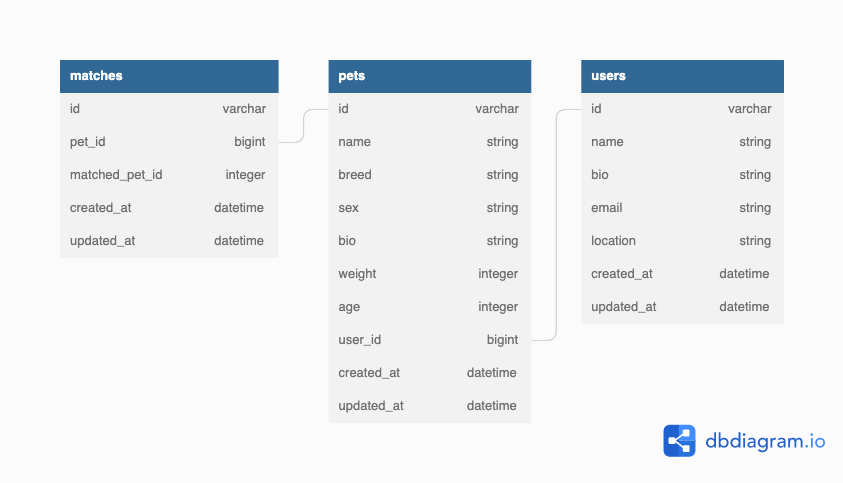
Thanks for checking out Bone! There are a few ways to access and manipulate data through our API endpoints and a few technologies we used to develop our project.
- get /api/vi/users
- Returns all users
- post /api/v1/users
- Creates a user
- get /api/v1/users/:id
- Returns an individual user
- delete /api/v1/users/:id
- Deletes an individual user
- get /api/vi/pets
- Returns all pets
- post /api/v1/users/:id/pets
- Creates a pet under a user
- patch /api/v1/pets/:id
- Updates pet attributes
- delete /api/v1/pets/:id
- Deletes a pet
In order to host this API locally you will need to configure your development environment appropriately.
Bone was developed in Rails 5.2.8.1 (it is recommended to use either this version or a newer version of rails within Rails 5) and Ruby version 2.7.4.
To verify your version of Ruby and Rails run the following commands from your command line:
$ ruby -v
$ ruby 2.7.4p191 (2021-07-07 revision a21a3b7d23) [arm64-darwin21]
$ rails -v
$ Rails 5.2.8.1
If you do not have Ruby installed please visit the Ruby docs here.
If you also need Rails please visit the Rails documentation site here.
Open your terminal and run these commands:
gem install bundlergit clone https://github.com/Bone-TM/bone_BEbundle installrails db:{drop,create,migrate,seed}
Due to the fact that this will be a local consumption, all endpoints you consume will start with http://localhost:3000 by default unless specified otherwise.
Now that everything is properly configured on your local machine, run rails s in your terminal to start the server and get consuming!