
A Customizable, Multi-Objective AI Agent Benchmarking Framework for Agentic Reliability and Mediation (ARM)



🚀 Quick Start in 2 minutes: Clone → Install → Run → Get comprehensive agent evaluation results!
Agentic Reliability and Mediation (ARM) is a research and development area at BrainGnosis. We study how to measure and improve the reliability of AI agents and how they mediate conflicts during autonomous decision making. Our goal is to establish clear principles, metrics, and evaluation protocols that transfer across domains, so agents remain dependable, aligned, and resilient under varied operating conditions.
From this work we are releasing OmniBAR (Benchmarking Agentic Reliability), an open source, flexible, multi-objective benchmarking framework for evaluating AI agents across both standard suites and highly customized use cases. OmniBAR looks beyond output-only checks: it assesses decision quality, adaptability, conflict handling, and reliability in single-agent and multi-agent settings. Its modular design lets teams add scenarios, metrics, reward and constraint definitions, and integrations with tools and simulators. The result is domain-relevant testing with reproducible reports that reflect the demands of real-world applications.
⚠️ Development Version Notice
OmniBAR is currently in active development. While we strive for stability, you may encounter bugs, breaking changes, or incomplete features. We recommend thorough testing in your specific use case and welcome bug reports and feedback to help us improve the framework.
- About Us: BrainGnosis
- Why OmniBAR?
- Why OmniBAR is Different
- How It Works
- Installation
- 30-Second Demo
- Quick Start
- Common Use Cases
- Core Concepts
- Examples
- Framework Integrations
- Advanced Usage
- Development
- Contributing
- FAQ
- License
- Support

BrainGnosis is dedicated to making AI smarter for humans through structured intelligence and reliable AI systems. We are developing AgentOS, an enterprise operating system for intelligent AI agents that think, adapt, and collaborate to enhance organizational performance.
Our Mission: Build reliable, adaptable, and deeply human-aligned AI that transforms how businesses operate.
🔗 Learn more: www.braingnosis.com
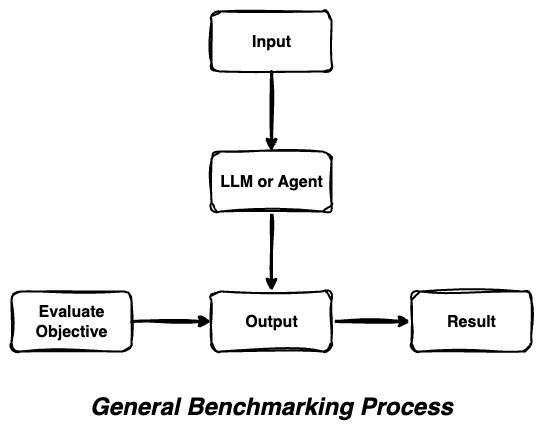
Traditional benchmarking approaches evaluate AI systems through simple input-output comparisons, missing the complex decision-making processes that modern AI agents employ.
OmniBAR's Comprehensive Approach
OmniBAR captures the full spectrum of agentic behavior by evaluating multiple dimensions simultaneously - from reasoning chains to action sequences to system state changes.
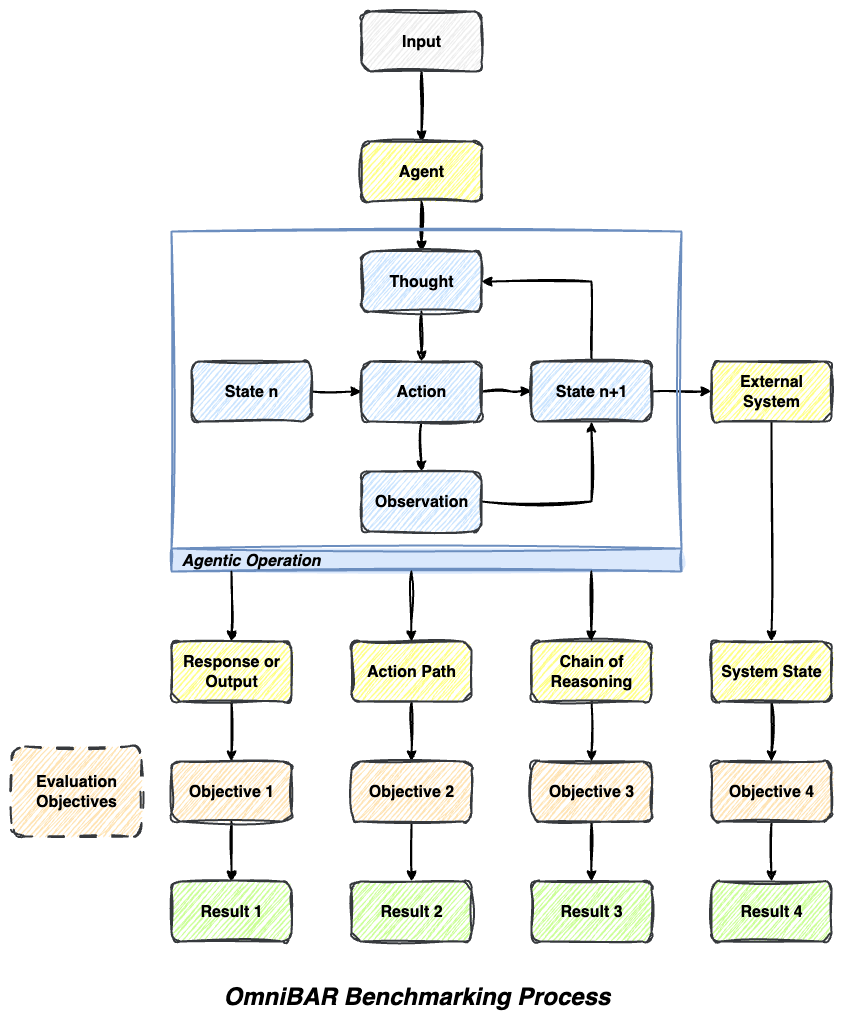
- 📊 Multi-Dimensional Evaluation: Assess outputs, reasoning, actions, and states simultaneously with native support for output-based, path-based, state-based, and llm-as-a-judge evaluations
- 🔄 Agentic Loop Awareness: Understands iterative thought-action-observation cycles that modern AI agents employ
- 🎯 Objective-Specific Analysis: Different aspects evaluated by specialized objectives with comprehensive evaluation criteria
- 🔗 Comprehensive Coverage: No blind spots in agent behavior assessment - captures the full decision-making process
- ⚡ High-Performance Execution: Async-support enables rapid concurrent evaluation for faster benchmarking cycles
- 📊 Advanced Analytics: Built-in AI summarization and customizable evaluation metrics for actionable insights
- 🔧 Extensible Architecture: Modular design allowing custom objectives, evaluation criteria, and result types
- 🔄 Framework Agnostic: Works seamlessly with any Python-based agent framework (LangChain, Pydantic AI, custom agents)
OmniBAR follows a clean, modular architecture that makes it easy to understand and extend:
omnibar/
├── core/                     # Core benchmarking engine
│   ├── benchmarker.py       # Main OmniBarmarker class
│   └── types.py             # Type definitions and result classes
├── objectives/              # Evaluation objectives
│   ├── base.py             # Base objective class
│   ├── llm_judge.py        # LLM-based evaluation
│   ├── output.py           # Output comparison objectives
│   ├── path.py             # Path/action sequence evaluation
│   ├── state.py            # State-based evaluation
│   └── combined.py         # Multi-objective evaluation
├── integrations/            # Framework-specific integrations
│   └── pydantic_ai/        # Pydantic AI integration
└── logging/                # Logging and analytics
    ├── logger.py           # Comprehensive logging system
    └── evaluator.py        # Auto-evaluation and analysis
Evaluation Flow:
- Agent Execution: Your agent processes input and generates output
- Multi-Objective Assessment: Different objectives evaluate different aspects
- Comprehensive Logging: Results are logged with detailed analytics
- Performance Insights: Get actionable feedback on agent behavior
- Python 3.10+ (Required)
- "API Keys": OpenAI, Anthropic (for LLM Judge objectives)
- 5 minutes for setup and first benchmark
Recommended Installation (Most Reliable):
# Clone the repository
git clone https://github.com/BrainGnosis/OmniBAR.git
cd OmniBAR

# Install dependencies
pip install -r omnibar/requirements.txt

# Install in development mode
pip install -e .
Alternative: PyPI Installation (Beta)
⚠️ Beta Notice: PyPI installation is available but currently in beta testing. Cross-platform compatibility is being actively improved. For the most reliable experience, we recommend the git installation above.
# Install from PyPI (beta - may have platform-specific issues)
pip install omnibarCreate a .env file in your project root with your API keys:
# .env
OPENAI_API_KEY=your_openai_api_key_here
ANTHROPIC_API_KEY=your_anthropic_api_key_here
✅ That's it! OmniBAR automatically loads environment variables when you import it.
Core dependencies:
python==3.10+
langchain==0.3.27
langchain_core==0.3.75
langchain_openai==0.3.32
pydantic==2.11.7
rich==14.1.0
numpy==2.3.2
tqdm==4.67.1Want to see OmniBAR in action immediately? Here's the minimal example:
from omnibar import OmniBarmarker, Benchmark
from omnibar.objectives import StringEqualityObjective

# 1. Define a simple agent
class SimpleAgent:
    def invoke(self, query: str) -> dict:
        return {"answer": "Paris"}

def create_agent():
    return SimpleAgent()

# 2. Create benchmark
benchmark = Benchmark(
    name="Geography Test",
    input_kwargs={"query": "What's the capital of France?"},
    objective=StringEqualityObjective(name="exact_match", output_key="answer", goal="Paris"),
    iterations=1
)

# 3. Run evaluation
benchmarker = OmniBarmarker(
    executor_fn=create_agent,
    executor_kwargs={},
    initial_input=[benchmark]
)
results = benchmarker.benchmark()

# 4. View results
benchmarker.print_logger_summary()
Output:
✅ Geography Test: PASSED (100% accuracy)
📊 1/1 benchmarks passed | Runtime: 0.1s
Here's a complete example demonstrating OmniBAR's core capabilities:
import asyncio
from dotenv import load_dotenv
from omnibar import OmniBarmarker, Benchmark
from omnibar.objectives import LLMJudgeObjective, StringEqualityObjective, CombinedBenchmarkObjective
from omnibar.core.types import BoolEvalResult, FloatEvalResult

# Load environment variables
load_dotenv()

# Define your agent (works with any Python callable)
class SimpleAgent:
    def invoke(self, query: str) -> dict:
        if "capital" in query.lower() and "france" in query.lower():
            return {"response": "The capital of France is Paris."}
        return {"response": "I'm not sure about that."}

def create_agent():
    return SimpleAgent()

# Create evaluation objectives
accuracy_objective = StringEqualityObjective(
    name="exact_accuracy",
    output_key="response",
    goal="The capital of France is Paris."
)

quality_objective = LLMJudgeObjective(
    name="response_quality",
    output_key="response",
    goal="The agent identified the capital of France correctly",
    valid_eval_result_type=FloatEvalResult  # 0.0-1.0 scoring
)

# Combine multiple objectives
combined_objective = CombinedBenchmarkObjective(
    name="comprehensive_evaluation",
    objectives=[accuracy_objective, quality_objective]
)

# Create and run benchmark
async def main():
    benchmark = Benchmark(
        name="Geography Knowledge Test",
        input_kwargs={"query": "What is the capital of France?"},
        objective=combined_objective,
        iterations=5
    )

    benchmarker = OmniBarmarker(
        executor_fn=create_agent,
        executor_kwargs={},
        initial_input=[benchmark]
    )

    # Execute with concurrency control
    results = await benchmarker.benchmark_async(max_concurrent=3)

    # View results
    benchmarker.print_logger_summary()
    return results

# Run the benchmark
if __name__ == "__main__":
results = asyncio.run(main())Got the basic example working? Here's your learning path:
- 🔍 Explore Examples: Check out
examples/directory for real-world use cases - 🎛️ Try Different Objectives: Experiment with LLM Judge and Combined objectives
- ⚡ Scale Up: Use async benchmarking with
benchmark_async()for faster evaluation - 🔧 Customize: Create your own evaluation objectives for domain-specific needs
- 📊 Analyze: Dive deeper with
print_logger_details()for comprehensive insights
Need help? Check our FAQ or join the community discussions!
Here are real-world scenarios where OmniBAR excels:
Scenario: Validating customer service chatbots before deployment
- Objectives: LLM Judge for helpfulness + StringEquality for policy compliance
- Benefit: Ensure agents are both helpful AND follow company guidelines
Scenario: Comparing different agent architectures or prompting strategies
- Objectives: Combined objectives measuring accuracy, reasoning quality, and efficiency
- Benefit: Rigorous A/B testing with statistical significance
Scenario: Continuous evaluation of deployed agents
- Objectives: State-based objectives tracking system changes + output quality
- Benefit: Early detection of performance degradation
Scenario: Evaluating AI tutoring systems
- Objectives: Path-based objectives tracking learning progression + content accuracy
- Benefit: Comprehensive assessment of both teaching method and content quality
Scenario: Testing collaborative agent teams
- Objectives: State-based objectives for system coordination + individual agent performance
- Benefit: Holistic evaluation of complex agent interactions
| Objective Type | Best For | Example Use Case | Key Benefit |
|---|---|---|---|
| LLM Judge | Subjective qualities | "Is this explanation clear?" | Human-like evaluation |
| Output-Based | Exact requirements | "Does output match format?" | Precise validation |
| Path-Based | Process evaluation | "Did agent use tools correctly?" | Workflow assessment |
| State-Based | System changes | "Was database updated properly?" | State verification |
| Combined | Comprehensive testing | "All of the above" | Complete coverage |
OmniBAR provides multiple evaluation objective types, each designed to address different evaluation challenges:
When to use: "How do I evaluate subjective qualities like helpfulness, creativity, or nuanced correctness that can't be captured by exact matching?"
Perfect for assessing complex, subjective criteria where human-like judgment is needed.
# Boolean evaluation (pass/fail)
binary_objective = LLMJudgeObjective(
    name="correctness_check",
    output_key="response",
    goal="Provide a factually correct answer"
)

# Numerical evaluation (0.0-1.0 scoring)
scoring_objective = LLMJudgeObjective(
    name="quality_score",
    output_key="response",
    goal="Provide comprehensive and helpful information",
    valid_eval_result_type=FloatEvalResult
)When to use: "How do I verify that my agent produces the exact output I expect, or matches specific patterns?"
Ideal for deterministic evaluations where you need precise output matching or format validation.
# Exact string matching
exact_objective = StringEqualityObjective(
    name="exact_match",
    output_key="answer",
    goal="Paris"
)

# Regex pattern matching
pattern_objective = RegexMatchObjective(
    name="pattern_match",
    output_key="response",
    goal=r"Paris|paris"
)When to use: "How do I evaluate not just what my agent outputs, but HOW it gets there and what changes it makes?"
Essential for evaluating agent reasoning processes, tool usage sequences, and system state modifications.
# Evaluate action sequences
path_objective = PathEqualityObjective(
    name="tool_usage",
    output_key="agent_path",
    goal=[[("search", SearchTool), ("summarize", None)]]
)

# Evaluate state changes
state_objective = StateEqualityObjective(
    name="final_state",
    output_key="agent_state",
    goal=ExpectedState
)📝 AI-Generated Content Notice
The examples and tests in this repository were developed with assistance from AI coding tools and IDEs. While we have reviewed and tested the code, please validate the examples thoroughly in your own environment and adapt them to your specific needs.
The examples/ directory contains comprehensive examples:
pydantic_ai_example.py- Model parity comparison (Claude 3.5 vs GPT-4)document_extraction_evolution.py- Document extraction prompt evolution (4 iterative improvements)langchain_embedding_example.py- LangChain embedding benchmarksinventory_management_example.py- Complex inventory management agent evaluation
📋 Full Example List:
output_evaluation.py- Basic string/regex evaluation (no API keys needed)custom_agent_example.py- Framework-agnostic agent patternsbool_vs_float_results.py- Boolean vs scored result comparisondocument_extraction_evolution.py- Document extraction prompt evolution
See examples/README.md for detailed descriptions and setup instructions.
# Print summary with key metrics
benchmarker.print_logger_summary()

# Detailed results with full evaluation data
benchmarker.print_logger_details(detail_level="detailed")

# Access raw logs for custom processing
logs = benchmarker.logger.get_all_logs()OmniBAR works seamlessly with popular AI agent frameworks:
LangChain Integration
from langchain.agents import create_openai_functions_agent
from langchain_openai import ChatOpenAI

def create_langchain_agent():
    llm = ChatOpenAI(temperature=0, model="gpt-4")
    tools = []  # Add your tools here
    agent = create_openai_functions_agent(llm, tools, prompt=None)
    return agent

benchmarker = OmniBarmarker(
    executor_fn=create_langchain_agent,
    executor_kwargs={},
    agent_invoke_method_name="invoke",
    initial_input=[benchmark]
)
Pydantic AI Integration
from omnibar.integrations.pydantic_ai import PydanticAIOmniBarmarker
from pydantic_ai import Agent

def create_pydantic_agent():
    return Agent(model="openai:gpt-4", result_type=str)

benchmarker = PydanticAIOmniBarmarker(
    executor_fn=create_pydantic_agent,
    initial_input=[benchmark]
)
Custom Agent Integration
class MyCustomAgent:
    def run(self, input_data: dict) -> dict:
        # Your custom agent logic
        return {"response": "Custom agent response"}

def create_custom_agent():
    return MyCustomAgent()

benchmarker = OmniBarmarker(
    executor_fn=create_custom_agent,
    executor_kwargs={},
    agent_invoke_method_name="run",  # Specify your agent's method
    initial_input=[benchmark]
)custom_objective = LLMJudgeObjective(
name="factual_correctness",
output_key="response",
goal="Correctly identify the author",
prompt="""
Evaluate this response for factual correctness.
Expected: {expected_output}
Agent Response: {input}
Return true if the information is factually correct.
{format_instructions}
""",
valid_eval_result_type=BoolEvalResult
)Required Placeholders: {input}, {expected_output}, {format_instructions}
def custom_evaluation_function(input_dict: dict) -> dict:
    agent_output = input_dict["input"]

    # Your custom logic here
    if "paris" in agent_output.lower():
        score = 0.9
        message = "Correctly identified Paris"
    else:
        score = 0.1
        message = "Failed to identify correct answer"

    return {"result": score, "message": message}

custom_objective = LLMJudgeObjective(
    name="custom_evaluation",
    output_key="response",
    invoke_method=custom_evaluation_function,
    valid_eval_result_type=FloatEvalResult
)from omnibar.core.types import ValidEvalResult
from omnibar.objectives.base import BaseBenchmarkObjective
class ScoreWithReason(ValidEvalResult):
result: float
reason: str
class CustomObjective(BaseBenchmarkObjective):
valid_eval_result_type = ScoreWithReason
def _eval_fn(self, goal, formatted_output, **kwargs):
# Your evaluation logic
score = 0.8
reason = "Custom evaluation completed"
return ScoreWithReason(result=score, reason=reason)git clone https://github.com/BrainGnosis/OmniBAR.git
cd OmniBAR
# Install development dependencies
pip install -e .[dev]
# Install pre-commit hooks
pre-commit installcd tests/
# Quick development tests
python run_tests.py fast # ~4s, fast tests only
python run_tests.py imports # ~1s, smoke test
# Run by category
python run_tests.py logging # Test logging components
python run_tests.py core # Core benchmarker tests
python run_tests.py objectives # Evaluation objectives
# Comprehensive testing with rich output
python test_all.py --fast # Skip slow tests
python test_all.py # Everything (~5min)
python test_all.py --verbose # Detailed failure infoSee tests/README.md for detailed information about the test suite structure and available options.
We welcome contributions to OmniBAR! Here's how you can help:
- 🐛 Bug Reports: Found an issue? Open an issue
- 💡 Feature Requests: Have an idea? Start a discussion
- 🔧 Code Contributions: Submit pull requests for bug fixes and new features
- 📚 Documentation: Help improve our docs and examples
- 🧪 Testing: Add test cases and improve test coverage
- Fork the repository
- Create a feature branch (
git checkout -b feature/amazing-feature) - Make your changes and add tests
- Run tests and ensure they pass (
pytest) - Commit your changes (
git commit -m 'Add amazing feature') - Push to your branch (
git push origin feature/amazing-feature) - Open a Pull Request
- Follow PEP 8 for Python code
- Use type hints where appropriate
- Add docstrings for public functions and classes
- Run
pre-commit installto enable automatic formatting
Q: What makes OmniBAR different from other benchmarking tools? A: OmniBAR evaluates the full agentic loop (reasoning, actions, state changes) rather than just input-output comparisons. It supports multi-objective evaluation and works with any Python-based agent framework.
Q: Can I use OmniBAR with my existing agent framework? A: Yes! OmniBAR is framework-agnostic and works with LangChain, Pydantic AI, AutoGen, or custom agents. Just provide a callable that takes input and returns output.
Q: How do I create custom evaluation objectives?
A: Extend BaseBenchmarkObjective and implement the _eval_fn method. See the Custom Objectives examples for details.
Q: Does OmniBAR support async execution?
A: Yes! Use benchmarker.benchmark_async() with concurrency control via the max_concurrent parameter.
Q: How do I integrate with different LLM providers?
A: OmniBAR uses your agent's LLM configuration. For LLM Judge objectives, set your API keys in the .env file and they'll be loaded automatically.
Q: Can I benchmark multi-agent systems? A: Absolutely! Create benchmarks for each agent or use Combined objectives to evaluate multi-agent interactions.
Q: I'm getting import errors when using OmniBAR
A: Ensure you've installed all dependencies: pip install -r omnibar/requirements.txt. Check that your Python version is 3.10+.
Q: My custom evaluation isn't working
A: Verify your _eval_fn returns the correct result type (BoolEvalResult, FloatEvalResult, etc.) and that required placeholders are included in custom prompts.
Q: How do I debug failed benchmarks?
A: Use benchmarker.print_logger_details(detail_level="detailed") to see full evaluation traces and error messages.
Licensed under the Apache License 2.0. See LICENSE for details.
- Issues: GitHub Issues
- Email: dev@braingnosis.ai