See the BroadStreet Example = http://darrenhurst.github.com/BroadStreet/


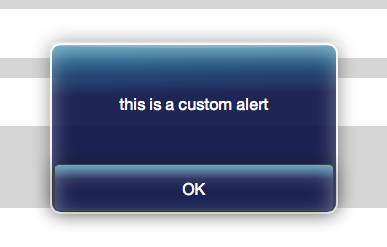
With a custom alert.js for IOS style notification!
Follow Greg Franko - https://github.com/gfranko/Backbone-Require-Boilerplate for the initial Boilerplate used in this project for more information on setting up the boiler.
Broadstreet Mobile is North America’s boutique Mobile Solutions consulting firm, helping customers like RBC, CIBC, Rogers, BMO, Labatt, Yellow Pages Group, Loblaw, and other major organizations achieve sustainable data intelligence. We offer comprehensive strategy and consulting services to develop and deliver high quality end-to-end mobile, web, and social media solutions. We focus all of our efforts on delivering solutions and services through our unwavering commitment in bringing results to our customers. We are passionate about setting the standards for the next generation of mobile technology.
#Getting Started
- Clone this repository
- Download and install Node.js (this is used to run the Require.js Optimizer)
- Download, install, and start a local web server (eg. XAMPP). Make sure to put this repository in your local web server's public folder (eg. htdocs).
Note: A local web server is required because Backbone-Require-Boilerplate dynamically pulls in an HTML dependency (a template), and IE and Chrome have local security restrictions that do not allow this action. If you don't want to download and install a local web server, then you should be able to test the code locally with Firefox. Keep in mind that if you remove the template, the code will work fine locally in all browsers. 4. Enjoy using Backbone.js, Require.js, jQuery, Lodash, and Modernizr (enjoyment optional) 5. Install Compass and start Compass Watch.
##Control Set Types
Controls take the target Div, and for input controls - this [view scope] for valueChange event
Button
var Btn1 =  new Button().render("controls_right");
Btn1.setText("Click For Page 2");
Btn1.setEvent(this,"alertButton");
Usage
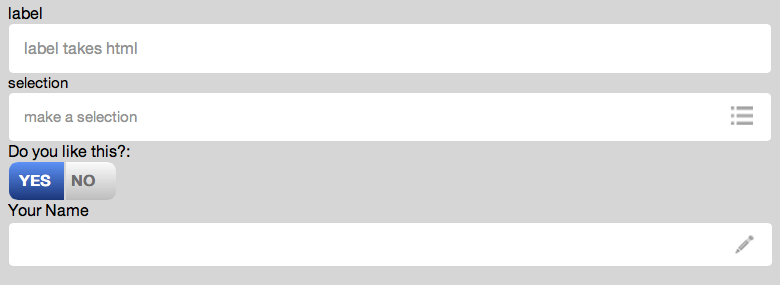
var TextInput = new Input("controls",this).render();

TextInput.setTitle("Your Name");
Usage
var Selection1 = new Selection("controls",this).render();

Selection1.setTitles("selection","make a selection");

Selection1.addRow("option1",1);

Selection1.addRow("option2",2);
Usage
var Toggle1 = new Toggle("controls",this).render();

Toggle1.setTitle("Do you like this?");

Toggle1.setOptions("YES","NO");
Usage
var Msg1 = new Msg("controls",this).render();

Msg1.setTitle("Do you like this?");

Msg1.setWarning("Something");
Usage
var Label1 = new Label("controls",this).render();

Label1.setTitle("label");

Label1.setLabel("label takes html");
##Contributors
Darren Hurst - BroadStreet Mobile
Connect on LinkedIn
Lucas Koolma - BroadStreet Mobile
Lyle Resnick - BroadStreet Mobile

Copyright (c) 2012 BroadStreet Mobile Licensed under the MIT license.