

An Android launcher for Minecraft: Bedrock Edition with multi-version management and an extensible native modding system.


CaramelClient is an open-source Android launcher for Minecraft: Bedrock Edition. It lets you import your official Minecraft APK and launch it without a system install, keep multiple isolated game versions side by side, and extend the game with native modules through a SweetLoader runtime.
It is built for legitimate players: it runs the copy of Minecraft you already own, it does not ship the game, and it does not bypass licensing.
Independent project: CaramelClient has its own architecture, branding, feature set, and maintenance. It is not a fork of any other launcher — no code in this repository is copied from another launcher. Its native-modding layer does build on conventions and one live data dependency from the wider open-source Bedrock modding ecosystem: the LeviLamina / Levilamina-Android mod-template conventions, and the LeviLaunchroid signature-rules source its own signed rule file derives from. Both are credited under Acknowledgements. Every component here is developed and maintained as part of CaramelClient.
Jump to: Screenshots · Quick start · Features · Status · Developers · Docs
| Launch tab Hero preview, info cards, docked launch bar 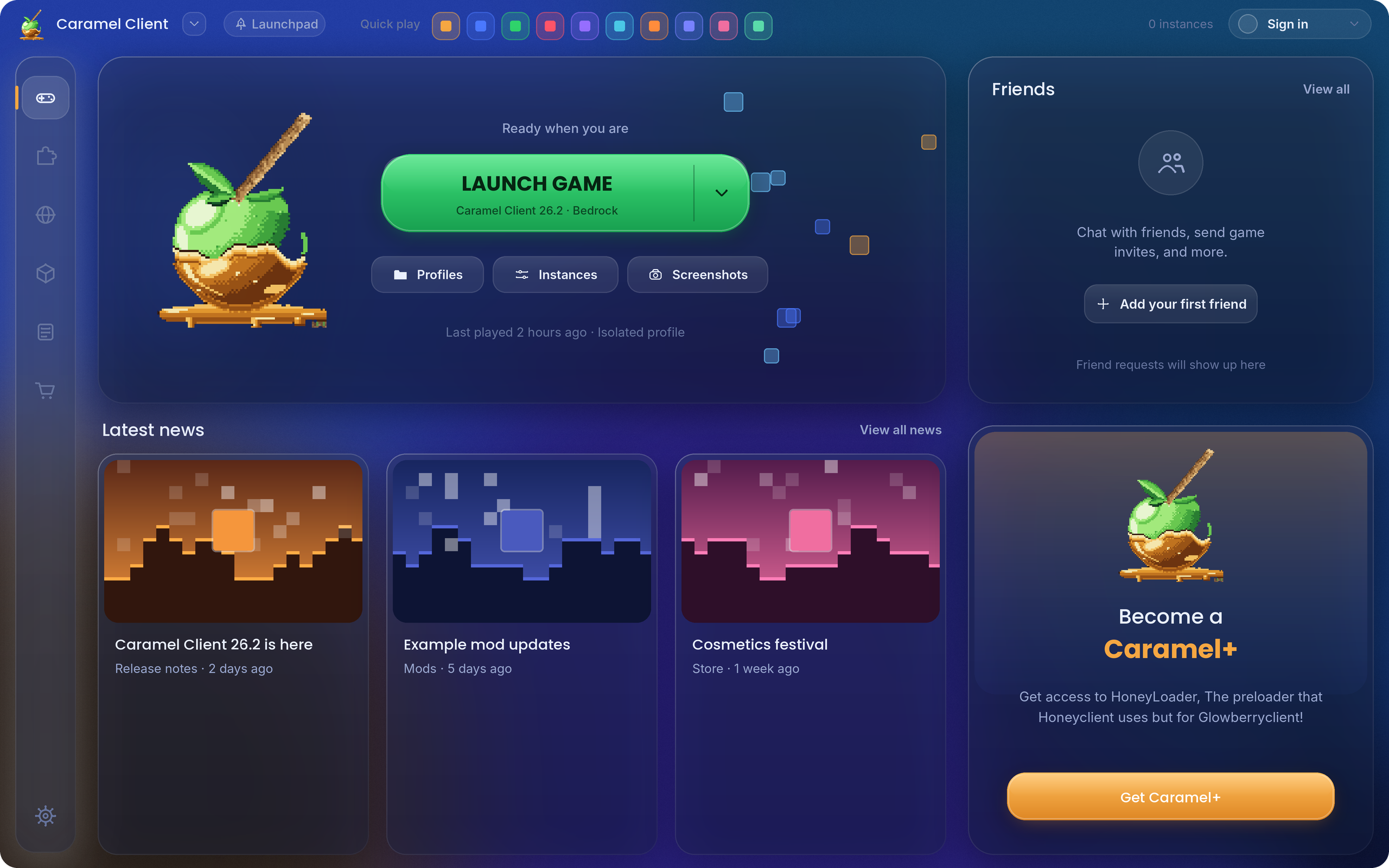 |
Mod Menu Two columns, top nav bar, search, switches and action rows 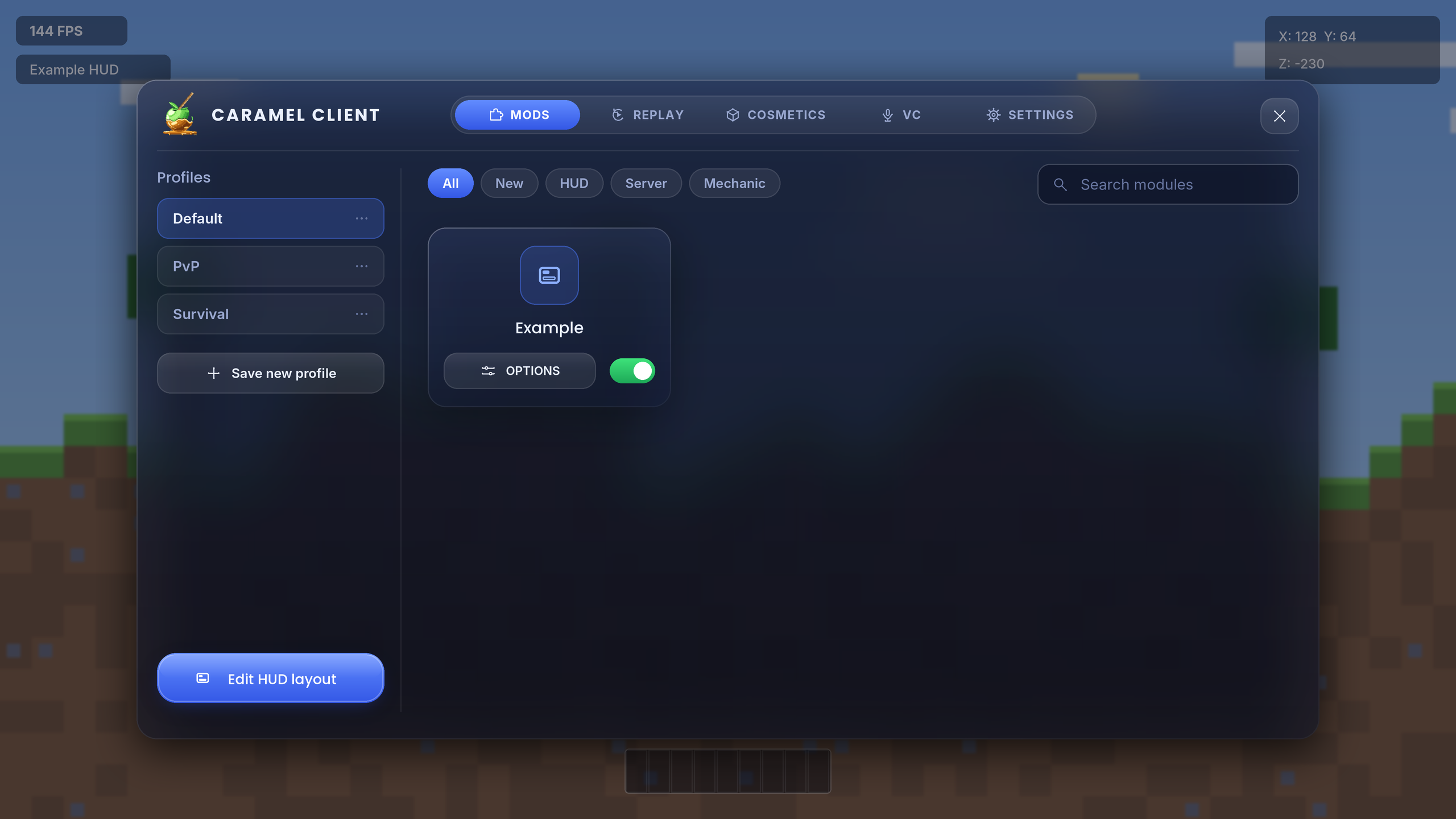 |
Mods tab Manage installed mods, import and configure 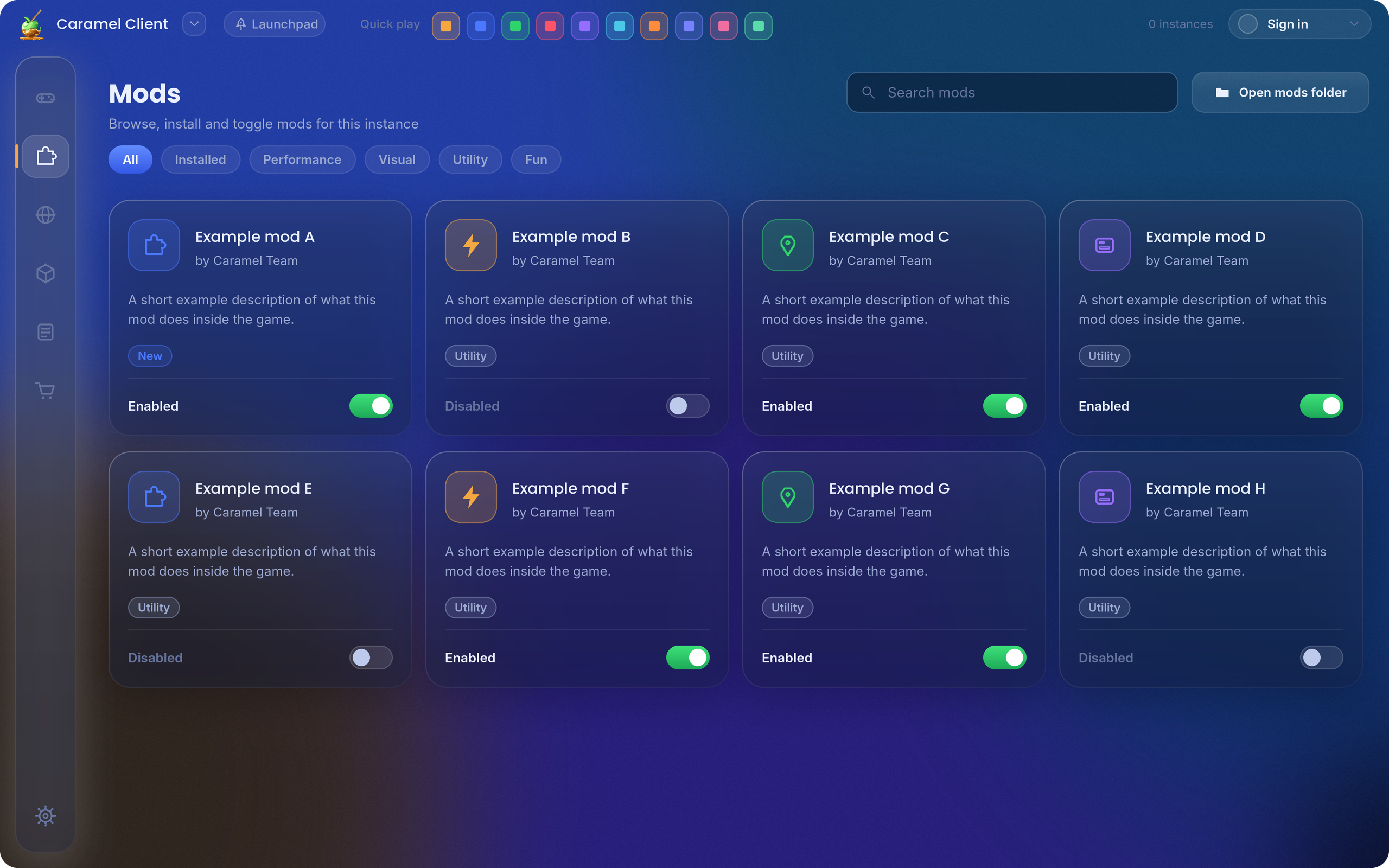 |
| Android | 9.0 (API 28) or higher |
| Architecture | 64-bit (arm64-v8a). Most versions ship both 64- and 32-bit libs and run fine; a version whose APK ships 32-bit only is refused |
| RAM | 1 GB minimum, 3 GB+ recommended |
| Storage | 2 GB minimum, 5 GB+ recommended |
| Minecraft | You need a Minecraft: Bedrock Edition APK (1.21.132 or newer) to import — your own licensed copy. CaramelClient reads the native libraries out of that APK; it never ships or redistributes the game. A Google Play install cannot be launched, because the game keeps its library inside the installed app; import an APK instead. See the compatibility guide for the one-page statement. |
- Get the latest build → Releases (download the APK/ZIP and extract it).
- On your device, allow installs from unknown sources (Settings → Security / Applications).
- Open the downloaded APK and install it.
- Launch CaramelClient, then point it at your Minecraft APK when asked.
Licensing: CaramelClient requires a legitimate, licensed copy of Minecraft Bedrock Edition. Do not use it with pirated or unauthorized versions, and keep your license linked to your Microsoft account.
Upgrading from a previous name
- From “CaramelClient”: CaramelClient is a display-name rebrand; the package id (
org.chimeramc.client) is unchanged, so it installs as an in-place update and your settings carry over. - From the older “Caramel Launcher”: that rename changed the package id, so Android will not offer an in-place update and the old app's private settings are not reachable. Export them from the old app (Settings → Backup & Restore → Export) and import them here. Account credentials and API keys are never included in the export.
Launching & instances
- APK Import & Installation-Free Launching – Import your official Minecraft APK (XAPK or composed APK) and run it directly, without a system install.
- Installations Tab – Browse the Bedrock versions a package mirror publishes and install one as its own isolated instance. Downloads survive a failed import so a retry never re-downloads hundreds of megabytes; listing pages page cleanly; a browser fallback handles a mirror that challenges plain requests. The source is pluggable.
- Multi-Version & Instance Management – Run multiple versions independently with complete isolation between configurations, game data, and worlds.
- Options Editing & Quick Launch – Edit per-version
options.txt-style settings, and use Minecraft URI quick-launch actions (open screens, connect to servers, add servers, join Realms, load worlds, run commands). - Custom Flat Worlds – Craft preset or fully customized superflat worlds before the game opens.
- Playtime Tracking – Per-instance playtime, shown on the home hero card and the instance list.
Modding
- Native Mod System (SweetLoader) – Load external native
.somodules (or a plain.so), with a SweetLoader input/output pipeline, hook installation, patches, and keyboard/gamepad input callbacks. Seedocs/apiandexamples/full-cpp-mod. - Mod Sourcing – Import from CurseForge (user API key) and install
.mcpack/.mcaddonfiles, or pick local files. A Mod Hub browses the Modrinth index and scans local Downloads; Modrinth hosts Java Edition content this launcher cannot install, so it is browse-only and says so. - Mod Load Diagnostics & Safe Mode – Failed mods are recorded with a user-readable reason and badged inline instead of crashing the process; a crash-loop safe mode offers to disable the mods loaded before a crash.
In-game menu & overlays
- Mod Menu (one screen, drawn in-game) – The menu is Dear ImGui rendered on the game's own GL context, not an Android view over it: the launcher writes the catalogue and the native side draws it on the present boundary. A top tab bar carries Mods, Replay, Cosmetics, Voice and Settings, and every page is drawn from the same Caramel theme the launcher uses, so the two surfaces look like one product. A module row is a pill switch and a one-shot action is a chevron, so a control always looks like what it does; a module that cannot run says why instead of looking like a plain off toggle.
- PvP Modules – A dedicated PvP section groups client-side combat tools: Aim Settings, CPS Display, Snaplook, Armor HUD, Crystal Optimizer, Hit Registration, Select Hit, and Hitboxes. Everything in the section shapes your own input or draws on your own screen — nothing here makes a miss land, changes your hitbox on the server, or alters server physics; those are the server's decision, and the section says so on screen. Modules that need live game data say so instead of showing a fabricated reading. The larger PvP catalogue is listed for discoverability only: those entries describe server-arbitrated outcomes or automation, so their toggles are refused rather than offered.
- PvP Suite (V1.1) – Four overlay-only visual modules in the General tab: Reach Indicator, Trajectory Prediction, Hit Prediction, and Custom Kill Effects. Each fails closed (draws nothing) when it has no data rather than guessing.
- Replay System – Record, trim, favorite, rename, and export clips from a shared Replay panel available in both Mod Menu screens, backed by a single capture/library backend.
- In-Game Pack Changer – Optionally change an instance's resource packs from inside the running game, written to every candidate game-data root so the change is never silently ignored.
Social & identity
- Proximity Voice Chat – Talk to players in the same world over LAN multicast, with multiple channels, shareable private join codes, a live in-game mic indicator, and a dedicated Voice tab. An optional internet relay extends voice to players who are not on the same Wi-Fi (Opus + a lightweight Go relay server).
- Multiple Xbox Account Management – Add and switch multiple Microsoft/Xbox accounts, with in-app MSAL login and device-code flows, so the game launches with the expected identity.
- Cosmetics Studio – Preview your character with an applied skin, cape, and accessories, and apply cosmetics in-game. A Cosmetics status diagnostic turns the silent failure modes into named checks.
Input, content & feel
- Controller Support & Input Mapping – Up to 5 profiles per controller type (Xbox, DualShock 4, DualSense), with button remapping (including remap layers), stick dead-zone tuning, sensitivity, rumble strength, anti-stick-drift with hysteresis, explicit calibration, and a Low Input Delay mode — applied live to gameplay. Controller screens use 3D illustrations.
- Content Management & Skin Packs – Import, export, and back up worlds, resource packs, skin packs, and launcher data from one place.
- Performance & Personalization – One-tap presets (Battery/Balanced/Performance), an FPS Optimization coordinator that quiets the launcher and sheds speculative work under thermal/battery/memory pressure while a session runs, and a Reduce Network Latency mode that tunes launcher-owned sockets and avoids polling during a session. Two present-frame modules, Frame Generation and Motion Blur, blend the previous presented frame in on the present boundary; neither presents an extra frame and neither claims a frame-rate gain. One colour system follows the wallpaper's palette with a brand fallback, and there is a single Reduce motion / Reduce transparency switch rather than separate animation, glass-card and compact toggles — the system accessibility settings always win over the in-app choice.
- Updates & Crash Reporting – In-app update check with a "What's new" dialog, a Diagnostics screen (app/SweetLoader/SDK versions, native-extraction version, signature-database status, cosmetics hook status, mod load errors, and a Copy report button), automated release-content tooling (
docs/RELEASE_CONTENT.md), and a Discord notification action for beta releases.
CaramelClient is actively developed. The table below describes what is reachable on the shipped build; anything that needs a per-build native hook fails closed and says so in-app rather than guessing.
| Area | Status |
|---|---|
| App build | Debug and release APKs from main; CI builds a debug APK on every push |
| Android | 9.0 (API 28) → 15; arm64-v8a only |
| Bedrock versions | Multi-version instances; a version is refused only when its APK ships no arm64-v8a libraries |
| Native modding | SweetLoader pipeline (native .so) |
| In-game overlays | Mod Menu (native ImGui), VIP menu, HUD editor |
| Cosmetics | Preview + native render route; in-game appearance depends on the per-build render hook |
| Voice | LAN multicast by default; optional internet relay |
| Java Edition | Not supported — no Java Edition runtime |
Where to get updates: Releases for builds (each release carries its SHA-256 checksum), Actions for CI artifacts, and the in-app "What's new" dialog for release notes. A more detailed compatibility matrix lives in docs/guide/compatibility.md.
Everything below is for building CaramelClient from source or writing mods against it. If you only want to play, see Quick start.
Prerequisites: Git, Android Studio (latest), JDK 21+, Android SDK (API 28+), Android NDK r28.
# The native SweetLoader and LibHttpClient code are git submodules the native build needs.
git clone --recurse-submodules https://github.com/ChimeraAnt-DEV/CaramelClient.git
# Already cloned without them?
git submodule update --init --recursive
Then open the project in Android Studio, let Gradle sync, connect a device (API 28+), and Run.
./gradlew :app:compileDebugJavaWithJavac   # fast Java-only check
./gradlew :app:testDebugUnitTest           # JVM unit tests
./gradlew :app:assembleDebug               # full APK (native build included)
- SweetLoader API reference →
docs/api(mod, hook, patch, input, memory-hook macros, signature, config, mod-menu) - Full C++ mod example →
examples/full-cpp-mod - Developer guide →
docs/guide/developer.md
Every push to main and every pull request triggers .github/workflows/build.yml, which checks out with submodules, builds a debug APK (JDK 21, Gradle 8.13 via the wrapper), fails the run if the build breaks, and uploads the APK as a workflow artifact. Grab it from the latest green Build Debug APK run under the Actions tab.
Full user guide (English and 简体中文), developer docs, and the SweetLoader API reference live under docs/ — start at docs/index.md.
Project pages: Architecture · Contributing · Security · Device compatibility · Accessibility.
We welcome contributions from the community. To keep the codebase high-quality and collaboration smooth:
Write clean, modular code with descriptive names and consistent formatting, following the Kotlin and Java style guidelines established in the project.
Use small, focused commits with clear messages; each should address a single feature or fix. Example: Fixed memory leak in version manager.
Comment complex logic and update relevant docs. If you add a feature, update the README and any related documentation.
Keep additions low-latency. The controller input path and in-game overlays run on the input-to-photon critical path, so keep them allocation-free.
Test on multiple devices and Android versions. Where logic can be isolated from Android and game APIs, add a pure unit test — many subsystems (controller response math, voice protocol, cosmetics, hit projection, mod packaging) are covered this way.
Submit PRs with a detailed description, reference related issues, and include screenshots or video for UI changes.
Before submitting: run a full build and test on at least one device. We review contributions promptly.
- Modify CaramelClient for personal gameplay and to test new features.
- Create educational content (videos, tutorials, blog posts).
- Create derivative projects and share them, provided you comply with the Apache License 2.0.
- Do not claim CaramelClient as your own without crediting the Caramel Team and its contributors.
- Do not use CaramelClient to violate Mojang or Microsoft's user agreements.
Disclaimer: The authors and contributors are not responsible for bans, damages, or issues arising from the use of this software. Use it at your own risk and in accordance with Minecraft's terms of service.
Full legal details: see the LICENSE.
CaramelClient is an independent project that stands on the shoulders of the open-source Android and Minecraft modding ecosystems.
- Caramel Team – For designing, building, and maintaining CaramelClient and providing infrastructure support.
- LeviLamina / Levilamina-Android ecosystem – For the
levilauncher-android-mod-template(QYCottage/levilauncher-android-mod-template) and its mod lifecycle / packaging conventions, which the CaramelClient native-modding layer builds upon and adapts. - LeviLaunchroid (LiteLDev/LeviLaunchroid) – For the sweetloader signature-rules source that CaramelClient's bundled snapshot is derived from. The rules are a data dependency, not code:
SweetLoaderSignatureRulesManageruses the app's own signed rule file when one is published and verified, and otherwise the bundled offline snapshot — a fetched rule set is installed only if its detached signature verifies against the public key the app ships (see Rule File Signing). Credit is due to that project for the rules themselves. The XERJ Corpus Hub tags this corpuslevilaunchroidfor the same reason; the tag describes the ecosystem this launcher interoperates with, not a claim of authorship. - Open-Source Bedrock Modding Community – For the shared knowledge, tooling conventions, and ecosystem research that inform how native modules are packaged, loaded, and kept safe.
- Android Community – For the documentation, libraries, and tools that made this launcher possible.
- Open Source Community – For the libraries, frameworks, and tools that power this project.
- Contributors – Thank you to everyone on the contributors graph.
| ↕▾ | ↕▾ |
|---|---|
| −Author / Team | Caramel Team |
| −Repository | github.com/ChimeraAnt-DEV/CaramelClient |
| −Report an issue | GitHub Issues — templates for bugs, mod questions, and feature requests |
| −Community support | Discord — setup help, crash triage, and modding questions |
| −Security | Report privately via Security Advisories |




Made by the Caramel Team Community
Licensed under the Apache License 2.0.
This account is shared among the 20 members of the Official CaramelTeam.