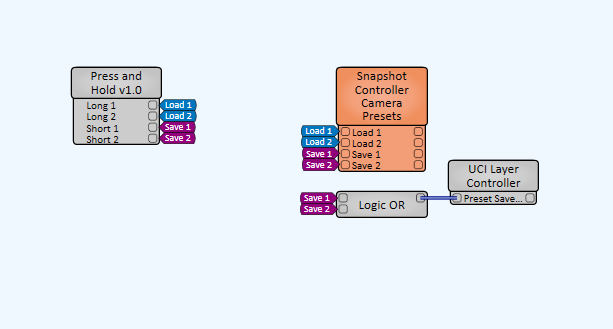
This is my revision for Q-SYS Press and Hold component with a scalable control count (2 to 64) and boolean output logic for short and long press. Can be used for generating single button for saving and recalling presets (much like in our Level 2 course) but also provide that Boolean feedback for driving other controls in your design. e.g., displaying a "preset saved" layer on your UCI.
To view the underlying code, open 'press-and-hold-v1.0.qplug' in your code editor, you can find the main Lua script at towards the end starting from the 'if Controls'. To contribute to this project, feel free to fork this project and make your own edits to the plug-in and submit a Pull Request for review. I've attached instructions from GitHub to contribution here: https://docs.github.com/en/get-started/quickstart/contributing-to-projects
- Clone the repository using Bash in your terminal.
- Double click the 'press-and-hold-v1.0.qplug' file to install it into your Q-SYS Designer.
- Drag in the component from your Plug-Ins inside Designer.
- Set the number of Controls your require in the properties and wire your Short and Long pins to your desired end-points.
- Enjoy!
Q-SYS Control
Information Technology
Q-SYS Designer 9.4.3, 9.5.0, 9.6.0
This is not an official Q-SYS Plug-In and therefore is not supported by the wider QSC Applications Team. If you have any questions feel free to raise them to myself on jasper.murrell@qsc.com