An experimental, multimodal conversational health assistant using Large Language Models (LLMs) and computer vision to enhance preliminary health support accessibility.
AI-DOCTOR aims to make basic healthcare interaction more accessible using the latest advances in AI. The assistant engages users in natural, conversational health queries and supplements responses with image-based analysis—such as reading and understanding prescriptions. This project is in a prototype phase, with active development continuing.
- Conversational AI: Handles user symptom descriptions and health-related questions with contextual, AI-powered responses.
- Prescription & Image Interpretation: Uses computer vision (OpenCV) to analyze and extract text from uploaded prescription images.
- Multi-Modal Interaction: Integrates both text and image modalities for versatile user engagement.
- Easy-to-Use Web Interface: Designed for accessibility, allowing hands-on interaction without technical barriers.
- Customizable AI Backend: Supports selection of LLM endpoints (e.g., GPT-4, GPT-4 Vision, or Azure OpenAI) to power conversational flows.
- Extensible Flask Backend: Built for rapid prototyping, enabling further expansion such as medical dataset integration, external API calls, or improved health reasoning.
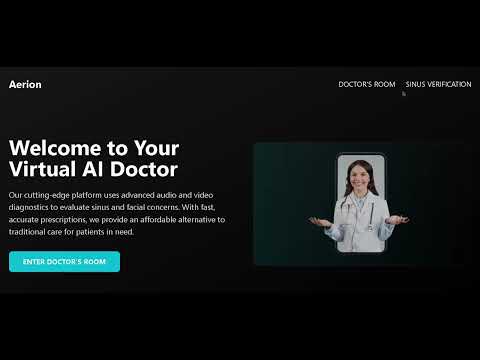
This is an early preview of the project. Note: The app is not fully completed; ongoing development is planned.
- Frontend: HTML/CSS (with plans for React-based upgrade)
- Backend: Python (Flask)
- AI Backend: Large Language Models (e.g., GPT-4, GPT-4 Vision), cloud-hosted or local
- Vision: OpenCV for image processing and OCR (Optical Character Recognition)
- APIs: Integration-ready for future health APIs and real-time data sources
- Node.js & npm
- Python (>=3.8 recommended)
- Flask, OpenCV, and required Python packages (see
requirements.txt) - Access to your preferred LLM (API key or local deployment)
-
Frontend
npm install npm run dev -
Vision Service
cd sinus verification python app.py -
Backend/Client
cd Client python app.py dev -
Model Configuration
- In
main.py, set the LLM as"gpt-4-vision","gpt-4", or your cloud provider setup (e.g., Azure, Gemini, etc.)
- In
- Ask health questions (symptoms, conditions, advice)
- Upload photos of handwritten/printed prescriptions for interpretation
- Get AI-driven text responses based on user input and image analysis
- Enhance medical reasoning and expand dataset coverage
- Improve OCR/vision accuracy and prescription handling
- Upgrade frontend to React for richer user experience
- Add user authentication and data privacy enhancements
- Integrate external health and symptom-checker APIs
[Specify your preferred license here.]
- OpenAI (and API providers) for language models
- OpenCV community for computer vision tools
- Any contributors and testers
DEMO LINKC= https://youtu.be/Vf7T_Yo6Cjc
- For feedback, feature requests, or collaboration—please open an issue or pull request! *