





A real-time 3D engine that runs entirely in your terminal — with zero dependencies. Just the Python standard library.
It renders solid, shaded 3D objects with a z-buffer, two orbiting colored
lights, a truecolor output, and a twinkling starfield. It can load Wavefront
.obj models, turn text into chunky 3D letters, show two shapes at once, and
export everything to a seamless looping GIF — using a GIF89a + LZW encoder
written from scratch (still no dependencies).
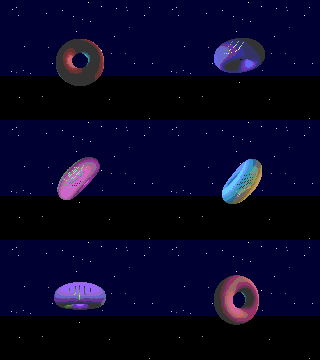
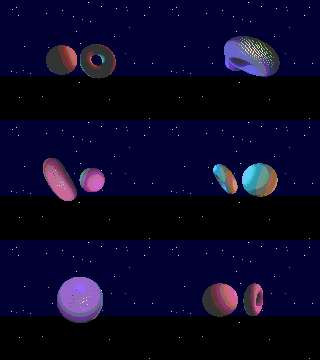
- Solid 3D shading — per-pixel surface normals, diffuse + specular lighting
- Z-buffer — correct hidden-surface removal, so shapes look genuinely solid
- Two colored light sources (warm + cool) orbiting the scene
- 24-bit truecolor with hue cycling (plus a
--no-colorASCII fallback) - Parallax twinkling starfield background
- Built-in shapes: torus, sphere, cube, ripple plane
- Load any
.objmodel and render it as a solid point cloud - 3D text from a built-in 5×7 font, extruded into blocks
- Two shapes at once, sharing one z-buffer so they occlude correctly
- Animated GIF export with a seamless loop (from-scratch GIF89a/LZW encoder)
- Interactive orbit camera and live controls
- Cross-platform: enables ANSI + UTF-8 on Windows, raw keyboard on POSIX
Python 3.9+ — nothing else.
pipx install aurora3d      # recommended: isolated, puts `aurora3d` on your PATH
# or
pip install aurora3d
Then just run the command:
aurora3d                       # interactive demo
aurora3d --text "AURORA 3D"    # extruded 3D text
aurora3d --obj model.obj --dual
aurora3d --gif out.gif         # export a looping GIF
No install needed to try it — running straight from a clone with
python aurora.py … works exactly the same.
python aurora.py                       # interactive demo (torus)
python aurora.py --shape sphere        # start on a specific built-in shape
python aurora.py --text "AURORA 3D"    # render extruded 3D text
python aurora.py --obj model.obj       # load & render an .obj model
python aurora.py --dual                # two shapes at once, orbiting
python aurora.py --no-color # luminance-only ASCII fallbackpython aurora.py --gif out.gif
python aurora.py --text "HELLO" --gif logo.gif
python aurora.py --obj model.obj --dual --gif duo.gif
python aurora.py --gif big.gif --gif-size 480x320 --gif-frames 90 --gif-fps 25The loop is seamless: every rotation, the light orbit, and the color cycle complete a whole number of turns over the length of the GIF.
| key | action | key | action | |
|---|---|---|---|---|
space / n |
next shape | w a d x |
orbit the camera | |
2 |
toggle two-shape mode | p |
pause / resume spin | |
c |
cycle light colors | r |
recenter camera | |
l |
freeze / orbit the light | + / - |
spin faster / slower | |
s |
toggle starfield | q |
quit (Ctrl-C works too) |
A shared rasterizer fills a single z-buffer from any number of objects, each with its own rotation matrix and world offset. The same code path drives the terminal (2:1 character cells), the GIF exporter (square pixels), and the two-shape mode — so lighting and occlusion are identical everywhere.
The GIF exporter renders each frame to a pixel buffer, quantizes it to a 216-color cube palette, and packs it with a hand-written LZW coder into a standards-compliant GIF89a (validated against Pillow and web browsers).
MIT