FolderToAI is a tool designed to facilitate the process of sharing folder contents with AI chat systems, such as those based on Generative Pre-trained Transformers (GPTs). It generates a series of messages that can be sent to these systems, providing detailed information about the files within a specified folder.
This project simplifies user interaction with AI chat systems by partially automating the description of files within a folder. It is particularly useful for scenarios where manually describing files would be tedious or impractical. Additionally, FolderToAI is designed to be highly user-friendly, enabling anyone to quickly and efficiently describe folder contents to AI chat systems with minimal effort.
- Windows Explorer Context Menu Integration: FolderToAI is designed to be launched directly from Windows Explorer by right-clicking inside a folder and selecting "FolderToAI", providing a seamless and convenient way to scan and generate messages for the folder's contents.
- Content Generation: Creates a series of messages that describe the folder's contents, including file names, sizes, and types, along with their hierarchical structure and location within the folder. This ensures that AI systems receive detailed information about the files' contents and how they are organized.
- Binary File Detection and Size Filtering: Identifies binary files and ensures that only text files are processed, excluding all binary files from being loaded. Additionally, it limits the loading of text files based on size, with a default limit of 100 KiB that can be configured, preventing the generation of an excessive number of messages that might be cumbersome to send.
- Ignoring Unwanted Subfolders: FolderToAI allows users to ignore specific subfolders by name, providing flexibility in what is scanned. By default, it automatically ignores common folders that are often irrelevant or inconvenient, such as
.git,.svn,node_modules,.venv, and others. This ensures that version control metadata and other unnecessary files are ignored from the generated messages, making the output more relevant and useful. - Clipboard Integration: The application automatically places the generated messages, which describe the folder's content, into the clipboard, allowing users to paste them into AI chats. While navigation is available via the left and right arrow keys, pasting a message using the
CTRL + Vhotkey automatically advances to the next one, often making manual navigation unnecessary and streamlining the interaction process. - GUI Interface: Provides a user-friendly graphical interface for monitoring the scanning, message generation, and message selection process.
Before installing FolderToAI, ensure you have Rust installed on your system. If you don't have it yet, you can download and install it from https://www.rust-lang.org/tools/install.
Once Rust is installed, follow these steps:
- Clone the Repository:
git clone https://github.com/DaviFN/FolderToAI.git- Build and Run: Navigate into the cloned directory and run:
cargo run --release- Setup:
- Upon launching the application, you will be presented with a simple and intuitive installation prompt.
- Invoking FolderToAI directly from inside a folder:
- Right-click inside a folder and select "FolderToAI"to invoke the application.
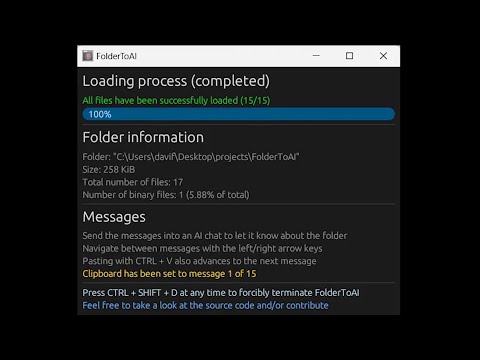
- The application will scan the folder and provide you messages.
- You can then paste these messages into your AI chat system of choice to let it know about the folder's contents.
Demo Video:
- Manual Invocation:
- Although not intended to be used this way, you can also invoke FolderToAI's executable via the command line passing the folder path as argument.
Platform Compatibility: FolderToAI is currently available only for Windows. Feedback from users interested in macOS or Linux versions is appreciated, as it may be considered for future development.
Limited Scanning Control: Currently, FolderToAI automatically loads files within a folder. While users are allowed to ignore specific subfolders, there is no option for fine-tuned control over which folders and files are loaded. A feature providing a detailed view of the directory structure, where users can selectively include or exclude files and subfolders, could enhance usability and might be considered for future development.
Lack of Text Extraction from Document Formats: FolderToAI currently does not extract text from document formats like PDFs, spreadsheets (e.g., .xlsx), and word processing files (e.g., .docx). These files are treated as binary and their contents are not included in the generated messages. Future enhancements could include integrating text extraction capabilities to improve the application's utility for users working with a variety of document types.
Binary File Detection: While many common binary and text formats are covered, some less common types might not be correctly identified, and the heuristic used to determine whether the content is binary or not may fail.
Message Size Limitation: The generated messages are limited to approximately 4096 characters, without the possibility of configuration. If a folder contains many files or large file contents, this might result in a large number of messages, which could be reduced if the system accepts more characters.
Application Responsiveness: The application may become unresponsive during file processing due to its current synchronous design. A hotkey is provided to forcibly terminate the application if needed.
Contributions are welcome! If you have ideas for new features or improvements, or if you encounter any bugs, feel free to open an issue or submit a pull request.
This project is licensed under the MIT License.