
See where your disk space went, and get it back safely. Disktop is a Linux storage manager for the terminal: a full-screen UI for exploring, and a scriptable CLI with versioned JSON for everything the UI does.
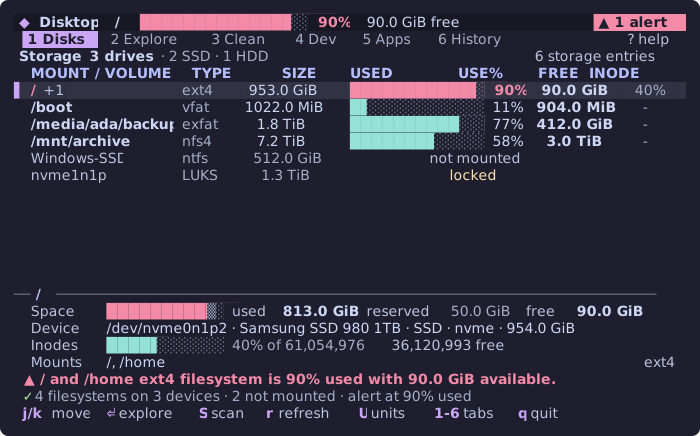
- Every disk at a glance — devices, filesystems, mounts, free space, inode use, partitions nothing has mounted (a Windows partition, a locked LUKS drive), and a warning before a filesystem fills.
- Fast, mount-safe scans — a native helper walks with
openat2containment, never follows a symlink, stays on one filesystem (Btrfs subvolumes such as/homeincluded), counts hardlinks once, and keeps the index on disk so memory stays flat on million-file trees. What it could not read can be measured afterwards as root, read-only, behind your system's own password prompt. - Find what is worth looking at — largest files and directories, file-type breakdowns, growth since the last scan, duplicates (byte-compared), stale files, empty directories, broken links, and two dozen detectors for build output, language and AI caches, browsers, IDEs, VMs, games, containers, package caches, logs, and kernels.
- Change nothing without a reviewed plan — Trash by default, undo from History, protected paths that no flag can override, a durable journal, and results that keep "selected", "moved to Trash", and "free space actually gained" apart.
Disktop 1.0.0 is available on npm. Published on 2026-10-07; the registry artifact, provenance and clean consumer execution have been verified. The release record records the reviewed artifact and postpublication verification status. Remaining hardware and VM checks are assigned to testers and remain unvalidated.
npx disktop@1.0.0            # run without installing
npm install -g disktop@1.0.0 # or install the `disktop` command
The same release is also on
GitHub Packages as
@dijo-404/disktop. It is identical to the npm package except for its name, and the
command is still disktop. GitHub requires a token even for public packages: log
in once, giving a personal access token (classic) with read:packages as the
password.
npm login --scope=@dijo-404 --auth-type=legacy --registry=https://npm.pkg.github.com
npm install -g @dijo-404/disktop@1.0.0
Requirements:
| OS | Linux. x86-64 or ARM64, glibc or musl. |
| Node.js | 24.21.0+ (24 LTS) or 26.10.0+ (26). Other versions are refused at startup. |
| Kernel | 5.6+ for scanning and cleanup (openat2). Older kernels still get the inventory. |
| Optional | lsblk (device topology), package managers, docker/podman, journalctl, lsof, smartctl, notify-send, systemd user units. Each feature that needs one says so when it is missing. |
The package ships a prebuilt, checksum-verified helper for each supported target and
runs no install script. Never run sudo npx disktop: cleanup that needs root asks
for it one reviewed command at a time.
disktop                       # the terminal UI
disktop --json                # the same dashboard as JSON, for scripts
disktop scan ~                # index a tree (metadata only; changes nothing)
disktop explore ~ --min-size 1GiB --type-totals
disktop find duplicates --path ~/Downloads
disktop clean                 # what the detectors found, with sizes
disktop clean plan FINDING_ID # review one finding (an id from `disktop clean`) as a plan
disktop clean apply PLAN_ID --yes   # apply exactly what was reviewed
disktop history               # what was done, item by item
disktop undo ACTION_ID --yes # put a Trash action backRun disktop in a terminal of at least 80×24. It keeps working down to 40×10, but a
plan is only reviewed and confirmed at 60×20 or larger, where all of it fits.
| Tab | What it shows |
|---|---|
| 1 Disks | Connected drive counts and every readable filesystem with a usage bar; the selected one separates used, root-reserved, and available space, device, inodes, and mounts. All other partitions and storage volumes stay visible, including locked, swap, RAID/LVM backing, and unknown-signature storage. |
| 2 Explore | A stored scan, directory by directory: size, share of the parent, growth since the previous comparable scan, a trend of the total, and a file-type breakdown. f cycles finders: largest files, duplicates, stale, empty directories, broken links. |
| 3 Clean | Everything the detectors found that a plan could act on, totalled by category, then what is there for information (swap, SMART, open-deleted files). |
| 4 Dev · 5 Apps | The same findings, narrowed to developer environments and caches, or to installed applications and their data. |
| 6 History | The action journal, with what happened to each item, and undo for Trash actions. |
Keys (also under ?):
| Key | Does |
|---|---|
j k / arrows, g G, PgUp PgDn, ^U ^D |
move |
1–6, Tab, [ ], h l outside Explore |
switch tab |
Enter, l / h, Backspace |
open a directory / go up (Explore); details (findings) |
s |
sort by size on disk, apparent size, modified, name |
/ |
filter: report ext:log >1GiB <5GB age>30 type:dir |
f |
next finder (Explore) |
t |
file-type breakdown on or off |
S |
scan the selected filesystem or this directory |
A |
measure the directories the scan could not read, as root and read-only (your system asks for your password) |
c |
review a plan to clean the selection |
o (in a review) |
plan the next operation instead: Trash, a move to another disk, a compression, permanent removal; a move or a compression asks for its destination first |
y / type yes |
apply a reversible / an irreversible plan |
u |
undo the selected Trash action (History) |
p |
which detectors ran, and why the others could not; j/k scroll their explanations |
U |
IEC or SI units |
r |
read again |
| Esc | close, or stop what is running (a scan keeps what it read) |
q, Ctrl+C |
quit; the terminal is always restored |
The Catppuccin Mocha palette pairs mauve accents with dark surfaces, teal usage bars, yellow warnings, and soft red failures. Truecolor terminals get the original palette; 256- and 16-colour terminals get approximations. Usage, category distribution, and growth charts communicate measured values; the scan activity bar says its total extent is unknown. Short dialogs use their content's height, and all six numbered tabs remain visible at 40 columns.
The mouse selects rows, switches tabs, and scrolls. NO_COLOR removes colour and keeps
bold and inverse; a non-UTF-8 locale gets ASCII glyphs (DISKTOP_ASCII=1 forces them);
TERM=dumb and pipes get the text dashboard; DISKTOP_NO_MOUSE=1 turns mouse
reporting off.
Every command writes text by default and one versioned JSON envelope with --json.
Byte counts and filesystem integers are decimal strings, and every path carries its raw
bytes in base64, so nothing is rounded or mangled. Progress goes to stderr, and only
when stderr is a terminal.
| Command | |
|---|---|
disktop devices |
All connected drives, partitions and logical volumes; mounts, free space and inodes. Unmounted, locked, swap and unknown signatures stay visible. |
disktop alerts check [--threshold N] [--notify] |
Exit 1 when a filesystem passes its space or inode threshold. |
disktop scan [PATH] |
Index a tree and save a snapshot. --accounting allocated|apparent, --cross-filesystems, --throttle 50MiB, --max-depth N, --sudo (then measure what it could not read, as root, read-only). |
disktop explore [PATH] |
Pages of a stored scan: --sort, --kind, --min-size, --ext, --name, --older-than, --type-totals, --owners. |
disktop find duplicates|stale|empty|broken |
Finders over a stored scan; duplicates are byte-compared, --keep oldest|newest|in-path. |
disktop snapshots list|diff |
Growth between comparable scans. |
disktop clean |
Findings, measured. --category, --no-sizes. |
disktop clean plan FINDING_ID|--path PATH |
Review into an expiring plan: --operation trash|permanent|move|compress|hardlink|manager. |
disktop clean apply PLAN_ID --yes [--permanent] |
Apply a reviewed plan, revalidating every item. |
disktop history, disktop undo ACTION_ID --yes |
The journal, and restoring a Trash action. |
disktop report --format json|csv|html [--output FILE] |
Capacity, a stored scan (--path), and findings (--findings). CSV is formula-safe and HTML is escaped and script-free. |
disktop timer install|uninstall |
An hourly user timer that runs only alerts check. |
disktop completion bash|zsh|fish |
Shell completion, generated from the same command table as --help. |
Exit status: 0 complete, 1 alert threshold reached (alerts check), 2 input or
operational error, 3 incomplete result, 130 interrupted. The full contract, with
JSON schemas, is in docs/cli.md and schemas/cli/v1.
- Detectors only suggest. No detector can delete or run a cleanup command.
- Every change is a reviewed, expiring plan with its exact entries, their identity
(device, inode, type, size, mtime, and a digest of a directory's whole subtree),
the operation, whether it can be undone, and the permission it needs. An apply
cannot change the operation;
--permanentacknowledges an irreversible plan and never turns a Trash plan into deletion. - The helper checks everything again, item by item, from its own side: protected
roots, mount roots and nested mounts, symlinks (never followed), unsafe
shared-writable parents, and changed identities. There is no
--force. - Everything is journalled before and after each item, durably. An interrupted
action is reconciled on the next start, and an item whose outcome could not be
judged is reported as
uncertain— never as done. - Trash is the default. A move to Trash on the same filesystem usually frees no space until Trash is emptied; results say so, and show the observed free-space change separately because other programs write too.
- Root is never the whole program. Under EUID 0 Disktop changes no file itself;
package and container cleanup runs one fixed command at a time through
sudoorpkexec, and a refused password is a refusal, not a fallback.
The threat model and its remaining limits — notably the last-component rename race against a concurrent writer in the same directory — are in docs/safety.md and docs/threat-model.md.
Disktop counts allocated bytes (st_blocks × 512) by default and apparent bytes
(st_size) on request; a hardlinked inode counts once. These can differ from df
because of snapshots, reflinks, compression, metadata, and files deleted while open.
A size nothing measured is shown as unknown, never 0, and a manager's own estimate
is marked ~. A scan that could not read a directory, was stopped, or skipped a mount
says so and exits 3.
Optional settings live in $XDG_CONFIG_HOME/disktop/config.toml; every key is
documented in docs/config.example.toml, including your own
declarative cleanup rules (data only — a rule cannot run a command). Snapshots go under
$XDG_DATA_HOME/disktop, the scan index under $XDG_CACHE_HOME/disktop, and plans and
the action journal under $XDG_STATE_HOME/disktop, with the usual ~/.config,
~/.local/share, ~/.cache, and ~/.local/state fallbacks.
On WSL, /mnt/c and /mnt/wsl are excluded even when you select their path
explicitly. To inspect one, set exclude_windows_mounts = false under [scan] in
config.toml, then scan that path. The WSL diagnostic is informational and offers
no cleanup.
Privacy: Disktop makes no network requests and collects no telemetry. Everything it reads and writes stays on your machine; reports go only where you ask.
- Linux only in
1.0.0; the platform boundary exists for a later macOS adapter. - Scanning and cleanup need kernel 5.6+ (
openat2); there is deliberately no less safe fallback. - Sizes from package managers are their own estimates, and the free-space change after an action includes whatever else wrote to the filesystem meanwhile.
- Real SMART health readings, ZFS, WSL and non-cache manager mutations still need tester validation. Their automated coverage and current status are recorded in the support matrix; the tester guide explains how to contribute results.
- See docs/support-matrix.md for what has been checked on which distributions and hosts.
npm ci
npm run build:native     # the Rust helper, debug build
npm run check            # typecheck, lint, unit, integration, recovery, PTY
cargo test --manifest-path native/disktop-fs/Cargo.toml
npm run test:performance # scan memory and latency budget
node dist/bin/disktop.js --help
Read AGENTS.md and PLAN.md first; the architecture, the helper protocol, and every recorded decision are under docs. Destructive tests run only in temporary sandboxes. Security issues: see SECURITY.md.
Bundled native components retain their upstream licences and copyright notices in THIRD_PARTY_NOTICES, included in the npm package.