The Secure Multifuctional Nginx Reverse Proxy (SMNRP) is a reverse proxy based on nginx.

If you migrate from version 2.x.y to version 3.x.y you need to make sure to remove all existing volumes and bind mounts before launching SMNRP
version 3.x.y, because from version 3.x.y on the services are running with the user smnrp (uid: 1000). If you don't reinitialize the volumes
you will get some permission denied messages and SMNRP will not work as expected.
- Automatic generation and renewal of https certificates (using Let's Encrypt or Buypass)
- Automatic generation of a self signed certificate
- Usage of custom certificates
- Load balancer to different locations
- Reverse proxy to a web application
- Virtual host support
- High baseline security
- Customized
Content-Security-Policy - OCSP stapling ℹ️
- Basic authentication to specific locations
SMNRP can be configured using only environment variables, what makes it ideal to implement into a configurable container. All possible configuration environment variables are described in this readme.
To integrate the SMNRP into your web application you just need to configure the environment variables (e.g. in the .env file).
Let's start with some examples.
To start with the most basic configuration to use SMNRP as a reverse proxy to a web application while requesting the certificates automatically from Let's Encrypt.
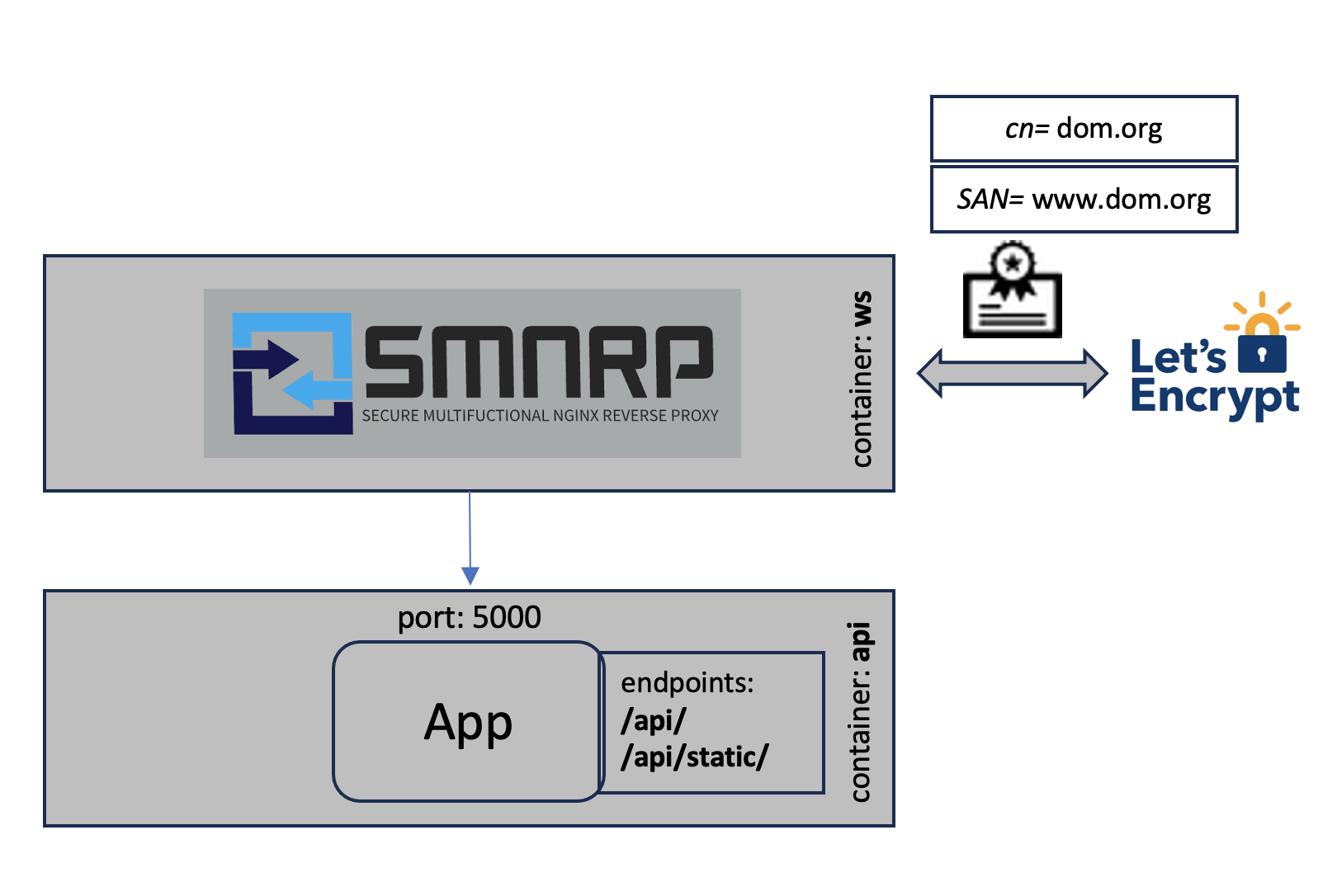
SMNRP_DOMAINS=dom.org,www.dom.org
SMNRP_UPSTREAMS=api:5000
SMNRP_LOCATIONS=/api/!http://targets/api/,/api/static!/usr/share/static
In this example the domain names (SMNRP_DOMAINS) are provided. The first name in the comma separated list is used as the common name (cn) in the certificate. The additional ones are configured as Subject Alternative Names (SAN).
Only a single upstream (SMNRP_UPSTREAMS) needs to be configured. This anonymous upstream can be referenced as targets in the locations (SMNRP_LOCATIONS) section.
The locations (SMNRP_LOCATIONS) can be configured in a comma separated list, where the parts are separated by !. In this example the
/api/location will be proxied (nginx:proxy_pass) tohttp://targets/api/and/api/staticwill be aliased (nginx:alias) to/usr/share/static.
The following example shows the load balancing mode.
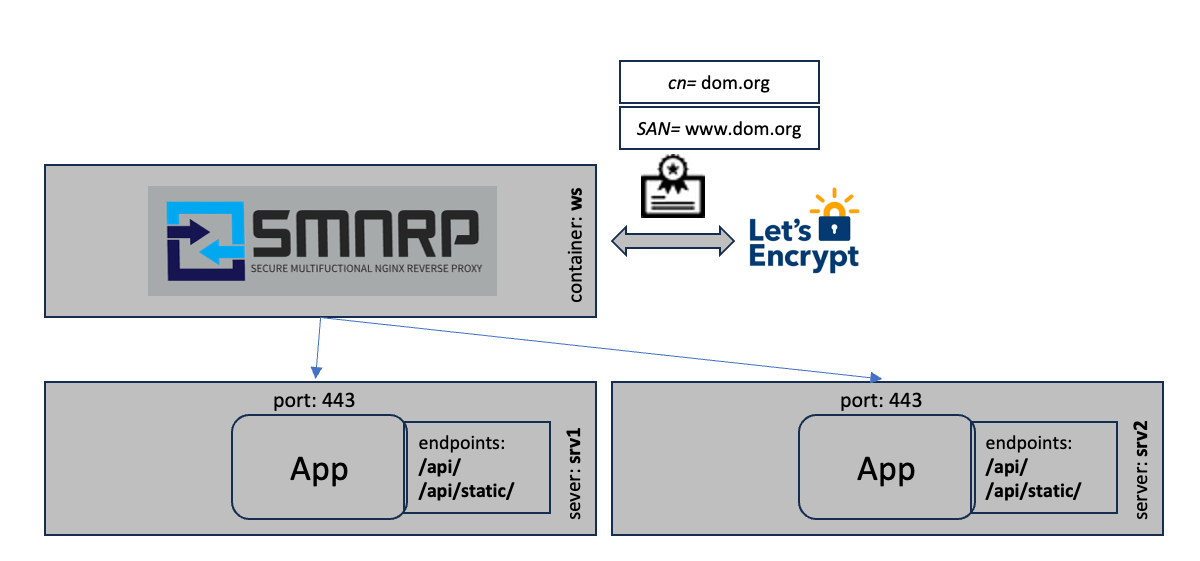
SMNRP_DOMAINS=dom.org,www.dom.org
SMNRP_UPSTREAMS=srv1.dom.org:443,srv2.dom.org:443
SMNRP_LOCATIONS=/!https://targets/
In this scenario the certificates are requested from Let's Encrypt as in the first example. The traffic is then load balanced to two servers srv1.dom.org and srv2.dom.org. The load balancing is internally configured as:
upstream targets {
  server srv1.dom.org:443 max_fails=3 fail_timeout=10s;
  keepalive 32;
  server srv2.dom.org:443 max_fails=3 fail_timeout=10s;
  keepalive 32;
}
The requests are equally distributed to the different targets. If one fails only the others are used. This mechanism can only be used for high availability scenarios without shared storage or shared state.
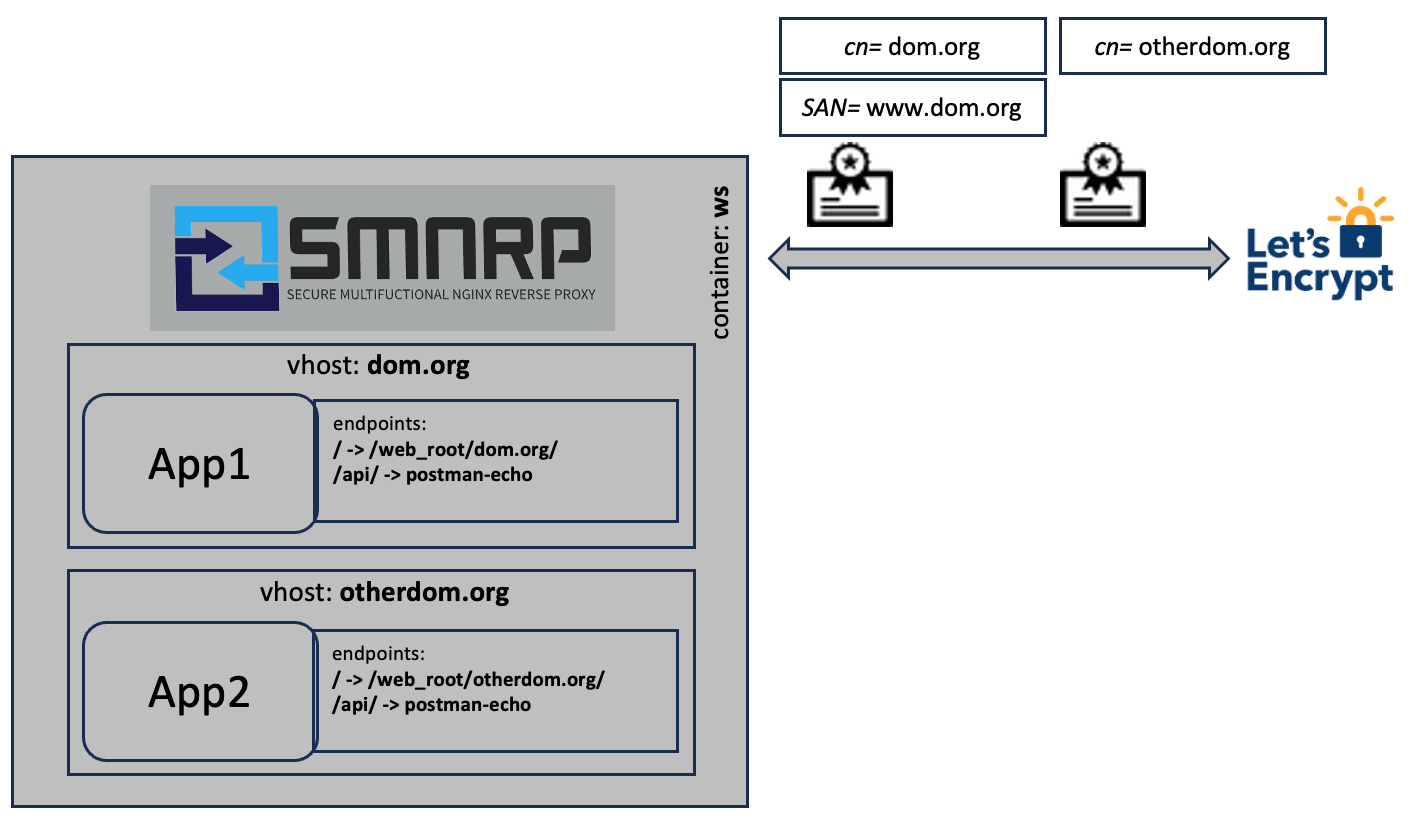
To enable virtual hosts you need to use the | separator in the config variables:
SMNRP_DOMAINS=dom.org,www.dom.org|otherdom.org
SMNRP_UPSTREAMS=|postman-echo.com:443
SMNRP_LOCATIONS=/!/web_root/dom.org/!t:a,/api/!https://postman-echo.com/get/|/api/!https://targets/get/
The configuration will take the order into account. First section is the first vhost (dom.org), second the second (otherdom.org) and so on. If you add vhost support for one config variable you need to add it for every other config variable as well except for SMNRP_ENABLE_ANALYTICS (this is a global setting).
In this example two vhosts are configured. vhost1 does not have any upstream configured, where the upstream of vhost2 is configured to be postman-echo.com:443. The first location for vhost1 is configured as / to be aliased (nginx: alias) to /web_root/dom.org as this is the directory inside SMNRP that is created to hold the files to be served for the vhost named dom.org. Additionally there are two flags configured for this location t and a. Those are described in details under the Flags section.
- The
/api/location is proxied (nginx:proxy_pass) tohttps://postman-echo.com/get/. - The second vhost only proxies the
/api/location tohttps://targets/get/, what is basically the same as in vhost1 because the upstream of vhost 2.
(required) Define a comma separated list of domains you want to have included in the https certificate. The fist entry is used as the common name (cn) and the domain name in general, the subsequent names are used as Subject Alternative Names (SAN).
If virtual hosts are configured the first entry is used as the folder name in the /web_root/<fist entry> directory.
(optional) Define the upstream servers in a comma separated list. Unnamed upstreams can be referenced in the SMNRP_LOCATIONS as targets. You can also name targets by prefixing them with target_name!. If you use named targets you can reference them in SMNRP_LOCATIONS by its target_name. If this setting is not given the /web_root or /web_root/<vhost> is served.
SMNRP_UPSTREAMS=api:5000,notebook!notebook:8888
                ^^^      ^^^^^^^^^^^^^^^^^
                |        |
                |        + named target (referenced by 'notebook')
+ unnamed target (referenced by 'targets')(optional) Define additional locations you want to support. This is essential if you use SMNRP as a simple proxy for your web application. The definitions are comma separated and consists of two mandatory and an optional part separated by !.
SMNRP_LOCATIONS=path!alias|proxy_url[!flags]The path is the url location that should be directed. A path need to be configured as the tail of the uri (e.g. /api/).
The alias is a local directory inside the SMNRP container, normally bind mounted. An alias need to be configured as a path (e.g. /usr/share/static or /web_root/<vhost>).
The proxy_url defines a target outside of the SMNRP context. It could be an external web application or another container. A proxy_url need to be configured as a url (e.g. https://target_name/api/ where target_name of the unnamed upstreams is targets).
Additionally, flags can be configured using a : separated string.
The three parts are separated by a !.
- t: Adds a
try_filesclause to an alias location. This must be used if the files in the target need to be served. - a: Adds a
auth_basicclause to the location so that onlySMNRP_USERShave access to it.SMNRP_USERSmust be configured in order to make this working. - c: Sets the headers to disables the browser cache.
- w: Whitelist networks to restrict access to a location and deny other traffic.
- r: Returns a permanent redirect (HTTP Status Code: 301) to the
aliasorproxy_url. This flag can not be mixed with other flags. - h: [DEPRECATED: replace with the flag
nin combination withSMNRP_LOCATION_CONFIGS] Sends the$http_hostinstead of$hostasHostandX-Forwarded-Hostproxy headers. - i: Adds a
internalclause to an alias location. This can be used to protect the file in this location from public access. Such files are only accessible by setting theX-Accel-Redirectheader - n: Do NOT add smnrp default proxy settings to the location.
SMNRP_LOCATIONS=/!/web_root/dom.org/!t:a,/api/!https://postman-echo.com/get/,/redirect/!/new-destination/!rThis example
- aliases (nginx:
alias) the/path to/web_root/dom.org/, - adds a
try_filesclause as well as aauth_basicclause to the location section. - The
/api/path is proxied (nginx:proxy_pass) tohttps://postman-echo.com/get/.
Basically the translation inside the nginx config is
- for an
alias:
location <path> {
  alias <alias>;
  try_files $uri $uri/ /index.html;      <--[Only if flag 't' is set]
}- for a
proxy_url:
location <path> {
  proxy_pass <proxy_url>;
}- for
auth_basic, only if flagais set:
location <path> {
  auth_basic "Authorization Required";
  auth_basic_user_file <path_to_user_pw_list>;   <--[Derived from 'SMNRP_USERS']
}- for whitelisting, only if flag
wis set:
location <path> {
  allow <network-1>      <--[Networks are derived from 'SMNRP_WHITELIST']
  allow <network-2>
  deny all;              <--[All other IPs are denied]
}- for permanent redirect, only if flag
ris set:
location <path> {
  return 301 <alias|proxy_url>;
}
If you want to redirect to the configured unnamed upstream(s) you can use targets as the server name.
If you want to redirect to another container you need to use the service name of the particular application.
If you only want to proxy to the configured upstreams (SMNRP_UPSTREAMS), just leave SMNRP_LOCATIONS empty.
- for
$http_hostinstead of$host, ifhflag is set:
location <path> {
  ...
  proxy_set_header Host $http_host;
  proxy_set_header X-Forwarded-Host $http_host;
}- for
internal, only if flagiis set:
location <path> {
  internal;
  alias <alias>;
}You can define additional nginx config lines per location.
SMNRP_LOCATION_CONFIGS=/api/!proxy_set_header Host $$http_host;proxy_set_header X-Forwarded-Host $$http_hostThis example adds two custom config lines to the location block location /api/:
location /api/ {
  proxy_set_header Host $http_host
  proxy_set_header X-Forwarded-Host $http_host
}- split the lines with
; - reference the location using the same location url as in the
SMNRP_LOCATIONSvariable - escape all
$with$$
Hint: Please be aware that the SMNRP default proxy config is included in the location BEFORE the custom configs. You can avoid this by adding the
nflag to the location. Oftennis used in combination withSMNRP_LOCATIONS.
If set to true SMNRP requests a new certificate from Let's Encrypt on every boot. Do not force this - it leads to problems getting a certificate because of too many requests. This is meant to be used in case of troubleshooting.
If set to true SMNRP is generating self signed certificates instead of gathering it from Let's Encrypt.
If set to true SMNRP will regenerate the self signed certificate on each start - for debugging purposes.
If set to true SMNRP will not create any certificate but it requires the following two files to be mapped into the container (i.e. as docker read-only volume):
/etc/letsencrypt/live/${domain}/fullchain.pem/etc/letsencrypt/live/${domain}/privkey.pem
Here is an example:
  ...
  ws:
    image: ethnexus/smnrp
    volumes:
      ...
      - /path/to/dom.org.fullchain.pem:/etc/letsencrypt/live/dom.org/fullchain.pem:ro
      - /path/to/dom.org.key.pem:/etc/letsencrypt/live/dom.org/privkey.pem:ro
Replace the
${domain}with the first domain name inSMNRP_DOMAINScomma separated list.
You can define the Content-Security-Policy header. If this is not defined, the default (most secure) header is used:
default-src 'self' http: https: data: blob: 'unsafe-inline'If you want to completely disable the Content-Security-Policy header set SMNRP_CSP to none:
SMNRP_CSP=noneIt's often a good idea to set this to none to avoid unexpected access problems. It should only be set, if you need to extensively secure your web application.
If set to true, ocsp-stapling is disabled.
If set to true, SMNRP will completely ignore https for communication and only listen on port 80 to serve the resources.
If set to true, SMNRP uses Buypass certificate service in case of Let's Encrypt. This can be helpful, if there have been made too many requests to Let's Encrypt, disabling you from gathering new certificates.
SMNRP_USE_BUYPASS=falseA comma separated list of user:password combinations to be allowed to do basic authentication on targets with the a flag.
A comma separated list of networks allow access to the location with the w flag.
SMNRP_USERS=admin:secret,user:passIf set to true, SMNRP is generating an analytics dashboard page based on goaccess at analytics/dashboard.html, default is false.
If set to true SMNRP only accepts TLSv1.3.
To enable virtual hosts you need to use the | separator in the config variables:
SMNRP_DOMAINS=dom.org,www.dom.org|otherdom.org
SMNRP_UPSTREAMS=|postman-echo.com:443
SMNRP_LOCATIONS=/!/web_root/localhost/!t:a,/api/!https://postman-echo.com/get/|/api/!https://targets/get/
SMNRP_SELF_SIGNED=true|true
SMNRP_USERS=admin:secret,user1:xzy|user2:pass
The configuration will take the order into account. First section is vhost1, the second is vhost2 and so on. If you add vhost support for one config variable you must add it for every other config variable as well except for SMNRP_ENABLE_ANALYTICS which is a global setting.
A vhost configuration may contain all configuration entries as a configuration without vhost support. The configuration that will be taken into account is selected by the url that is accessing SMNRP (default vhost behavior).
To configure on which ports the nginx is listening on internally you can use the following environment variables:
SMNRP_HTTP_PORT=80
SMNRP_HTTPS_PORT=443
SMNRP_HTTPS_REDIRECT_PORT=
With the SMNRP_HTTP_PORT you can configure the http server port of nginx.
With the SMNRP_HTTPS_PORT you can configure the ssl server port nginx is listening on.
As SMNRP by default redirects to https in case http is requested you have the ability to define a SMNRP_HTTPS_REDIRECT_PORT to be added to
the redirect url. This is only necessary if you don't expose the SMNRP_HTTPS_PORT to the default port (443).
SMNRP also loads *.nginx files in the directory /etc/nginx/conf.d/custom/*.nginx. You can bind mount or copy a local directory including your custom configs to /etc/nginx/conf.d/custom/.
services:
  ws:
    image: ethnexus/smnrp
    volumes: ...
- ./custom/configs:/etc/nginx/conf.d/customTo integrate SMNRP into docker compose to setup a reverse proxy to the application, you need to add the following part into you docker-compose.yml:
volumes:
  web_root:
  smnrp_data:
  log_data:
services:
  ws:
    image: ethnexus/smnrp
    volumes:
      - web_root:/web_root
      - smnrp_data:/etc/letsencrypt
      - log_data:/var/log
    ports:
      - 80:80
      - 443:443
    env_file: .env
    restart: unless-stopped
    depends_on:
      - ui
      - api
  ui:
    ...
    volumes:
      - "web_root:/path/to/webapp"
    ...
  api:
    ...
Your web application files need to be generated into the docker volume web_root that needs to be mapped to /web_root. In case of vhosts it should be bind mounted to /web_root/<vhost>
Essential is the smnrp_data volume. It should always bind mounted to /etc/letsencrypt, otherwise SMNRP may create too many requests to Let's Encrypt and gets blocked for about 24h to request certificates.
If you are using a local directory to bind mount /etc/letsencrypt (i.e. ./ssl:/etc/letsencrypt) you must create the ssl-dhparams.pem in the root of this directory (i.e. ./ssl) by using:
openssl dhparam -out ssl-dhparams.pem 4096In case you want to chaing SMNRP instances on the same host you need to configure the
network_modetohostand- omit the
portsconfiguration.
volumes:
  smnrp_data:
  log_data:
services:
  ws:
    image: ethnexus/smnrp
    volumes:
      - smnrp_data:/etc/letsencrypt
      - log_data:/var/log
    env_file: .env
    restart: unless-stopped
network_mode: hostTo enable the maintenance mode you need to touch the file .maintenance into the folder /web_root or /web_root/<vhost>. As long as the file exists SMNRP will return 503 Service unavailable and displays a nice maintenance page.
To add a custom maintenance page you need to overwrite the file /usr/share/nginx/html/error/maintenance.html.
---
volumes:
- ./my-maintenance.html:/usr/share/nginx/html/error/maintenance.htmlHere is a script that you could use to enable, disable the maintenance mode with one command (maint.sh):
#!/usr/bin/env bash

DC_EXEC="docker-compose -f docker-compose.yml -f docker-compose.prod.yml exec ws"

if [[ "$1" == "on" ]]; then
    ${DC_EXEC} sh -c 'touch /web_root/.maintenance'
elif [[ "$1" == "off" ]]; then
    ${DC_EXEC} sh -c 'rm -f /web_root/.maintenance'
else
    echo "Please specify 'on' or 'off'"
    exit 1
fiTo enable basic authentication on selected locations you need to flag the location with the a flag and define the
users and passwords using the SMNRP_USERS environment variable.
SMNRP_LOCATIONS=/!/web_root/!t:a
SMNRP_USERS=admin:admin,user:pass
This example restricts the access to the
/location to the usersadminwith the passwordadminand- the user
userwith the passwordpassusing Basic Authentication.
To enable network whitelisting to selected locations you need to flag the location with the w flag and define the
networks using the SMNRP_WHITELIST environment variable.
SMNRP_LOCATIONS=/!/web_root/!t:w
SMNRP_WHITELIST=127.0.0.1,10.0.0.0/8,172.16.0.0/12,192.168.0.0/16To add a custom Authorization Required page you need to overwrite the file /usr/share/nginx/html/error/auth_required.html.
---
volumes:
- ./my-auth_required.html:/usr/share/nginx/html/error/auth_required.htmlSMNRP is adding a file called like the domain for which the certificate update happened into the directory /signal. You can bind mount this directory and run a cronjob on your host os to detect changes. This can be essential, for example if you want to restart a mail server after the Let's Encrypt certificate has been renewed. An example script could look like this:
#!/usr/bin/env bash

SIGNAL_DIR="/path/to/signal"
DOMAIN="domain.of.interest"

if [ -f "${SIGNAL_DIR}/${DOMAIN}" ]; then
    echo "##############"
    echo `date`
    rm -f "${SIGNAL_DIR}/${DOMAIN}"
    ### EXAMPLE to reload postfix
    postfix reload
    service dovecot reload
    ### you can add your own logic here
fi
The following entry can be added to the repository's owners crontab:
* * * * * (sudo /path/to/scripts/certRenew.sh 2>&1) >> /path/to/logs/certRenew.logIf you went into troubles because of too many different configuration changes, you may want to reset smnrp:
docker exec <smnrp-container> /smnrp_reset
docker restart <smnrp-container>
This will basically remove already downloaded certificates and forces SMNRP to request a new certificate after the container restart.
ℹ️ The default values are the most secure ones.
Set the client_max_body_size, default is 1m. This must be set to support large file uploads through SMNRP.
SMNRP_CLIENT_MAX_BODY_SIZE=1mSet the server_tokens parameter for this server, default is off.
SMNRP_SERVER_TOKENS=offSet the client_body_buffer_size parameter for this server, default is 1k. Nginx default would be 8k|16k
SMNRP_CLIENT_BODY_BUFFER_SIZE=1kSet the large_client_header_buffers parameter for this server, default is 2 1k. Nginx default would be 4 8k
SMNRP_LARGE_CLIENT_HEADER_BUFFERS=2 1kSet the proxy_buffer_size parameter for this server, default is 32k. Nginx default would be 8k
SMNRP_PROXY_BUFFER_SIZE=32k