A low-latency teleprompter/autocue with local speech recognition. Paste your script (with Markdown support), and the display scrolls automatically as you speak—including detecting when you backtrack to restart a sentence.
The code was written with help from Claude, with me prompting it for improvements. While the implementation uses only local AI (speech recognition) to do transcription, AI-generated code comes with other risks. I make no promises about this code being production-worthy or safe. This is really just a hobby project to support my own work on YouTube.
Use at your own risk / judgement.
Contributions are welcome. Contributions written by AI will be subject to equal scrutiny.
(After Claude had a first go at this autocue program, I ended up heavily rewriting the core tracking algorithms because it had become so messy and wasn't reliable, and Claude simply couldn't reason about this complex tracking task.)
See Autocue in action with these video demonstrations:
Sample Script - A recording showing the autocue tracking while reading the "Sample Script", with Picture-in-Picture video and audio:
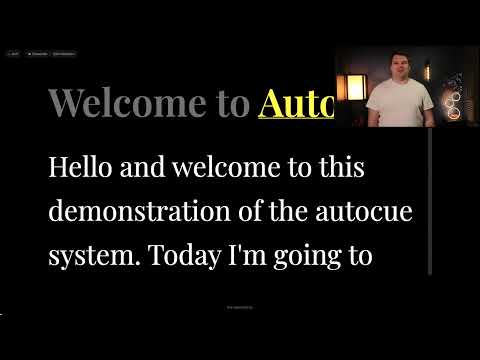
Number Expansion Test Script - A recording showing the autocue handling number expansion, with Picture-in-Picture video and audio:

Primarily developed and tested on macOS (M3), but should work on Windows and Linux with appropriate audio dependencies installed.
- Sub-250ms latency using Vosk or Sherpa-ONNX streaming speech recognition
- Multiple transcription providers - choose between Vosk (en-US, en-GB) or Sherpa-ONNX
- Backtrack detection - automatically rewinds when you restart a sentence
- Markdown support - format your script for easy reading
- Fully local & private - no cloud services, all processing on your device
- Configurable display - font size, colors, line count, etc.
- Web-based UI - works on any browser, easy to put on a separate monitor
- macOS with Apple Silicon (M1/M2/M3/M4) or Intel
- Python 3.10+
- ~40MB for the small speech model (or ~1.8GB for medium)
macOS:
brew install portaudioWindows:
Option A - Using pip (recommended):
pip install pyaudioOption B - Using conda/anaconda:
conda install portaudioLinux (Ubuntu/Debian):
sudo apt-get install portaudio19-dev# Clone or download this directory, then:
cd autocue
pip install -e .Using Vosk (default, recommended for most users):
autocue --download-modelThis downloads the Vosk "small" en-US model (~40MB). For other models:
# List all available models
autocue --list-models

# Download a specific model
autocue --download-model --model-id vosk-en-us-medium
autocue --download-model --model-id vosk-en-gb-small
Using Sherpa-ONNX (optional, alternative provider):
First, install the Sherpa-ONNX package:
pip install sherpa-onnxThen download a Sherpa model:
# List available Sherpa models
autocue --list-models

# Download a specific Sherpa model
autocue --download-model --model-id sherpa-zipformer-en-20M-2023-02-17autocueThen open http://127.0.0.1:8000 in your browser.
- Paste your script in the editor (left panel)
- Adjust settings in the right panel (font size, colors, etc.)
- Click "Start Prompter" to begin
- Speak - the display tracks your position automatically
- Make a mistake? Just restart your sentence - the prompter will detect the backtrack
Autocue supports two transcription providers:
- Easy to install (no additional dependencies)
- Supports en-US and en-GB models
- Good accuracy with low latency
- Models: small (~40MB), medium (~1.8GB), large (~2.3GB)
- Requires
pip install sherpa-onnx - Supports multiple English models
- Optimized for streaming recognition
- Models: 20M (~30MB), standard (~70MB), LSTM (~50MB)
- Open http://127.0.0.1:8000
- In the settings panel, find "Transcription"
- Choose your provider and model
- Click "Save as Default"
- Restart the prompter to use the new model
# Use Vosk with en-GB
autocue --provider vosk --model-id vosk-en-gb-small

# Use Sherpa-ONNX
autocue --provider sherpa --model-id sherpa-zipformer-en-2023-06-26# Save your preferred provider/model
autocue --provider vosk --model-id vosk-en-us-medium --save-configSettings are saved to .autocue.yaml in your current directory.
| Key | Action |
|---|---|
Escape |
Exit prompter mode |
Space |
Pause/resume tracking |
R |
Reset to start of script |
autocue --help

Transcription Options:
  --provider {vosk,sherpa}
                        Transcription provider (default: vosk)
  --model-id MODEL_ID   Model identifier (e.g., 'vosk-en-us-small',
                        'sherpa-zipformer-en-2023-06-26')
  --model-path PATH     Path to custom model directory (optional)
  --list-models         List all available transcription models
  --download-model      Download the specified model

Server Options:
  --host HOST           Web server host (default: 127.0.0.1)
  --port, -p PORT       Web server port (default: 8000)

Audio Options:
  --device, -d INDEX    Audio input device index
  --list-devices        List available audio input devices
  --chunk-ms MS         Audio chunk size in milliseconds (default: 100)

Configuration:
  --save-config         Save current CLI options to config file
  --save-transcript     Save a transcript of recognized speech

Legacy (Deprecated):
  --model, -m {small,medium,large}
                        [DEPRECATED] Use --model-id instead
# List available microphones
autocue --list-devices

# Use a specific device (e.g., device 2)
autocue --device 2autocue --host 0.0.0.0Then access via your Mac's IP address from another device.
The settings panel lets you configure:
| Setting | Description |
|---|---|
| Font Size | Text size in pixels (24-120) |
| Font | Choose from several readable fonts |
| Line Height | Spacing between lines |
| Past Lines | Lines of already-spoken text to show (default: 1) |
| Future Lines | Lines of upcoming text to show (default: 8) |
| Colors | Highlight, text, dim, and background colors |
- Audio Capture: Your Mac's microphone captures audio in 100ms chunks
- Streaming Transcription: Vosk processes audio in real-time, providing partial results as you speak (not waiting for complete sentences)
- Fuzzy Matching: The tracker uses
rapidfuzzto match transcribed text to your script, tolerating minor recognition errors - Backtrack Detection: If the matched position jumps backwards significantly, it's detected as a backtrack (you restarted a sentence)
- Web UI: Updates are pushed via WebSocket to provide smooth, real-time scrolling
Run autocue --download-model to download the speech model.
- Try the "small" model instead of "medium":
autocue --model small - Reduce chunk size:
autocue --chunk-ms 75 - Close other applications using the microphone
- Try the "medium" model:
autocue --download-model --model medium - Ensure your microphone is positioned correctly
- Reduce background noise
# List devices and check your microphone is present
autocue --list-devices

# Grant microphone permission to Terminal/your terminal app in System Preferences- Check that port 8000 is not in use by another application
- Try a different port:
autocue --port 8766
| Model ID | Language | Size | Accuracy | Latency | Recommended For |
|---|---|---|---|---|---|
| vosk-en-us-small | en-US | ~40MB | Good | Fastest | Most use cases |
| vosk-en-us-medium | en-US | ~1.8GB | Better | Fast | Noisy environments |
| vosk-en-us-large | en-US | ~2.3GB | Best | Slower | Maximum accuracy |
| vosk-en-gb-small | en-GB | ~40MB | Good | Fastest | British English |
| Model ID | Size | Type | Description |
|---|---|---|---|
| sherpa-zipformer-en-20M-2023-02-17 | ~30MB | Zipformer | Small, fast model |
| sherpa-zipformer-en-2023-02-21 | ~70MB | Zipformer | Standard model |
| sherpa-zipformer-en-2023-06-21 | ~70MB | Zipformer | Updated standard |
| sherpa-zipformer-en-2023-06-26 | ~70MB | Zipformer | Latest standard |
| sherpa-lstm-en-2023-02-17 | ~50MB | LSTM | Alternative approach |
Note: All models run entirely locally. No internet connection required after download.