A Vanilla WoW AddOn
Displays an extra customizable, moveable HP and Power bar.
Customization is saved per character.
Video for the addon:
https://www.youtube.com/watch?v=MjyhXCvZSxw
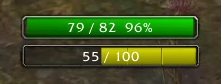
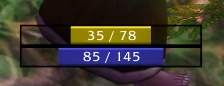


 Open by typing "/erb", See how to edit here!
- Download the addon
- Unpack the file
- Open the unpacked file and rename the folder named ExtraResourceBars-master to ExtraResourceBars
- Put the renamed folder into the AddOns folder: World of Warcraft\Interface\AddOns
- Start or restart WoW if already running
IF YOU CANT MOVE A FRAME THEN SET ITS "under" VALUE TO NIL
For example, if you can't move the power bar then run this command:
/run ERB_options.erb_pp.under = nil
  hide       (true or false)
  barResize  ("LEFT", "CENTER", "RIGHT")
  width      (Any number)
  height     (Any number)
  fontSize   (Any number)
  textType   (0, 1, 2, 3, 4)
  textAlign  ("LEFT", "CENTER", "RIGHT")
  under      ("erb_hp" or any other frame, for example, "PlayerFrame", set to nil to be able to move the bar again)
  spacing    (Any number, for example, 5 or -10)
  bar        (1-26, 0 for no bar texture)
  border     (1-4, 0 for no border texture)
  background (true or false)
  backgroundColor (Accepts 3-4 numbers from 0-1 like this (Red, Green, Color, Alpha): {0, 0, 0, 0.45} )
  only_combat (true or false) Defaults to false
  fade_in_time (Any number) (example: 0.4)
  fade_out_time (Any number) (example: 0.4)
  hide_when_full (true or false) Defaults to false, if only_combat and hide_when_full are both set to true then the bar will be shown in combat regardless if the resource is full or not (out of combat it will only show if its not full)

  Unique for HP bar:
  color         (Accepts 3-4 numbers from 0-1 like this (Red, Green, Color, Alpha): {0.2, 0.2, 1} )  Only works if gradiantHP is set to false.
  gradiantHP    (true or false) Gradiant hp color change from green to yellow to red.
  moveable      (true or false) Defaults to true, when false you wont be able to move the HP bar with the mouse cursor.

  Unique for the Power bar:
  powers = {
      mana    (Accepts 3-4 numbers from 0-1 like this (Red, Green, Color, Alpha): {0.2, 0.2, 1} )
      rage    (Accepts 3-4 numbers from 0-1 like this (Red, Green, Color, Alpha): {1, 0, 0} )
      energy  (Accepts 3-4 numbers from 0-1 like this (Red, Green, Color, Alpha): {1, 1, 0} )
      main =  ("mana", "energy", "rage")  The target power to track (changes automatically with druid shapeshifting)
  }
/run ERB_options.erb_hp.[OPTION]=[VALUE]
Example:
/run ERB_options.erb_hp.width=150
/run ERB_options.erb_hp.backgroundColor={1, 0, 0, 0.55}
First example will change the HP bar's width to 150.
Second example will change the background's color to red with 45% transperancy.
/run ERB_options.erb_pp.[OPTION]=[VALUE]
Example:
/run ERB_options.erb_pp.powers.main="energy"
Will change the power tracking to energy (A must for rogues, druids bar will change automatically)
Run this to reload UI to apply changes:
/console reloadui