ERA of Replicating Agents - Create AI agents with custom prompts using Deno.

era-advertisement.mp4
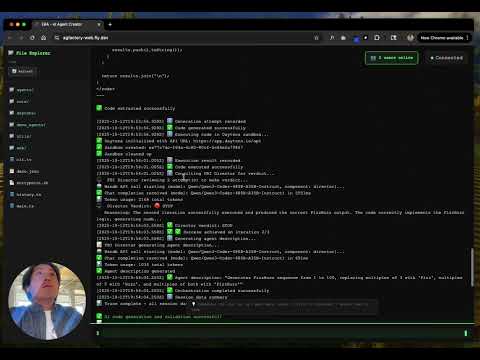
https://agfactory-web.fly.dev/
ERA doesn't just generate code—it improves itself. Every agent you create becomes a reusable utility for future agents. The system:
- ✨ Self-replicates: Generated agents can be promoted to utilities and injected into new agents
- 🔄 Self-corrects: FBI Director reviews, refines, and iterates on generated code automatically
- 🧬 Compounding growth: Each new agent expands the capabilities of the entire system
- 🤖 CLI Tool - Create and manage AI agents with custom prompts
- 🧠 FBI System - AI-powered agent orchestration with prompt improvement & iteration
- 🏗️ Utility Promotion - AI converts agents to injectable utilities with
examples.ts - 🌐 Web Server - Hono-based server with Alpine.js frontend
- ☁️ Integrations - Daytona sandbox, Wandb AI, and Weave tracing
📢 Note: This project generates its own code organized as
core/(orchestration system),utils/(reusable utilities used by the app itself for code generation, AI interactions, and integrations), andagents/(experimental AI agents with specific tasks)
See docs/ARCHITECTURE.md for system design, docs/WORKFLOWS.md for usage patterns.
Install Deno (if not already installed):
# macOS/Linux
curl -fsSL https://deno.land/install.sh | sh

# Windows
irm https://deno.land/install.ps1 | iex# Clone the repository
git clone <your-repo-url>
cd ERA
# No installation needed! Deno downloads dependencies automatically.ERA/
├── core/ # 🧠 Core FBI Orchestration System
│ ├── fbi.ts # Main orchestrator
│ ├── director.ts # AI decision maker & prompt improvement
│ ├── prep.ts # File preparation
│ └── test-prep-integration.ts
├── utils/ # 🔧 Utility Functions
│ ├── codegen/ # AI code generation
│ ├── daytona/ # Sandbox execution
│ ├── wandb/ # AI API wrapper
│ └── weave/ # Tracing
├── tests/ # 🧪 Test Files
├── frontend/ # 🎨 UI Assets
│ └── index.html # Alpine.js frontend
├── agents/ # 🤖 Generated Agents
│ └── <agent-name>/
│ ├── index.ts # Latest/best version
│ ├── agent.json # Full metadata & history
│ └── iterations/ # Timestamped snapshots
├── docs/ # 📚 Documentation
│ ├── ARCHITECTURE.md # System design
│ ├── WORKFLOWS.md # Usage patterns
│ ├── UTILITY-PROMOTION.md # Promotion system
│ └── NPM-PACKAGES-GUIDE.md # Package usage
├── cli.ts # 💻 CLI Interface
├── main.ts # 🌐 Hono Web Server
├── history.ts # 📝 Type Definitions
├── deno.json # Deno configuration & tasks
└── README.md

deno task cliThis starts an interactive prompt with Quick Start Templates:
- Choose a template or define your own:
- 🔢 FizzBuzz Solver - Simple code generation demo
- 🎭 Joke Generator - WandbChat + Weave tracing demo
- 🔍 Web Search Agent - Tavily search demo
- 🌐 AI Web Browser - Browserbase/Stagehand AI browsing demo
- 🤖 Multi-Agent System - Mastra framework with agents & workflows
- ✨ Define Your Own - Custom agent with AI-suggested name
- Generate code using FBI Director + AI code generation
- Choose location - agents/ (experimental) or utils/ (stable)
- Refine (optional) - improve with natural language feedback
- Promote (optional) - convert agent to reusable utility
New: Interactive Refinement 💡
After successful generation, you can refine the code by describing improvements:
- "Add error handling"
- "Make it faster with async/await"
- "Add more test cases"
- "Simplify the logic"
Each refinement creates a new iteration while preserving history.
New: Agent Continuation 🔄
Using an existing agent name automatically continues development:
- Loads previous code and history
- Builds upon existing functionality
- Preserves all previous attempts
- Tracks sessions across CLI invocations
# 1. Create a joke-telling agent
deno task cli:create jokemeister --prompt "tell jokes with tracing"

# 2. Create an agent that USES the first agent
deno task cli:create joke-rater --prompt "rate jokes from jokemeister"

# 3. Promote to reusable utility (AI generates injection code)
deno task cli:promote jokemeister --dry-run  # Preview
deno task cli:promote jokemeister            # Execute

# 4. Now jokemeister is injectable into ALL future agents!
# The system grew its own capabilities 🚀Try these pre-configured examples:
# FizzBuzz Solver (simple demo)
deno task start:fizzbuzz

# Joke Generator (WandbChat + Weave demo)
deno task start:jokemeister

# Web Search Agent (Tavily demo)
deno task start:tavily

# AI Web Browser (Browserbase/Stagehand demo)
deno task start:browserbase

# Multi-Agent System (Mastra framework demo)
deno task start:mastra# Create an agent with a prompt
deno task cli:create my-agent --prompt "You are a helpful coding assistant"
# Or use the full command
deno run --allow-read --allow-write --allow-env cli.ts create my-agent -p "You are helpful"When you create an agent, the following structure is created:
agents/my-agent/
├── index.ts                    # Latest/best version (run this!)
├── agent.json                  # Full metadata with ALL attempts
└── iterations/                 # Historical snapshots
    ├── iteration-1-1760237068655.ts
    ├── iteration-2-1760237123456.ts
    └── iteration-3-1760237178901.ts
index.ts- Always contains the latest/best version to runagent.json- Complete history of all attempts, prompts, execution results, and sessions (CLI invocations)iterations/- Timestamped snapshots so you can review or rollback
Sessions track each time you continue the agent with a new prompt, making it easy to see the development timeline.
After creating an agent, run it with:
deno run agents/my-agent/index.tsEach agent is a self-contained TypeScript file that you can customize and extend.
deno task devThis starts the Hono server at http://localhost:8000 with watch mode enabled.
deno task serveRuns the server on port 9995 with all necessary permissions.
deno task proddeno task test:daytonaRuns Daytona sandbox tests for code execution.
deno task test:wandbTests Wandb Inference API with Weave tracing.
deno task test:weaveTests Weave tracing functionality.
Create a .env file in the root directory:
# Daytona Configuration
DAYTONA_API_KEY=your_api_key
DAYTONA_API_URL=https://api.daytona.io

# Wandb Configuration
WANDB_API_KEY=your_wandb_key
WANDB_PROJECT=your-team/your-project

# AI Model Configuration
# Default model for Director, FBI, and Code Generation
AI_MODEL=Qwen/Qwen3-Coder-480B-A35B-Instruct

# Optional: Override specific models for different components
# AI_MODEL_DIRECTOR=Qwen/Qwen3-Coder-480B-A35B-Instruct
# AI_MODEL_CODEGEN=Qwen/Qwen3-Coder-480B-A35B-Instruct
# AI_MODEL_FBI=Qwen/Qwen3-Coder-480B-A35B-Instruct

# Groq Configuration (for core/main.js)
GROQ_API_KEY=your_groq_key

# Zoom RTMS Configuration (for core/main.js)
ZOOM_CLIENT_ID=your_zoom_client_id
ZOOM_CLIENT_SECRET=your_zoom_client_secret
ZOOM_SECRET_TOKEN=your_zoom_secret_token
WEBHOOK_PATH=/webhook

# Salesforce MCP Configuration (for core/main.js)
SALESFORCE_MCP_URL=your_salesforce_mcp_url
PARALLEL_API_KEY=your_parallel_api_keyERA supports per-component model and provider configuration. You can mix different providers (Wandb, OpenAI, Groq) for optimal speed/cost/quality.
⚠️ Important:WANDB_API_KEYis always required for Weave tracing, even if you use other providers for inference.
Components: director, codegen, fbi, sluggen, promoter
Configuration Priority:
- Models:
AI_MODEL_<COMPONENT>→AI_MODEL→Qwen/Qwen3-Coder-480B-A35B-Instruct - URLs:
INFERENCE_URL_<COMPONENT>→INFERENCE_URL→https://api.inference.wandb.ai/v1/chat/completions - Keys:
INFERENCE_API_KEY_<COMPONENT>→INFERENCE_API_KEY→WANDB_API_KEY
WANDB_API_KEY=your_wandb_api_key_here
AI_MODEL=Qwen/Qwen3-Coder-480B-A35B-InstructWANDB_API_KEY=your_wandb_key_here # Still needed for Weave tracing!
INFERENCE_URL=https://api.openai.com/v1/chat/completions
INFERENCE_API_KEY=sk-your_openai_key_here
AI_MODEL=gpt-4o# Fast operations (Director, FBI, Slug) → Groq
INFERENCE_URL_DIRECTOR=https://api.groq.com/openai/v1/chat/completions
INFERENCE_API_KEY_DIRECTOR=gsk_your_groq_key_here
AI_MODEL_DIRECTOR=llama-3.3-70b-versatile
INFERENCE_URL_FBI=https://api.groq.com/openai/v1/chat/completions
INFERENCE_API_KEY_FBI=gsk_your_groq_key_here
AI_MODEL_FBI=llama-3.3-70b-versatile
INFERENCE_URL_SLUGGEN=https://api.groq.com/openai/v1/chat/completions
INFERENCE_API_KEY_SLUGGEN=gsk_your_groq_key_here
AI_MODEL_SLUGGEN=llama-3.1-8b-instant
# Quality code generation → OpenAI
INFERENCE_URL_CODEGEN=https://api.openai.com/v1/chat/completions
INFERENCE_API_KEY_CODEGEN=sk-your_openai_key_here
AI_MODEL_CODEGEN=gpt-4o
# Fallback for promoter → Wandb
WANDB_API_KEY=your_wandb_key_hereThe deno.json file contains:
- Tasks - Predefined commands for common operations
- Imports - Dependency mapping (npm and jsr packages)
- Compiler Options - TypeScript configuration
- Deploy Settings - Deno Deploy configuration
| Task | Description |
|---|---|
deno task cli |
Run CLI in interactive mode |
deno task cli:create |
Create an agent (with args) |
deno task dev |
Run web server with watch mode |
deno task serve |
Run production web server |
deno task prod |
Deploy to Deno Deploy |
deno task test:daytona |
Test Daytona integration |
deno task test:wandb |
Test Wandb integration |
deno task test:weave |
Test Weave integration |
deno task git |
Quick git commit and push |
- Deno Standard Library - File operations, path handling
- Custom ANSI Colors - Terminal styling (no external deps)
- Custom Banner - ASCII art generation
- Hono - Fast web framework for Deno
- Alpine.js - Lightweight reactive framework
- Tailwind CSS - Utility-first CSS framework
- Daytona SDK - Code sandbox execution
- Wandb - AI experiment tracking and inference
- Weave - AI operation tracing
- OpenAI - LLM inference (via Wandb and Groq)
ERA uses an intelligent "FBI Director" system that orchestrates code generation:
-
Director Reviews - Analyzes your prompt and improves it with:
- Specific technical requirements
- Expected input/output behavior
- Error handling considerations
- Best practices
-
Code Generation - Creates code using improved prompt via Wandb AI
-
Sandbox Execution - Tests code in Daytona sandbox environment
-
Director Verdict - Analyzes results and decides:
- ✅ Success - code works, stop here
- 🔄 Retry - has errors, refine and try again
- 🛑 Stop - no progress, accept current version
-
Iteration - If verdict is retry, Director refines the prompt based on errors and repeats
After successful generation, you can provide natural language feedback:
Would you like to refine/improve this agent? (y/n): y

What would you like to improve?: Add input validation and better error messages
The Director will:
- Understand your feedback
- Build context from previous successful code
- Generate an improved version
- Test it in the sandbox
- Ask if you want to refine further
Every attempt is preserved:
agent.jsoncontains ALL attempts with prompts, code, and resultsiterations/folder has timestamped snapshots of each versionindex.tsalways has the latest/best version
This means:
- ✅ Never lose work
- ✅ Review what changed between iterations
- ✅ Rollback if needed
- ✅ Learn from the progression
$ deno task cli

🚀 Welcome to ERA CLI!

What do you want the agent to do?: Create a function that reverses a string

🤖 Generating agent name...
Agent name: (default: string-reverser) [press Enter]

🤖 Creating agent: string-reverser
💬 Prompt: Create a function that reverses a string

⏳ Calling ERA orchestrator...
✅ Success! Code generated and validated

Would you like to refine/improve this agent? (y/n): y

What would you like to improve?: Add unicode emoji support and handle edge cases

🔄 Refining agent with your feedback...
✅ Refinement complete!

Would you like to refine/improve this agent? (y/n): n

✅ Agent finalized!
Result:
agents/string-reverser/index.ts- Your refined agentagents/string-reverser/agent.json- Full history of both attemptsagents/string-reverser/iterations/- Snapshots of each version
# Run the latest version
deno run agents/string-reverser/index.ts

# Compare iterations
cat agents/string-reverser/iterations/iteration-1-*.ts
cat agents/string-reverser/iterations/iteration-2-*.ts

# View complete metadata
cat agents/string-reverser/agent.json# Session 1: Create initial agent
$ deno task cli
What to do?: Create a calculator
Agent name: calculator
✅ Created!
# ... Later (hours, days, weeks) ...
# Session 2: Continue development
$ deno task cli
What to do?: Add division and modulo operations
Agent name: calculator # Same name!
📂 Found existing agent: calculator
Previous attempts: 1
Continuing with new iteration...
✅ Updated! Now has division and modulo
# View session history
$ cat agents/calculator/agent.json | jq '.sessions'
[
{
"timestamp": "2025-10-12T02:00:00.000Z",
"prompt": "Create a calculator",
"attemptCount": 1
},
{
"timestamp": "2025-10-12T03:30:00.000Z",
"prompt": "Add division and modulo operations",
"attemptCount": 1
}
]deno task dev
# Visit http://localhost:8000Deno is secure by default. This project requires:
--allow-net- Network access (for web server and API calls)--allow-read- File system reads (for HTML, config files)--allow-write- File system writes (for creating agents)--allow-env- Environment variable access (for API keys)--allow-import- Dynamic imports (for modules)
These are pre-configured in deno.json tasks.
# Deploy to production
deno task prod
The deploy configuration is in deno.json under the deploy key.
The project also supports:
- Val.town - Set
valtownenv var - Smallweb - Compatible out of the box
- Self-hosted - Use
deno task serve
- Deno-Native - No Node.js, no npm, pure Deno
- Zero Config - Works out of the box
- Type Safe - Full TypeScript support
- Minimal Dependencies - Leverage Deno standard library
- Backend Modules - Add to
core/backend/ - Frontend Pages - Add to
core/frontend/ - CLI Commands - Extend
cli.ts
- Use Deno fmt:
deno fmt - Use Deno lint:
deno lint
- docs/WORKFLOWS.md - Complete workflows: experimental agents, stable utilities, AI-powered promotion
- docs/ARCHITECTURE.md - System design: core/, utils/, agents/ separation and philosophy
- docs/UTILITY-PROMOTION.md - Deep dive into the promotion system and examples.ts generation
- docs/NPM-PACKAGES-GUIDE.md - How generated agents can use npm packages in Daytona
- docs/README-UTILS-INJECTION.md - Utils injection system
# Workflows
deno task test:create-util    # Guide for creating utilities
deno task test:promotion       # Guide for promoting agents

# System
deno task test:registry        # See all available utilities
deno task test:e2e-agent # Test self-improving loop- Fork the repository
- Create a feature branch
- Make your changes
- Run
deno fmtanddeno lint - Submit a pull request
ISC
- Built with Deno
- Powered by Hono
- Styled with Tailwind CSS
- UI with Alpine.js
- Open an issue on GitHub
- Check the Deno documentation
- Visit Hono documentation
Made with ❤️ using Deno