This is my first Atari assembly project (in fact I never really used assembly beside some x86 code back when I was teenager), so the code may not be optimal or especially clever. It's a small homebrew display-test program for the 8-bit Atari (XL/XE), written in 6502 assembly (MADS): geometry grids, gray/RGB ramps, convergence patterns and the usual test cards (PLUGE, SMPTE, EBU), drawn straight from RAM. If a GTIA2RGB board is fitted it is detected automatically and a couple of 80-column screens are added (see below).
It's a homage to Artemio Urbina's 240p Test Suite. Back in February 2026 I needed convergence and geometry patterns to adjust a composite monitor and couldn't run the 240p Test Suite (e.g. on a SNES) at the time, so I decided to play a bit with building something similar myself and at the time I had Atari 8-bit computer sitting on my desk. The idea was to learn something new - 6502 assembly and MADS can't be that hard, can it? Well yes and no. I was scratching my head more than one time. When I finished the first screens I intended to build I started adding more, playing with various techniques and graphic modes and here it is...
Rusty Bits - 192p Test Suite - small display-test program for 8-bit Atari
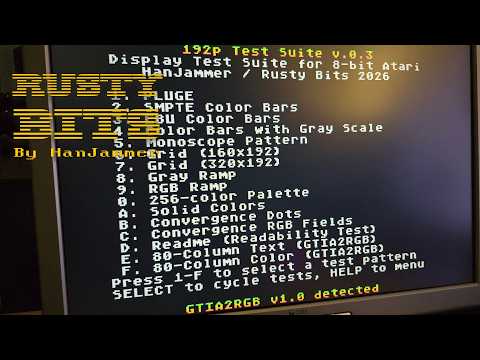
This is a hobby tool, not a calibration instrument. Don't treat it as a replacement for proper calibration gear or established suites like the 240p Test Suite. Calibrating a display over composite off an Atari is a mediocre idea anyway: the signal path smears the very things you're trying to measure. Treat any result as a rough guide.
This changes with the GTIA2RGB upgrade (below), which gives the Atari a proper RGB output and makes this kind of testing more meaningful (at least for color calibration, white balance calibration, brightness/contrast and G2 screen calibration).
You don't need to build anything. Grab the ready-to-run 192p.xex from the /bin directory (it's based on the latest codebase), then load it in an emulator (e.g. Altirra) or run it on real hardware. That's all. Assembly code is here if you want to improve it further or learn something yourself.
main.asm- state machine, input dispatch, VBLANK sync, test switching, GTIA2RGB detectionconfig.asm- hardware/OS register definitions, constants, PAL/NTSC palette valuesengine_grid.asm- split-buffer rendering engine for the geometry tests (works around the ANTIC 4KB boundary bug)menu.asm- main menu (Graphics 0)readme.asm- the help screen; SPACE cycles GR.0/GR.1/GR.2 text modes (normal + inverse) as a text-readability testpluge.asm- PLUGE, black-level / brightnesssmpte.asm- SMPTE color barsebu.asm- EBU color barscbg.asm- color bars with gray scalegrayramp.asm- 16-step luma ramp (GTIA mode 9)rgbramp.asm- color gradient rampspalette256.asm- full 256-color Atari palette via DLI multiplexing, with a picker for the reference R/G/B entries (R/G/B keys + arrows)solidcolors.asm- full-screen color fills for screen-purity checks320_grid.asm- hi-res 320x192 grid (linearity / overscan)320_monoscope.asm- monoscope geometry and sharpness pattern320_convdots.asm- convergence dots for CRT gun alignment320_symbols.asm- 16x16 1-bit tile definitions for the 320 enginescreen_data.asm- tile map for the monoscope160_grid.asm- 160x192 4-color grid160_convfields.asm- RGB convergence fields (DLI + PMG trickery)160_symbols.asm- 8x16 2-bit tile definitions for the 160 enginetext80.asm- 80-column text screen for the GTIA2RGB overlay (COL80 mode 1); SPACE cycles white/green/amber and inversetext80color.asm- 80-column color screens for GTIA2RGB; SPACE cycles CGA, Atari chroma+luma and RGB
GTIA2RGB is an FPGA companion board that adds a clean digital RGB output and an 80-column character overlay to the Atari. The suite detects it automatically at boot by reading the device ID register, and shows the firmware version at the bottom of the menu. When the board is present, two extra entries appear:
- E. 80-Column Text - an 80-column text-readability screen. SPACE cycles white, green and amber "phosphor" colors plus inverse.
- F. 80-Column Color - cycles the overlay's color modes: CGA 16-color attributes, Atari chroma + luma (the full 256-color palette), and full RGB (intensity bands and a richer ramp/rainbow screen).
On a stock GTIA (or in Altirra, which doesn't emulate the board) these entries stay hidden and everything else works exactly as before. The board's own display-quality options (palette, blending, scandoubler, and so on) are set on the device through its DIP switches and on-screen menu, not by this program.
- 1-D: pick a test (E and F also appear when a GTIA2RGB board is detected)
- SELECT: next test
- HELP/OPTION: back to menu
- SPACE/FIRE: toggle the current test's variation
Requires the MADS assembler. Run build.bat (point the MADS env var at your mads.exe, or edit the default path in the script); output lands in bin/192p.xex.
Or directly: mads main.asm -o:bin/192p.xex
HanJammer / Rusty Bits, 2026