GITHUB LINK: https://github.com/HandsomeDingor/React-Portfolio-20
- Description
- Installation
- Usage
- Contributing
- Tests
- License
- Questions
- User-Story
- Acceptance-Criteria
- Built-with
- Demo-Video
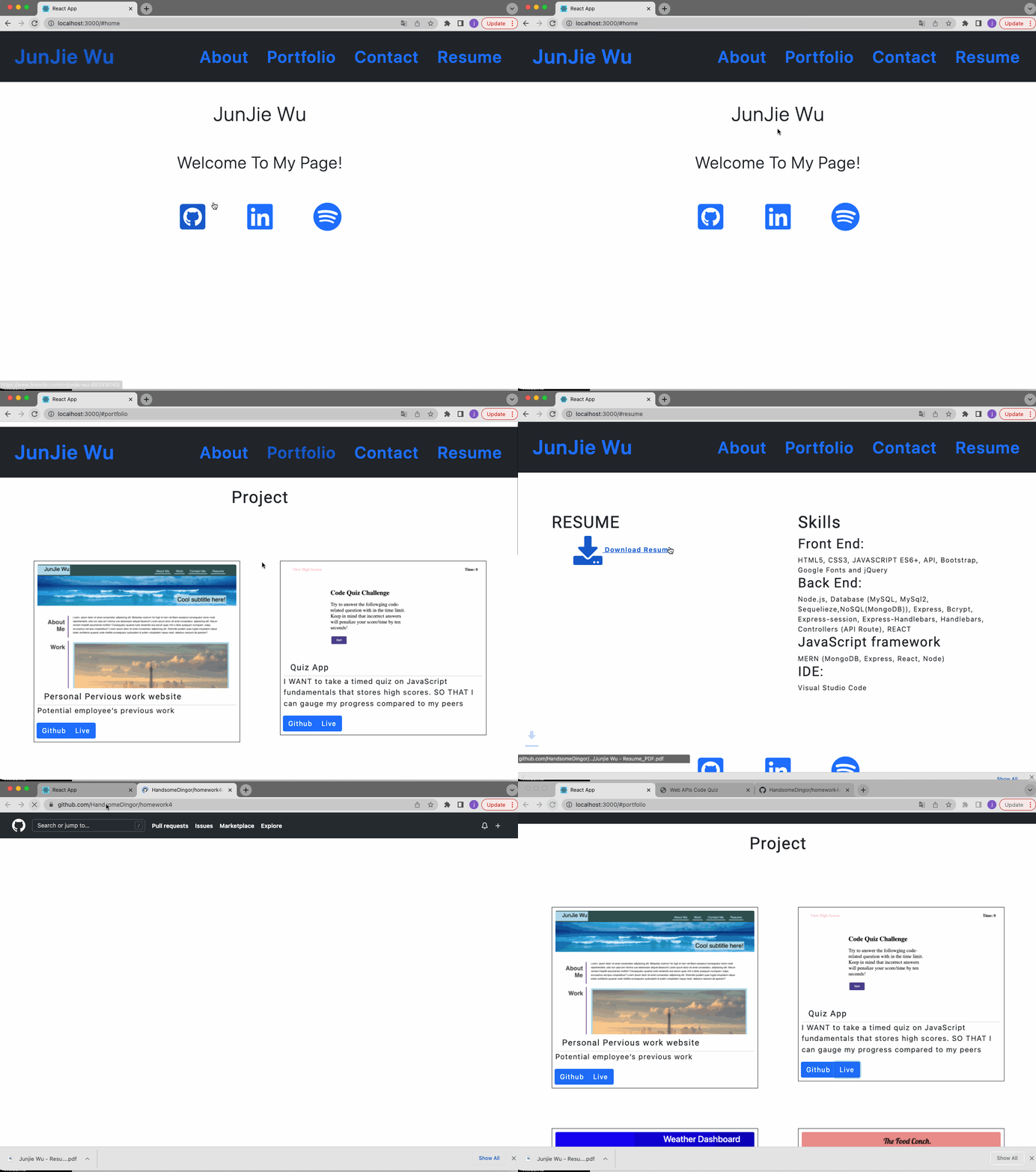
- Demo-output
Being a web developer means being part of a community. You’ll need a place to share your projects not only if you're applying for jobs or working as a freelancer but also so that you can share your work with fellow developers and collaborate on future projects.
Now that you’ve completed multiple projects, your task is to create a portfolio, using your new React skills to help set you apart from other developers whose portfolios don’t use the latest technologies.
- Clone the Repository.
- npm install
- npm Start
OR
- Go to live url : https://handsomedingor.github.io/React-Portfolio-20/
N/A
N/A
N/A
The application is covered under the MIT License.
Please contact me using the following options:
AS AN employer looking for candidates with experience building single-page applications
I WANT to view a potential employee's deployed React portfolio of work samples
SO THAT I can assess whether they're a good candidate for an open position
GIVEN a single-page application portfolio for a web developer
WHEN I load the portfolio
THEN I am presented with a page containing a header, a section for content, and a footer
WHEN I view the header
THEN I am presented with the developer's name and navigation with titles corresponding to different sections of the portfolio
WHEN I view the navigation titles
THEN I am presented with the titles About Me, Portfolio, Contact, and Resume, and the title corresponding to the current section is highlighted
WHEN I click on a navigation title
THEN I am presented with the corresponding section below the navigation without the page reloading and that title is highlighted
WHEN I load the portfolio the first time
THEN the About Me title and section are selected by default
WHEN I am presented with the About Me section
THEN I see a recent photo or avatar of the developer and a short bio about them
WHEN I am presented with the Portfolio section
THEN I see titled images of six of the developer’s applications with links to both the deployed applications and the corresponding GitHub repository
WHEN I am presented with the Contact section
THEN I see a contact form with fields for a name, an email address, and a message
WHEN I move my cursor out of one of the form fields without entering text
THEN I receive a notification that this field is required
WHEN I enter text into the email address field
THEN I receive a notification if I have entered an invalid email address
WHEN I am presented with the Resume section
THEN I see a link to a downloadable resume and a list of the developer’s proficiencies
WHEN I view the footer
THEN I am presented with text or icon links to the developer’s GitHub and LinkedIn profiles, and their profile on a third platform (Stack Overflow, Twitter)
- npm
- node.js
- vs code
- Javascript
- HTML
- CSS
- Heroku
- REACT
- React-Dom
- React-Scripts
- React-Icons
N/A