Benchmark 5 vector quantization methods with full parameter sweep support. Clean, tested, production-ready.
📄 Project Documentation: Overleaf Handover Document - Complete project background, literature review, and future directions.
Systematically test vector compression methods across parameter ranges:
- 5 methods: PQ, OPQ, SQ, SAQ, RaBitQ
- 4 datasets: DBpedia (100K-1M), MS MARCO (53M)
- Parameter sweeps: Automatic multi-configuration testing
- PACE/ICE ready: Slurm integration, NVMe caching, environment variables
git clone <repo-url>
cd vector-quantization
pip install -e .# Quick test - PQ with default parameters
vq-benchmark sweep --dataset dbpedia-100k --method pq
# Test multiple PQ configurations
vq-benchmark sweep --dataset dbpedia-100k --method pq --pq-subquantizers "8,16,32"
# Limit dataset size
vq-benchmark sweep --dataset dbpedia-1536 --dataset-limit 500000 --method opq# Quick test (100K, 2 hrs, 4GB RAM, 5GB local disk on NVMe)
sbatch --mem=4G --time=2:00:00 --tmp=5G -C localNVMe \
--wrap="vq-benchmark sweep --dataset dbpedia-100k --method pq"
# PQ parameter sweep (500K, 4 hrs, 8GB RAM, 10GB NVMe)
sbatch --mem=8G --time=4:00:00 --tmp=10G -C localNVMe \
--wrap="vq-benchmark sweep --dataset dbpedia-1536 --dataset-limit 500000 --method pq --pq-subquantizers '8,16,32'"
# Full production (1M, 8 hrs, 12GB RAM, 20GB NVMe)
sbatch --mem=12G --time=8:00:00 --tmp=20G -C localNVMe \
--wrap="vq-benchmark sweep --dataset dbpedia-1536 --method opq --opq-quantizers '8,16,32'"sqlite3 logs/benchmark_runs.db
sqlite> SELECT method, config, compression_ratio, mse, recall_at_10
FROM benchmark_runs ORDER BY timestamp DESC LIMIT 10;| Name | Vectors | Dims | Memory | Use Case |
|---|---|---|---|---|
dbpedia-100k |
100K | 1536 | ~1 GB | Quick testing & method validation |
dbpedia-1536 |
1M | 1536 | ~6 GB | Production benchmarking |
dbpedia-3072 |
1M | 3072 | ~12 GB | High-dimensional evaluation |
cohere-msmarco |
53M | 1024 | ~200 GB | Large-scale real-world passages |
DBpedia (Qdrant OpenAI Embeddings)
- Source: Wikipedia entity embeddings via OpenAI ada-002 model
- Real-world relevance: Structured knowledge base with diverse semantic content
- Dimensionality variants: 1536-dim and 3072-dim allow testing across different embedding sizes
- Use case: Entity search, knowledge graph applications, semantic similarity tasks
- Why useful: Clean, well-structured data ideal for controlled experiments and method comparison
Cohere MS MARCO v2.1
- Source: 53.2M web passage embeddings from Microsoft's MS MARCO collection
- Real-world relevance: Production-scale document retrieval corpus
- Dimensionality: 1024-dim (Cohere embed-english-v3 model)
- Use case: Large-scale passage retrieval, RAG systems, production vector databases
- Why useful: Tests quantization methods at scale with realistic retrieval workloads; captures real-world data distribution challenges
Common options:
--dataset-limit INT: Limit vectors loaded (for regularsweepcommand)--cache-dir PATH: HuggingFace cache (default:../datasets)
MS MARCO Options:
- Subset testing: Use
sweepwith--dataset-limit 100000(up to ~1M fits in memory) - Full 53M dataset: Use
streaming-sweepcommand (evaluates on full dataset without memory constraints)
Splits vectors into M subvectors, quantizes each with k-means.
vq-benchmark sweep --dataset dbpedia-100k --method pq \
    --pq-subquantizers "8,16,32" \    # Number of subvectors (M)
    --pq-bits "8"                      # Bits per subvector (B=8 means 256 clusters)
Parameters:
--pq-subquantizers: M values, comma-separated (default:"8,16,32")- M must divide dimension evenly
- Higher M = more compression, less accuracy
--pq-bits: B values, comma-separated (default:"8")
Compression: 32-512:1 | Paper: Jégou et al., 2011
PQ with learned rotation matrix for better accuracy.
vq-benchmark sweep --dataset dbpedia-100k --method opq \
    --opq-quantizers "8,16,32" \      # Number of quantizers (M)
    --opq-bits "8"                     # Bits per quantizer
Parameters:
--opq-quantizers: M values (default:"8,16,32")--opq-bits: Bits (default:"8")
Compression: Same as PQ, better accuracy | Paper: Ge et al., 2013
Quantizes each dimension independently to 8 bits.
vq-benchmark sweep --dataset dbpedia-100k --method sq \
    --sq-bits "8"                      # Bits per dimension
Parameters:
--sq-bits: Bits per dimension (default:"8")
Compression: 4:1
Adaptive bit allocation based on dimension variance.
vq-benchmark sweep --dataset dbpedia-100k --method saq \
    --saq-num-bits "4,6,8" \          # Default bits per dimension
    --saq-allowed-bits "0,2,4,6,8" \  # Allowed bit values
    --saq-segments "4,8"               # Number of segments
Parameters:
--saq-num-bits: Default bitwidth sweep (default:"4,8")--saq-total-bits: Total bit budget per vector (overrides num-bits)--saq-allowed-bits: Discrete allowed bitwidths (default:"0,2,4,6,8")--saq-segments: Segment counts (default: auto)
Compression: 8-32:1 | Paper: Zhou et al., 2024
Bit-level quantization with FAISS.
vq-benchmark sweep --dataset dbpedia-100k --method rabitq \
    --rabitq-metric-type "L2"         # Distance metric
Parameters:
--rabitq-metric-type:"L2"or"IP"(inner product)
Compression: 100:1+ | Paper: Gao & Long, 2024
Control metrics computed:
vq-benchmark sweep ... \
    --with-recall / --no-with-recall           # k-NN recall (default: on)
    --with-pairwise / --no-with-pairwise       # Pairwise dist (default: on)
    --with-rank / --no-with-rank               # Rank distortion (default: on)
    --num-pairs 1000                           # Pairs for pairwise
--rank-k 10 # k for rank distortionThe tool automatically detects and uses:
- Cache priority:
$TMPDIR(fast local NVMe) >/storage/ice-shared/cs8903onl/.cache/huggingface(shared) > local.cache - Codebooks:
$CODEBOOKS_DIRor./codebooks - Database:
$DB_PATHorlogs/benchmark_runs.db
Why $TMPDIR? ICE compute nodes have fast local NVMe storage ($TMPDIR) that's automatically cleared after jobs. This is MUCH faster than network storage for dataset loading. The loaders automatically use it when available.
| Dataset Size | Time | Memory | Temp Disk | Command |
|---|---|---|---|---|
| 100K | 2 hrs | 4 GB | 5 GB | sbatch --mem=4G --time=2:00:00 --tmp=5G -C localNVMe --wrap="vq-benchmark sweep --dataset dbpedia-100k --method pq" |
| 500K | 4 hrs | 8 GB | 10 GB | sbatch --mem=8G --time=4:00:00 --tmp=10G -C localNVMe --wrap="vq-benchmark sweep --dataset dbpedia-1536 --dataset-limit 500000 --method pq" |
| 1M | 8 hrs | 12 GB | 20 GB | sbatch --mem=12G --time=8:00:00 --tmp=20G -C localNVMe --wrap="vq-benchmark sweep --dataset dbpedia-1536 --method pq" |
| 1M (3072-dim) | 16 hrs | 16 GB | 30 GB | sbatch --mem=16G --time=16:00:00 --tmp=30G -C localNVMe --wrap="vq-benchmark sweep --dataset dbpedia-3072 --method pq" |
Key Slurm flags:
--tmp=<size>G: Request local disk space-C localNVMe: Request NVMe storage (faster)-C localSAS: Request SAS storage (slower but available on more nodes)
Reference: PACE ICE Local Disk Documentation
squeue -u $USER
tail -f slurm-<job_id>.out
ls -lh logs/Results → logs/benchmark_runs.db (SQLite)
- compression_ratio: How much smaller (32:1 = 32x)
- mse: Mean squared error (lower = better)
- pairwise_distortion: Relative distance preservation (lower = better)
- recall@10: % true k-NN found (higher = better)
-- View recent runs
SELECT method, config, compression_ratio, mse, recall_at_10
FROM benchmark_runs ORDER BY timestamp DESC LIMIT 20;

-- Compare PQ configurations
SELECT config, compression_ratio, recall_at_10
FROM benchmark_runs
WHERE method='pq' AND dataset='dbpedia-1536'
ORDER BY compression_ratio DESC;

-- Best compression-accuracy tradeoff
SELECT method, config, compression_ratio, recall_at_10
FROM benchmark_runs
WHERE dataset='dbpedia-100k'
ORDER BY (compression_ratio * recall_at_10) DESC LIMIT 10;

-- Method comparison
SELECT method, AVG(compression_ratio) as avg_comp, AVG(recall_at_10) as avg_recall
FROM benchmark_runs WHERE dataset='dbpedia-100k' GROUP BY method;# Runs on your local machine (no Slurm)
for method in pq opq sq saq rabitq; do
vq-benchmark sweep --dataset dbpedia-100k --method $method
done
# Visualize - creates comprehensive analysis plots:
# • Compression-distortion tradeoffs
# • Pareto frontier showing optimal configurations
# • Radar chart for multi-dimensional comparison
# • Recall and rank distortion analysis
vq-benchmark plotLocally:
# Run all methods (100K subset)
for method in pq opq sq saq rabitq; do
  vq-benchmark sweep --dataset cohere-msmarco --dataset-limit 100000 --method $method
done

# Visualize results
vq-benchmark plot --dataset cohere-msmarco
On PACE (parallel jobs):
# Submit 5 jobs (run in parallel)
for method in pq opq sq saq rabitq; do
  sbatch --mem=8G --time=4:00:00 --tmp=10G -C localNVMe \
    --wrap="vq-benchmark sweep --dataset cohere-msmarco --dataset-limit 100000 --method $method"
done

# After jobs complete
vq-benchmark plot --dataset cohere-msmarcoThe streaming-sweep command evaluates quantization on the full 53M dataset without loading it all into memory. It trains on a subset (e.g., 1M vectors), then streams through the full dataset computing metrics on-the-fly.
Locally:
# Run streaming evaluation (trains on 1M, evaluates on all 53M)
vq-benchmark streaming-sweep --method pq --training-size 1000000 --batch-size 10000

# Limit to first 100 batches (1M vectors) for testing
vq-benchmark streaming-sweep --method pq --training-size 1000000 --max-batches 100

# Try different methods
vq-benchmark streaming-sweep --method opq --training-size 1000000
vq-benchmark streaming-sweep --method sq --training-size 500000
On PACE (recommended for full 53M):
# PQ on full 53M (~18-24 hours, 12GB RAM, 10GB NVMe cache)
sbatch --mem=12G --time=24:00:00 --tmp=10G -C localNVMe \
    --wrap="vq-benchmark streaming-sweep --method pq --training-size 1000000 --batch-size 10000"

# OPQ on full 53M (slower due to rotation matrix training)
sbatch --mem=16G --time=30:00:00 --tmp=15G -C localNVMe \
    --wrap="vq-benchmark streaming-sweep --method opq --training-size 1000000 --batch-size 10000"
Streaming sweep options:
--training-size: Vectors to train quantizer (default: 1M)--batch-size: Batch size for streaming (default: 10K)--max-batches: Limit batches for testing (default: None = all ~5300 batches)
Note: Unlike the regular sweep command, streaming-sweep computes MSE across the entire streamed dataset, providing generalization metrics on data the quantizer hasn't seen during training.
### Deep PQ parameter sweep

```bash
vq-benchmark sweep --dataset dbpedia-1536 --method pq \
    --pq-subquantizers "4,8,12,16,24,32" \
    --pq-bits "6,8" \
    --dataset-limit 500000
vq-benchmark sweep --dataset dbpedia-1536 --method pq --pq-subquantizers "8,16,32"
vq-benchmark sweep --dataset dbpedia-1536 --method opq --opq-quantizers "8,16,32"

# Query comparison
sqlite3 logs/benchmark_runs.db "
SELECT method, config, compression_ratio, recall_at_10
FROM benchmark_runs WHERE method IN ('pq','opq') ORDER BY method, config"
Ground truth k-nearest neighbors are required for computing recall and rank distortion metrics.
For datasets ≤100K vectors, ground truth is computed automatically using FAISS:
# dbpedia-100k: Ground truth computed automatically (fast with FAISS)
vq-benchmark sweep --dataset dbpedia-100k --method pqFor large datasets (1M+), ground truth is skipped by default to save memory.
Option 1: Precompute ground truth separately (recommended)
# 1. Save dataset vectors to .npy file first
python -c "
from haag_vq.data import load_dbpedia_openai_1536
import numpy as np
data = load_dbpedia_openai_1536(limit=None)
np.save('dbpedia_1536_vectors.npy', data.vectors)
"

# 2. Precompute ground truth using FAISS (efficient, GPU-accelerated if available)
vq-benchmark precompute-gt \
    --vectors-path dbpedia_1536_vectors.npy \
    --output-path dbpedia_1536_ground_truth.npy \
    --num-queries 100 \
    --k 100

# 3. Run sweep with precomputed ground truth
vq-benchmark sweep --dataset dbpedia-1536 --method pq \
    --ground-truth-path dbpedia_1536_ground_truth.npy
Option 2: Skip recall metrics
# Run without recall/rank distortion metrics
vq-benchmark sweep --dataset dbpedia-1536 --method pq \
    --with-recall false --with-rank false
PACE Example (precompute ground truth with GPU):
# Use GPU for faster ground truth computation on large datasets
sbatch --mem=32G --time=4:00:00 --gres=gpu:1 \
    --wrap="vq-benchmark precompute-gt \
        --vectors-path /scratch/\$USER/msmarco_vectors.npy \
        --output-path /scratch/\$USER/msmarco_gt.npy \
        --num-queries 1000 \
        --k 100 \
--use-gpu"vector-quantization/
├── README.md # This file (complete documentation)
├── src/haag_vq/
│ ├── cli.py # CLI entry point (vq-benchmark)
│ ├── benchmarks/
│ │ ├── sweep.py # Parameter sweep implementation
│ │ └── precompute_ground_truth.py
│ ├── data/ # Dataset loaders
│ │ ├── dbpedia_loader.py
│ │ └── cohere_msmarco_loader.py
│ ├── methods/ # Quantization implementations
│ │ ├── product_quantization.py # PQ
│ │ ├── optimized_product_quantization.py # OPQ
│ │ ├── scalar_quantization.py # SQ
│ │ ├── saq.py # SAQ
│ │ └── rabit_quantization.py # RaBitQ
│ ├── metrics/ # Evaluation
│ │ ├── distortion.py
│ │ ├── pairwise_distortion.py
│ │ ├── recall.py
│ │ └── rank_distortion.py
│ └── utils/
│ └── run_logger.py # SQLite logging
└── logs/
└── benchmark_runs.db # Results
Command not found: vq-benchmark
pip install -e .Out of memory
vq-benchmark sweep --dataset dbpedia-100k --method pq  # Use smaller dataset
vq-benchmark sweep --dataset dbpedia-1536 --dataset-limit 100000 --method pq  # Or limit
Slow download
- First run downloads from HuggingFace (takes time)
- Subsequent runs use cache
- PACE: Auto-uses
$TMPDIR(NVMe) then/storage/ice-shared/cs8903onl/.cache/huggingface
Python/FAISS
- Requires Python 3.9+
- Install:
pip install faiss-cpu - PACE:
module load python/3.12
- 👥 Roster
- 📄 Weekly Report
- 🎤 Presentations
- 💬 Slack:
#vector-quantization
Project Documentation:
- 📄 Overleaf Handover Document - Complete project overview including:
- Literature survey and comparison of quantization techniques
- Systems perspective on memory hierarchy and hardware optimization
- Vector quantization presentation materials
- Scope for improvement and future research directions
- 📝 Original Project Doc
Learning Resources:
- 📺 VQ Intro
- 🔍 FAISS PQ Chart
- 📚 Qdrant VQ
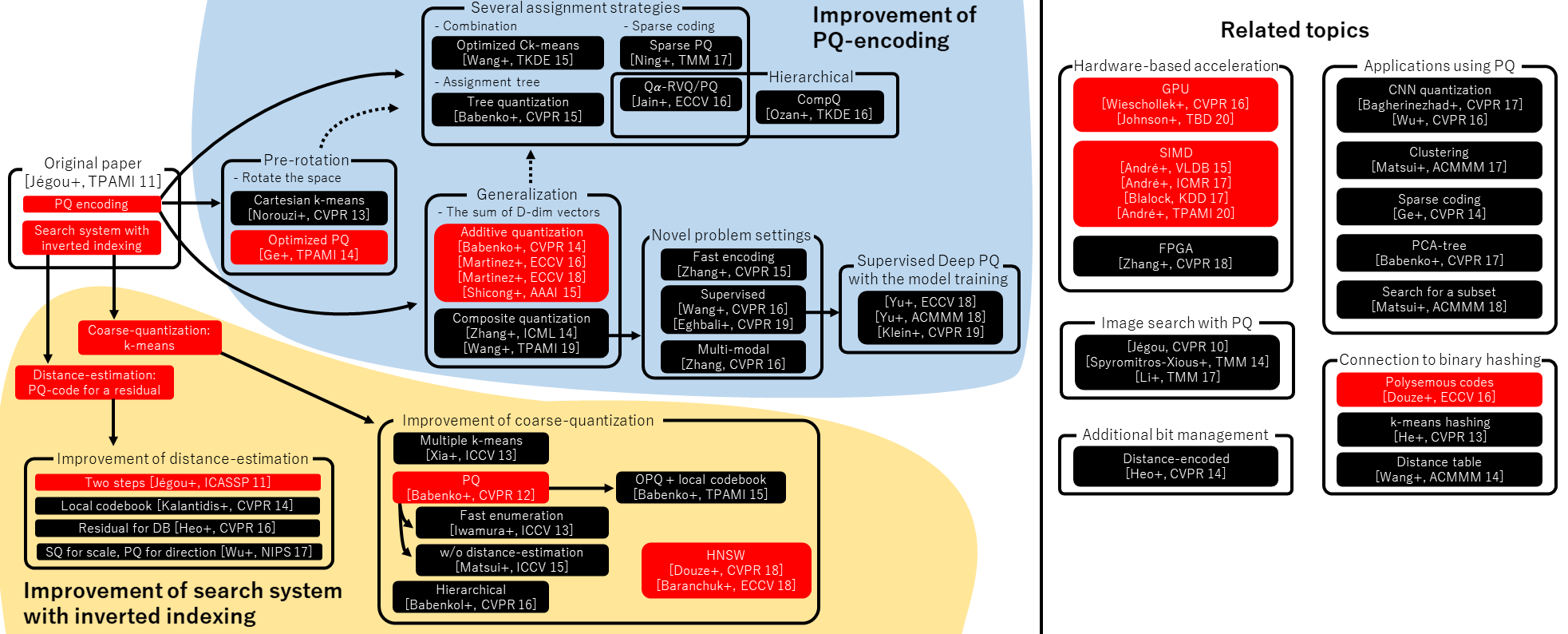
From the project team's analysis, promising areas for improvement include:
- GPU-friendly SAQ variants for faster quantization and queries
- Dynamic/incremental training to avoid full re-quantization on dataset updates
- Information theory-based compression for better rate-distortion tradeoffs
- Tail optimization for better handling of outlier embeddings
- Dimensionality reduction techniques that preserve relative distances (t-SNE, ISOMAP, LLE)
See the Overleaf document for detailed analysis and references.