A modern, high-performance SRT subtitle translator powered by Google's Gemini 3 Pro. This project is built from the ground up with a modern tech stack including React, TypeScript, and Vite, and features a sleek, glassmorphic dark UI with client-side AI processing.
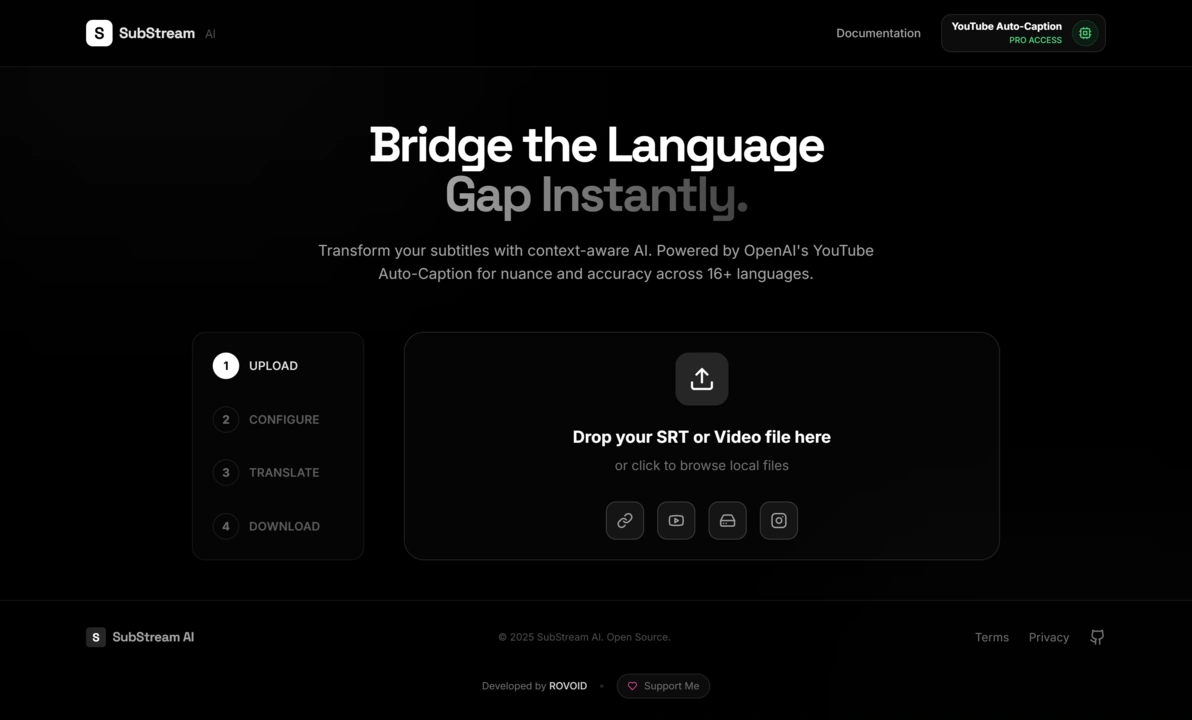
- Context-Aware Translation: Uses intelligent batching to process subtitles in groups, allowing Gemini 3 Pro to understand context, gender, and tone across lines.
- Multi-Model Support: Switch between Gemini 3 Pro (High Reasoning), Gemini 2.5 Flash (High Speed), and other models instantly via the configuration overlay.
- Client-Side Privacy: Your API keys and files are processed locally in the browser memory and sent directly to Google. No data is stored on our servers.
- Live Preview & Editing: View original and translated text side-by-side in real-time as the AI processes the file.
- Smart Quota Management: Real-time estimation of API request usage and local quota tracking to help you stay within limits.
The project is organized into a clean and scalable structure to make navigation and modification intuitive.
/src
├── components/     # Reusable UI components (Modal, SubtitleCard, StepIndicator)
├── services/       # AI integration logic (Gemini SDK, batching, retry logic)
├── utils/          # Helpers for SRT parsing and stringifying
├── App.tsx         # Main application logic and state management
├── index.tsx       # Application entry point
└── types.ts        # TypeScript definitions for Subtitles and Models
To get a local copy up and running, follow these simple steps.
-
Clone the repository:
git clone https://github.com/IMROVOID/SubStream-AI.git
-
Navigate to the project directory:
cd SubStream-AI -
Install NPM packages (Requires Node.js):
npm install
-
Run the development server:
npm run dev
The application will be available at
http://localhost:5173(or the next available port).
This project was designed to be easily customizable. Here’s how you can modify its key parts:
- AI Logic & Prompts: The core translation logic, system instructions, and retry mechanisms are located in
services/geminiService.ts. - Supported Models: To add or remove Gemini models, update the
AVAILABLE_MODELSarray intypes.ts. - UI Components: The visual elements like the glassmorphic modals and cards are found in
components/. - Styling & Theming: All global styles, animations, and Tailwind configuration are located in
index.htmlandApp.tsx.
This project leverages several modern libraries and tools to achieve its functionality and appearance.
| Library | Link | Description |
|---|---|---|
| Vite | vitejs.dev | A next-generation frontend tooling that provides a faster and leaner development experience. |
| React | react.dev | The library for web and native user interfaces. |
| TypeScript | typescriptlang.org | A strongly typed programming language that builds on JavaScript. |
| Google GenAI SDK | npmjs.com/package/@google/genai | The official SDK for accessing Gemini models. |
| Tailwind CSS | tailwindcss.com | A utility-first CSS framework for rapid UI development. |
| Lucide React | lucide.dev | Beautiful & consistent icons for the UI. |
| gh-pages | github.com/tschaub/gh-pages | A command-line utility to publish files to a gh-pages branch on GitHub. |
This repository is pre-configured for easy deployment to GitHub Pages.
-
Update Configuration Files:
-
package.json: Add the homepage field:"homepage": "https://imrovoid.github.io/SubStream-AI/",
-
vite.config.ts: Set the base path:export default defineConfig({ base: '/SubStream-AI/', plugins: [react()], })
-
-
Run the deploy script: This single command will build your project and push the
distfolder to thegh-pagesbranch on your repository.npm run deploy
(Ensure you have the
gh-pagespackage installed:npm install gh-pages --save-dev) -
Configure GitHub Settings:
- In your repository settings, navigate to the Pages tab.
- Set the Source to "Deploy from a branch".
- Set the Branch to
gh-pageswith the/rootfolder. - Save your changes. Your site will be live at
https://imrovoid.github.io/SubStream-AI/within a few minutes.
This project is open-source and licensed under the GNU General Public License v3.0 (GPL-3.0).
The GPL-3.0 is a strong copyleft license that ensures the software remains free. If you use, modify, or distribute this code, you must adhere to the following:
- Disclose Source: You must make the source code available when you distribute the software.
- License & Copyright Notice: You must include a copy of the license and the original author's copyright notice.
- Same License (Copyleft): Any modifications or derived works must also be licensed under GPL-3.0.
- State Changes: You must clearly indicate if you have modified the original files.
- No Warranty: This software is provided "as is" without any warranty of any kind.
This program is free software: you can redistribute it and/or modify it under the terms of the GNU General Public License as published by the Free Software Foundation, either version 3 of the License, or (at your option) any later version.
This program is distributed in the hope that it will be useful, but WITHOUT ANY WARRANTY; without even the implied warranty of MERCHANTABILITY or FITNESS FOR A PARTICULAR PURPOSE.
For full details, please refer to the LICENSE file in this repository.
This application was developed and is maintained by Roham Andarzgou.
I'm a passionate professional from Iran specializing in Graphic Design, Web Development, and cross-platform app development with Dart & Flutter. I thrive on turning innovative ideas into reality, whether it's a stunning visual, a responsive website, or a polished desktop app like this one. I also develop immersive games using Unreal Engine.
- Website: rovoid.ir
- GitHub: IMROVOID
- LinkedIn: Roham Andarzgou
If you find this application useful, please consider a donation. As I am based in Iran, cryptocurrency is the only way I can receive support. Thank you!
| Cryptocurrency | Address |
|---|---|
| Bitcoin (BTC) | bc1qd35yqx3xt28dy6fd87xzd62cj7ch35p68ep3p8 |
| Ethereum (ETH) | 0xA39Dfd80309e881cF1464dDb00cF0a17bF0322e3 |
| USDT (TRC20) | THMe6FdXkA2Pw45yKaXBHRnkX3fjyKCzfy |
| Solana (SOL) | 9QZHMTN4Pu6BCxiN2yABEcR3P4sXtBjkog9GXNxWbav1 |
| TON | UQCp0OawnofpZTNZk-69wlqIx_wQpzKBgDpxY2JK5iynh3mC |