

Official repository for AB-Attention
Accurate Block Attention for Accelerating Video Diffusion Transformers


Quick start / Results / Method / Citation
AB-Attention is a training-free sparse attention method for long video sequences. It combines local query clustering, inclusion-probability weighting, and paged GPU execution so that high sparsity does not require dropping the contribution of every unselected block from the attention estimate.
The implementation supports Wan2.1 T2V 1.3B / 14B and HunyuanVideo 1.0 13B on NVIDIA Hopper GPUs, including H20 and H100.
89–92% attention skipped · up to 2.23× end-to-end speedup · matched video evaluation
git clone --single-branch https://github.com/InfRec-Cardinal/AB-Attention.git
cd AB-Attention
Install dependencies and kernels (Linux · CUDA 12.4 · Hopper GPU)
Use Linux, Python 3.10+, PyTorch 2.6 with CUDA 12.4, the CUDA 12.4 toolkit,
GCC/G++ 11 or 12, and enough GPU memory for the model (the paper uses 96 GB H20).
Activate a fresh Python environment and set CUDA_HOME to the toolkit directory.
From the AB-Attention checkout, install the video dependencies and kernels:
pip install torch==2.6.0 torchvision==0.21.0 --index-url https://download.pytorch.org/whl/cu124
pip install ninja 'setuptools>=77' wheel
pip install --no-build-isolation -e '.[video]' --extra-index-url https://pypi.nvidia.com

# Keep the upstream dependency outside this checkout.
GIT_LFS_SKIP_SMUDGE=1 git clone https://github.com/svg-project/Sparse-VideoGen.git ../Sparse-VideoGen
GIT_LFS_SKIP_SMUDGE=1 git -C ../Sparse-VideoGen checkout f89aedaf169ac2ae5b186bda674e53c3dc08c476
git -C ../Sparse-VideoGen submodule update --init \
  svg/kernels/3rdparty/cutlass svg/kernels/3rdparty/flashinfer
pip install -e ../Sparse-VideoGen
pip install flash-attn==2.7.4.post1 --no-build-isolation

# Build SVG2's unchanged Norm/RoPE source with PyTorch's extension tooling.
python - <<'PY'
from pathlib import Path
from torch.utils.cpp_extension import load

root = Path('../Sparse-VideoGen/svg/kernels').resolve()
build = root / 'build'
build.mkdir(exist_ok=True)
load('_kernels', sources=[str(root / 'csrc/ops.cu')],
     extra_include_paths=[str(root / p) for p in
                          ('include', '3rdparty/cutlass/include',
                           '3rdparty/flashinfer/include')],
     extra_cuda_cflags=['-gencode=arch=compute_90a,code=sm_90a',
                       '-U__CUDA_NO_HALF_CONVERSIONS__',
                       '-U__CUDA_NO_BFLOAT16_CONVERSIONS__',
                       '--expt-extended-lambda', '--expt-relaxed-constexpr',
                       '--use_fast_math'],
     build_directory=str(build))
PY
export PYTHONPATH="$(realpath ../Sparse-VideoGen/svg/kernels/build):${PYTHONPATH:-}"
SVG2 imports FlashAttention and cuVS even though AB does not run its KMeans selector. AB installs standard FlashInfer 0.6.12 as a runtime dependency; no SVG2 FlashInfer fork or sparse-attention patch is needed.
For the Q/K/V API alone, install . instead of .[video] after installing
PyTorch and the build tools; SVG2 and the video dependencies are not needed.
After installation, generate a video:
python generate.py --model wan1.3b \
  --prompt 'A penguin walks across a snowy beach.' --output outputs/wan.mp4
Use --model wan14b or --model hunyuan for the other models, --dense
for the full-attention baseline, or --cube-layout for optional 4×4×4
spatiotemporal grouping.
Paper settings, timing, and pipeline integration
Models download from Hugging Face. --model-path /path/to/model accepts an
existing Diffusers-format checkpoint; for Hunyuan this must include its
transformer, VAE, both text encoders, and tokenizers. The default Hunyuan
download is the community Diffusers conversion. For paper reproduction, use
the same checkpoint conversion/revision, prompt and initial noise as the
reference, rather than treating any downloadable checkpoint as equivalent.
| Setting | Wan2.1 | HunyuanVideo |
|---|---|---|
| Resolution | 1280 × 720 | 1280 × 720 |
| Frames / denoising steps | 81 / 50 | 129 / 50 |
| Scheduler | UniPC, flow shift 5 | FlowMatch Euler, shift 7 |
| Guidance | CFG 5 | Embedded guidance 6, true CFG 1 |
| Sample pages / keys | 64 / 8192 | 71 / 9088 |
| Text sequence length | 512 | 256 |
Both use BF16 inference, Dense FA3 for steps 1–10 and layer 0 at every step, and plan refreshes at steps 11, 15, …, 47. Wan shares the conditional branch's plan with the unconditional branch. Hunyuan keeps video/text interactions exact and preserves the separate padding partition. Plans live in pinned CPU memory between attention calls.
--dense uses full FA3 attention with the same model preprocessing.
--warmup runs a complete video before reporting text encoding + denoising +
VAE time; model loading and MP4 export are excluded. Compare the same model,
prompt, negative prompt, resolution, frames, steps and initial noise on the
same idle GPU. --latents noise.npy accepts an explicit float32 initial latent;
otherwise the script generates CPU noise with --seed (default 42).
The default negative prompt is empty; pass the reference's negative prompt
when reproducing an existing video.
For a quick functional check, use
--height 256 --width 256 --frames 17 --steps 15 --sample-pages 1.
This exercises Dense, plan refresh and reuse;
it is not a paper quality or speed measurement.
Add --cube-layout to group video tokens into 4×4×4 spatiotemporal cubes.
The first ten denoising steps are unchanged. From step 11, tokens and their
RoPE positions are reordered once at transformer entry, then restored at exit.
The IBCS/SIP kernels and sample budget are unchanged. This optional extension
follows the permutation described in VSA2
and the boundary-token ordering used in FastVideo;
the paper's reported results use the original raster order.
For an existing pipeline, call use_cube_layout from ab_attention.video
after installing AB, passing the same height, width, and num_frames as
the generation call.
from ab_attention.video import install_wan

schedule = install_wan(pipe)
schedule.reset()  # Start each new video with fresh plans.
video = pipe(prompt=prompt, num_inference_steps=50,
             callback_on_step_end=schedule.step_end).frames[0]
For Hunyuan, call install_hunyuan(pipe, height=720, width=1280, num_frames=129),
then schedule.set_prompt(prompt) before each call. Pass that same shape,
max_sequence_length=256, true_cfg_scale=1, and the callback to pipe.
Use the scheduler and VAE settings in generate.py to match the table.
Installers change only the supplied pipeline's forwards and processors.
The attention API also works directly with BF16 tensors shaped [B, H, N, 128]:
from ab_attention import build_plan, apply_plan

plan = build_plan(q, k, sample_pages=64)
output = apply_plan(q, k, v, plan)
IBCS and SIP use CUDA kernels; the paged attention backend reuses FlashInfer.
The results below are the paper's end-to-end video measurements on the 600-prompt Penguin Benchmark. Quality is compared with matched dense references; speed is measured against matched dense FlashAttention-3 runs on NVIDIA H20.
| Model | Attention skipped | PSNR | SSIM | LPIPS | End-to-end speedup |
|---|---|---|---|---|---|
| Wan2.1-T2V · 1.3B | 89.16% | 34.436 | 0.9328 | 0.0734 | 2.01x |
| Wan2.1-T2V · 14B | 89.16% | 30.788 | 0.9169 | 0.0964 | 1.84x |
| HunyuanVideo · 13B | 92.35% | 34.347 | 0.9480 | 0.0700 | 2.23x |
The two videos below use the same prompt and generation settings. Play them directly in the README; the project page contains the full multi-method gallery.
| Dense attention · original | AB-Attention · accelerated |
|---|---|
magpie-dense.mp4 |
magpie-ab-attention.mp4 |
See the project page for matched dense, AB-Attention, DFSAttn, and SVG2 videos.
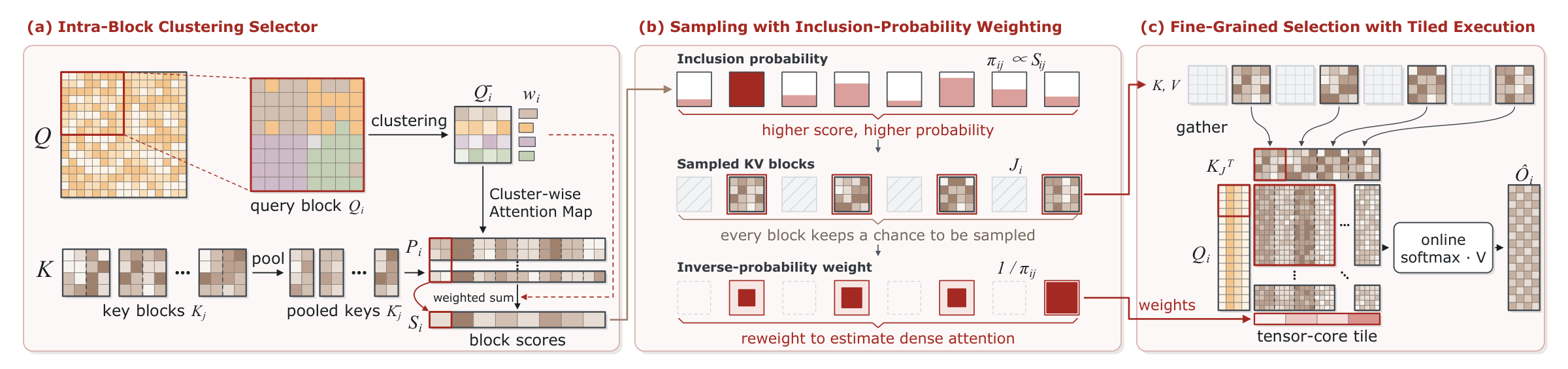
- Intra-Block Clustering Selector (IBCS) scores small key/value blocks from query representatives formed within each query block.
- Sampling with Inclusion-Probability Weighting (SIP) samples blocks without replacement and reweights their contribution to the attention normalization.
- Paged execution gathers selected blocks into full attention tiles for efficient GPU execution.
generate.py: load a model → install AB → generate/export a video.ab_attention/video.py: Dense schedule, plan reuse, model integration.ab_attention/attention.py:build_plan→apply_plan.csrc/ibcs.cuandcsrc/sip.cu: scoring and sampling.ab_attention/flashinfer_backend.py: convert the sampled blocks to FlashInfer pages and apply SIP logit weights.
@misc{xu2026abattentionaccurateblockattention,
  title = {AB-Attention: Accurate Block Attention for Accelerating Video Diffusion Transformers},
  author = {Bin Xu and Mo Zhang and Zhengfeiyang Zhang and Xinfeng Yang and
            Yixing Ma and Wei Wang and HeXin Wang and Pengfei Zhou and Wangbo Zhao},
  year = {2026},
  eprint = {2610.39663},
  archivePrefix = {arXiv},
  primaryClass = {cs.CV},
  url = {https://arxiv.org/abs/2610.39663}
}Released under the MIT License. Inspired by DFSAttn and Sparse-VideoGen (SVG2). The three vendored FlashInfer headers come from revision f6717ff and retain their Apache-2.0 license.