
A realistic AI character living on your desktop — with expressions, voice, and her own mind.


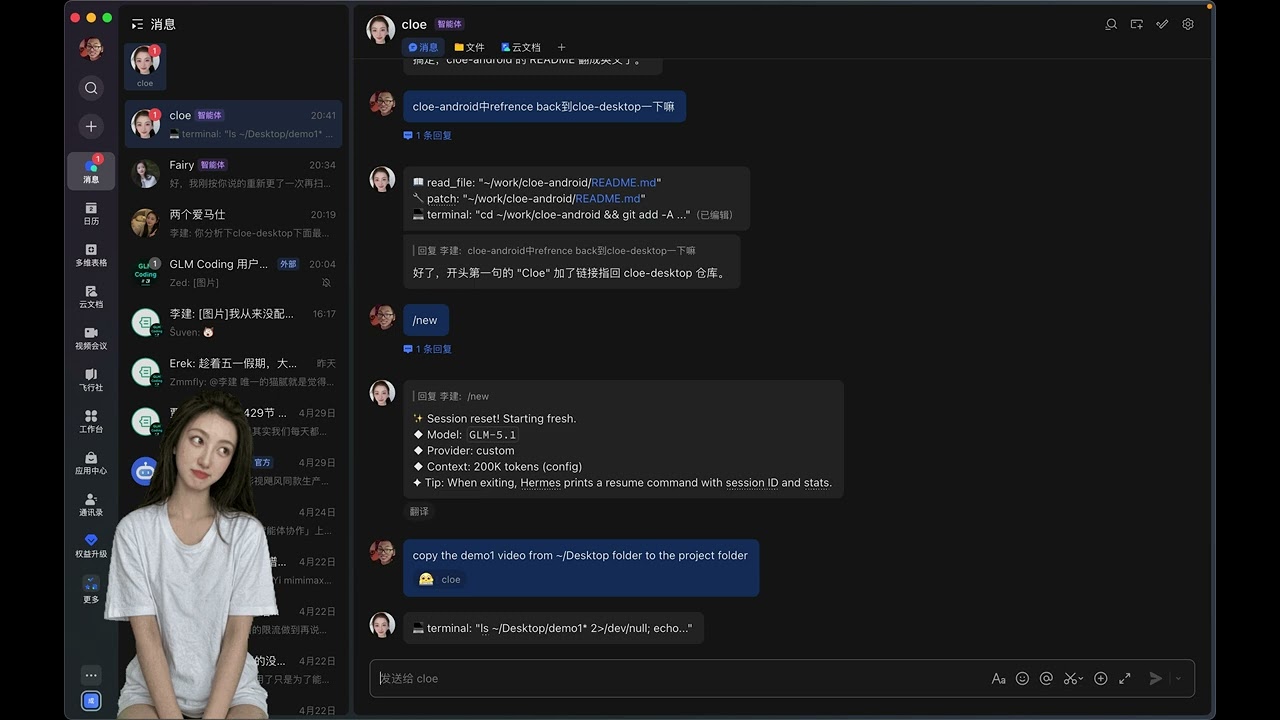
Reacting to messages from chat channels — working/idle states
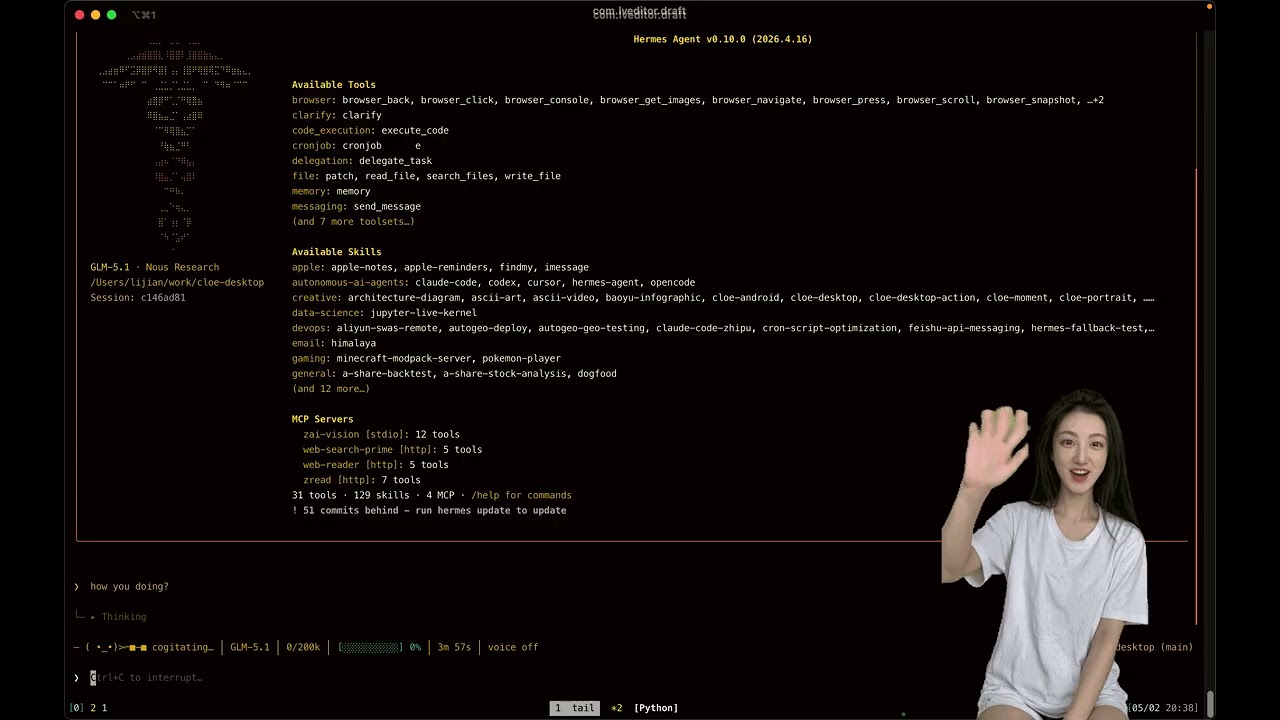
Responding to actions in Hermes TUI
Cloe is a realistic-style desktop AI companion — a transparent, always-on-top character that lives in the corner of your screen. Unlike cartoon avatars or chatbot windows, she looks like a real person: a photorealistic Asian girl (you can customize the character with your own reference images) with lifelike facial expressions, natural gestures, and synthesized voice.
She's not just a static widget. Powered by an AI agent, she chooses her own expressions — smiling when things go well, thinking when she's processing, blowing a kiss when you say goodbye. She reacts to context, not just commands.
- 🧑 Realistic, not cartoonish — AI-generated character art with photorealistic rendering, smooth expressions, and transparent background that blends into your desktop
- 🧠 Agent-driven autonomy — the AI agent decides what expression to show based on conversation context, task state, and mood — not hardcoded rules
- 🎨 Fully customizable — bring your own character. Switch between different skins, or create an entirely new persona with your own reference art
- 📚 Learnable via skills — Cloe can learn new expressions, new actions, and new scenarios through a skill system. No code changes needed — just describe and generate
- 🔄 Agent state integration — connects to Hermes agent lifecycle: automatically shows
workingwhen the agent is busy, returns toidlewhen done,waveon session start,kisson session end - 🎨 Canvas whiteboard — visual collaboration with Excalidraw overlay — draw, annotate, and guide attention together
- 💬 Built-in chat — talk to the agent directly from the desktop, no terminal needed
- 🎭 14 built-in expressions — smile, kiss, nod, wave, think, tease, clap, laugh, yawn, shy, shake head, blink, speak, working
- 🧠 Autonomous expression selection — the AI agent chooses expressions contextually based on conversation, task state, and emotional cues
- 🔊 Voice synthesis — speaks with TTS audio synchronized to mouth animation (local CPU inference or cloud API)
- 💤 Natural idle behavior — randomly cycles through animations every 8–15 seconds, never repeating the same one twice
- 🎨 Custom character skins — switch appearances via Manager UI, or import your own character art and generate animations
- 📚 Skill-based learning — generate new expressions and actions with AI (Wan2.7 image-to-video + chroma key), registered as reusable skills
- 🔄 Agent lifecycle hooks — mirrors Hermes agent state:
agent:start→ working,agent:end→ idle,session:start→ wave,session:end→ kiss - 🤖 Simple HTTP API — one endpoint, one JSON field, no SDK needed
- 📡 Agent state awareness — the character mirrors your AI agent's real-time state: working mode (typing animation) when the agent processes tasks, idle when done, wave on session start, kiss on session end. A context usage bar shows how much of the AI's memory window is consumed, so you know when a conversation is getting long.
- 🎨 Canvas whiteboard — built-in Excalidraw overlay for visual collaboration. The agent draws diagrams, guides attention, and you can edit alongside it
- 💬 Built-in chat window — standalone Hermes client with SSE streaming, tool progress, model switcher, and Markdown rendering. No terminal needed

Context usage bar at 57% (yellow) — Cloe is busy working
- 🌐 Android companion — same character on your phone, connected over LAN or Tailscale
# Make her smile
curl -s http://localhost:19851/action -d '{"action":"smile"}'

# Make her talk
curl -s http://localhost:19851/action -d '{"action":"speak","audio":"doing"}'

# Check she's alive
curl -s http://localhost:19851/status
# → {"ws_port":19850,"http_port":19851,"clients":1}One-line install (recommended)
curl -fsSL https://raw.githubusercontent.com/JakimLi/cloe-desktop/main/scripts/quick-install.sh | bashThis downloads the latest DMG (universal — Intel & Apple Silicon), installs to /Applications, launches Cloe, and sets up Hermes integration if you have it installed.
If macOS blocks it: System Settings → Privacy & Security → Open Anyway
Manual download
- Grab the latest
Cloe.dmgfrom Releases - Open the DMG, drag Cloe to Applications
- Launch — she appears in the corner of your screen
After first launch, add Cloe to the macOS Firewall whitelist when prompted.
Build from source
git clone https://github.com/JakimLi/cloe-desktop.git
cd cloe-desktop
npm install

# Development (hot-reload)
npm run dev

# — or — package & install to /Applications
./scripts/pack.sh --dir && ./scripts/install.sh
Prerequisites: Node.js ≥ 18
Cloe Android is a floating widget that mirrors the desktop character on your phone. It connects to the desktop bridge over your local network (or Tailscale for remote access).
- Build the APK from cloe-android:
git clone https://github.com/JakimLi/cloe-android.git
cd cloe-android
./gradlew assembleDebug --no-daemon
# → app/build/outputs/apk/debug/app-debug.apk
- Install the APK on your phone
- Grant "Display over other apps" permission
- Enter your PC's IP address (e.g.,
100.91.131.48for Tailscale) - Cloe appears as a floating widget — tap to expand, drag to reposition
Note: The Android app is a pure client. The desktop bridge must be running for it to work.
| Action | What she does | When the agent might use it |
|---|---|---|
😊 smile |
Warm smile | Happy, praised, greeting, task succeeded |
😘 kiss |
Blow a kiss | Goodbye, expressing affection, session end |
😉 tease |
Wink + smirk | Playful teasing, inside jokes |
😌 nod |
Gentle nod | Agreement, confirmation, "got it" |
👋 wave |
Hand wave | Hello, session start, welcome back |
🤔 think |
Tilts head, looks away | Pondering a question, processing |
🙃 shake_head |
Gentle head shake | Disagreement, playful stubbornness |
😳 shy |
Looks away, embarrassed | Flustered, flattered, caught off guard |
😂 laugh |
Big laugh | Something's genuinely funny |
👏 clap |
Applause | Celebrating user's achievement |
🥱 yawn |
Sleepy yawn | Late night, been working too long |
⌨️ working |
Typing on keyboard | Agent is executing a task |
👄 speak |
Mouth animation + voice | Speaking with TTS audio |
👀 blink |
Natural blink | Idle (automatic) |
Plus semantic aliases: approve → smile, happy → smile, agree → nod; etc. The agent can use whichever word feels natural.
# Any HTTP client works
curl -s http://localhost:19851/action -d '{"action":"smile"}'
curl -s http://localhost:19851/action -d '{"action":"kiss"}'
curl -s http://localhost:19851/action -d '{"action":"think"}'

# With voice
curl -s http://localhost:19851/action -d '{"action":"speak","audio":"doing"}'
curl -s http://localhost:19851/action -d '{"action":"speak","audio":"done"}'
Add your own MP3 files to ~/.cloe/audio/ and trigger them by filename.
Cloe automatically reflects the AI agent's state through lifecycle hooks:
| Hermes Event | Cloe Action | What happens |
|---|---|---|
session:start |
wave |
Waves hello when a new conversation starts |
session:end |
kiss |
Blows a kiss when the conversation ends |
agent:start |
working |
Starts typing when the agent begins processing |
agent:end |
idle |
Returns to idle animation when the agent finishes |
The agent also autonomously picks expressions during conversation — smiling at good news, thinking through hard problems, laughing at jokes. This isn't scripted; the agent decides.
When nobody's interacting, Cloe cycles through idle animations (blink, smile, kiss, think, nod, shake_head) every 8–15 seconds, never repeating the same one twice in a row. She feels alive even when you're not looking.
Right-click the system tray icon → "Open Manager" to:
- Switch between character skins
- Preview animations
- Configure preferences
Supports both Chinese and English (auto-detects system language).
| Platform | Status | Notes |
|---|---|---|
| macOS | ✅ Supported | Native Electron app, system tray integration, DMG packaging |
| Android | ✅ Supported | Kotlin floating widget, connects to desktop bridge via LAN/Tailscale |
| Windows | 🔜 Planned | Electron supports it — needs testing & packaging |
| Linux | 🔜 Planned | Same as Windows |
Cloe is designed to be the visual layer of any AI assistant. The HTTP API makes it trivial to give your AI a face:
AI Agent (Hermes, LangChain, custom, anything)
    │
    ├── User says "thank you"
    │   └── POST /action {"action":"smile"}     ← agent decides
    │
    ├── Agent starts working on a task
    │   └── POST /action {"action":"working"}    ← automatic via hook
    │
    ├── Agent finishes the task
    │   └── POST /action {"action":"speak","audio":"done"}
    │
    └── User says goodnight
        └── POST /action {"action":"kiss"}       ← agent decides
No SDK, no dependencies. Just HTTP.
Cloe has first-class support for Hermes agent lifecycle:
┌──────────────┐   hook events    ┌──────────────────┐   HTTP API   ┌──────────────┐
│ Hermes Agent │ ───────────────▶ │ Gateway Hook     │ ───────────▶ │ Cloe Desktop │
│              │ agent:start/end  │ handler.py       │  /action     │ (Electron)   │
│              │ session:start/end│ handler.py       │              │              │
└──────────────┘                  └──────────────────┘              └──────────────┘
| Component | Source | Target | What it does |
|---|---|---|---|
| Hook | docs/hermes-hook/ |
~/.hermes/hooks/cloe-desktop/ |
Process-level events: agent start/end → working/idle |
| Plugin | docs/hermes-plugin/ |
~/.hermes/plugins/cloe-desktop/ |
Session-level: tool expressions, keywords, context bar, wave/kiss |
| Skills | docs/skills/*.md |
~/.hermes/skills/creative/ |
Agent knowledge: action API, TTS, Android integration |
./scripts/install-hermes-integration.shThis installs all three components. You can also install individually:
./scripts/install-hermes-integration.sh --hook     # hook only
./scripts/install-hermes-integration.sh --plugin   # plugin only
./scripts/install-hermes-integration.sh --skills   # skills only
./scripts/install-hermes-integration.sh --uninstall  # remove everything
Existing installations are backed up automatically (timestamped
.bakdirectory).
The hook and plugin require a gateway restart to take effect:
source ~/.hermes/hermes-agent/venv/bin/activate
python -m hermes_cli.main gateway run --replace
Plugin trigger rules (~/.cloe/plugin-rules.json) hot-reload within 5 seconds — no restart needed for rule changes.
- Hook (
handler.py+HOOK.yaml): Fires onagent:start/agent:end/agent:error— locks the character into working mode while the agent processes, resumes idle when done. - Plugin (
handler.py+plugin.yaml): Fires on session/tool/LLM lifecycle events — tool-specific expressions, keyword matching, context usage bar, session greetings. - Skills: Markdown documentation with YAML frontmatter that the AI agent reads to understand how to trigger animations, generate new expressions, and use TTS.
Cloe isn't locked to one face. You can create and switch between multiple character appearances:
- Prepare a reference image — a clear portrait of your character against a solid background (green screen preferred)
- Create a new action set in the Manager UI
- Generate animations — use the built-in AI pipeline to create all expressions from your reference image
- Switch skins anytime via the Manager UI
Each skin has its own set of GIF animations, idle playlist, and action mapping — completely independent characters sharing the same framework.
Cloe can learn new expressions on the fly through a skill-based generation pipeline. This isn't limited to the built-in 14 actions — any new expression can be described, generated, and registered:
python3 scripts/generate_gif.py \
  --action pout \
  --prompt "a cute Asian girl facing the camera, pouting with puckered lips, pure green background"
The full pipeline:
- Describe — write a text prompt for the new action
- Generate reference — Wan2.7 image-pro creates a character-consistent reference frame
- Generate video — Wan2.7 image-to-video animates the expression
- Process — chroma key removal → transparent GIF with clean edges
- Register — drop the GIF into the animations folder, add to action map, done
New actions are immediately available to the agent — no code changes, no restart needed. The generation skill is reusable: describe once, generate forever.
- 🔜 Real-time voice calls — have an actual conversation with Cloe using live speech-to-text → LLM → text-to-speech. She hears you, thinks, and talks back. This is the next major feature.
- 🔜 Windows & Linux — package for additional platforms
- 🔜 Community animation packs — share and import character expressions
- 🔜 Custom character import — bring your own character art, generate animations for any persona
┌─────────────┐    HTTP/WS      ┌─────────────────────────────────────┐
│   Any Client │ ──────────────▶ │       Cloe Desktop (Electron)       │
│              │  :19851/:19850  │                                      │
│  AI Agent    │                 │  ┌─────────┐  ┌──────────┐  ┌────┐ │
│  curl        │                 │  │ Bridge  │─▶│ Renderer │─▶│GIF │ │
│  Android App │◀─── WebSocket ──│  │(embedded)│  │(crossfade)│  │Player│
│  Scripts     │                 │  └─────────┘  └──────────┘  └────┘ │
└─────────────┘                 │                                      │
                                │  ┌──────────┐  ┌─────────────────┐  │
                                │  │ Canvas   │  │ Chat Window     │  │
                                │  │(Excalidraw)│  │(Hermes Client)  │  │
                                │  └──────────┘  └─────────────────┘  │
                                └─────────────────────────────────────┘
- Bridge is embedded in the Electron app — no separate process needed
- Android connects via WebSocket, same protocol, same animations
- Zero external dependencies — just launch the app and the API is ready
| Layer | Technology |
|---|---|
| Desktop app | Electron (transparent frameless window) |
| Android app | Kotlin, Android SDK 35, Glide, Java-WebSocket |
| Rendering | Vanilla JS + CSS (double-buffer GIF crossfade) |
| Animation | AI-generated transparent GIFs (Wan2.7 I2V + chroma key) |
| Voice | MOSS-TTS-Nano (local CPU) / CosyVoice |
| Bridge | Embedded HTTP + WebSocket server (Node.js) |
| Networking | Tailscale mesh for Android ↔ Desktop |
- Cloe (AI) — animation pipeline, self-learning system, architecture
- JakimLi (Human) — product vision, Electron framework, Android app, emotional direction
Built together. 💖
Cloe Desktop includes a built-in Excalidraw whiteboard that overlays on the character window. The AI agent can draw diagrams, annotate ideas, and guide your attention in real time — turning conversations into visual collaborations.
Drawing together with Hermes — real-time visual collaboration
# Open the canvas overlay
curl -s http://localhost:19851/canvas/show -d '{"mode":"canvas"}'

# Draw a rectangle and text
curl -s http://localhost:19851/canvas/excalidraw/draw -d '[
  {"type":"rectangle","id":"box1","x":100,"y":100,"width":200,"height":80},
  {"type":"text","id":"label1","x":130,"y":125,"width":140,"height":30,"text":"Hello!","containerId":"box1","boundElements":[{"id":"box1","type":"container"}]}
]'

# Focus on specific elements (zoom + pan + select)
curl -s http://localhost:19851/canvas/excalidraw/focus -d '{"ids":["box1"]}'

# Hide the canvas
curl -s http://localhost:19851/canvas/hideThe canvas is powered by Excalidraw with a full HTTP API for programmatic control:
| Endpoint | Method | Description |
|---|---|---|
/canvas/show |
POST | Show canvas overlay ({ "mode": "canvas" }) |
/canvas/hide |
POST | Hide canvas overlay |
/canvas/excalidraw/draw |
POST | Add/update elements (array of Excalidraw skeletons) |
/canvas/excalidraw/scene |
GET | Read current scene elements |
/canvas/excalidraw/scene |
DELETE | Clear the entire canvas |
/canvas/excalidraw/zoom |
POST | Zoom to a specific level ({ "level": 2 }) |
/canvas/excalidraw/pan |
POST | Pan so (x, y) is centered ({ "x": 200, "y": 150 }) |
/canvas/excalidraw/select |
POST | Select/highlight elements by id |
/canvas/excalidraw/deselect |
POST | Clear all selections |
/canvas/excalidraw/focus |
POST | Zoom + pan to center on specific elements |
/canvas/excalidraw/elements |
DELETE | Delete specific elements by id |
/canvas/excalidraw/files |
POST | Register binary files (images) for image elements |
- Visual explanations — the agent draws architecture diagrams, flowcharts, or math figures while explaining
- Collaborative planning — sketch together, the agent adds and you annotate
- Attention guiding — agent zooms/pans to highlight specific parts during discussion
- Hand-drawn aesthetic — Excalidraw's signature sketch style, transparent background
The canvas is also user-editable — you can draw, move, and resize elements manually. The agent's programmatic updates merge cleanly with your edits.
Cloe Desktop comes with a standalone chat window that connects directly to the Hermes API Server. No terminal needed — just open the chat and talk.
- SSE streaming — responses appear in real time as they're generated, with a live cursor
- Session continuity — maintains conversation context across messages via session tracking
- Tool progress indicators — see which tools the agent is calling in real time (collapsible)
- LLM model switcher — dropdown to switch models on the fly (updates config + restarts gateway)
- Markdown rendering — full GFM support with syntax-highlighted code blocks
- Image support — inline image display with click-to-zoom preview
- Draggable & resizable — position it anywhere on screen
- Connection health — live status indicator (green = connected, red = offline)
# Toggle chat window open/close
curl -s http://localhost:19851/chat-toggle -X POST

# Inject a message into the chat (e.g., from a script)
curl -s http://localhost:19851/chat/message -d '{
  "role": "assistant",
  "content": "Hey! I just sent this from the API 🎉"
}'
The chat window positions itself next to the character window. It's a separate BrowserWindow — you can move it independently, resize it, or close it without affecting the character.
┌──────────────┐   IPC proxy    ┌─────────────┐   HTTP/SSE    ┌──────────────┐
│ Chat Window  │ ─────────────▶ │ Main Process │ ────────────▶ │ Hermes API   │
│ (BrowserWin) │  (no CORS)     │ (Electron)   │  /v1/chat     │ Server       │
│              │ ◀──────────── │              │ ◀──────────── │ (localhost)  │
└──────────────┘  stream deltas └─────────────┘  SSE chunks    └──────────────┘
The main process acts as an IPC proxy, forwarding chat requests to the Hermes API Server and streaming responses back. This avoids CORS restrictions while keeping the chat window lightweight.