
MinimalFox is a minimalist user style focused on reducing screen clutter while keeping Firefox simple and usable.

This was written mainly for Firefox ESR, but it may also work on standard Firefox versions.
This style is compatible with any theme. The one used in the screenshots is Dark Space.
MinimalFox owns toolbar reveal, compact tabs, browser chrome fonts, and the five-column extension grid and notification layout. In a combined setup, Amber Black owns colors, background images, borders, focus, selection, carets, and about-page fonts.
minimalDemo.mp4
- Firefox ESR (recommended, though it may also work on standard Firefox versions)
- Cascadia Code installed on your system
- Knowing basic Firefox shortcuts like
CTRL+W,CTRL+T, andALT+D
Firefox keyboard shortcuts
-
Open Firefox and type
about:configin the address bar. -
Press Enter.
-
Click Accept the Risk and Continue if prompted.
-
Search for
toolkit.legacyUserProfileCustomizations.stylesheetsand set it totrue. -
Search for
browser.compactmode.showand set it totrue. -
Set toolbar density to
compact.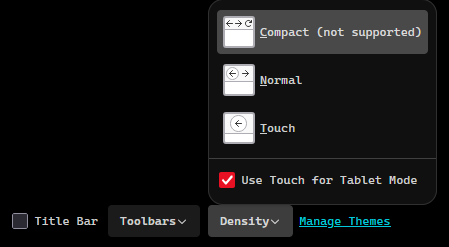
-
Optional: disable tab previews by setting
browser.tabs.hoverPreviewtofalse.
-
Open Firefox and go to your profile root folder through
about:profiles. -
Create a folder named
chromeif it does not already exist. -
Copy the
userChrome.cssfile from this repository into thechromefolder. -
Restart Firefox.
-
In
about:preferences, set your default font to Cascadia Code.
Keep the prerequisites, Firefox configuration, and font settings above. For the combined setup, use these file-copy steps:
- Copy this repository's
userChrome.cssas<profile>/chrome/minimalFox.css. - Copy Amber Black's
firefox/userChrome.css,firefox/userContent.css, andfirefox/img/into the samechromefolder under their original names. - Restart Firefox.
Amber's userChrome.css imports the local minimalFox.css first. Its appearance rules then override MinimalFox's defaults. Keep one userChrome.css and one minimalFox.css; all CSS files stay local to the profile. The standalone installation above still uses MinimalFox directly as userChrome.css.
MinimalFox is a simple, easy-to-maintain user style focused on a clean and developer-friendly Firefox setup.