Resources:
Link to Trello Board: https://trello.com/b/n9GDI9Nb/bar-stock-list
Link to presentation: https://docs.google.com/presentation/d/1xM3zEHTS7NzXbnXKgt1u-8H2uX1hT7LssjeTPEMzq0c/edit#slide=id.p
Brief
This document encloses all the necessary steps that were taken to produce a functioning web application and fulfilled tests to ensure the app was stable. The project brief was to create a web app that included CRUD (Create, Read, Update, Delete) functionality. To do this, numerous tools and frameworks were used to create the back end of the web app, testing of the app, and the deployment of the web app.
Additional requirements of this project were as followed:
- Documentation of the design and development of the app
- A trello board showing the progression of both the app planning and development process
- A relational database modelling at least two tables
- Relevant tests for the app including unit and integration testing
- A functioning front-end web app using Flask
- The use of a version control system and use of a CI server
Approach of the project
In consideration of the brief and requirements of the project, below is a streamlined approach of what I intended to include in the app:
-
User creation
- First and Last name
- Password
-
Add a product to the stock list:
- Product name
- Product category
- Product size
- Product price
-
Add stock of a product already added to the database:
- Product name
- Quantity
-
View and update products shown on the stock list
-
Delete a product from the stock list
MoSCow Prioritization
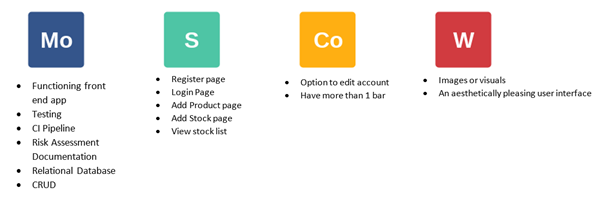
The MoSCoW method was used when deciding the prioritization of certain features within the application and decided what would or wouldn't be included. The original MoSCoW of the project can be seen below:
Project Tracking
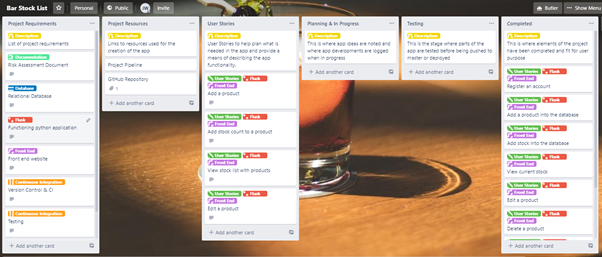
Trello was the chosen method when planning the project and tracking the progress of tasks set out. This was done to ensure a steady workflow and create an agile work frame where changes could be made through the production of the web app. Below is the trello board used for this project:
Database Structure
Below is an entity relationship diagram (ERD) showing the tables that were used in the project and how they relate with each other. Everything in the diagram has been implemented.
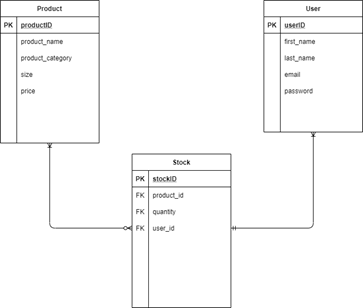
The ERD was used so that the relationship of tables could be visualised before being implemented and the development of back end coding began. It also provided a good base to fall back on to ensure the development of code was following this diagram, and ensuring consistency.
Continuous Integration
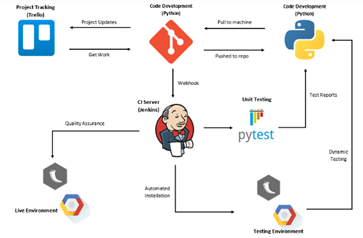
Below is the CI pipeline used for this project and includes the relationships between each tool and the frameworks used to create the app, perform sufficient tests and the deployment of the app in the smoothest and efficient manner. This is turn meant that once Jenkins was introduced, I would be able to change or produce code that is pushed to the version control system(GitHub), then automatically pushed to Jenkins with use of a build trigger webhook. Tests are then automatically run, and the app is pushed towards a live environment with no user input in between these stages. This is created with the use of job builds where I have instructed the server exactly to perform, and in the case of an error to subsequently stopped any proceeding builds that would follow.
Testing
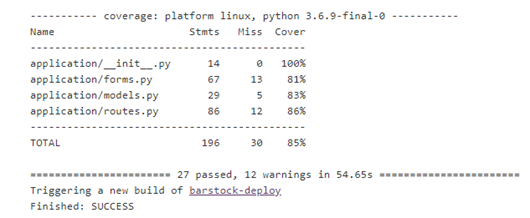
The tools used for testing the application was pytest when conducting unit tests, while selenium was the preferred framework while performing integration tests. An acceptable coverage of these tasks was met to ensure that most of the application had relevant tests.
Risk Assessment
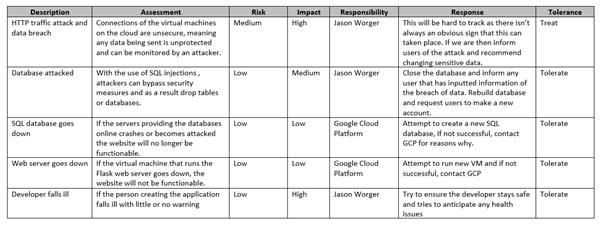
The risk assessment produced for the project can be found below. It attempts to cover all risks or threats involved and what would be done to eliminate or reduce the impact of these threats.
Future Improvements
There are a few improvements that I would want to implement to improve the app. These are:
- Improve the aesthetics of the application that provides for a more enjoyable experience
- Filter the stock list by price, quantity, category etc
- Feature to update the stock of the product with the use of a pull-down menu on the main stock page
- Improved features allowing a user to make the app more personal to them such as a customised stock list name.
Author
Jason Worger
Acknowledgements
QA Academy for the teaching of the skills needed to carry out this project successfully.