





Turning your fleeting social media saves into a permanent, searchable "Second Brain."
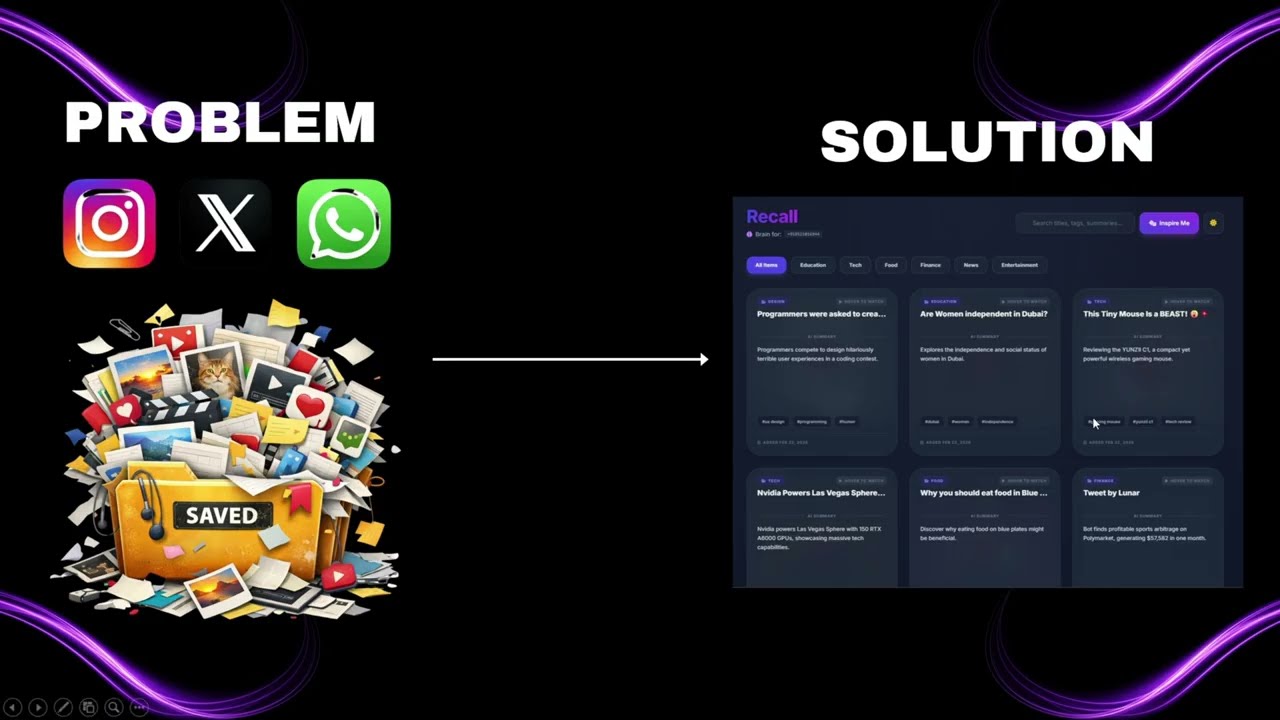
We all do it: you're scrolling through Instagram, X, or YouTube, and you see a great workout routine, a design tip, or a coding hack. You hit "Save," but it gets buried in a hidden folder forever.
Recall is a WhatsApp bot that fixes this. Simply forward an Instagram Reel, Tweet, or YouTube video to the bot. It automatically reads the link, extracts the core content, generates an AI summary, and saves it to your personal, cryptographically-secured web dashboard.
This project was built to meet and exceed the Hackathon Evaluation Criteria:
- Frictionless Entry: Send a link to the Twilio WhatsApp bot. No new app downloads required.
- Instant Feedback: The bot replies immediately confirming the link is being processed, and then sends a secure link to your personal web vault.
- Real-Time Sync: Built with Socket.io! If you have your dashboard open, new links sent via WhatsApp appear instantly without refreshing the page.
- Powered by Google Gemini (2.5 Flash): The backend scrapes the link (bypassing restrictions using Microlink and vxTwitter APIs) and feeds the content/transcripts to Gemini.
- Auto-Categorization: Automatically sorts links into strictly defined categories (Tech, Design, Fitness, Food, etc.).
- Punchy Summaries & Tags: Generates a 1-sentence summary and 3 highly relevant, searchable tags for every saved link.
- Clean, Searchable Dashboard: A beautiful, responsive masonry-style grid built with Tailwind CSS and EJS.
- Instant Search & Filters: Filter by category or use the live search bar to find that one specific recipe or coding trick you saved weeks ago.
- Dark Mode: Seamless light/dark mode integration that syncs with social media embeds.
- Native Video Embeds: Dynamically detects URL types and embeds native, playable Instagram Reels, X (Twitter) posts, and YouTube videos directly inside the dashboard cards.
- 🎲 "Inspire Me" Button: Implemented the requested "Random Inspiration" button to resurface forgotten gems from your vault with a fun slide-in animation.
| Layer | Tech |
|---|---|
| Bot Interface | Twilio WhatsApp API |
| Backend | Node.js, Express.js |
| Database | MongoDB + Mongoose |
| AI / LLM | Google Gemini API |
| Realtime | Socket.io |
| Frontend | EJS, Tailwind CSS |
| Scraping | Cheerio, Axios, Microlink, vxTwitter |
Follow these steps to run the bot locally:
git clone https://github.com/JhaSourav07/Recall.git
cd recallnpm install 
- Go to MongoDB Atlas and sign up / log in.
- Create a new Cluster
- The free Shared Tier is sufficient.
- Navigate to Database Access
- Click Create a new user
- Save the username and password
- Go to Network Access
- Click Add IP Address
- Select Allow Access from Anywhere (0.0.0.0/0) for simplicity
- Click Connect → Connect your application
- Copy the connection string. It will look like: mongodb+srv://:@cluster0.mongodb.net/?retryWrites=true&w=majority

- Sign up at Twilio.
- From the Console Dashboard, copy:
- Account SID
- Auth Token
- Navigate to Messaging → Try it out → Send a WhatsApp message.
- Follow the on-screen instructions to activate the Twilio WhatsApp Sandbox.
- Note the following details:
- Sandbox Number (e.g.,
+1 415 523 8886) - Join Code (e.g.,
join something-random)
- Sandbox Number (e.g.,
- Keep this tab open — you will configure the Webhook URL in Step 5.
- Visit Google AI Studio.
- Click Get API key.
- Create a key in a new project.
- Copy the API Key string.
Since Twilio needs to communicate with your local machine, you must expose your local server to the internet.
- Install ngrok (or use localtunnel).
- Run ngrok on port
3000:
ngrok http 3000- Copy the Forwarding URL (example):
https://a1b2-c3d4.ngrok-free.appThis URL will be used as your BASE_URL.
Create a file named .env in the root folder and paste the following.
Replace the placeholders with the data you gathered above.
# Server Config
PORT=3000
BASE_URL=[https://your-ngrok-url.ngrok-free.app](https://your-ngrok-url.ngrok-free.app)  <-- Paste ngrok URL here

# Database
MONGODB_URI=mongodb+srv://user:pass@cluster.mongodb.net/recall?retryWrites=true&w=majority

# Twilio Credentials
TWILIO_ACCOUNT_SID=your_actual_account_sid_here
TWILIO_AUTH_TOKEN=your_actual_auth_token_here
TWILIO_PHONE_NUMBER=whatsapp:+14155238886      <-- The Twilio Sandbox Number

# AI Credentials
GEMINI_API_KEY=your_google_gemini_api_key_here
Run the following command:
node server.js
You should see:
🚀 Server running on 3000 ✅ MongoDB Connected Successfully
- Go back to your Twilio Sandbox settings
(Messaging → Settings → WhatsApp Sandbox Settings). - In the When a message comes in field, paste your ngrok URL followed by
/whatsapp.
Example: https://your-ngrok-url.ngrok-free.app/whatsapp
- Save the settings.
- Open WhatsApp.
- Send the Join Code (e.g.,
join paper-crane) to the Twilio number. - Send an Instagram Reel link.
- ✅ The bot should reply!
recall/
├── models/
│   └── Link.js          # MongoDB Schema for saving links
├
├── services/
│   ├── aiService.js     # Gemini AI prompt engineering & integration
│   └── scraperService.js# Logic to extract text from URLs
├── views/
│   ├── pages/
│   │   └── dashboard.ejs # Main UI (Masonry Grid)
│   └── partials/        # Reusable UI components (Cards, Header)
├── server.js            # Main entry point (Express, Socket.io, Webhooks)
└── .env # Secrets (Not committed)-
Working Demo
Screen recording of the WhatsApp-to-Web flow. -
Code Repository
Public GitHub repository with full commit history. -
System Diagram


📱 USER (WhatsApp)
       │
       │ 1. Sends URL (Instagram, YouTube, X)
       ▼
🟢 TWILIO API (Sandbox)
       │
       │ 2. Triggers Webhook (via ngrok)
       ▼
⚙️ NODE.JS BACKEND (Express Server)
       │
       ├─► 🕷️ SCRAPER SERVICE
       │      • Extracts text, title, and metadata from the URL.
       │
       ├─► 🧠 GEMINI AI (2.5 Flash)
       │      • Analyzes text.
       │      • Returns JSON: { Summary, Category, Tags }.
       │
       ├─► 🗄️ MONGODB (Database)
       │      • Saves the processed link under the user's unique Vault Token.
       │
       └─► ⚡ SOCKET.IO (Real-Time Engine)
              │
              │ 3. Pushes new HTML card instantly
              ▼
🌐 WEB DASHBOARD (Frontend / User's Browser)
- Documentation
This README file.
Built with ❤️ by Sourav Jha for Hackathon.